
Clinic Phone Coverage Plan: A Five-Phase Playbook for Practices
Phone coverage in most practices is a set of habits. This playbook turns it into one written page: every window of the week, who covers it, where urgent calls go, and when it is reviewed.
Key takeaways.
- A phone coverage plan assigns every window of the week, including lunch, peaks, after-hours, holidays and sick days, to a primary, a backup and a fallback.
- Name roles rather than people, and make sure each backup is trained to schedule and knows the escalation path.
- Write the escalation path per window; a triage vendor targets 15 minutes for urgent and 30 to 60 minutes for non-urgent clinical callbacks.
- Decide in advance what changes on a short-staffed day, during an outage, and in an unplanned closure.
- Test every route from outside each month, review the plan quarterly, and update it the day hours or staffing change.
Table of Contents8 sections
Ask a front desk who answers the phone at 12:15, at 5:05, or on the day two people call in sick, and you will often get three different answers from three different people. Phone coverage in most practices is a set of habits, not a plan. Habits work until the day they do not, and that day usually involves a patient who needed someone.
A clinic phone coverage plan is one written page that says who or what answers the phone in every window of the week, what callers hear, and where urgent calls go. This playbook builds one in five phases: list the windows, assign coverage, write the escalation path, plan for bad days, and set a review cadence.
What a phone coverage plan is
A phone coverage plan is a single document that assigns every hour of the week to someone or something: staff, a queue, an answering service, an AI receptionist, or an on-call clinician. It covers normal hours, lunch, peaks, after-hours, holidays and sick days, and it names the escalation path for urgent calls.
The plan exists so that coverage does not depend on memory. When the office manager is on vacation, when a new receptionist starts, or when the phone system is changed, the plan is what everyone checks. It also makes gaps visible: a window with no name next to it is a window where calls are going somewhere nobody chose.
Keep it short. One page per location is enough for most practices, with the escalation path on the same page. Longer documents do not get read on the day they are needed.
Give the plan one owner, usually the office manager, and put the date of the last review at the top. A coverage plan without a review date is a history document.
Phase 1: list every window of the week
Start by listing every window a call can arrive in: opening, normal hours, peak hours, lunch, closing, evenings, overnight, weekends, holidays, and days when staff are out. Many practices end up with eight to ten distinct windows, and each one needs its own answer.
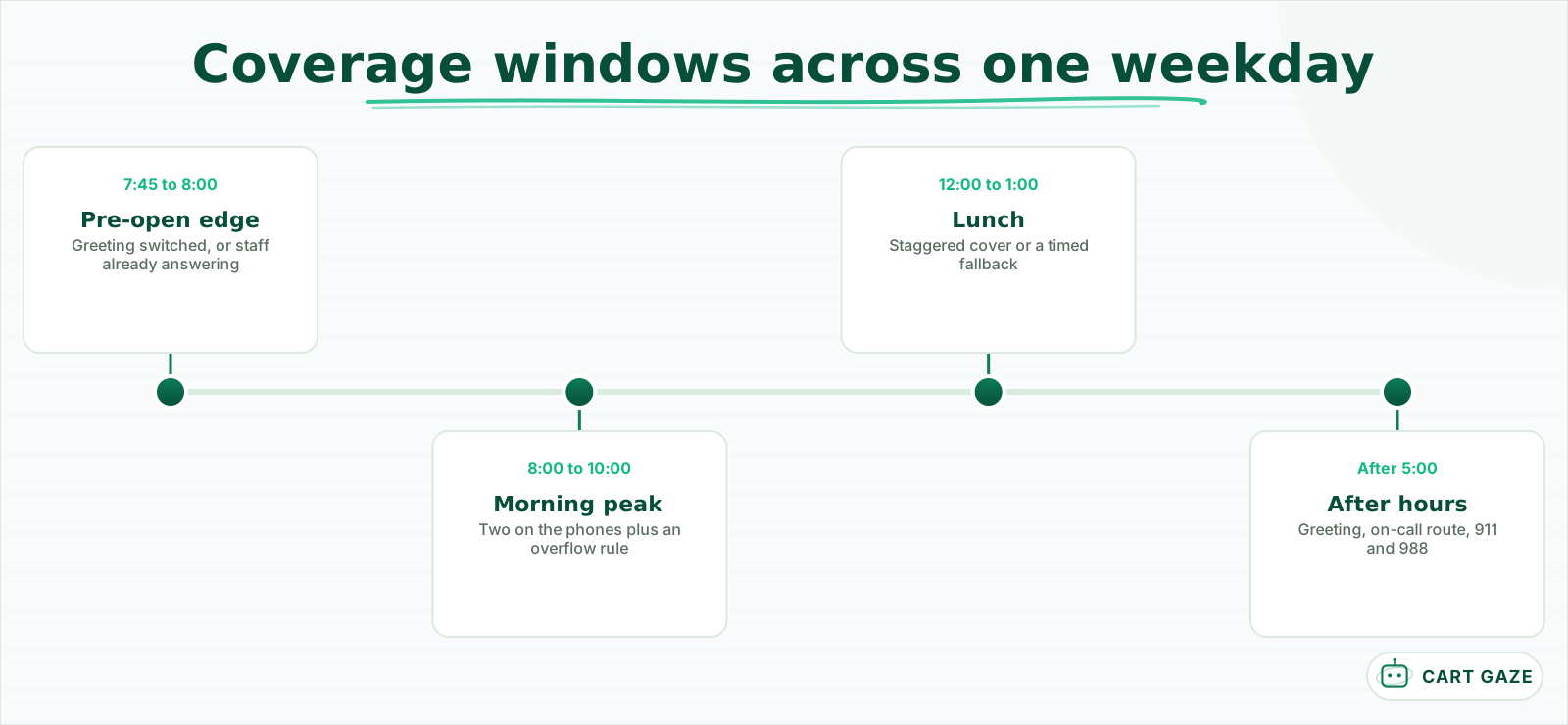 An example weekday. Your reports decide where the peaks really are.
Use your phone reports to find the peak windows rather than guessing. The first hour of the day and the hour after lunch are common peaks, but your reports will show your own. Mark them separately from normal hours, because they need more coverage than the average.
Include the edges. The 15 minutes before opening and after closing catch more calls than most practices expect, and they are often covered by nobody: the greeting has switched, but staff are still in the building, or the reverse.
Practices with more than one location need a list per site, plus a note on shared lines. If a central number rolls to whichever site is free, the plan has to say what happens when both are busy, and which site owns the call when a patient asks for a specific office.
Add the non-routine windows too: provider meetings, all-staff training, the monthly afternoon when the desk closes early. If the phones behave differently then, it belongs on the list.
Phase 2: assign who or what covers each window
For each window, name the primary cover, the backup, and what the caller hears if both are busy. Primary cover might be two front-desk staff; backup might be a trained medical assistant; the fallback might be a queue with a callback offer, an answering service, or an AI receptionist.
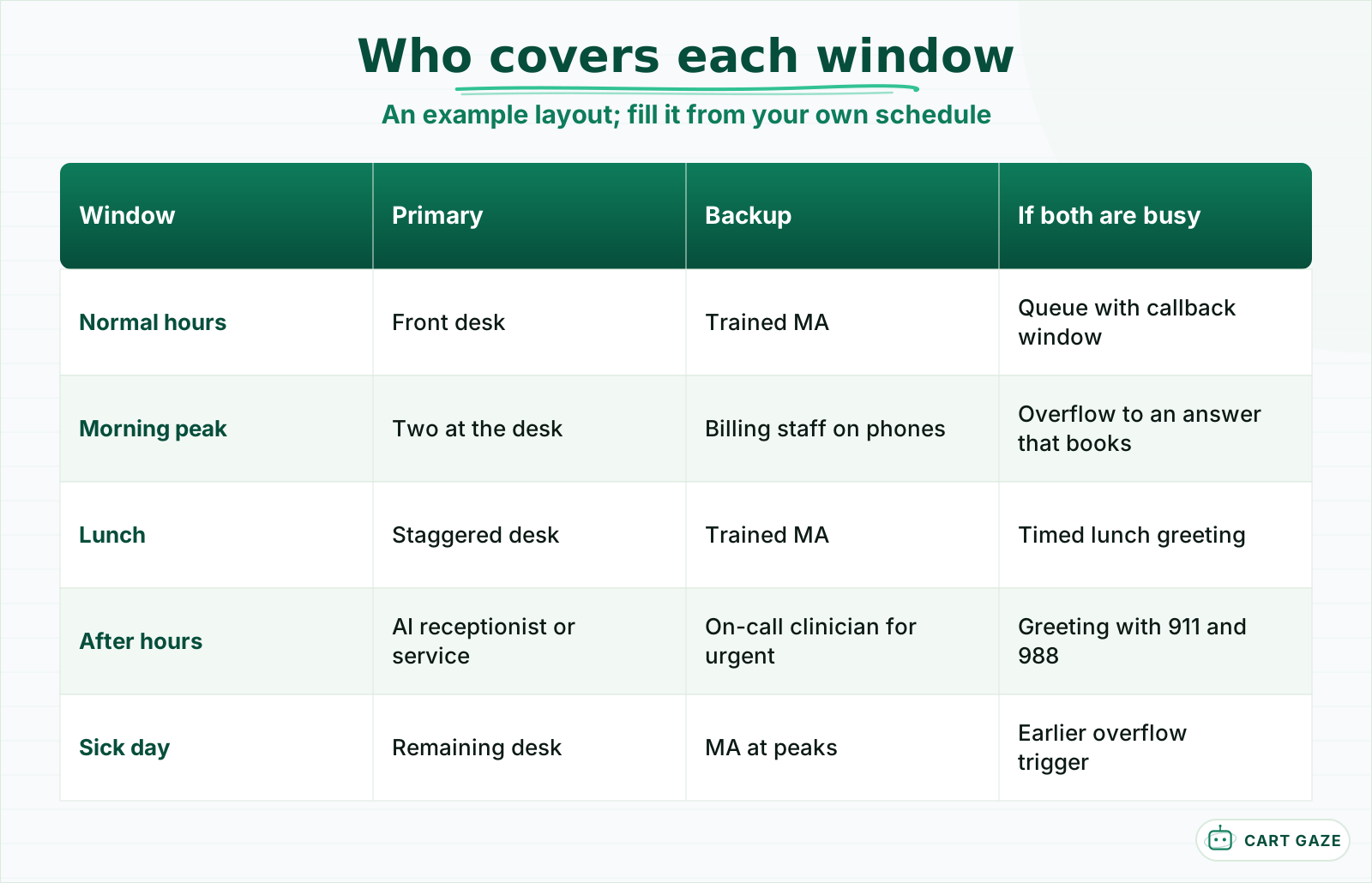 Roles, not names. Every row needs all three columns filled.
Name roles, not people, where you can. "Front desk lead" survives staff turnover; "Maria" does not. But make sure each role has a named person on the current schedule, and that the backup is actually trained to schedule and knows the escalation path.
A backup is only a backup if trained. At minimum, the person who picks up the phones when the desk is short should know how to book the common visit types, the new-patient rules, what may and may not be said about a patient on the phone, and exactly where an urgent call goes. An hour of shadowing at the desk each quarter keeps that knowledge fresh.
Be specific about the fallback. "Voicemail" is a fallback only in the narrowest sense, since many callers will not leave a message. A queue with a callback window, an answering service with instructions, or an AI receptionist that can book all give the caller something more useful. What each after-hours option costs and covers is compared in how to handle after-hours calls.
Write down what the caller hears in each window, word for word or by reference to a named greeting. The greeting is part of the coverage, because for some callers it is the only thing they get.
Phase 3: write the escalation path
The escalation path says where urgent and clinical calls go in every window, and how fast they must be answered. During hours, a clinical call goes to a nurse or clinician. After hours, it goes to the on-call line. Every greeting tells callers with an emergency to hang up and call 911.
Timing targets make the path concrete. TriageLogic, a URAC-accredited nurse triage vendor, publishes its own callback targets: 5 minutes or less for emergent calls, 15 minutes or less for urgent calls, and 30 to 60 minutes for non-urgent clinical questions. Use them as a reference point, not a rule, and set your own with your clinicians.
| Call type | Route during hours | Route after hours | Target |
|---|---|---|---|
| Emergency | Greeting and staff: call 911 now | Greeting: call 911 now | Immediate |
| Urgent clinical | Nurse or clinician, live transfer | On-call clinician | 15 minutes or less |
| Non-urgent clinical | Nurse message queue | On-call next morning, or triage service | 30 to 60 minutes in hours |
| Routine scheduling | Front desk or AI receptionist | AI receptionist or next business day | Same day |
| Billing and records | Callback queue | Next business day | 1 business day |
Malpractice insurers are clear about the emergency step. The Doctors Company's guidance on telephone triage says that when a situation is emergent, the patient should be directed to call 911 or go to the nearest emergency department. For practices whose patients may be in mental health crisis, "call or text 988" belongs beside it.
Documentation belongs in the path too. MagMutual's risk guidance says after-hours calls must be recorded, because they often concern problems patients see as acute. Write down who documents an urgent call in the chart, in each window, and by when, so the record exists the next morning whoever took the call.
Warning
Test the on-call route every month by calling it from outside. An on-call number that still forwards to someone who left the practice fails silently, and nobody finds out until a patient does.
Phase 4: plan for the bad days
Plan for the days the normal plan breaks: a sick call that leaves the desk short, a phone or internet outage, severe weather, and an unplanned closure. For each, write one line saying what changes, who decides, and what callers will hear. Most of these are decided in minutes, so decide them in advance.
The short-staffed day is the most common. Decide now which window loses coverage first and what replaces it: an earlier overflow trigger, a medical assistant on the phones for the peak, or routine calls sent to an AI receptionist. Write it down so the person running the desk that day does not have to invent it.
Decide who makes the call on a bad day and how staff hear about it. A named person, usually the office manager or the front desk lead, switches the plan to its short-staffed version, and a group text to the team confirms it. Without a named decider, the change tends to happen at 11 a.m. after the morning peak it was meant to cover.
For outages, know how to forward the main number to a mobile phone or to your answering service, and who has the login to do it. Cloud phone systems usually allow forwarding from a web portal, but only if someone knows where it is.
For unplanned closures, keep a closure greeting and a patient text ready. Planned holiday closures are their own discipline, covered in holiday closure communication automation.
Phase 5: review the plan on a schedule
Review the plan on a fixed schedule: a test call to every route each month, a full review each quarter, and an update whenever hours, staffing, providers or the phone system change. Each review ends with the date at the top of the page and any changes made in the phone settings the same day.
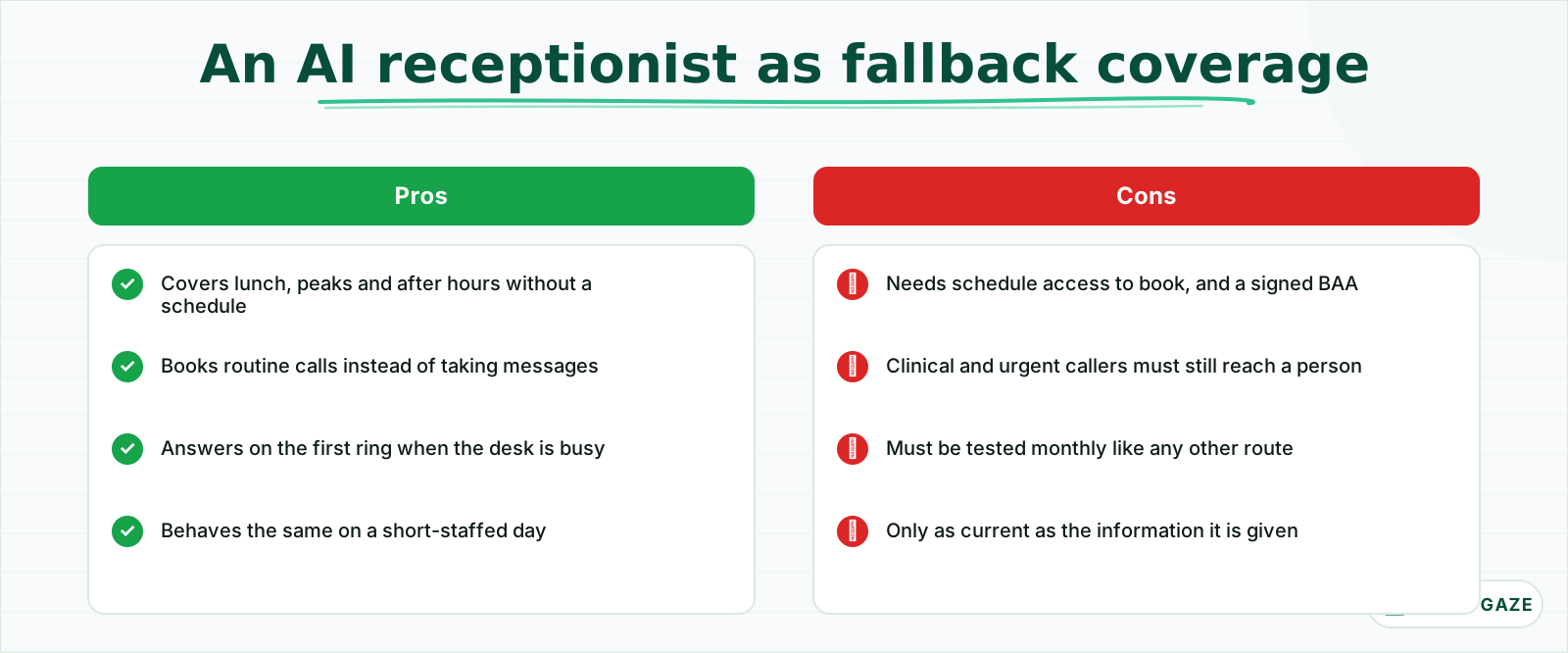 Useful for routine calls in any window. The escalation path still belongs to people.
The monthly test takes 20 minutes. Call from outside during a normal hour, at lunch, after hours, and to the on-call route, and confirm each does what the plan says. The quarterly review looks at the phone reports: are peaks where the plan says, and are calls still going unanswered in any window?
Some events should trigger a review at once rather than waiting for the quarter: a new provider, extended or reduced hours, a new phone system or vendor, a change of answering service, and any patient complaint about not reaching the practice. Each changes at least one window, and the plan should change with it.
AI receptionists deserve a specific check if you use one. It should be answering the windows the plan assigns to it, booking routine calls into the schedule, and routing every clinical, urgent, or distressed caller to a person. It never assesses symptoms or gives medical advice. What it does and where it hands off is set out in what an AI receptionist does and where it stops.
Before you sign off the coverage plan
- Every window of the week has a primary, a backup, and a fallback.
- Every greeting opens with the emergency instruction.
- The on-call route was tested from outside this month.
- The plan has one owner and a review date at the top.
Put the plan on one page
Put the whole plan on one page per location: the windows, the cover for each, the escalation path, the bad-day rules, and the review date. Keep it where the desk can see it and where the phone settings are managed. Then test it, and change the settings to match the page.
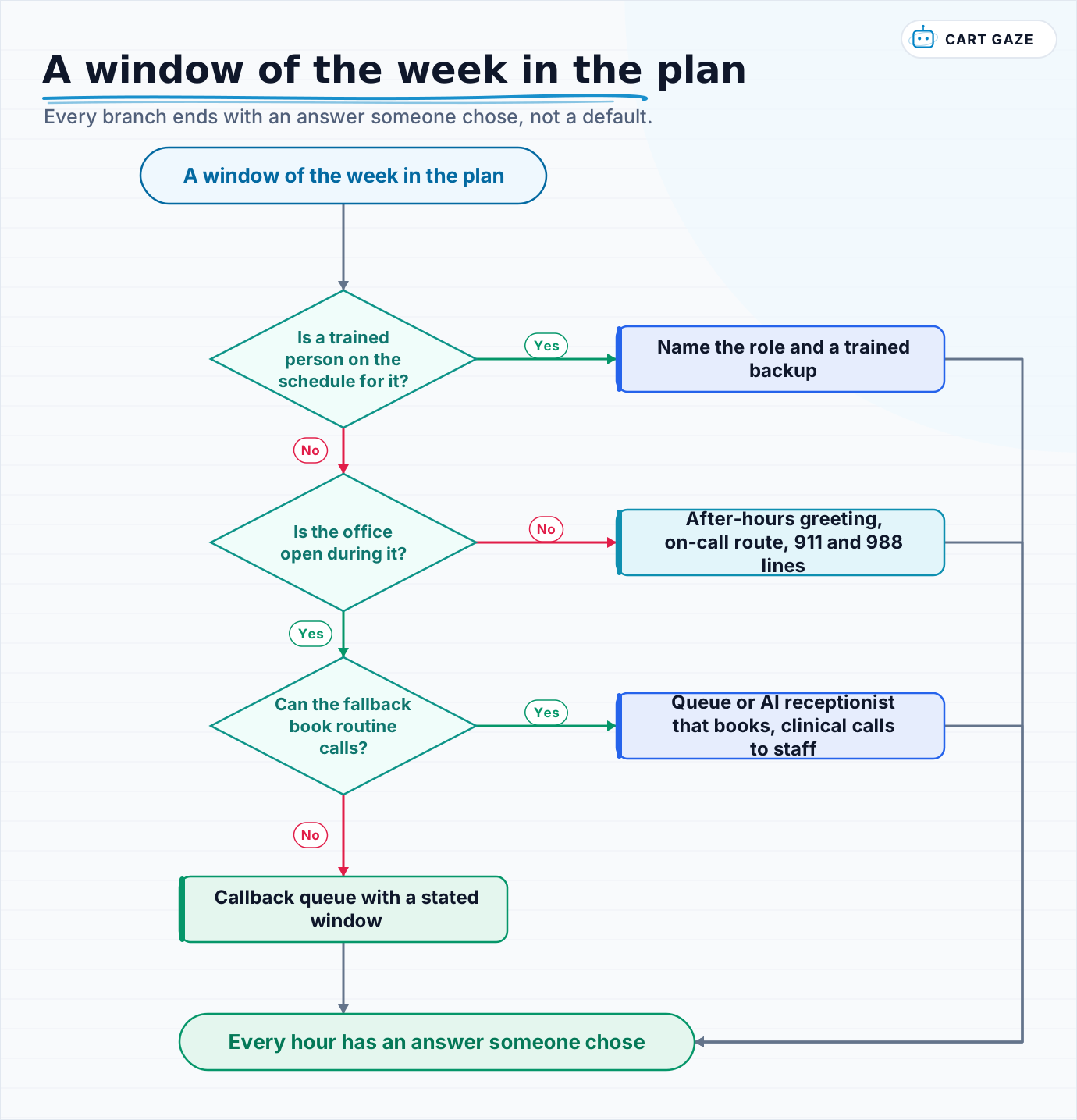 Every branch ends with an answer someone chose, not a default.
Walk each window through the flow once. The goal is a page where every hour has an answer someone chose, and where a new staff member could run the phones on a bad day by reading it.
To see what a finished build looks like when a practice turns a plan like this into working phone coverage, what a live build actually looked like walks through one.
Fair questions.
What is a phone coverage plan for a medical practice?
A one-page document per location that assigns every window of the week to someone or something: staff, a queue, an answering service, an AI receptionist, or an on-call clinician. It covers normal hours, lunch, peaks, after-hours, holidays and sick days, states what callers hear, and names the escalation path for urgent calls.
Who should answer clinic phones at lunch?
Whoever the coverage plan names: a staggered lunch so one person stays on the phones, a trained backup, a queue with a callback window, or an AI receptionist that can book routine calls. Voicemail alone is a weak fallback because many callers will not leave a message. Whatever you choose, write it down and test it.
How fast should urgent clinical calls be returned?
Set targets with your clinicians. As a reference point, TriageLogic, a URAC-accredited triage vendor, publishes targets of 5 minutes or less for emergent calls, 15 minutes or less for urgent calls, and 30 to 60 minutes for non-urgent clinical questions. Every greeting should tell callers with an emergency to call 911.
What should a practice do when phones go down?
Know in advance how to forward the main number to a mobile phone or to your answering service, and who has the login to do it. Most cloud phone systems allow forwarding from a web portal. Keep a closure greeting and a patient text ready for outages and weather, and write the steps into the coverage plan.
How often should a phone coverage plan be reviewed?
Test every route from outside the building each month, which takes about 20 minutes, and review the whole plan each quarter against your phone reports. Update it the same day whenever hours, staffing, providers, or the phone system change, and put the date of the last review at the top of the page.
Sources.
Written by

Muhammad Qasim Hammad
Founder, Cart Gaze
Qasim builds AI receptionists and front-office automation for medical and dental practices at Cart Gaze. Posts here start from published sources and real call data, not vendor claims, and every number links back to where it came from.
Keep reading.
 Practice Automation PlaybooksFront Desk SOP Template: A Five-Step Guide for Medical Practices10 min read
 Practice Automation PlaybooksMedical Practice Phone System Audit: A 30-Day Guide10 min read
 Practice Automation PlaybooksReduce Call Abandonment in 30 Days: A Week-by-Week Plan10 min read
 Practice Automation PlaybooksHuman in the Loop AI Approvals: What to Gate and What to Let Run11 min read
 Practice Automation PlaybooksAI Agent Orchestration Rules That Stop Automations Colliding12 min read
 Practice Automation PlaybooksFront Desk AI Training: The Conversation Practices Skip10 min read