
AI Receptionist for Medical & Dental Practices: What It Really Does
Most "AI receptionist" results are written for hospital systems, or by the vendors selling one. This is the plain version for a practice owner: what it books, what it costs, and the calls it must hand to a person.
Key takeaways.
- An AI receptionist answers calls, qualifies patients, books into your live calendar, and takes after-hours intake; without calendar access it can only take a message.
- The most important setup decision is where it stops: define the call types it must route to a person, and default to a human whenever it is unsure.
- Say HIPAA-aware, not "HIPAA compliant". The concrete artifact is a signed BAA; no BAA means no patient data should touch the vendor.
- Pricing runs roughly $99 to $499 a month for small practices, with named tools from about $59 to $1,500-plus; per-minute and setup fees are extra. Verify every quote.
- ROI is real only if the tool books calls you were actually dropping. Start with after-hours and overflow, measure from your own phone logs, then expand.
Table of Contents8 sections
- What does an AI receptionist actually do for a practice?
- What does an AI receptionist sound like to a patient?
- Where does an AI receptionist stop and hand the call to a person?
- What does an AI receptionist cost, and how do you size the return?
- Is an AI receptionist safe for patient data?
- How do the main options compare, and where does ClinicFront AI fit?
- How should a practice actually roll one out?
- Fair questions
Every practice has the same quiet leak. The phone rings while your front desk is checking in a patient, verifying insurance, or already on another line. The call rolls to voicemail. Some of those callers leave a message. Many just hang up and dial the next practice on their list. You never see the ones you lost, which is exactly why the problem is easy to ignore. One published multi-practice benchmark puts unanswered calls at 38%, and that figure is for business hours, not nights and weekends.
An AI receptionist is one answer to that leak, and it is worth understanding before you let one anywhere near your phone or your patients. Search "ai receptionist" and page one gives you three kinds of page: enterprise platforms built for hospital systems, product vendors describing what their tool does and staying quiet about where it stops, and listicles ranking ten tools without teaching you how to choose. None of them are written for a two-operatory dental office or a single-location clinic deciding in good faith.
This guide is the plain version. It spends as much time on where the AI hands the call to a person as on what it books, because in a medical or dental front office that boundary is the whole game.
What does an AI receptionist actually do for a practice?
An AI receptionist is software that answers your inbound calls, holds a real conversation with the caller, takes an action such as booking or rescheduling, and writes the outcome back into your scheduling system. The good ones handle a routine call end to end. The weak ones just take a message.
Here is the whole job on a single routine call.
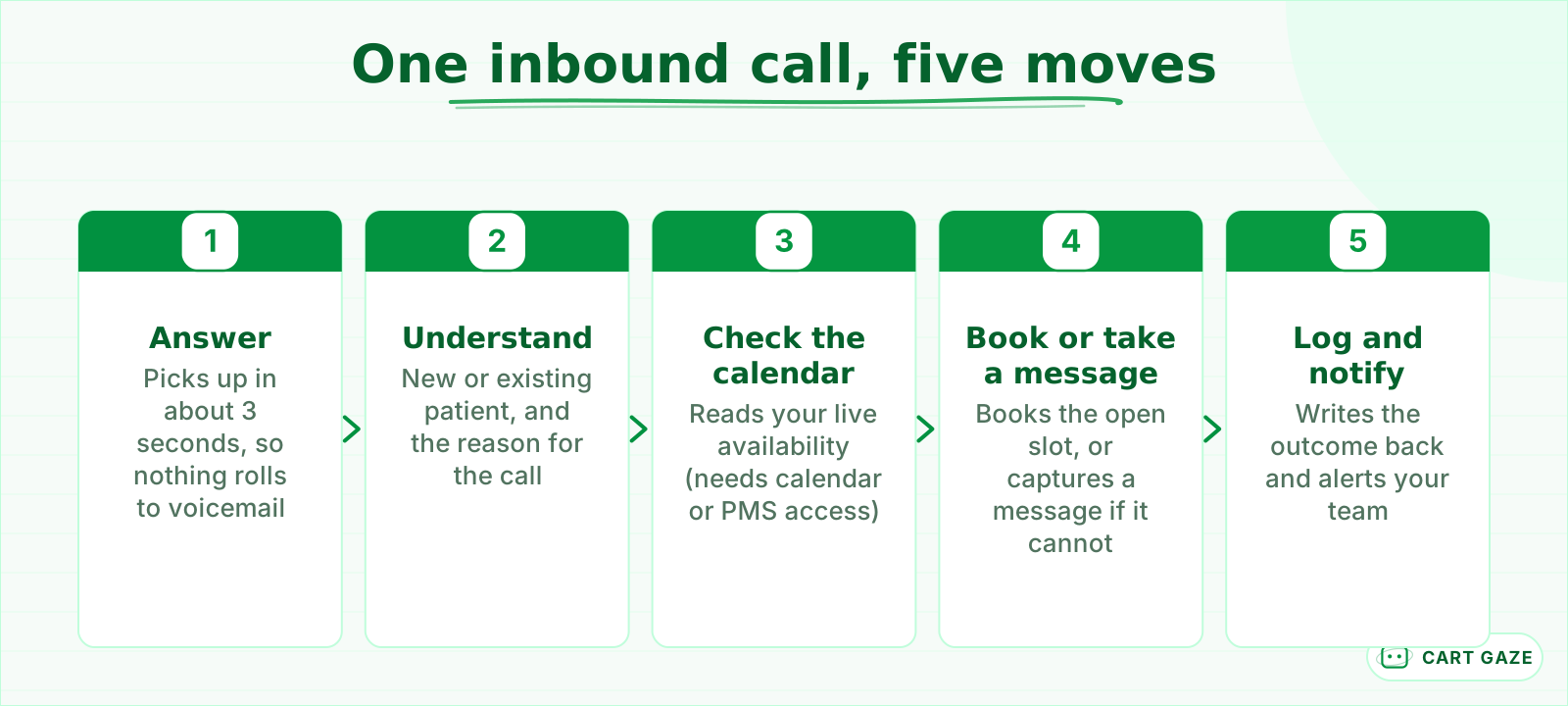 The whole job in five moves. Steps 3 and 4 need the AI wired into your real calendar or PMS.
The dividing line between a real AI receptionist and glorified voicemail is one thing: read and write access to your live calendar. If the software cannot see your actual availability, it cannot book. It can only capture a message and hope someone calls back. When you evaluate a tool, that is the first question to ask, before voice quality or anything else.
Four jobs are what practices lean on most. Answering every call so none roll to voicemail. Qualifying the caller, which means new versus existing patient and the reason for the visit. Booking into open slots. And after-hours or overflow intake, when the line is already busy or the office is closed for the night. Many tools also cover text and web chat with the same script.
It helps to be just as clear about what an AI receptionist is not. It is not a diagnosis tool. It is not a nurse line. It is not a replacement for the person at your desk who knows the regulars by name. It is a first layer that catches the calls you are dropping now, so your team can spend its attention on the patient in the room.
What does an AI receptionist sound like to a patient?
Modern voice agents answer in about 3 seconds, speak with natural pacing, and handle interruptions without losing the thread. Many callers never notice they are talking to software until a handoff or the end of the call. That is true on routine calls, and worth saying plainly: on a hard call, the illusion breaks.
Language coverage is genuinely useful here. Leading tools support 100 or more languages, which matters for a practice with a diverse patient base. Confirm the specific languages your patients actually speak rather than trusting the headline number, because a long list on a marketing page is not the same as fluent handling of the two or three you need.
The awkward moments still happen. A heavy accent, a noisy room, a caller who rambles, a name the system cannot spell. What separates a good setup from a risky one is the direction it fails in. A good system fails toward a human, not toward a wrong booking on the wrong day.
Trust is easier when you are honest. A short disclosure such as "I am the practice's virtual assistant, I can book you or get a team member" lands better than pretending to be a person. Some patients prefer knowing up front. Set the same expectation for your own staff: the AI is a calm, tireless first layer, not a personality replacement for your best receptionist.
Where does an AI receptionist stop and hand the call to a person?
This is the most important design decision, and it is the part most vendor demos skip. Before go-live you define the call types the AI must never handle alone, and you make the default a handoff whenever it is unsure. A clean warm transfer beats a confident wrong answer every time.
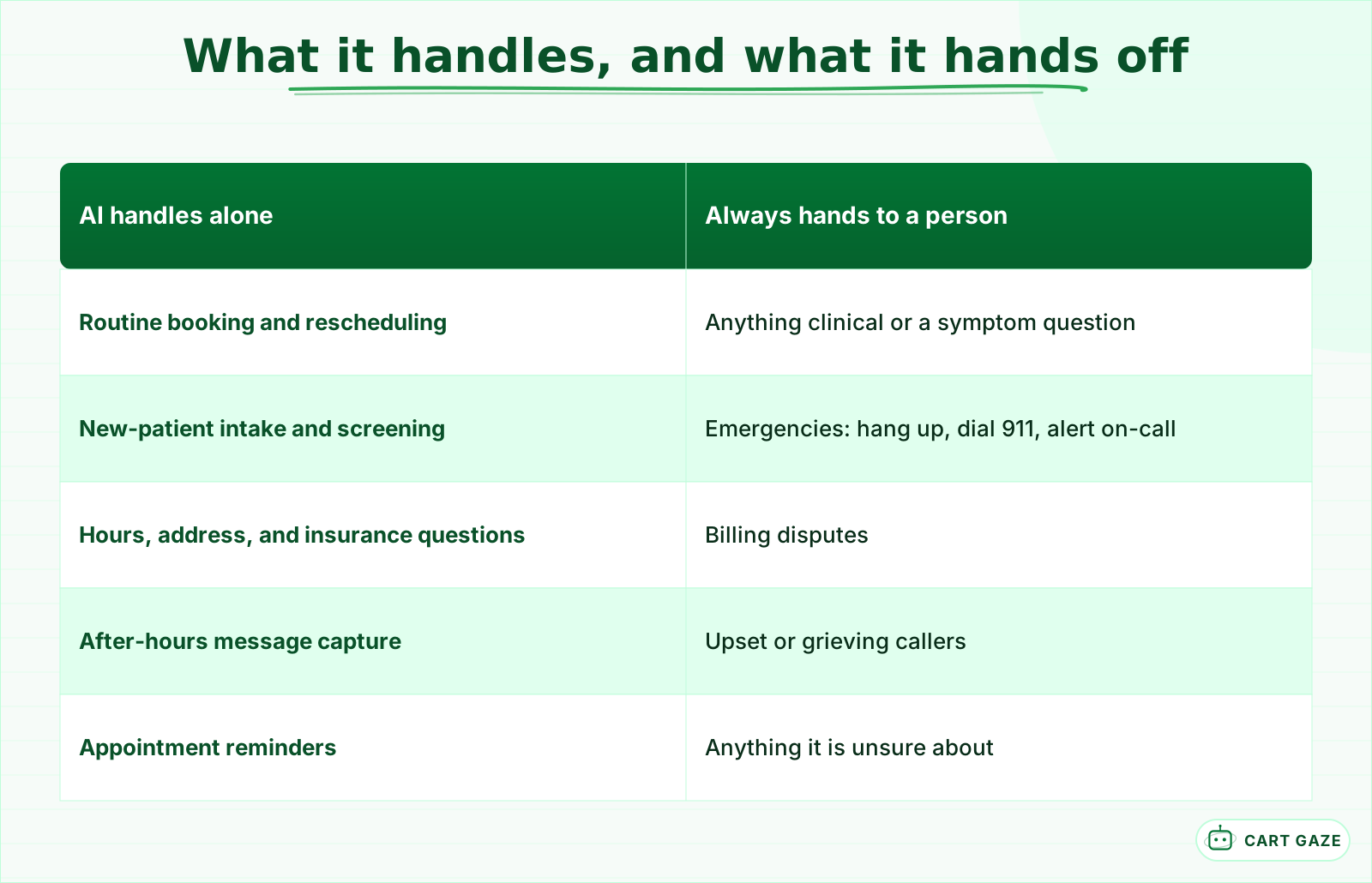 The safe default is a human. The AI keeps only the calls it can finish without judgment.
The hard boundaries are not negotiable in a clinical setting. No clinical advice. No symptom assessment. No medication decisions. The AI collects information and routes it. A clinician decides. Wire those as absolute rules, not as preferences the model can weigh against being helpful.
Warning
Emergencies get their own protocol, tested before go-live. The system recognizes keywords such as chest pain, difficulty breathing, severe bleeding, or sudden confusion, tells the caller to hang up and dial 911, and alerts your on-call staff with context. It never tries to work through an emergency itself.
Sorting your call types in advance makes the boundary concrete. This is the version of that exercise we walk practices through:
| Call type | AI receptionist | Hands to a person |
|---|---|---|
| Book, reschedule, cancel | Handles end to end | Only if the calendar is ambiguous |
| After-hours and overflow intake | Captures and books | Flags urgent items for morning |
| Hours, address, insurance | Answers from a script | Edge cases and disputes |
| Prescription refill request | Takes it as a message | Clinical staff decides |
| Symptom or clinical question | Does not advise, routes | Yes, always a clinician |
| Billing dispute or upset caller | Acknowledges and routes | Yes, needs judgment |
| Emergency (chest pain, bleeding) | Recognizes keywords, says call 911 | Alerts on-call staff |
Then there are the judgment and empathy calls: a billing dispute, an upset or grieving caller, anything sensitive. These warm-transfer to a person with the context already gathered, so the patient does not have to repeat themselves. When you shortlist tools, ask each one to show you its escalation rules, not just its booking flow. The escalation rules are where a vendor's honesty actually shows.
What does an AI receptionist cost, and how do you size the return?
Expect flat monthly tiers of roughly $99 to $499 for a solo or small practice, and $700 to $2,000 or more for multi-location groups. Per-minute plans advertise $0.05 to $0.10 a minute but land closer to $0.13 to $0.31 all-in. The return depends entirely on how many calls you miss today.
Many vendors add a one-time setup fee on top of either model, and telephony plus the underlying AI model are what push per-minute plans past their advertised rate, per aggregator breakdowns. Before you weigh any price, size the leak you are trying to plug. We walk through that math line by line in what a missed call actually costs a practice.
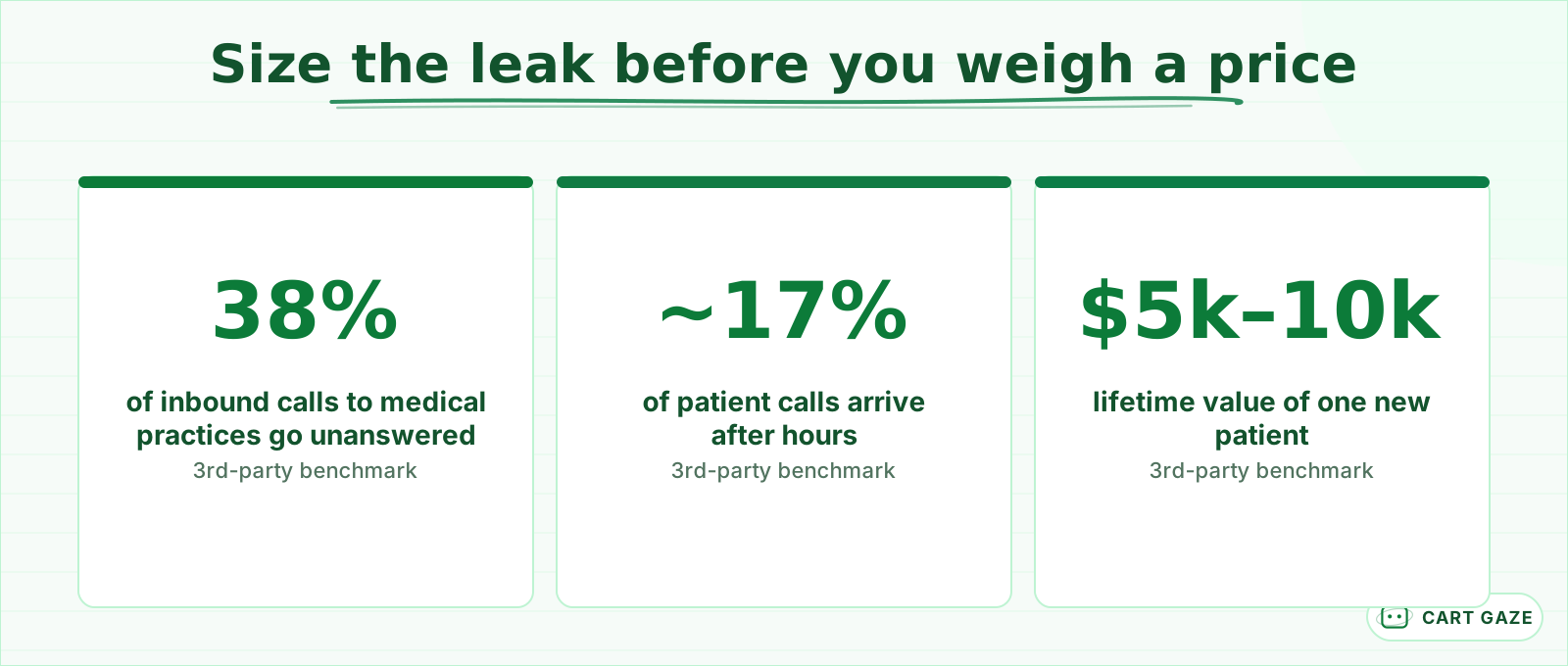 None are Cart Gaze numbers, just third-party benchmarks that vary by source. Size the problem, then measure your own line.
Those are third-party benchmarks, not Cart Gaze figures, and they vary by source. Use them to frame the problem, then pull your own call logs, because the only miss rate that matters for your decision is yours. Here are published starting prices for a few named tools, to show the real spread from generalist to enterprise.
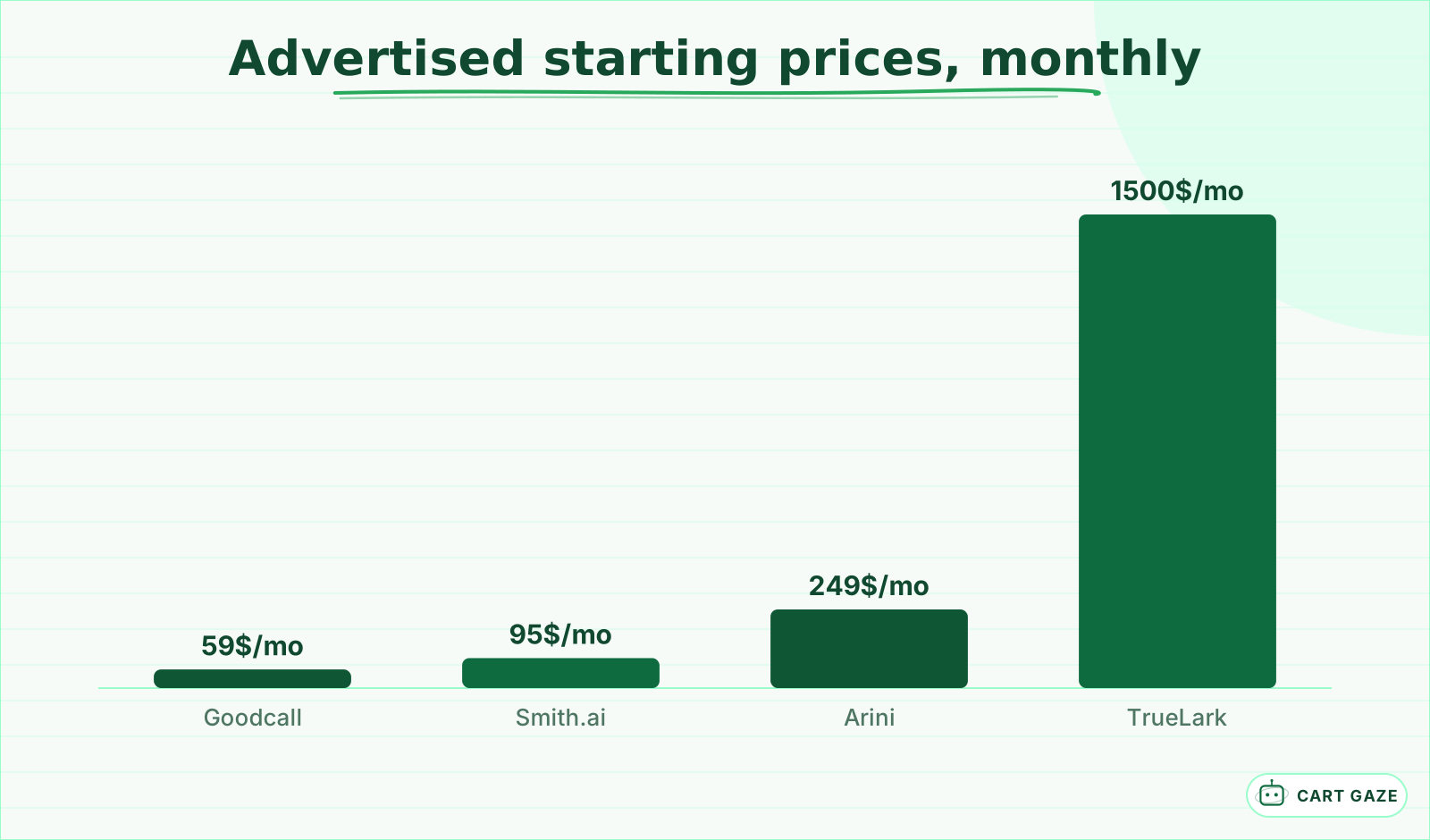 Advertised starting prices as of mid-2026. Verify on each vendor page. Per-minute plans and one-time setup fees are separate.
Now the return, and this is a modeled framework, not a promise. Suppose your practice misses 5 new-patient calls in a month, and you use a conservative third-party new-patient value of about $5,000. Recovering even one of those a month more than covers a $249 monthly plan. Every number in that sentence is third-party or modeled, so plug in your own miss rate and your own patient value before you trust it.
The honest caveat: the return is real only if the AI books calls your team was actually dropping. If your front desk already answers everything during the day, the case is smaller, and it is about after-hours and overflow rather than replacing anyone. And do not skip the costs that never show on the pricing page: the integration time to connect your practice-management system, and the internal work of writing and testing the escalation rules.
Is an AI receptionist safe for patient data?
It can be, if you hold vendors to two tests. There is no government HIPAA certification, so treat every compliance claim as a posture to verify, not a stamp. A serious vendor encrypts patient data, stores only what the task needs, and signs a Business Associate Agreement. No BAA means no patient data.
Important
Ask one question first: will you sign a BAA? A Business Associate Agreement legally shares responsibility for the patient data the vendor touches. That single answer sorts serious healthcare vendors from thin wrappers around a general-purpose model, faster than any feature list will.
We say HIPAA-aware rather than HIPAA-compliant for exactly this reason: compliance describes how a tool is configured and operated, never a certificate it holds. For context, Weave markets its product as "HIPAA compliant" and offers a BAA; treat that as its own claim to verify, not as proof. The full question list lives in our guide to what HIPAA compliance really means for an AI receptionist.
The rules are also moving. In January 2025 the HHS Office for Civil Rights published a proposed update to the HIPAA Security Rule (89 FR 980) that would require encryption of electronic patient data at rest and in transit, multi-factor authentication, 72-hour incident reporting, and annual penetration testing. As of mid-2026 that update is still proposed, not final, so no one should present it as an in-force mandate yet. Watch for the final rule and its compliance window.
Whatever tool you choose, an AI receptionist should never store or repeat more patient information than the task needs, read clinical notes aloud, or send patient data to a vendor with no BAA in place. Five questions cover most of the risk. Will you sign a BAA? Where is patient data stored, and for how long? Is it encrypted at rest and in transit? Who can access the transcripts? Can you delete a patient's data on request?
How do the main options compare, and where does ClinicFront AI fit?
The market sorts into four buckets: enterprise voice AI for hospital systems, all-in-one practice communication suites, dental-specific voice AI with native practice-software integrations, and generalist receptionist bots. Price and polish vary widely inside each bucket, but the deciding question is the same one every time: does the tool natively read and write your scheduling system?
Names make the buckets concrete. Enterprise voice AI means Assort Health and TrueLark, built for hospital systems and large dental groups. All-in-one suites adding AI means Weave. Dental-specific voice AI means Arini, Dentina, and Viva. Generalists such as Smith.ai and Goodcall answer for any business and are not healthcare-built. Assort Health raised a $120M round in mid-2026 at a reported valuation near $1.2B and markets a platform trained on more than 190 million patient interactions, which tells you where the enterprise ceiling sits. That scale is not what a single-location practice is shopping for.
Integration is usually what decides it. Does the tool natively read and write Dentrix, Open Dental, Eaglesoft, Curve, or your medical EHR? A native integration beats "we can build a bridge for that" every time, because a bridge is one more thing that breaks on a Tuesday.
ClinicFront AI is Cart Gaze's own answer, and we frame it the same honest way we frame everyone else. It is built for the independent-to-small-group front office, wired to your calendar, with escalation rules written for your practice and a BAA on the table. It is not a 190-million-interaction enterprise brain, and it is not a generic bot that has never seen a patient call. We name what it does not do, on purpose. If a shorter list of promises makes a vendor look less impressive, that is the point.
Tip
Shortlist two tools, run each on your after-hours line for a month, and read the transcripts, especially the handoffs. Our guide to choosing an AI receptionist turns that trial into a scorecard you can put in front of your partners.
How should a practice actually roll one out?
Start narrow and expand on evidence. Put the AI on after-hours and overflow lines first, where it can only add captured calls, then write escalation rules before go-live, measure against your own phone logs for 30 days, and expand toward daytime coverage only once the transcripts have earned your trust.
Write the escalation rules before go-live, not after. List your emergency keywords, your must-route call types, and your warm-transfer destinations. This is the work that keeps a patient call safe, and it is not something to improvise once the phone is live.
Measure honestly, from your own phone logs rather than the vendor dashboard alone. Compare your answered-call rate and your after-hours bookings for the month before and the month after. Those two numbers tell you whether the tool is earning its fee.
Expand only once it has earned trust. Overflow during peak hours next, then primary answering with human backup, in that order. Keep a person in the loop for everything the escalation rules route out. The goal is a front desk that never drops a call, not a front desk with no people in it.
Before the AI touches a live line
- Escalation list written: emergencies, clinical questions, billing disputes, each with a named human destination
- BAA signed and filed before any patient data flows
- After-hours pilot only for the first 30 days
- A named owner reads the handoff transcripts every week
If you want the revenue side of this decision sized for your own practice, run your numbers through the free Growth Leak Audit. It takes your call volume and miss rate and shows what the leak costs before you spend anything fixing it.
Fair questions.
What is an AI receptionist for a medical or dental practice?
It is software that answers your inbound calls, holds a real conversation, and takes an action such as booking or rescheduling, then writes the outcome back into your scheduling system. The better tools handle a routine call end to end. Weaker ones only capture a message.
Is an AI receptionist HIPAA compliant?
There is no government HIPAA certification a product can pass, so "HIPAA compliant" on a homepage is a posture, not a stamp. Look for HIPAA-aware design and, most concretely, a signed Business Associate Agreement (BAA). No BAA means no patient data should reach the vendor.
How much does an AI receptionist cost?
Flat monthly plans run roughly $99 to $499 for a small practice and $700 to $2,000 or more for multi-location, with per-minute options and one-time setup fees on some tools. Published starting prices in mid-2026 ranged from about $59 a month for a generalist to $1,500 or more for enterprise. Verify current pricing on each vendor page.
When should an AI receptionist hand the call to a person?
Whenever it is unsure, and always for clinical questions, symptom or medication decisions, billing disputes, and upset callers. Emergencies get a hard rule: recognize keywords, tell the caller to dial 911, and alert on-call staff. A clean warm transfer beats a confident wrong answer.
Can an AI receptionist replace my front desk staff?
No. It is a first layer that answers every call and catches what you are dropping, especially after hours and during overflow. It does not know your regulars, handle sensitive conversations, or make clinical judgments. The goal is a front desk that never drops a call, not one with no people.
Sources.
- [1]Dental practice phone-call statistics 2026 (38% missed, via Peerlogic)
- [2]AI receptionist for dental practices (Intavia)
- [3]The value of a dental patient (third-party estimate)
- [4]AI receptionist pricing 2026 (Ainora)
- [5]Best dental AI virtual receptionist tools (CloudTalk)
- [6]AI voice agent pricing, full cost breakdown (Retell AI)
- [7]Assort Health raises $120M Series C (HIT Consultant)
- [8]Proposed HIPAA Security Rule update, 89 FR 980 (Federal Register)
- [9]Dental AI receptionist reviews 2026: Arini, Weave, DentalBase compared
- [10]AI receptionist prompting and handoff design (Smith.ai)
Written by

Muhammad Qasim Hammad
Founder, Cart Gaze
Qasim builds AI receptionists and front-office automation for medical and dental practices at Cart Gaze. Posts here start from published sources and real call data, not vendor claims, and every number links back to where it came from.
Keep reading.
 AI ReceptionistsAI Booking vs Online Scheduling: Why Most Practices Need Both11 min read
 AI ReceptionistsAI Receptionist vs Answering Service: Which Fits Your Practice?11 min read
 AI ReceptionistsAI Receptionist Maintenance: What Decays and Who Fixes It11 min read
 AI ReceptionistsVoice AI Patient Identity Capture: Names, Dates, and Digits10 min read
 AI ReceptionistsAI Receptionist Knowledge Base: What Your Practice Must Load10 min read
 AI ReceptionistsHow to Choose an AI Receptionist for Your Medical Practice10 min read