
Medical Practice Phone System Audit: A 30-Day Guide
Most practices change their phone setup only when something breaks. This 30-day audit finds the same problems earlier, with 2 to 3 hours a week and no new software.
Key takeaways.
- A phone system audit takes 4 weeks and 2 to 3 hours a week: reports, test calls, a routing map, then ranked fixes.
- Pull 4 weeks of queue data and write down how your system defines missed and abandoned calls before comparing anything.
- Call your own line at least 10 times from a mobile, across every window of the week, including lunch, closing, and a busy hour.
- Map what should happen to a call in each window, then compare it with the test calls; the gaps are the findings.
- Rank fixes by calls recovered, but fix anything that could leave an urgent caller with no one on the day you find it.
Table of Contents8 sections
Most practices change their phone setup only when something breaks: a patient complains, a provider notices the schedule has gaps, or a new system goes in. A planned audit finds the same problems earlier and costs almost nothing. The whole thing fits in 30 days, with about 2 to 3 hours of work a week, and it ends with a one-page list of fixes ranked by how many calls each one recovers.
This guide walks through a phone system audit for a medical practice, week by week: pulling the reports and setting a baseline, calling your own line, mapping hours, greetings and routing, measuring misses and abandonment, and deciding the fixes. It also covers what these audits usually find and how to close one out so the fixes actually happen.
What a phone system audit covers
A phone system audit checks three things: what your phone reports say is happening, what a caller actually experiences, and whether the routing matches your hours and staffing. It takes 4 weeks because you need a full month of call data and time to test every window of the week.
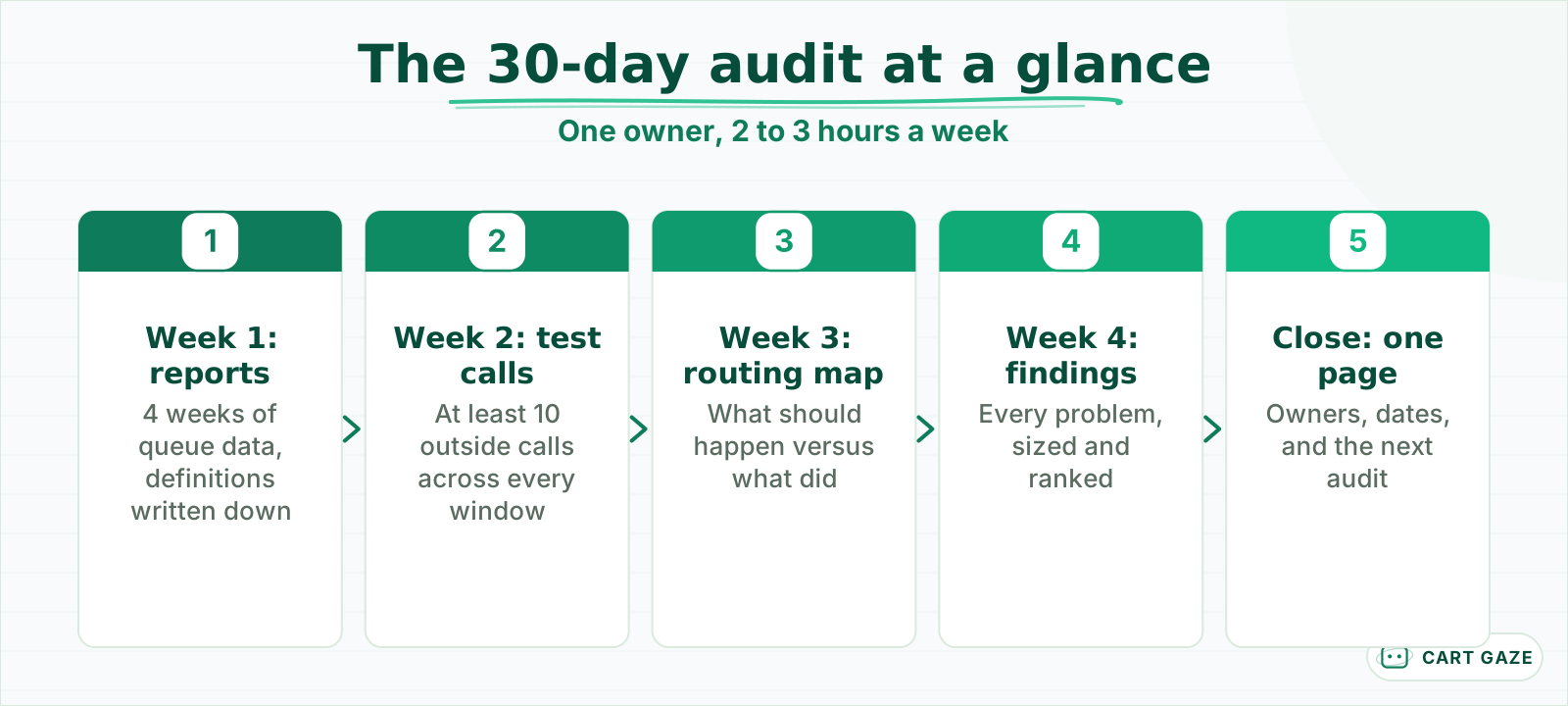 About 2 to 3 hours a week, one owner, no new software.
The audit is not a vendor evaluation. It does not ask whether you have the right phone system. It asks whether the system you have is set up to answer patients, and whether anyone would know if it was not. Most of the fixes it produces are settings, schedules, and greetings, not purchases.
Pick one owner before you start, usually the office manager, and block 2 to 3 hours each week. The owner does not need technical skill; they need admin access to the phone system, a copy of the practice's hours, and permission to call the line from outside the building.
A short baseline matters for the end. Write down the three numbers the practice believes today: roughly how many calls a day, roughly what share go unanswered, and how long callers typically wait. The audit's real value often lies in the gap between those beliefs and the reports.
Week 1: pull the reports and set a baseline
In week 1, pull 4 weeks of call data from the phone system: calls offered, answered, missed or abandoned, average wait, and calls by hour and weekday. Write down how your system defines each one. By the end of the week you have a baseline and a picture of when calls arrive.
Most cloud phone systems keep this in a queue or call-flow report rather than on the main dashboard. Look for per-queue numbers, not per-user ones, since a call that rang three extensions and went to voicemail may show as a missed call for each of them.
Definitions trip people up. Some systems count a call as abandoned only if the caller waited in a queue and hung up; a call that rang an extension and went to voicemail may be "missed" instead. Some exclude very short calls. Write the definitions on the first page of your audit notes so every number later is read the same way.
Pull the voicemail numbers too: how many messages are left each day, at what times, and how long they sit before someone returns them. A mailbox that fills by 10 a.m. or messages returned the next afternoon are findings in their own right, and neither shows up in the call report.
Then split the data. Calls by hour and weekday show your peaks. Missed or abandoned calls by hour show where the losses concentrate. Losses often cluster in a few hours, commonly the first hour of the day and the hour after lunch.
Week 2: call your own line
In week 2, call your own practice from outside the building, at least 10 times across different days and hours, and write down what each caller experiences: how long it rang, what they heard, where they landed, and whether anyone answered. This is the only way to hear the patient's side.
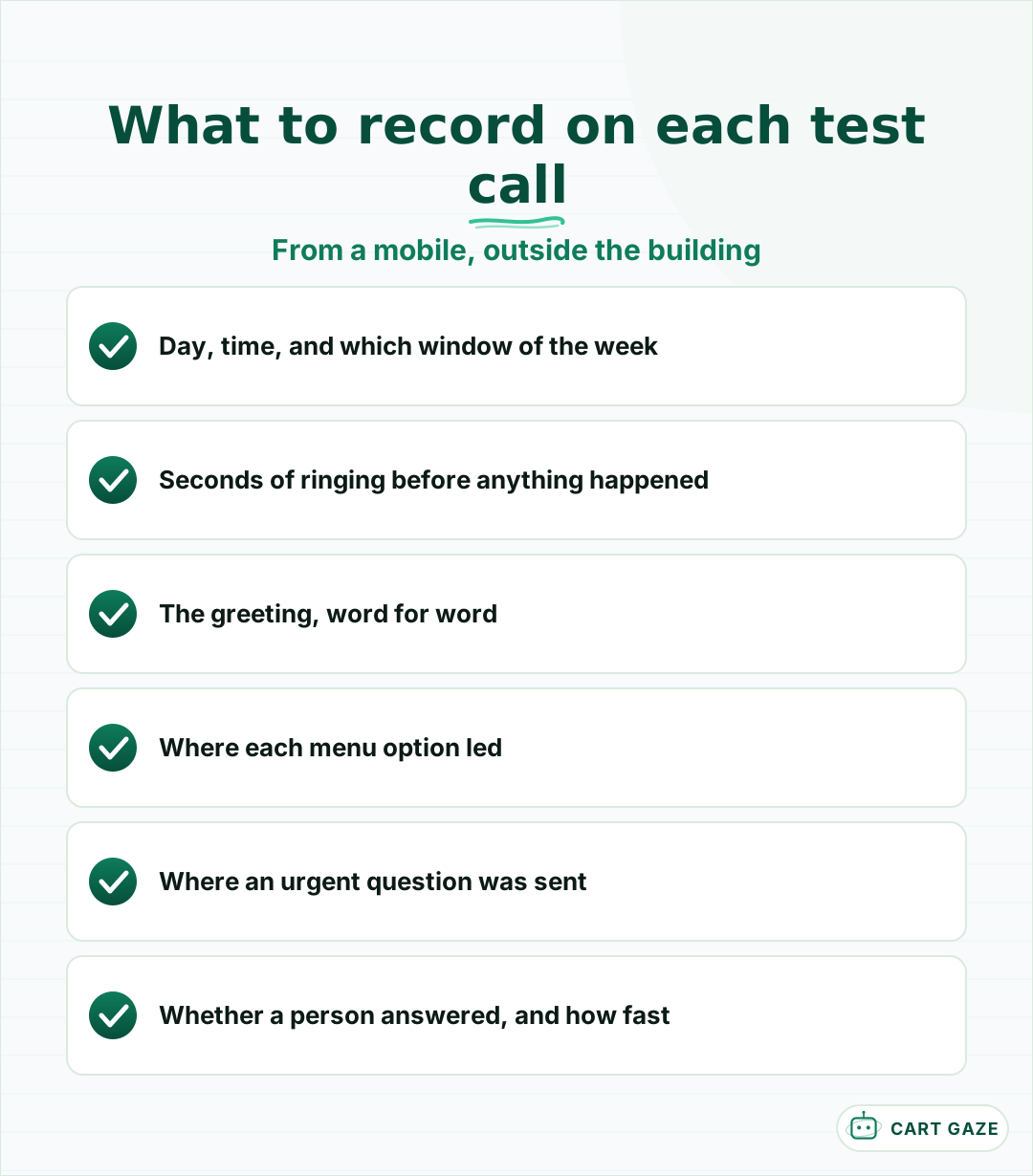 The patient side of the phones, which no report shows.
Use a mobile phone, not an internal extension, because internal calls often skip the routing an outside call goes through. Cover the windows the reports flagged, plus the ones they cannot show: lunch, the 15 minutes before opening, just after closing, a weekend, and a day when one staff member is out.
Time the rings. A traditional US ring cycle is about 6 seconds, so a call that rings 8 times has rung for close to 50 seconds before anything happens. Note every greeting word for word, and whether it says what to do in an emergency, when you will call back, and another way to reach you.
Test the patient's options too. Press the menu options, ask to leave a message, and at least once, say you have an urgent question and see where you are sent. If the practice has an after-hours clinical line, confirm it reaches a person.
Tip
Recruit two colleagues to call at the same time as you during a busy hour. The third simultaneous call is where most routing problems show up, and you cannot test it alone.
Week 3: map hours, greetings and routing
In week 3, write out what should happen to a call in every window of the week, then compare it with what your test calls found. The gaps between the two maps are your findings. Most of them are settings nobody has looked at since the system was installed.
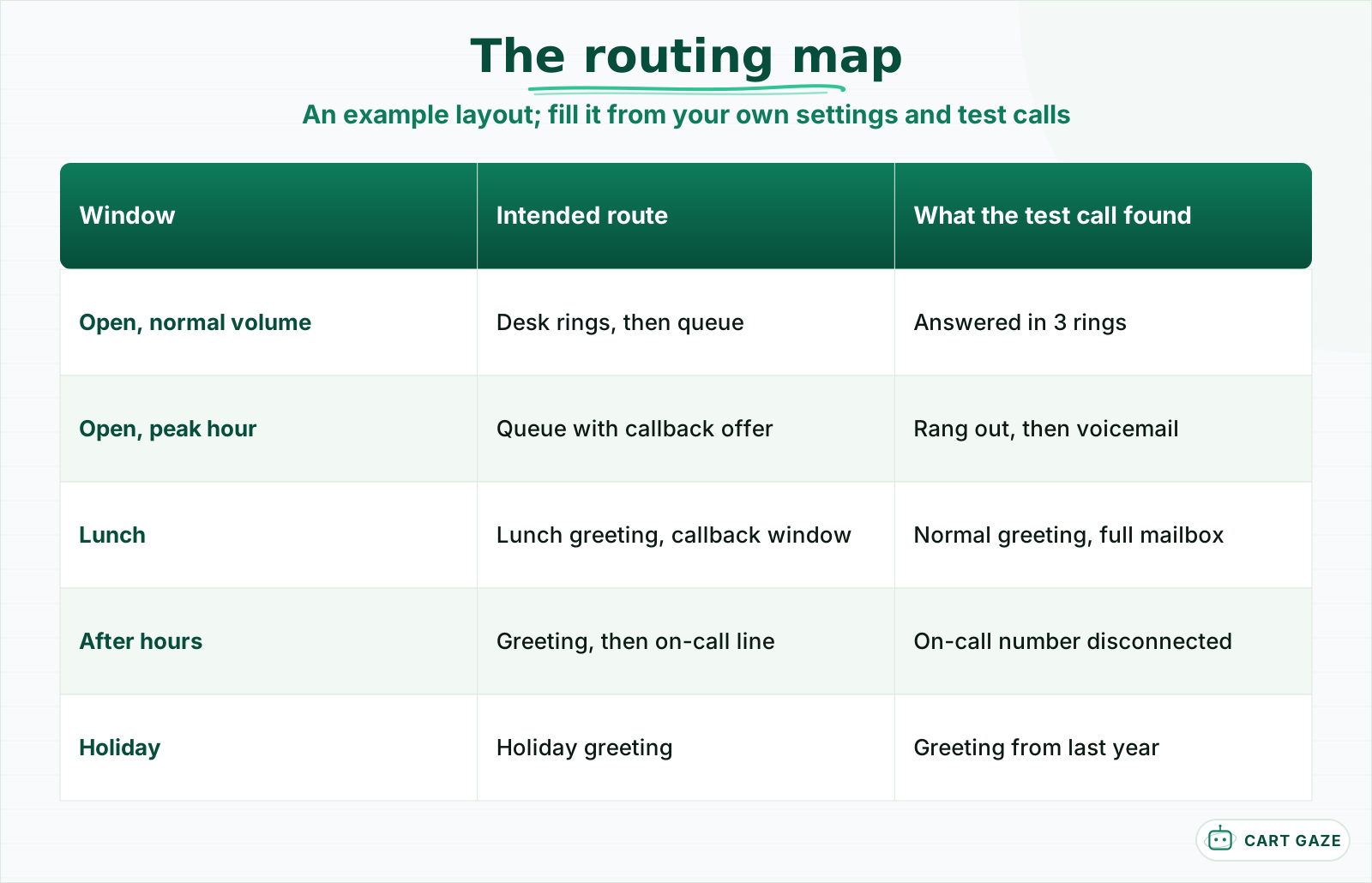 The gaps between the two middle columns are the audit findings.
Start with the practice's published hours, then add every exception: lunch, early closing days, holidays, and provider-specific hours. For each window, write the intended route: which phones ring, for how long, where the call goes next, and what the caller hears.
Then open the phone system's admin settings and check each route. Look for ring groups that still include people who left, schedules that do not match the published hours, holiday greetings that never switched back, and after-hours routes that point to a number nobody answers. Check the difference between a ring group and a call queue while you are there: a queue holds callers when everyone is busy, a ring group simply rings.
Check the outbound side as well. When staff return calls, which number shows on the patient's phone, and does it display the practice name? If an answering service covers any window, read the instructions it has on file and confirm the on-call names and numbers are current.
Finally, read every greeting in the system, including ones you think are unused. Each one should name the practice, give the emergency instruction first, and say when the office reopens or will call back.
Week 4: measure the misses and decide the fixes
In week 4, put the report data, the test-call notes and the routing map side by side, list every problem found, and estimate how many calls each one affects a week. Then rank the fixes by calls recovered for effort spent. Expect a handful of fixes, and many of them will be simple settings.
| Finding | Typical cause | Fix | Effort |
|---|---|---|---|
| Calls ring out at peak hours | Ring group, no queue or overflow | Add a queue or an overflow rule | Low |
| Lunch calls hit voicemail | No lunch schedule | Timed lunch route and greeting | Low |
| Greeting lacks emergency line | Old recording | Re-record all greetings | Low |
| After-hours line unanswered | Stale forwarding number | Update the route, test monthly | Low |
| Long holds with no end | No wait limit or callback | Wait limit plus a callback offer | Medium |
| Routine calls swamp the desk | Staffing, call mix | Online booking or an AI receptionist | Medium |
Estimate the impact honestly. If the reports show 25 abandoned calls a week between 8 and 9 a.m. a fix to that hour is worth more than one that affects 2 calls a week at lunch, even if the lunch fix is easier. Put both on the list, in that order.
Some findings deserve immediate action regardless of rank. An after-hours clinical route that reaches nobody, or a greeting with no emergency instruction, should be fixed the day it is found.
What the audit usually finds
Audits like this tend to turn up the same handful of problems: peak-hour calls ringing out, routing that no longer matches the hours, greetings that are years out of date, and a desk that cannot keep up with routine calls at peaks. The first three are settings. The last is a capacity question with a few possible answers.
For peaks, the options are shifting staff hours, adding a queue with a callback offer, or sending overflow to an answer that can book. For routine volume, online booking and an AI receptionist both take calls off the desk; the AI receptionist can answer on the first ring, book into the schedule, and pass anything else to staff. What it does and where it stops is set out in what an AI receptionist does and where it hands off. It routes every clinical, urgent, or distressed caller to a person and never assesses symptoms or gives medical advice.
A federal benchmark gives the audit a hard floor. In its secret shopper guidance for marketplace health plans, CMS treats a provider as nonresponsive if the phone rings for 5 minutes unanswered, if a voicemail picks up during business hours, or if the caller is held for more than 15 minutes. If any test call met one of those, it belongs at the top of the list.
If the audit leads to a new phone system rather than new settings, plan the move carefully, as covered in the phone system migration checklist. Which numbers to keep tracking once the audit is done is covered in the front desk call metrics worth tracking.
Before you close the audit
- The report definitions are written down with the numbers.
- At least 10 outside test calls cover every window of the week.
- Every route and greeting in the system has been read and checked.
- Each finding has an owner and a date.
Close the audit with a one-page report
Close the audit with one page: the baseline numbers, the ranked findings, the owner and date for each fix, and the date of the next audit. Re-run the week 1 numbers 30 days after the fixes to see what moved. A yearly audit, or one after any staffing or hours change, keeps the phones honest.
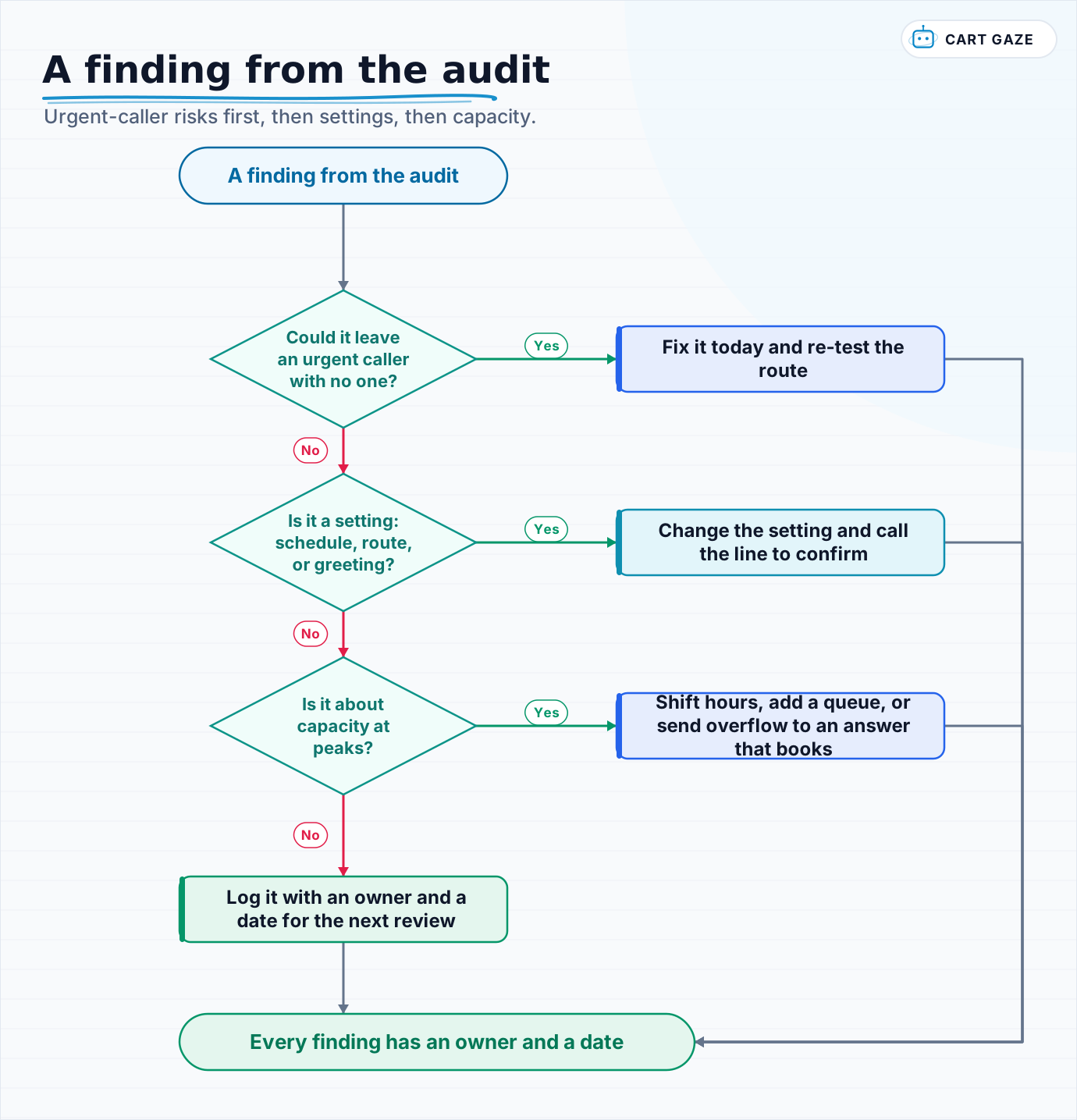 Urgent-caller risks first, then settings, then capacity.
Walk each finding through the flow to decide what kind of fix it needs. Then send the one-page report to whoever signs off on staffing and spending, because the medium-effort fixes usually need a decision, not just a setting.
To see what a completed build looks like once an audit has pointed to changes, what a live build actually looked like walks through one.
Fair questions.
How do you audit a medical practice phone system?
Over 4 weeks: pull a month of call reports and note the definitions, call your own line at least 10 times from outside across every window of the week, map what should happen to calls in each window against what happened, then list and rank the fixes by calls recovered. It takes about 2 to 3 hours a week.
What should I look for when calling my own practice?
How long it rings, what the greeting says word for word, where each menu option leads, whether an urgent question reaches a person, and what happens at lunch, just after closing, on a weekend, and during a busy hour. Call from a mobile, not an internal extension, because internal calls often skip the routing patients go through.
Which phone reports matter for a practice phone audit?
The queue or call-flow report rather than per-user views: calls offered, answered, missed or abandoned, average wait, and all of them by hour and weekday. Write down how your system defines each metric, since some count only queued calls as abandoned and others exclude short calls. Four weeks of data is a reasonable baseline.
What problems does a phone system audit usually find?
Common findings are calls ringing out at peak hours, schedules that no longer match published hours, lunch calls going to voicemail, greetings without an emergency instruction, and after-hours routes pointing to numbers nobody answers. Many are settings that can be fixed the same day; peak-hour capacity usually needs a staffing or overflow decision.
How often should a medical practice audit its phones?
At least once a year, and again after any change to hours, staffing, or the phone system itself. Re-run the week 1 report numbers about 30 days after making fixes to see what moved. A short monthly test call from outside the building catches broken greetings and routes between full audits.
Sources.
Written by

Muhammad Qasim Hammad
Founder, Cart Gaze
Qasim builds AI receptionists and front-office automation for medical and dental practices at Cart Gaze. Posts here start from published sources and real call data, not vendor claims, and every number links back to where it came from.
Keep reading.
 Practice Automation PlaybooksReduce Call Abandonment in 30 Days: A Week-by-Week Plan10 min read
 Practice Automation PlaybooksClinic Phone Coverage Plan: A Five-Phase Playbook for Practices10 min read
 Practice Automation PlaybooksFront Desk SOP Template: A Five-Step Guide for Medical Practices10 min read
 Practice Automation PlaybooksHuman in the Loop AI Approvals: What to Gate and What to Let Run11 min read
 Practice Automation PlaybooksAI Agent Orchestration Rules That Stop Automations Colliding12 min read
 Practice Automation PlaybooksFront Desk AI Training: The Conversation Practices Skip10 min read