
Practice Phone System Migration: Move Lines Without Losing Calls
A patient who calls a dead number does not email you about it. The damage from a botched phone migration is almost entirely invisible from inside the building, and it can run for weeks.
Key takeaways.
- Three failure modes cause almost all lost calls: a number left off the port order, a cutover before the new system was configured, and an old forwarding rule nobody removed.
- Carriers must port a number on a valid request and an unpaid balance is not a lawful reason to refuse, so delays are nearly always mismatched account details rather than an unwilling incumbent.
- Build the number inventory from three sources: the carrier bill, your public listings and printed material, and the teams who hold direct numbers nobody else knows about.
- Never cut over on a Friday, and keep the old service running in parallel for at least a week rather than cancelling it on the day.
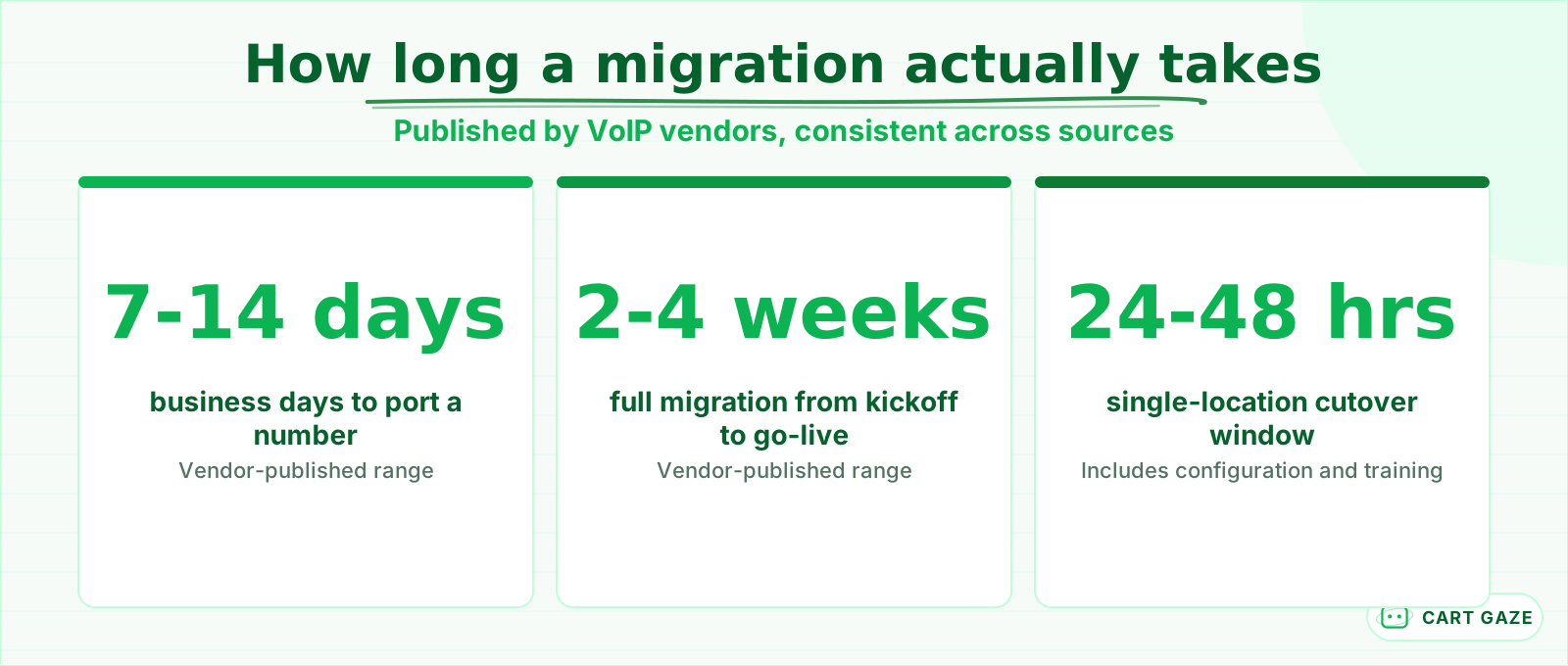
- Vendor figures put porting at 7 to 14 business days, a full migration at 2 to 4 weeks, and a single-location cutover at 24 to 48 hours.
Table of Contents8 sections
- What actually breaks during a phone migration
- Porting is a legal right and an administrative obstacle course
- Inventory every number before you touch anything
- The cutover window is where calls go missing
- What to test before you release the old system
- The lines nobody remembers until they break
- A realistic timeline
- Fair questions
Changing phone providers looks like an IT task and behaves like a clinical operations risk. The main line usually survives. What goes quiet is the fax the referral desk depends on, the direct extension a hospital has on file for your office manager, and the after-hours number printed on a sign that nobody has updated since 2019.
None of that shows up as a complaint, which is the problem. A patient who calls a dead number does not email you about it. A discharge planner whose fax bounces sends the referral somewhere else. The damage from a botched migration is almost entirely invisible from inside the building, and it can run for weeks before anyone notices the pattern.
This post covers what actually breaks, why ports get rejected, the number inventory nobody completes, and how to sequence a cutover so the old system is still there when something surprises you.
What actually breaks during a phone migration
Three failure modes account for nearly everything. A number that never made it onto the port order simply stops working. A cutover that happened before the new system was fully configured drops calls into a void. And a forwarding rule left over from the old setup quietly sends a slice of traffic somewhere nobody is listening.
 Vendor-published windows. Useful for planning, not a guarantee.
The first is the most common and the most preventable. It happens because a practice thinks of itself as having a phone number, singular, when the bill actually lists several and the ones nobody uses daily are exactly the ones nobody thinks to move.
The third failure mode is the sneakiest because it looks like success. Everything rings, everyone is happy, and a forwarding rule set up two years ago for an overflow line is still quietly diverting a share of calls to a voicemail box on a system you no longer own. Nobody finds these by testing the main number.
Warning
The vendor selling you the migration is not responsible for finding your numbers. They will port what you list. Anything you leave off the order is a line that stops working on cutover day, and you will find out from a patient rather than from a report.
Porting is a legal right and an administrative obstacle course
Practices often approach this expecting a fight with their incumbent provider. That is usually not what happens. Carriers are required to port a number when they receive a valid request, and an outstanding balance is not a lawful reason to refuse. The incumbent has no standing to keep your number.
What does hold up a port is paperwork. The most common cause of a rejection is mismatched account information, and the mismatch is usually small enough to be invisible until it fails.
| Why the port failed | What actually fixes it |
|---|---|
| Business name does not match the account | Use the name exactly as it appears on the bill, not your trading name |
| Service address is out of date | Match the address on the carrier account, not your current suite number |
| Wrong or partial account number | Pull it from a current bill, not from memory or an old portal |
| Authorising person is not on the account | Have the named account holder sign the request |
| Number is in a pending order elsewhere | Cancel the other order first, they cannot both proceed |
| Number was never actually yours | Some numbers belong to a vendor rather than to you |
It is worth submitting the port order and the account details as one careful piece of work rather than as a form somebody fills in between patients. A rejection does not just cost the correction, it usually costs another full porting window, so a mismatch found in five minutes at the start saves two weeks at the end.
That last row is worth a pause. If a marketing agency or an answering service supplied you a tracking number, it may sit on their account rather than yours, and it may not be portable at all. Find that out before it is printed on anything else.
Inventory every number before you touch anything
The inventory is the job and everything else is scheduling. A single-location practice typically carries more numbers than its staff expect, and the ones that matter most are often the ones used least, which is exactly why nobody thinks to list them when a vendor asks what needs moving.
 Eight categories. Most practices find at least two they had forgotten.
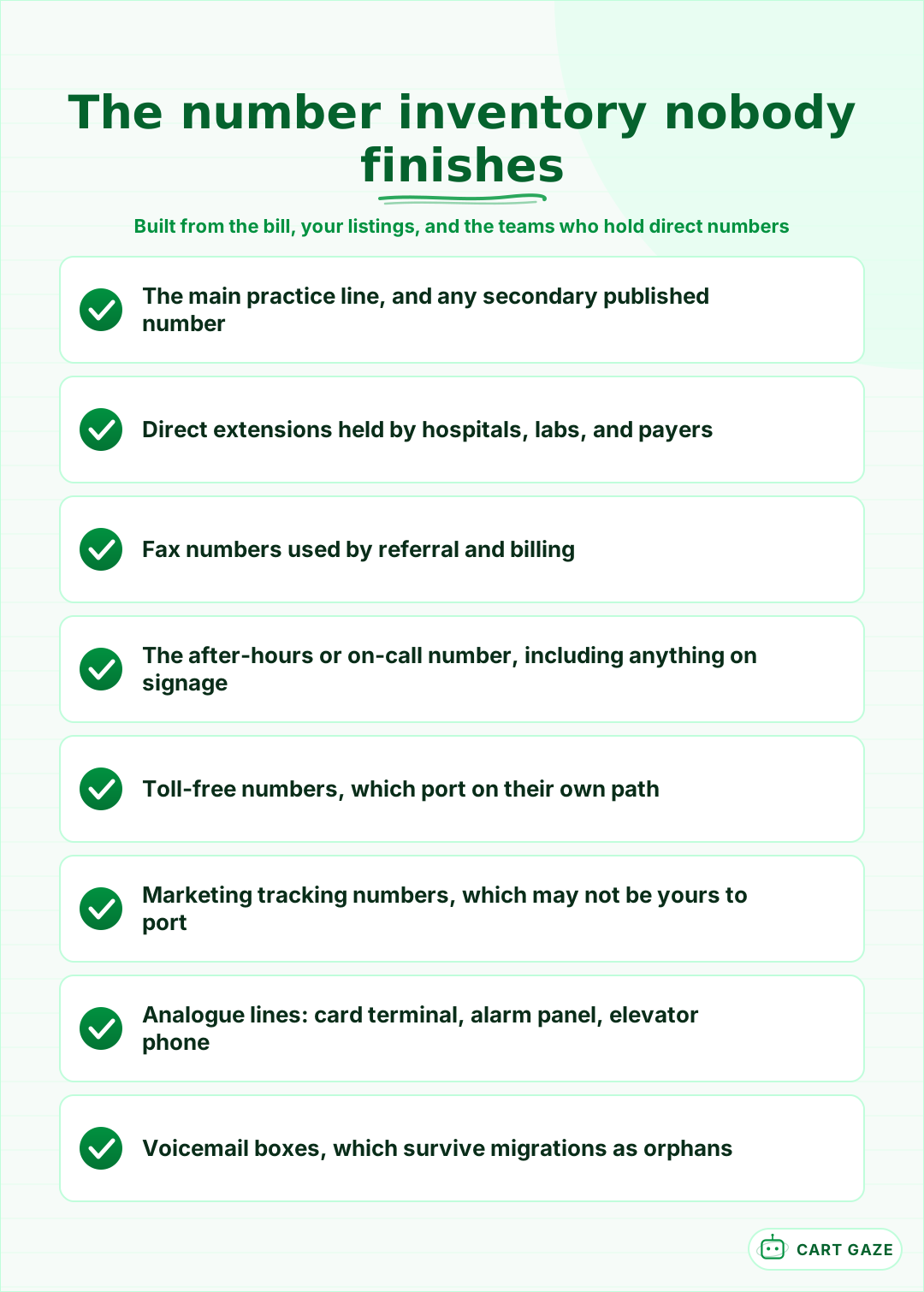
Direct extensions deserve their own pass. Hospitals, referring offices, labs, and payers all keep direct numbers for specific people at your practice, collected over years and stored in systems you cannot see. Those numbers are not on your marketing material and they are the ones whose failure costs you referrals rather than patients.
Work from three sources rather than one. The carrier bill lists what you pay for. Your online listings, directory entries, and printed material list what patients actually dial. And the referral desk, the billing team, and the on-call service each know a number that appears on neither.
Tip
Search your own practice name online and write down every phone number that appears, including on aggregator sites and old directory listings. Patients dial what they find, not what is on your bill, and a number you stopped paying for years ago may still be published somewhere prominent.
The cutover window is where calls go missing
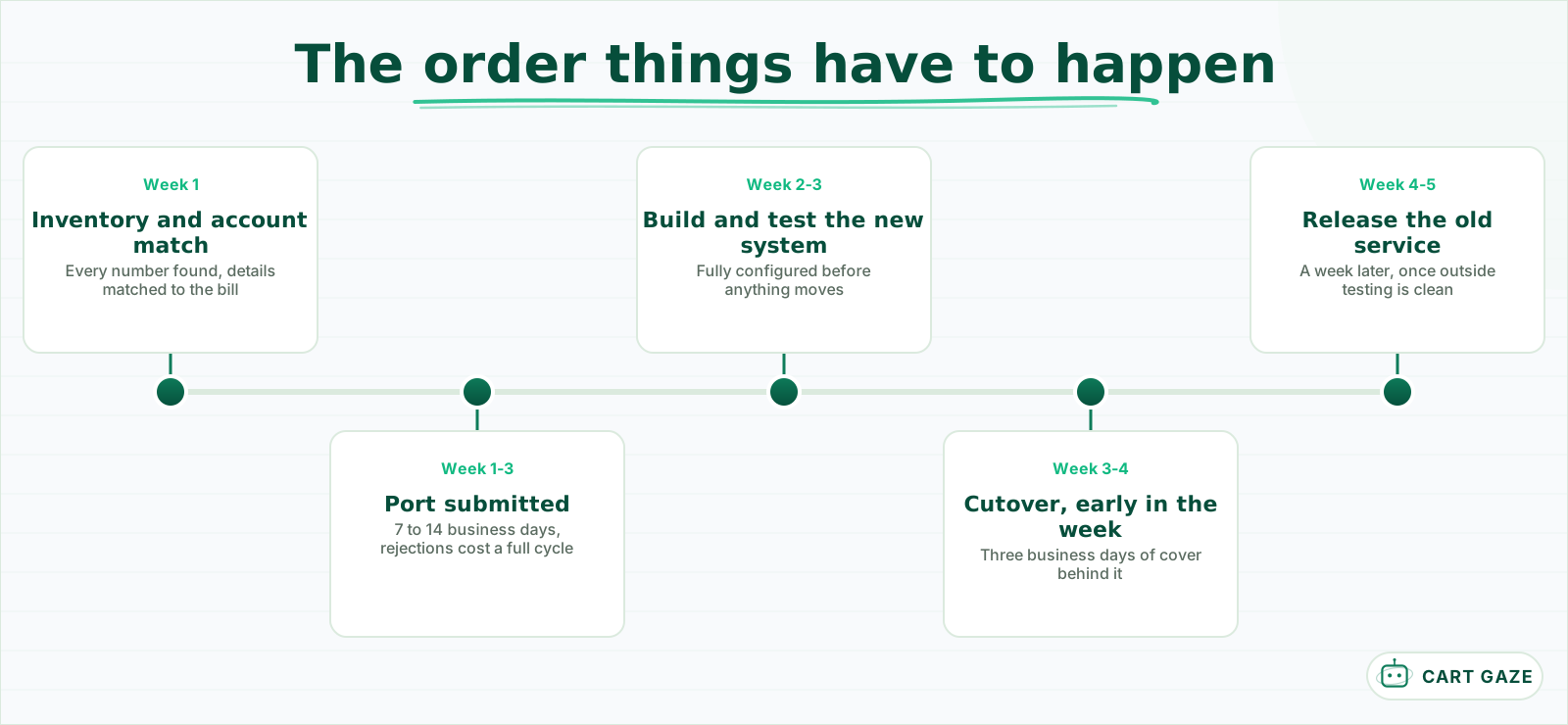
Vendors describe migrations as zero downtime, and that is achievable, but only under conditions the marketing page does not state. The new system has to be fully built and tested before anything moves, the port has to complete during a low-traffic window, and the old service has to stay live afterwards rather than being cancelled the same day.
 The old service comes down last, never on cutover day.
Never cut over on a Friday. If something surprises you at 4 p.m. you have a weekend of dead lines and a vendor support desk that is closed. Tuesday morning gives you three full business days with everyone available, which is the single cheapest risk reduction in this whole exercise.
There is a second reason to avoid a Friday that has nothing to do with support hours. Cutover day generates a burst of small problems that staff need to report, and the people best placed to notice them are the ones who answer the phone all day. On a Friday afternoon those observations go home for the weekend and arrive on Monday as vague recollections.
Keep the old service running in parallel for at least a week after the port completes. It costs one more month of a bill you were about to stop paying and it is the only thing standing between you and a hard failure with no fallback.
What to test before you release the old system
Test from outside the building, always. Calls placed from a desk phone on your own network can succeed while the outside world reaches nothing at all, and that is precisely the failure mode that survives a cheerful round of internal testing and then runs unnoticed for days afterwards.
Call every ported number from a mobile on a different carrier. Then call the main line after hours and confirm the routing does what it did before. Send a fax to your own fax number from somewhere else and confirm it arrives. Then check that voicemail actually reaches somebody, because voicemail boxes routinely survive a migration as orphans that nobody monitors.
Test with the staff who will actually use it, too. A transfer that works when the vendor demonstrates it may not work the way your team expects to perform it, and a receptionist who cannot transfer a call on day one will invent a workaround that lasts for years.
If you are pointing the main line at an automated system as part of this move, test its escalation path rather than just its greeting, using the approach in designing the handoff to a human. If the system is new to you, what an AI receptionist actually does is worth reading before you decide what the main line should point at.
The lines nobody remembers until they break
Beyond the phones people talk into, most practices have analogue lines doing quiet jobs. The credit card terminal, the alarm panel, an elevator emergency phone, a postage meter, and sometimes a legacy fax line the billing service depends on. Several of these will not work over a standard internet connection without specific handling.
Before the port order goes in
- Every number is listed, including fax, after-hours, and any tracking numbers.
- The account name and service address match the carrier bill exactly.
- Someone has checked whether the alarm and card terminal lines are analogue.
- The old service stays live for a week after cutover, not cancelled on the day.
Ask your vendor directly which of these they have handled before rather than whether they support them. The answer to the second question is always yes. The answer to the first tells you whether they will recognise the problem when the card terminal stops settling on the second day.
The alarm panel is the one worth checking personally. Monitored alarm and fire systems often rely on a plain phone line, and a migration that silently breaks that connection creates a compliance and safety problem that nobody discovers until the next test or the next incident.
A realistic timeline
Published vendor figures put number porting at 7 to 14 business days, a full migration at 2 to 4 weeks from kickoff to go-live, and a single-location cutover at 24 to 48 hours including configuration and staff training. Multi-site practices phase it site by site rather than moving everything at once.
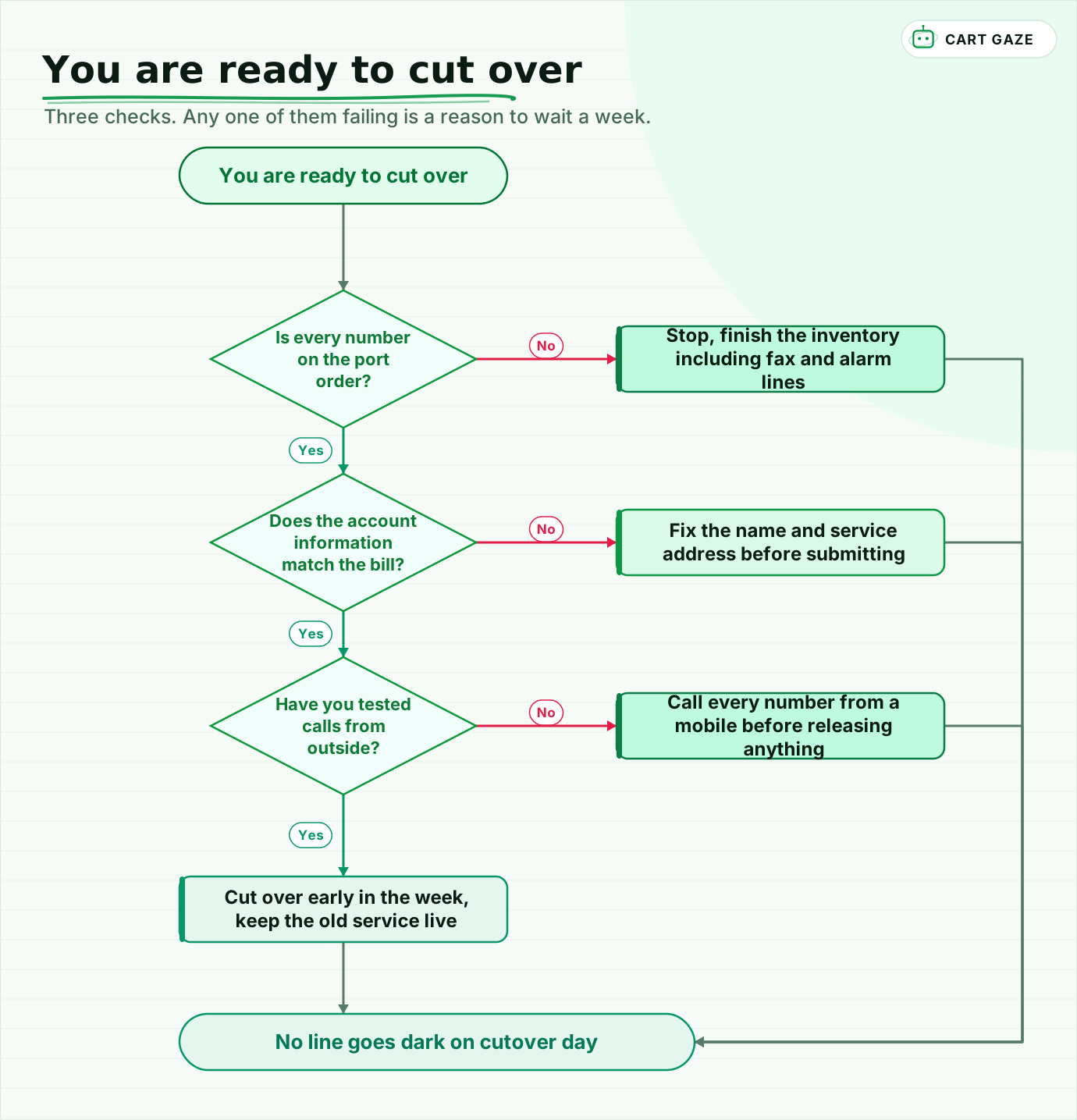 Three checks. Any one of them failing is a reason to wait a week.
Walk the readiness check once. Every number on the order, including the ones nobody uses. Account details matching the bill exactly, because a single mismatched character is a two-week delay. Calls tested from outside on a mobile before anything is released. And a cutover early in the week with the old service still live behind it.
One more sequencing note. If you are also changing what answers the phone, do the two moves separately rather than together. Porting numbers and introducing a new answering flow on the same morning makes every problem ambiguous, and you will spend the week arguing about which change caused what.
Budget for the fees nobody mentions in the quote: per-number porting charges, toll-free handling, and premium support if you want somebody reachable during the cutover. These are small individually and they change the comparison between two vendors whose headline pricing looked identical, which is the same pattern covered in the contract terms that set your real bill.
Whatever you move to, size what the phone is currently costing you first. A migration is a good moment to fix a call-handling problem rather than to carry it across, and the free Growth Leak Audit works from your own numbers, with the underlying arithmetic in the real cost of missed calls.
Fair questions.
How long does it take to port a medical practice phone number?
Vendor-published figures put porting at 7 to 14 business days, with a full migration running 2 to 4 weeks from kickoff to go-live. A single-location cutover typically takes 24 to 48 hours including configuration and staff training. Multi-site practices usually phase it site by site.
Can my current provider refuse to release my phone number?
No. Carriers are required to port a number when they receive a valid request, and an outstanding balance is not a lawful basis to refuse. What actually delays ports is administrative: a business name that does not match the account, an old service address, or a partial account number.
Why do number port requests get rejected?
Almost always mismatched account information, and the mismatch is usually small enough to be invisible until it fails. Common causes are a trading name instead of the legal name on the bill, a stale service address, an incorrect account number, an authoriser not named on the account, or a pending order elsewhere.
Which lines do practices forget to migrate?
Fax lines the referral or billing desk depends on, direct extensions held by hospitals and payers, after-hours numbers printed on signage, marketing tracking numbers, and analogue lines running the credit card terminal, alarm panel, or elevator phone. Several of those will not work over a standard internet connection without specific handling.
When should a practice schedule a phone cutover?
Early in the week, ideally Tuesday morning, so you have three full business days with your team and the vendor available. A Friday cutover that surprises you at 4 p.m. gives you a weekend of dead lines and a closed support desk, and it loses the small observations staff would otherwise report.
Sources.
- [1]Porting: keeping your phone number when you change providers
- [2]Reasons a number port request is rejected
- [3]What to do when a carrier refuses to port your number
- [4]VoIP for healthcare: phone systems for medical practices
- [5]Medical office phone system guide for private practices
- [6]Best cloud VoIP phone systems for medical practices
- [7]Why medical practices are switching to cloud VoIP
Written by

Muhammad Qasim Hammad
Founder, Cart Gaze
Qasim builds AI receptionists and front-office automation for medical and dental practices at Cart Gaze. Posts here start from published sources and real call data, not vendor claims, and every number links back to where it came from.
Keep reading.
 Practice Automation PlaybooksHuman in the Loop AI Approvals: What to Gate and What to Let Run11 min read
 Practice Automation PlaybooksAI Agent Orchestration Rules That Stop Automations Colliding12 min read
 Practice Automation PlaybooksThe Front Office Automation Stack for Medical Practices10 min read
 Practice Automation PlaybooksProvider Schedule Template Optimization Before You Automate11 min read
 Practice Automation PlaybooksFront Desk AI Training: The Conversation Practices Skip10 min read
 Practice Automation PlaybooksThe Practice Daily Digest That Owners Actually Read10 min read