
AI Receptionist Accessibility: Older Callers and Relay Calls
Research puts voice assistants at roughly 50 to 60% accuracy on impaired speech against a 90 to 95% floor for typical speech. That gap lands on the patients least able to work around it.
Key takeaways.
- Published figures put voice assistants near 50 to 60% accuracy on impaired speech, against the 90 to 95% generally treated as the floor for typical speech.
- Older callers struggle with automated systems through changes in processing speech rhythm and stress, not only through hearing loss, so pacing matters as much as volume.
- For a healthcare provider, communicating effectively with patients who have disabilities is an obligation, and covered entities must answer relay calls as they answer any other call.
- A system that reads the long typing pauses of a relay call as an abandoned call and disconnects has created a compliance problem, not just a poor experience.
- Two failed attempts at understanding is a reasonable ceiling before handing to a person, and a long silence should produce an offer of help rather than a disconnection.
Table of Contents8 sections
The person who demoed your AI receptionist spoke clearly, at a normal pace, from a quiet room, on a good connection, using words the system was built to expect. Almost nobody who calls a medical practice does all five of those things.
A meaningful share of your callers are over 50, and hearing loss becomes common in that group. Others speak with an accent, or quietly, or with a speech difference following a stroke. Research puts current voice assistants at roughly 50 to 60% accuracy on impaired speech, against the 90 to 95% generally treated as the floor for acceptable performance on typical speech. That gap is not a rounding error, and it lands on the patients least able to work around it.
There is also a legal dimension that vendor material never mentions. For a healthcare provider, communicating effectively with patients who have disabilities is an obligation rather than a courtesy, and it specifically covers how you answer the phone. This post covers where automation genuinely struggles, what the obligation requires, and what to design so that no caller reaches a dead end.
Your callers are older than the demo assumed
Age changes how people manage automated phone systems, and not only through hearing loss. Research on age-related decline in recognising machine speech points to changes in processing the rhythm and stress of speech rather than to hearing thresholds alone. Someone who hears perfectly well can still struggle with a synthetic voice moving at conversational pace.
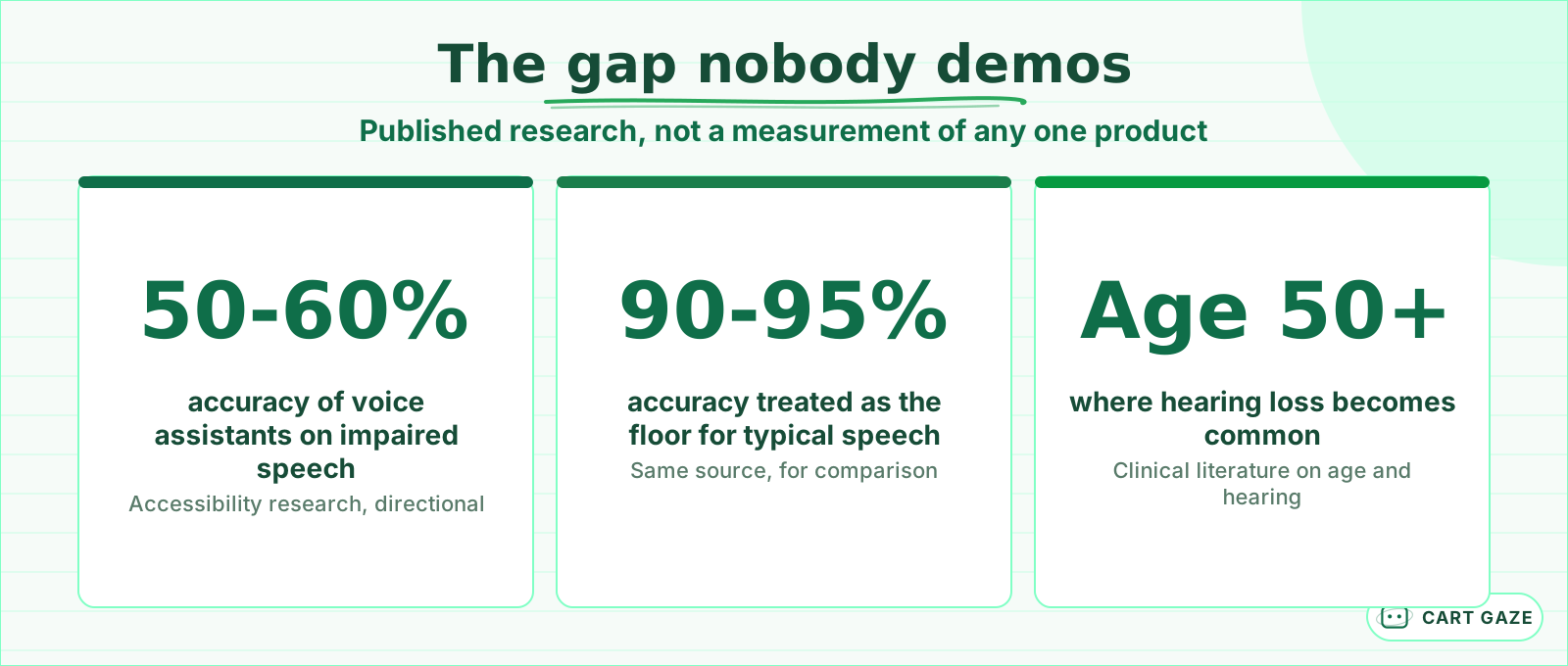 Published research figures. The gap lands on your most vulnerable callers.
The practical effect is that older callers take longer to respond, pause mid-sentence more often, and are more likely to give a partial answer while they think. A system tuned for speed reads those pauses as the end of a turn and starts talking over the person, which is where the call unravels.
It compounds with the synthetic voice itself. Speech generated by software carries slightly different rhythm and stress from human speech, and those are exactly the cues an older listener relies on most when the audio is imperfect. A voice that sounds fine in a quiet demo can be genuinely hard work over a mobile connection.
Important
If your patient population skews older, ask the vendor to lengthen the wait before the system decides a caller has finished speaking. It costs a little responsiveness on every call and prevents the failure mode that actually loses patients.
Where recognition falls apart
Speech recognition does not fail evenly. It fails at the edges of what it was trained on, and those edges are populated by exactly the patients who most need a phone to work. Understanding where it breaks lets you decide which calls automation should not be trying to handle at all.
| Caller situation | Where automation struggles | What has to exist |
|---|---|---|
| Speech difference after a stroke | Recognition accuracy drops sharply | A person, reached quickly |
| Strong or less common accent | Names and numbers misheard | Read-back and easy correction |
| Quiet or breathy voice | System misses the start of speech | Longer patience, no timeout drop |
| Hard of hearing | Misses fast synthetic speech | Slower pace, willingness to repeat |
| Deaf, using text relay | An operator types and reads | Route to a person, always |
| Calling from a car or clinic waiting area | Background noise degrades everything | Confirm rather than assume |
It is worth being fair about the comparison. A busy human front desk also mishears surnames, also struggles with a poor connection, and also puts people on hold. The difference is that a person notices confusion and adapts within a sentence, while a system does what it was configured to do until something stops it. Designing that stop is the whole job.
The pattern in that right-hand column is worth noticing. Almost every remedy is either patience or a person. Neither is expensive, and neither is the default configuration.
Relay calls are an obligation, not an edge case
A relay call is one where an operator sits between a deaf or speech-disabled patient and your office, typing what you say and speaking what the patient types. It arrives on an ordinary phone line, opens with the operator explaining the service, and moves in slow, formal turns that do not resemble a normal conversation at all.
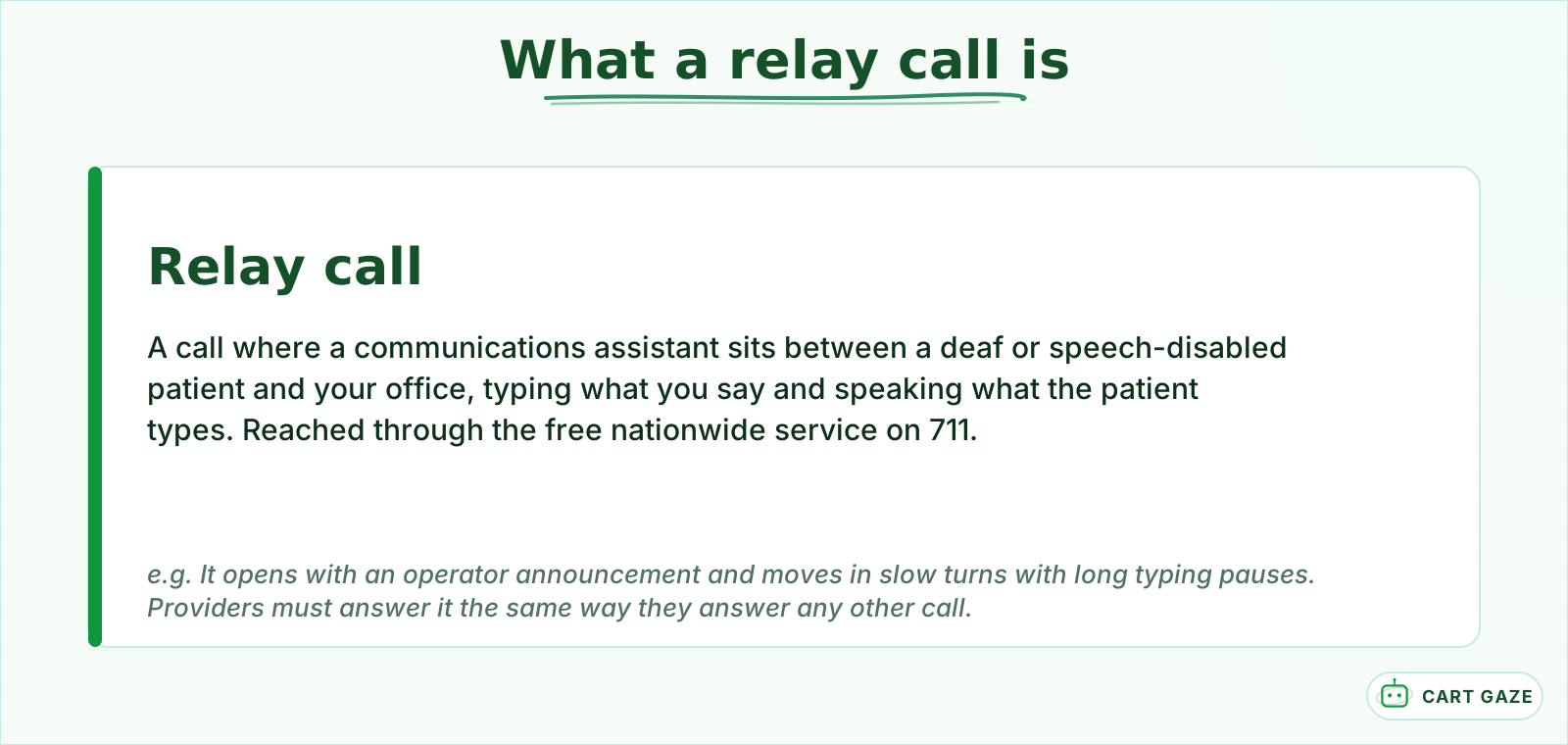 A relay call arrives on an ordinary line and behaves nothing like one.
For a healthcare provider this is not a category you may decline to serve. Effective communication with patients who have disabilities is placed directly on the provider, and covered entities are required to respond to relay-service calls in the same way they respond to any other call. A system that hangs up on an operator, or loops them through a menu they cannot navigate, is a compliance problem rather than a usability one.
Warning
Test a relay call before go-live. Ask your vendor how the system behaves when a call opens with an operator announcement and long typing pauses. Many systems interpret that silence as an abandoned call and disconnect, which is the worst possible outcome on this particular line.
The safe default is simple. Detect the pattern, stop trying to automate, and route to a person, because none of the efficiency the system was bought for applies to a conversation that runs at typing speed. Nothing about this is legal advice, and a practice with a meaningful deaf or hard-of-hearing population should have its own counsel look at the setup.
Design choices that help every caller
The useful thing about designing for the hardest callers is that almost every choice improves the line for everyone. None of these are accessibility features bolted on the side. They are just better phone design, and most practices could ask for them tomorrow.
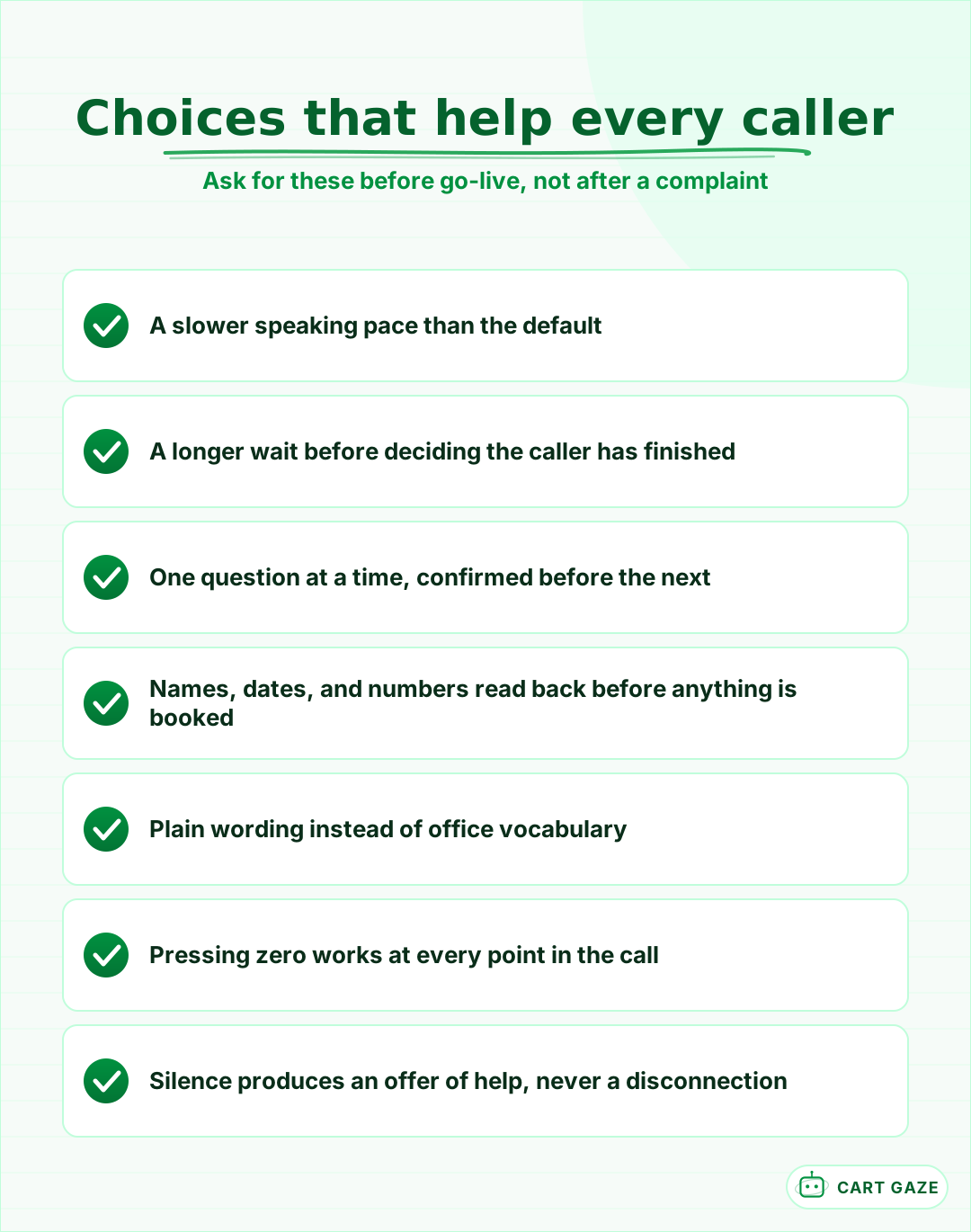 None of these are accessibility extras. They are better phone design.
Plain wording is the cheapest of them. A system that asks "are you an established patient with us" will lose people who have never heard the phrase. "Have you been seen here before" gets the same information from everyone. Practices write their phone scripts in the vocabulary of the office rather than the vocabulary of the caller, and automation makes that habit much more expensive.
The biggest single lever is pace. Synthetic voices default to a brisk conversational speed that sounds natural to a 35-year-old and fast to a 75-year-old. Slowing it slightly costs a few seconds per call and lifts comprehension across the whole population.
The second is one question at a time. Systems love to compress: name, date of birth, and reason for calling in a single sentence. Any caller who is thinking, or who did not catch the first part, now has to unpick which piece the system missed. Ask, confirm, then ask again.
The third is reading back. Names, dates, and numbers should be repeated to the caller before anything is booked. This matters everywhere, and it is what turns a misheard surname from a chart problem into a two-second correction. The broader version of that question is covered in what to listen for on a vendor demo.
The route to a person has to survive
Every accessibility failure ends in the same place: the caller needs a human and cannot get to one. So the route to a person has to work without depending on the caller being understood. That means pressing zero always works, saying almost any variation of asking for help works, and silence does not end the call.
Two failed attempts is a reasonable ceiling before the system stops trying. Systems configured to retry three or four times are not being thorough, they are trapping someone. A caller who has already been misheard twice has learned that this will not work, and every further attempt spends goodwill you cannot get back.
There is a related trap in how systems handle a caller who keeps saying the same thing. Repetition is a signal of failure, not of a caller who needs to be prompted more clearly. If the same phrase arrives twice, the right response is a person, not a rephrased question.
Silence deserves its own rule. A caller who says nothing may be deciding, may be deaf, may be waiting on a relay operator, or may have put the phone down to find an insurance card. Treating silence as a hang-up is the most common way these systems fail a vulnerable caller, and the fix is to offer a person rather than to disconnect. How that handoff should be built is covered in designing the escalation path.
Test with the callers who actually struggle
Staff testing tells you nothing here, because your team knows what the system expects and unconsciously speaks to it. Testing with real patients who find phones difficult is uncomfortable and it is the only way to find out what happens.
Before you point older patients at it
- Someone has run a relay call end to end and it reached a person.
- Pressing zero works at every point, including during a question.
- The system offers a person after two misunderstandings, not four.
- A long silence produces an offer of help rather than a disconnection.
Recruiting for this is easier than it sounds. Most practices have a handful of long-standing patients who would be glad to help and who fall squarely in the group you are worried about. Ask directly, explain why, and make clear that the system failing is the useful outcome rather than an embarrassment.
Ask two or three willing patients to call and book a routine appointment, then listen to the recordings with them if your state's rules allow it, which is worth checking first in what recording consent requires. What you hear in those calls will change the configuration more than any vendor checklist.
Where to start
Three checks, none of which needs the vendor's help. Call your own line and say nothing for 20 seconds. Call again and deliberately mumble a surname twice. Then have somebody place a relay call through 711 and see how far it gets.
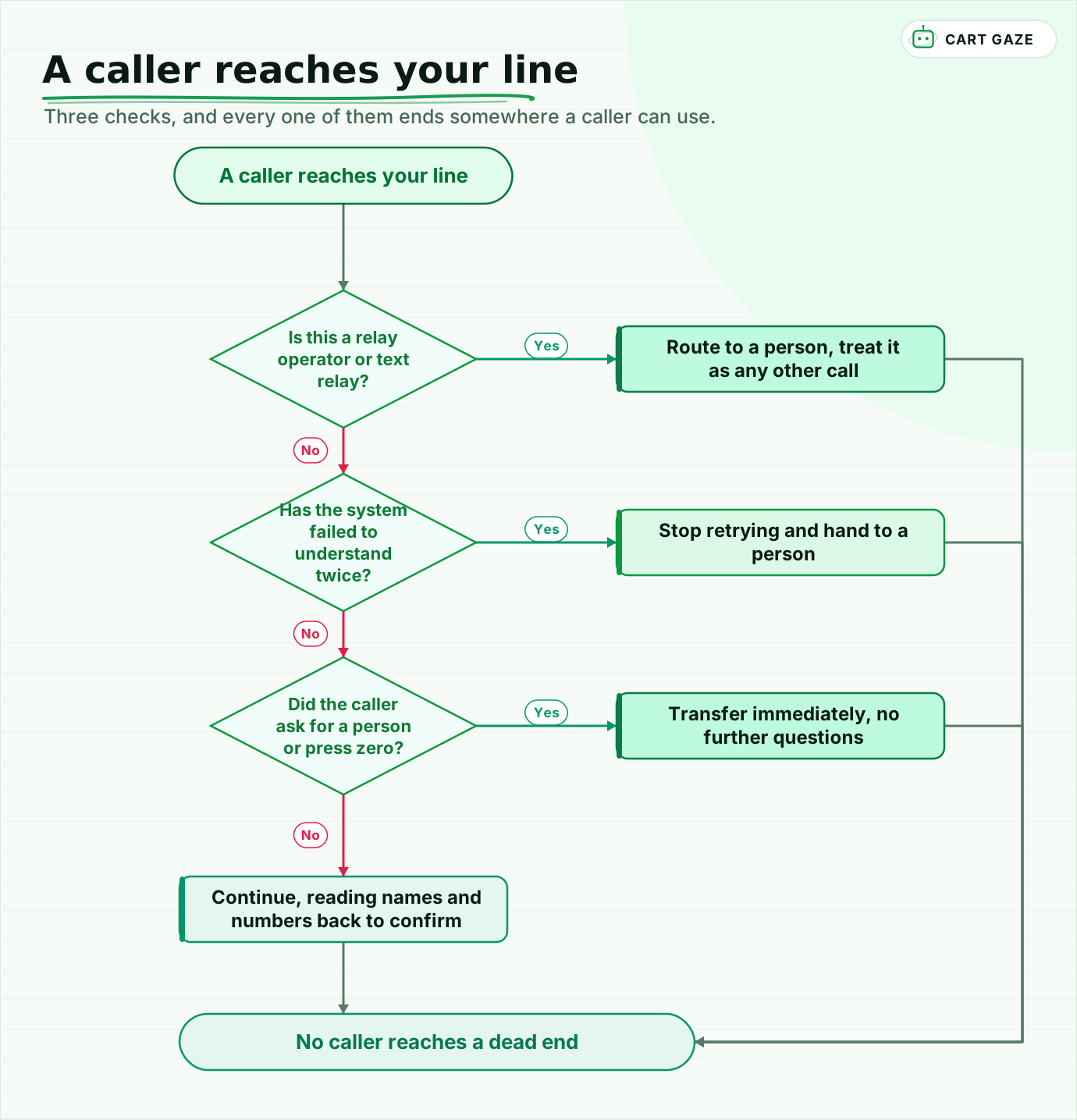 Three checks, and every one of them ends somewhere a caller can use.
Walk the routing once. A relay operator or text relay goes to a person immediately, treated exactly as any other call. Two failed attempts at understanding ends the automated portion. A request for a person, or a pressed zero, transfers without further questions. And everything that does continue reads names and numbers back before acting on them.
None of this makes automation unsuitable for a practice with older patients. It makes the escape routes the part you configure first, rather than the part you discover after a complaint. If you want the size of what your phone line is costing before you change anything, the free Growth Leak Audit works from your own numbers, and the boundaries of what these systems should handle at all are in what an AI receptionist actually does.
Fair questions.
Do AI receptionists work for older patients?
They can, with configuration. Older callers pause more, respond more slowly, and find brisk synthetic speech harder to follow, so a system tuned for speed will talk over them. Slowing the pace, waiting longer before deciding a caller has finished, and asking one question at a time fixes most of it.
What happens when a relay call reaches an AI receptionist?
Often badly, unless it was designed for. A relay call opens with an operator announcement and moves in slow turns with long typing pauses, which many systems read as an abandoned call and disconnect. The safe default is to detect the pattern and route to a person immediately.
Is phone accessibility a legal requirement for a medical practice?
Effective communication with patients who have disabilities is placed directly on health care providers, and covered entities are required to respond to relay-service calls in the same way they respond to other calls. How that applies to your specific setup is a question for your own counsel rather than a vendor.
How accurate is speech recognition for accented or impaired speech?
Considerably worse than for typical speech. Published work puts current assistants around 50 to 60% on impaired speech where 90 to 95% is treated as the satisfactory floor. Accents, quiet or breathy voices, speech differences after a stroke, and background noise all degrade recognition in the same direction.
How many times should an AI receptionist retry before transferring?
Twice at most. A caller who has been misheard twice has already learned the system will not work for them, and further attempts spend goodwill rather than solving anything. Repetition of the same phrase is a failure signal, so the right response is a person rather than a rephrased question.
Sources.
- [1]Speech recognition for non-standard and impaired speech
- [2]AI-enabled speech recognition for older adults with severe dysarthria
- [3]Impaired prosodic processing and age-related reduction in speech recognition
- [4]Speaker adaptation for dysarthric and elderly speech recognition
- [5]ADA requirements: effective communication
- [6]Access to effective communication for health care providers
- [7]Telecommunications relay service obligations
- [8]Access for telephone emergency services and relay under the ADA
- [9]Voice AI and accessibility for accents and disabilities
Written by

Muhammad Qasim Hammad
Founder, Cart Gaze
Qasim builds AI receptionists and front-office automation for medical and dental practices at Cart Gaze. Posts here start from published sources and real call data, not vendor claims, and every number links back to where it came from.
Keep reading.
 AI ReceptionistsCaller Frustration Detection: Escalate Before They Hang Up12 min read
 AI ReceptionistsMulti-Provider Call Routing: Get the Right Doctor on Every Call10 min read
 AI ReceptionistsAI Receptionist Voice Quality: What to Listen For Before You Buy10 min read
 AI ReceptionistsAI Receptionist Escalation: Designing the Handoff to a Human10 min read
 AI ReceptionistsWill Patients Accept an AI Receptionist? What Surveys Show10 min read
 AI ReceptionistsAI Receptionist Maintenance: What Decays and Who Fixes It11 min read