
AI Receptionist Knowledge Base: What Your Practice Must Load
Hand an AI receptionist an empty knowledge base and it will not go quiet when it lacks an answer. It will produce the most plausible-sounding one, in your practice's voice, to a patient who cannot tell the difference.
Key takeaways.
- A missing entry is not silence: a language model with nothing to consult produces the most plausible-sounding answer, with the same confidence as a correct one.
- Build the knowledge base from 50 of your own recent calls rather than a template, because it should be shaped by the questions your patients actually ask.
- One fact per entry, phrased the way a patient would say it, with answers kept near 40 words so they still sound like a person when spoken aloud.
- Clinical guidance, coverage promises, and anything that reads a patient's details back on an unverified line must never be in there at any level of detail.
- Stable facts get stored, daily-changing facts like availability need a live lookup, and accepted insurance plans sit between the two with a review date attached.
Table of Contents8 sections
Every AI receptionist arrives with an empty box and a vague request: give us your practice information. Most practices respond by uploading whatever document is closest to hand, usually a new-patient policy or a services page from the website. Then the system goes live and starts telling callers things nobody at the practice would say.
The failure is not that the software lies. It is that a language model with no retrievable answer does not stop talking. It produces the most plausible-sounding thing, confidently, in your practice's voice. Ask it whether you take a particular insurance plan and, with nothing to consult, it will guess. A guess about coverage sounds exactly like a fact about coverage to the person on the phone.
The fix is unglamorous and it is yours to do. This post covers what actually belongs in the knowledge base, how to phrase an entry so it works when spoken aloud, what must never go in for a healthcare line, and who keeps it true after launch.
Why an AI receptionist invents answers
A knowledge base is the set of facts the system consults before it answers. Without one, or with a gap in one, the model falls back on general knowledge and pattern-matching. It has no way to signal uncertainty in a normal conversational voice, so the wrong answer arrives with exactly the same confidence as the right one.
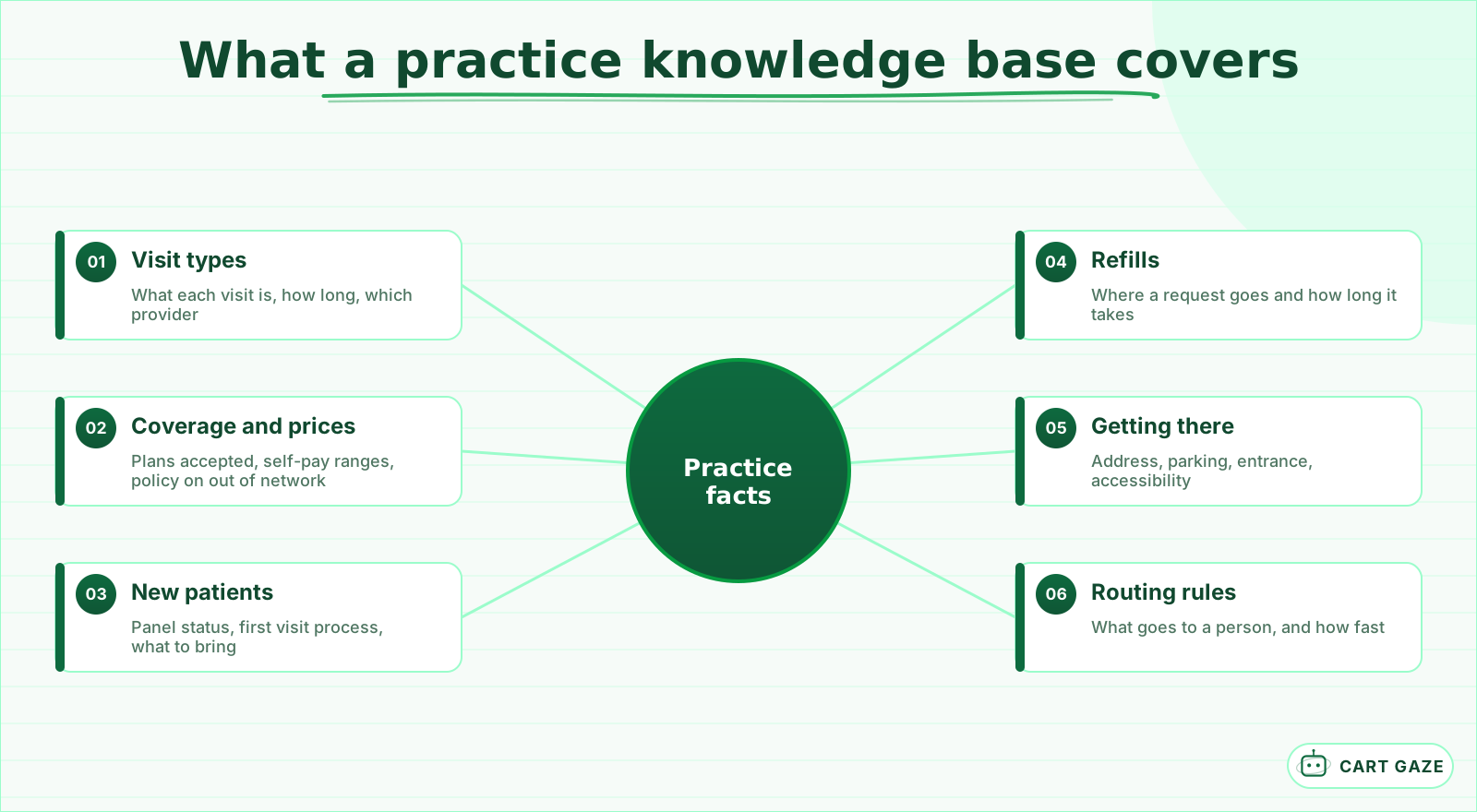 Six areas cover most of what a front desk repeats every day.
In most industries a confidently wrong answer costs a refund. In a practice it can cost a patient who was told you accept a plan you dropped 2 years ago, arrives, and gets an invoice. Or one who was told a provider is accepting new patients when the panel closed in March.
This is also why generic testing misses so much. A demo script asks the questions the vendor built for. Your patients ask the ones they have always asked, in the phrasing they have always used, and the gaps only appear when a real caller wanders off the expected path.
Important
Ask any vendor what the system does when it has no answer. The correct behaviour is to say it does not know and offer a person. A system that cannot be configured to refuse is not ready for a patient line.
Build from the calls you actually get
The fastest way to a useful knowledge base is your own phone log. Pull 50 recent calls, write down what each caller wanted in their own words, and group them. Published breakdowns of patient call reasons cluster around scheduling, insurance and coverage, refills, urgent concerns, and general access questions, and most practices find the same shape.
| Common call reason | What the knowledge base needs | Stored or live |
|---|---|---|
| Booking or rescheduling | Visit types, durations, which provider does what | Live availability |
| Insurance and coverage | Plans accepted, out-of-network policy, self-pay prices | Stored, reviewed often |
| New patient questions | Panel status, first-visit process, what to bring | Stored |
| Prescription refills | Where refill requests go and expected turnaround | Stored |
| Location and access | Address, parking, entrance, accessibility | Stored |
| Symptoms or urgent concerns | Nothing. This routes to a human | Neither |
Notice how much of that table is stored rather than live. That is the reassuring part: most of what a front desk repeats all day is stable information that simply needs writing down once. The live rows are fewer, and they are the ones that need a real connection rather than a good paragraph.
Insurance questions are worth extra attention because they spike after open enrolment in January, and they are the answers most likely to be out of date. A plan list that was accurate in November is a liability in February.
Write entries the way patients ask, not the way you file
The common mistake is uploading documents. A 12-page policy is hard for any system to search usefully mid-conversation, and it produces long, formal answers that sound wrong spoken aloud. The same policy broken into roughly 30 short entries, each answering one question, performs far better.
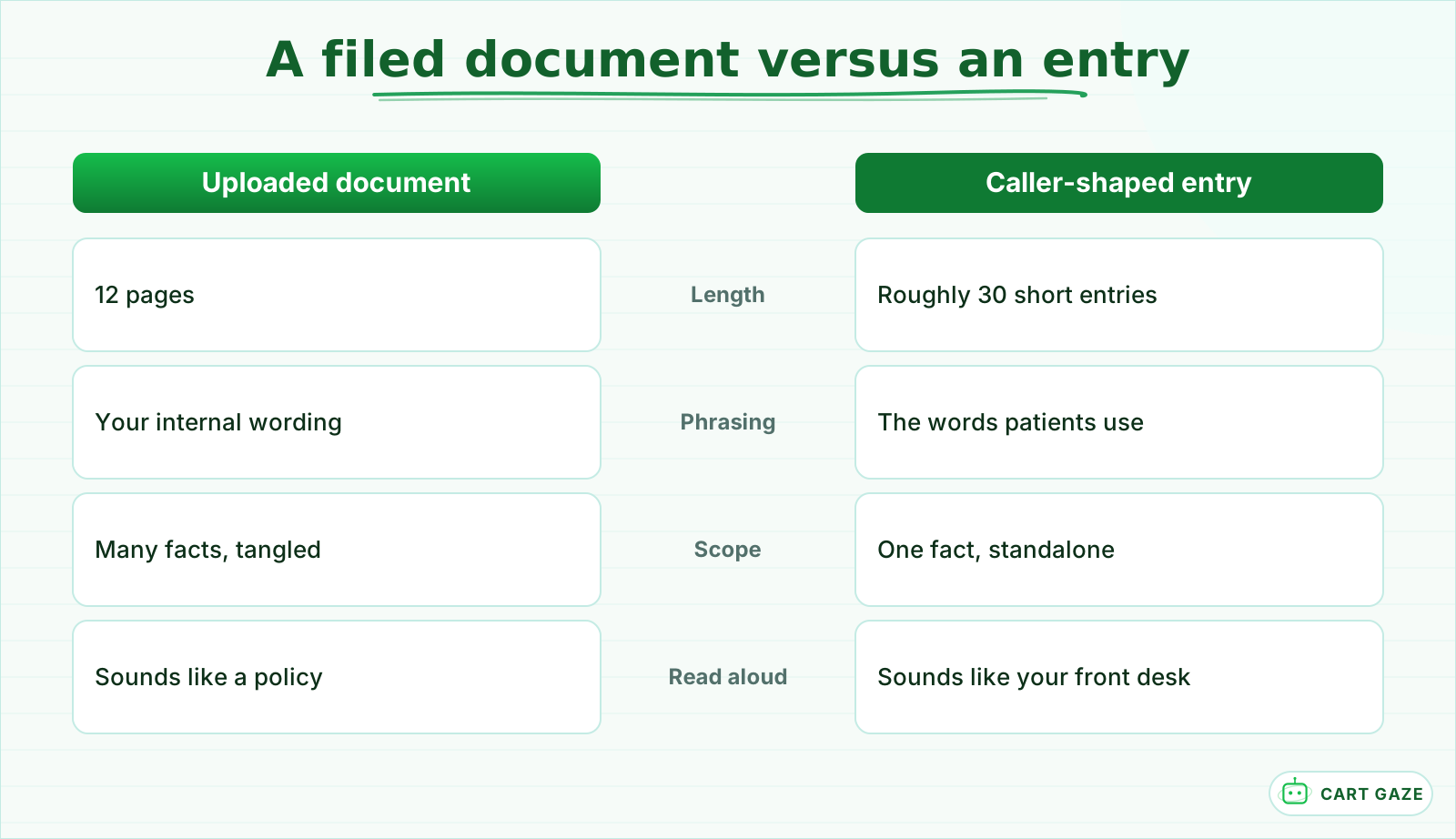 Same information. Only one of them works spoken down a phone line.
Two rules carry most of the benefit. One fact per entry, so nothing depends on the entry before it. And phrase the question the way a patient would actually say it, not the way it appears in your internal documentation. Nobody calls and asks about your financial policy. They ask how much a filling costs without insurance.
It helps to write in the practice's speaking voice rather than its writing voice. "We are open until 7 on Thursdays" is an entry. "Extended hours are offered on Thursday evenings for patient convenience" is a brochure sentence that will sound strange coming down a phone line.
Keep answers short. A useful ceiling is around 40 words, because anything longer stops sounding like a person and starts sounding like a document being read at you. If an answer genuinely needs more than that, it is usually two entries wearing a coat.
Tip
Read every entry out loud before you save it. Anything you would not say to a patient standing at the desk is wrong for the phone, no matter how accurate it is on paper.
What must never be in there
There is a short list that does not belong in a knowledge base on a healthcare line at any level of detail. Clinical guidance is first: nothing that interprets a symptom, suggests what a condition might be, or advises what to do about one. If it is in there, the system will use it.
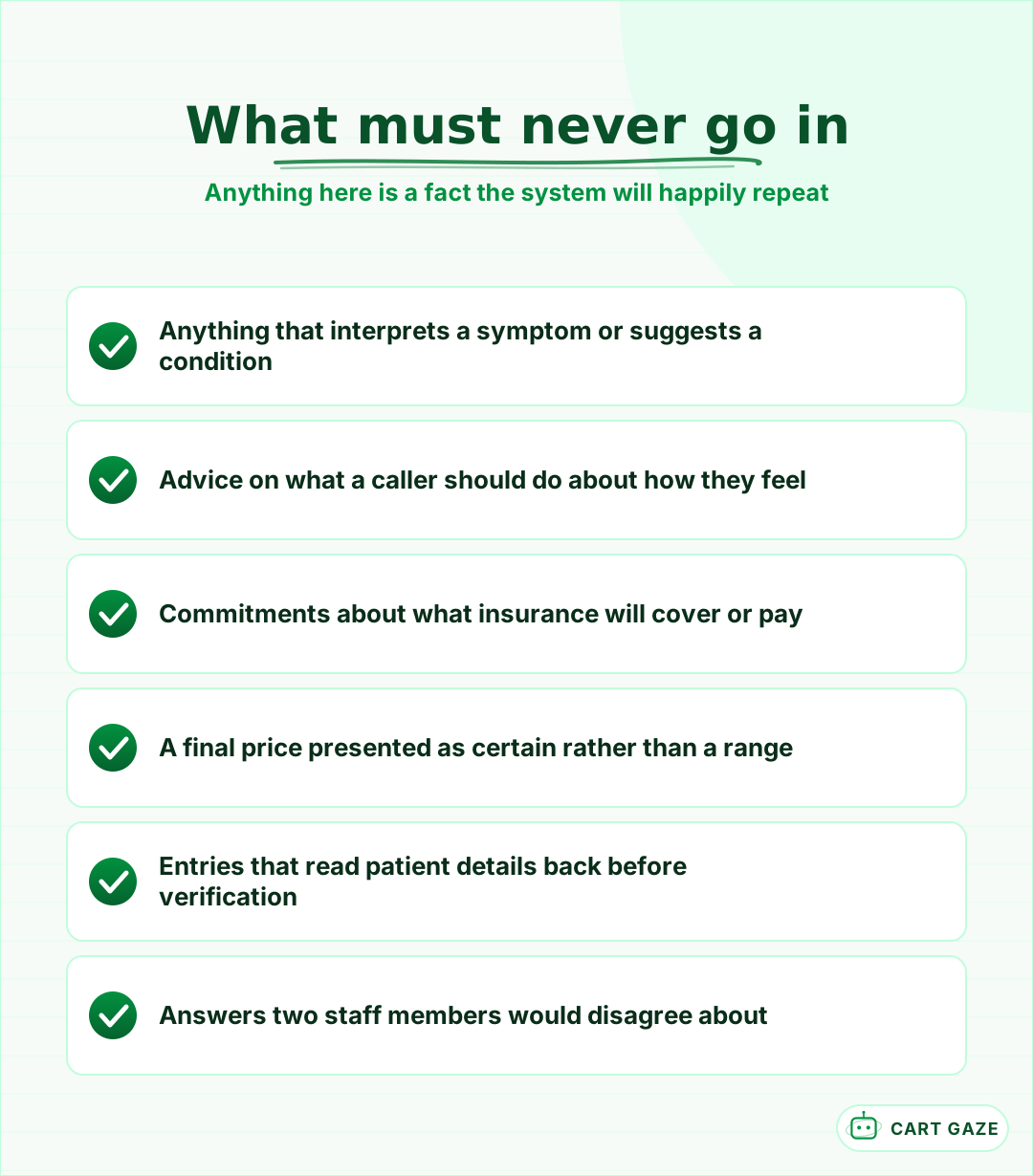 If a fact is in there, the system will use it. That is the whole risk.
Worth being precise here, because practices sometimes over-correct. The rule is not that the system must avoid every clinical word. It can say a visit type exists, how long it takes, and what to bring. What it must not do is connect a caller's described symptom to any of that, because the moment it does, it is triaging.
Promises are second. Anything that commits to what insurance will cover, what a claim will pay, or what a treatment will finally cost is a promise the system cannot keep and the practice will have to honour. Ranges with an explicit caveat are fine. Specific commitments are not.
The third is more subtle. Do not load entries that cause the system to read a patient's own details back to them before the caller has been verified. A cheerful confirmation of an appointment type is a disclosure if the person holding the phone is not the patient. The wider version of that question is covered in what a HIPAA-aware setup requires, and the boundary between what a system should and should not handle is in what an AI receptionist actually does.
Stored facts versus live lookups
Some answers are stable and belong in the knowledge base. Your address, your parking, your refill process, and what a new patient should bring do not change week to week, so they can be written once and left alone. Everything else needs a decision about where the answer really lives.
Other answers change constantly, and storing them is how a system ends up confidently wrong. Appointment availability, whether a provider is in today, an account balance, and whether a specific referral has arrived are all live questions. They need a real lookup into the system that holds the answer, or an honest handoff.
A third category sits between the two: facts that are stable but expensive to be wrong about. Accepted insurance plans are the clearest example. They do not change weekly, so they can be stored, but the cost of a stale entry is a patient billed for a visit they were told was covered. Store those, and put a review date on them rather than treating them as settled.
The distinction is worth making explicitly during setup, because vendors do not always draw it for you. A demo that answers "we have Tuesday at 2" from a stored example looks identical to one doing a real calendar lookup, and only one of them survives contact with your actual schedule. The integration side of that is covered in connecting an AI receptionist to practice management software.
Keeping it true after launch
A knowledge base is not a launch task. It is a small ongoing responsibility, and the practices that do well here named an owner on day one. Left alone for 3 months it drifts: prices rise, a provider leaves, a plan is dropped, and the system keeps answering from the version it was given.
Before you call the knowledge base finished
- One named person owns it, and everyone knows who that is.
- Prices and accepted plans have a review date, not just a last-updated stamp.
- Nothing in it interprets a symptom or promises what insurance will pay.
- A weekly look at unanswered questions feeds the next few entries.
Tie the review to things that already happen rather than to a calendar reminder nobody honours. A fee change, a provider joining or leaving, a plan being added or dropped, and the holiday schedule are all events somebody already announces internally. Adding "update the phone answers" to each of those lists costs nothing and catches most drift.
The best source of new entries is the system itself. Most platforms log the questions callers asked that the system could not answer. Reading that list once a week for the first month will build a better knowledge base than any template, because it is made of your patients' actual words.
A first-week build plan
You can get to a usable knowledge base in about a week without stopping the practice. Day one, pull 50 calls and group what people wanted. Day two, write the 20 entries that cover the top five reasons. Then mark which answers are live rather than stored, write the refusal rules, and test it against the same 50 calls.
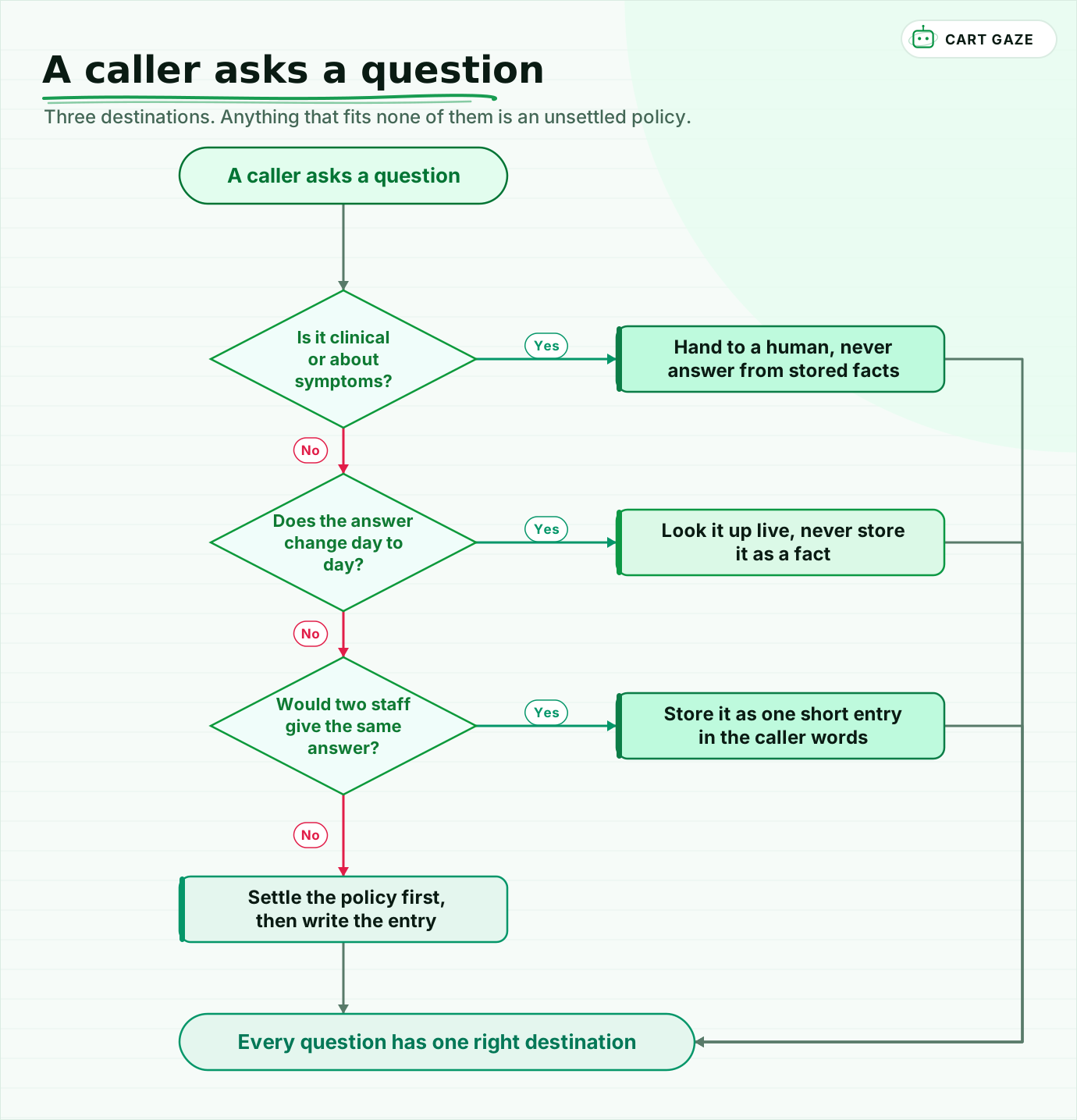 Three destinations. Anything that fits none of them is an unsettled policy.
Walk the routing once. Anything clinical goes to a person and never gets an entry. Anything that changes daily gets a live lookup and never gets stored. Anything where two staff members would answer the same way becomes one short entry in the caller's own words. And anywhere two staff would disagree, you have found a policy question that needs settling before it needs writing.
That last case is the quiet benefit of this exercise. Most practices discover during it that several common questions have no agreed answer, and that different people at the desk have been telling patients different things for years. If you want the size of what the phone is costing you before you build any of it, the free Growth Leak Audit works from your own call numbers.
Fair questions.
What should go in an AI receptionist knowledge base?
The answers your front desk repeats all day: visit types and durations, accepted insurance plans and self-pay prices, new patient process, refill routing, location and parking, and hours. Build the list from 50 recent calls rather than a template, so the entries match how your patients actually phrase questions.
Why does an AI receptionist give wrong answers?
Usually because it has no retrievable answer and fills the gap. Language models do not signal uncertainty naturally in conversation, so a guess arrives sounding exactly like a fact. The fix is coverage plus an explicit instruction to refuse and offer a person when nothing matches the question.
How long should each knowledge base entry be?
Short enough to speak. A useful ceiling is around 40 words per answer, because anything longer stops sounding like a person and starts sounding like a document read aloud. If an answer genuinely needs more, it is usually two separate entries that should be split apart.
Should appointment availability go in the knowledge base?
No. Availability changes constantly, so it needs a live lookup into the system that holds your schedule rather than a stored fact. Storing it is how a system ends up confidently offering a slot that was taken yesterday. The same applies to balances and whether a provider is in today.
Who should own the AI receptionist knowledge base?
One named person, with a review tied to events that already happen: a fee change, a provider joining or leaving, a plan added or dropped, and the holiday schedule. Left alone for a few months it drifts quietly, and the system keeps answering from the version it was originally given.
Sources.
- [1]How to structure a voice AI knowledge base
- [2]Safety, hallucinations and guardrails in voice AI agents
- [3]AI voice agent accuracy: stopping phone bot hallucinations
- [4]Structuring scalable knowledge bases for reliable AI agents
- [5]AI voice agent knowledge base setup
- [6]Top reasons patients call, and how to handle them
- [7]Enhancing patient access through phone system improvements
- [8]Using knowledge retrieval to avoid voice agent hallucinations
Written by

Muhammad Qasim Hammad
Founder, Cart Gaze
Qasim builds AI receptionists and front-office automation for medical and dental practices at Cart Gaze. Posts here start from published sources and real call data, not vendor claims, and every number links back to where it came from.
Keep reading.
 AI ReceptionistsAI Receptionist Maintenance: What Decays and Who Fixes It11 min read
 AI ReceptionistsHow to Choose an AI Receptionist for Your Medical Practice10 min read
 AI ReceptionistsAI Receptionist vs Answering Service: Which Fits Your Practice?11 min read
 AI ReceptionistsCaller Frustration Detection: Escalate Before They Hang Up12 min read
 AI ReceptionistsAI Booking vs Online Scheduling: Why Most Practices Need Both11 min read
 AI ReceptionistsDouble Booking Prevention for AI Scheduling: Hold, Then Confirm11 min read