
AI Receptionist Implementation: A Realistic Week-by-Week Guide
Vendors advertise a 75-minute setup. The realistic plan for a practice is 2 to 4 weeks, phased so your front desk never skips a beat: audit, build, test, go live after hours, then expand on transcript evidence.
Key takeaways.
- Realistic AI receptionist implementation for a small practice runs 2 to 4 weeks, between the 75-minute vendor claim and the 3-month enterprise rollout.
- Your hands-on share is roughly 4 to 8 hours: FAQ answers, an insurance list, scheduling rules, escalation contacts, and a signed BAA before patient data flows.
- Go live after hours first, where about 41% of patient calls already go unanswered, so the pilot cannot disrupt your daytime front desk.
- Test with messy calls before launch: your 10 most common call reasons plus noise, mid-call changes, and at least 1 urgent phrase that must escalate.
- The 3 rollout killers are unread transcripts, no named owner, and skipping the pilot; a 15-minute weekly review in month 1 prevents all 3.
Table of Contents8 sections
- What AI receptionist implementation actually involves
- Week 1: audit your calls and pick the AI's first job
- Week 2: build the knowledge base and scripts
- Week 3: connect the phones and run messy test calls
- Week 4: train your staff and go live after hours
- The weekly review loop that keeps it working
- Expand coverage only when the transcripts say so
- Fair questions
The reason most practices delay an AI receptionist is not the price, it is the fear that setup will disrupt the front desk for months. The marketing makes it worse: one vendor advertises a 75-minute setup, an enterprise case study describes a 3-month rollout, and neither sounds like your practice.
The realistic middle for a small or mid-size practice is 2 to 4 weeks, and almost none of it lands on your staff. Implementation is not a technology project you endure. It is a routing decision you phase: the AI starts on the after-hours calls nobody was answering, and it earns more of the line only when transcripts prove it deserves it.
This guide walks the plan week by week: the call audit, the knowledge base only you can supply, the phone routing and test calls, staff training and go-live, and the weekly review that keeps the whole thing working after launch day.
What AI receptionist implementation actually involves
For a small practice, realistic AI receptionist implementation runs 2 to 4 weeks from signed contract to live calls. Most of that is vendor-side configuration that never touches your front desk. Your hands-on share is measured in hours, roughly 4 to 8 for the core setup, spread across an audit, a knowledge base, test calls, and training.
The published timelines disagree because they measure different things. NextPhone, a vendor, claims a 75-minute minimum setup and a 3-day launch for its own product. Commure claims 7 to 10 days for medical practices. A 2026 buying guide puts practices on major EHR systems such as Athena, Epic, eClinicalWorks, or NextGen at 1 to 3 weeks. Tampa General's rollout with Hyro took 3 months from kickoff to go-live, but that is an enterprise health system, not a 3-operatory clinic.
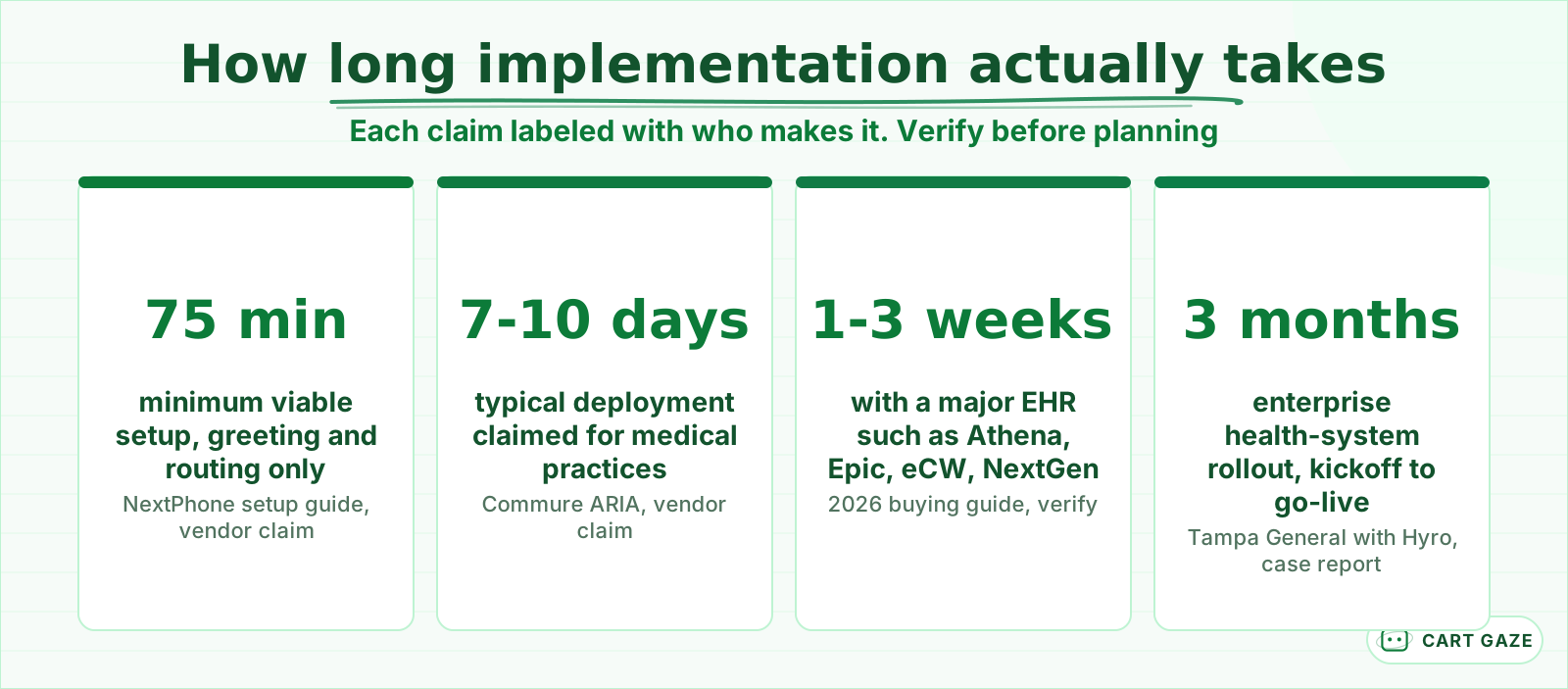 Every number has an author. Vendor claims time software setup, not your practice rollout.
Read those numbers for what they are. The vendor figures describe software configuration, which genuinely is fast. Your implementation also includes the parts no vendor can compress: your call audit, your facts, your test calls, and your staff. That is what the 4-week plan below schedules.
| Week | Focus | What only you can do | Exit test |
|---|---|---|---|
| 1 | Call audit and scope | Tag a week of calls, name an owner | You know your call mix and the AI's first job |
| 2 | Knowledge base and scripts | Supply FAQs, insurance list, rules, BAA | The AI answers your top 15 to 20 questions |
| 3 | Routing, integration, testing | Make messy test calls | Test calls stop producing surprises |
| 4 | Staff training and go-live | Walk the team through scope and escalation | After-hours calls answered, transcripts read |
One clock runs in parallel: if you move your published number to a new system, porting takes 1 to 2 weeks industry-wide. Most practices skip the wait by forwarding calls instead, which works from day 1.
Week 1: audit your calls and pick the AI's first job
Week 1 is measurement, not technology. Pull one week of real call logs, tag every call by reason, and pick one narrow first job for the AI, almost always the after-hours window. Then name a single owner: the person who will read transcripts and request changes. No vendor work blocks your front desk yet.
Export one week of call logs from your phone system and tag each call by reason: book, reschedule, insurance question, refill, directions, clinical concern. The tally usually surprises people. Practices miss roughly 23 to 42% of inbound calls depending on size and measurement method, and about 41% of patient calls arrive outside business hours, per the Relatient Communications Study.
That second number is why the after-hours window is the standard first job. Those calls currently go to voicemail, so an AI answering them disrupts nothing and risks little. Your front desk never competes with it, and a mistake on a 9 p.m. booking call is recoverable in the morning.
The week's other deliverable is a name. One person owns the rollout: reads transcripts, collects staff complaints, requests configuration changes. Deployment postmortems consistently flag unassigned ownership as the reason systems drift. If you are still deciding what belongs in scope at all, what an AI receptionist handles and where it stops is the grounding to read before any of this.
Week 2: build the knowledge base and scripts
Week 2 is the only week with real homework for you. The vendor builds the voice, greeting, and call flows. You supply the facts it speaks: written answers to your top 15 to 20 caller questions, your accepted-insurance list, scheduling rules, provider roster, escalation contacts, and a signed BAA.
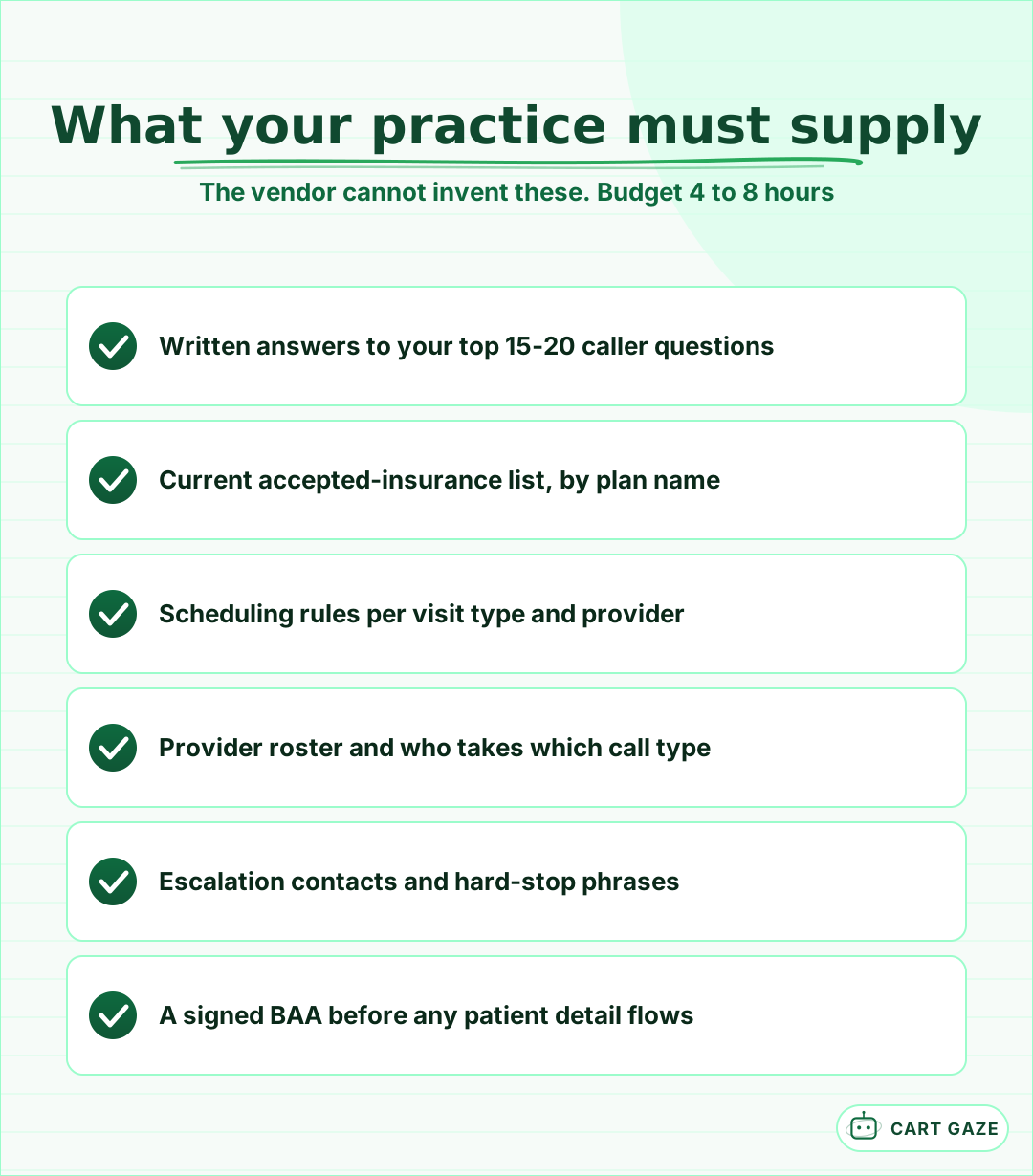 Roughly 4 to 8 hours of homework only you can do. The vendor configures; you supply the facts.
A 2026 comparison guide budgets 4 to 8 hours for this configuration work: scripts, knowledge base, and escalation rules. The FAQ layer matters most. Collect the top 15 to 20 questions your front desk answers every week, in your staff's own words, with the real answers: parking, first-visit paperwork, which cleanings are covered, whether you take walk-ins.
Escalation rules deserve the same specificity. List the hard-stop phrases that must reach a human immediately, such as chest pain, trouble breathing, an infant's symptoms, or a caller in distress, and define exactly where those calls go and how fast. Then put the whole arrangement in writing as a 1-page document your team can see; an internal policy and SOP is what turns vendor settings into practice policy.
Important
Sign the BAA before any patient detail reaches the system, including test calls that use real patient names. And treat "HIPAA certified" as a red flag on any sales page: no such certification exists. Compliance is a configuration plus a signed BAA, never a badge.
Week 3: connect the phones and run messy test calls
Week 3 wires the system to your phones and your schedule, then tries to break it. The routing decision carries the risk: start the AI on a test line, not your published number. Connect the calendar so it books rather than takes messages, and run messy test calls until they stop surprising you.
Routing has 4 switch positions, and your risk model is simply which position you are in. A test line only. After-hours only. Overflow, where the AI picks up when staff cannot, typically after 3 to 4 rings. Full coverage. Week 3 lives entirely in the first position.
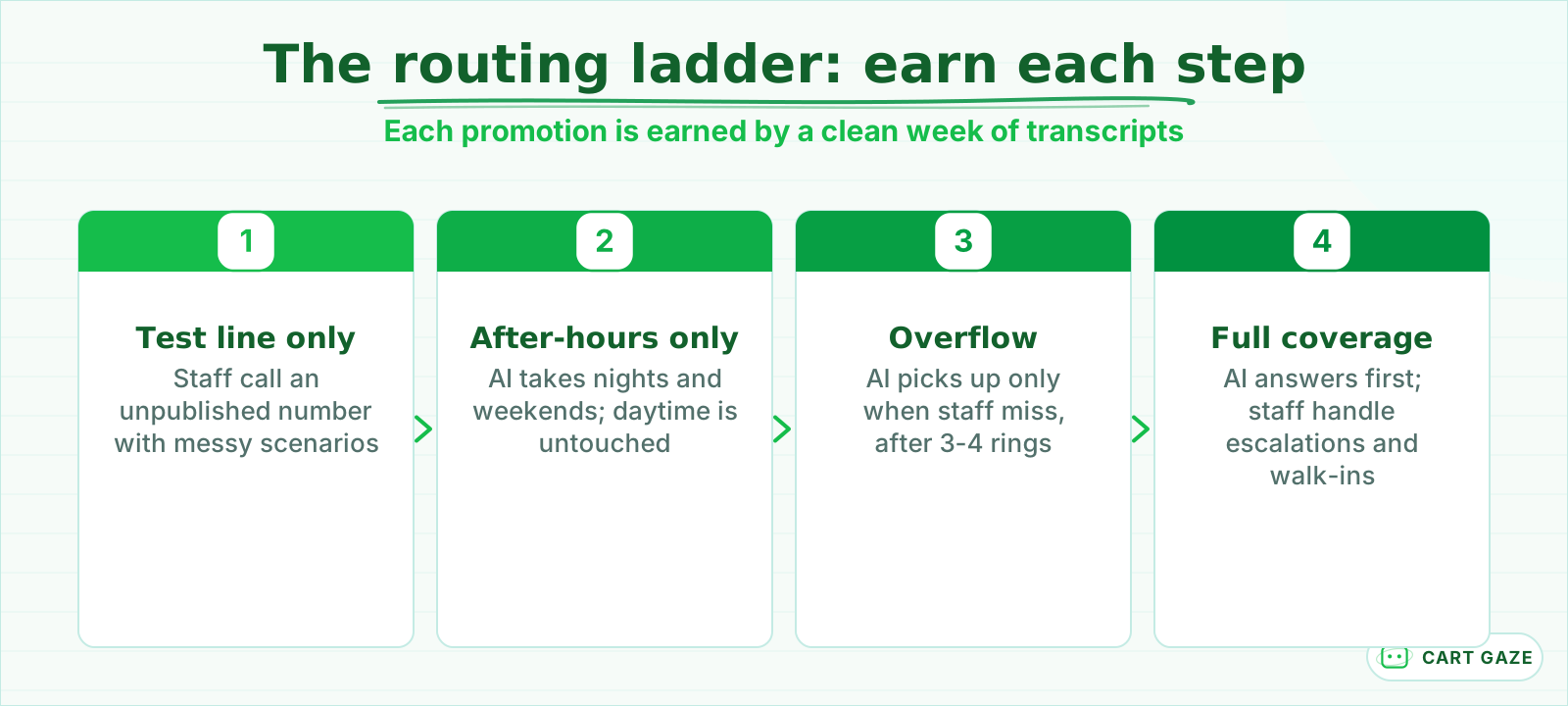 Never flip the whole line. Promote one rung at a time, on evidence from your own transcripts.
Integration is what separates a booking machine from an answering machine. Connected to your calendar or practice management system, the AI books the appointment on the spot; without write-back it only takes a message a human retypes later. Native connectors for the big systems are why the buying-guide timeline sits at 1 to 3 weeks, while niche systems can add another 1 to 2 weeks through webhooks. The details live in how AI receptionists connect to practice management software.
Then break it on purpose. Call the test line with your 10 most common call reasons, then with the calls that are not clean: background noise, a caller who changes their mind mid-sentence, two requests in one call, an insurance plan you dropped last year, and at least 1 urgent phrase that must escalate.
Warning
If an urgent test call fails to reach a human even once, do not go live. Fix the escalation rule and retest. A missed booking costs you a patient; a missed escalation on a real clinical call is a safety event.
Week 4: train your staff and go live after hours
Week 4 is staff training and a deliberately small go-live. Your team learns two things: exactly which calls the AI handles versus escalates, and how to flag an error without filing a ticket. Then you switch on the after-hours window only. Daytime calls ring the front desk exactly as they did before.
Keep the training concrete. Show the team real test-call transcripts, show where summaries and messages land, and draw the boundary line out loud: the AI books, reschedules, and answers policy questions; anything clinical, upset, or ambiguous comes to a human with context attached.
Framing decides adoption. Positioned as a replacement, the system gets quiet resistance. Positioned as the thing that takes the 7 p.m. calls nobody was answering, it gets used. Deployment reviews list unclear scope and poor staff alignment among the most common failure modes, and both are training problems, not technology problems.
Then go live small: after-hours only, exactly as scoped in week 1. Your daytime operation does not change. The owner reads every transcript daily for the first live week, which rarely takes more than a few minutes per night.
Before the first live night
- The BAA is signed and on file before any patient detail reaches the system.
- The escalation path is written down, with a named human and a target response time.
- Test calls covered your 10 most common call reasons, including 1 urgent phrase.
- One named person is scheduled to read the first week of transcripts.
The weekly review loop that keeps it working
Implementation does not end at go-live. The rollouts that fail share 3 habits: nobody reads transcripts, nobody owns the system, and the practice skipped the pilot and flipped the whole line at once. A 15-minute weekly transcript review during the first month prevents all of them, then a monthly check keeps it honest.
The transcript habit is the entire early-warning system. Booking errors, missed escalations, and wrong answers do not announce themselves; they sit in transcripts until someone looks. The same 2026 guide that budgets setup hours also budgets a weekly transcript review for the first month, and deployment guides recommend monthly governance checks after that.
Keep the review to 15 minutes and 4 questions. Did every booking land correctly in the schedule? Did anything that should have escalated slip through? Which questions stumped the AI? Where did callers hang up? The stumped questions are the most valuable output, because each one becomes a knowledge-base entry.
Track 2 launch metrics and ignore the rest: missed calls recovered and booking accuracy. Raw call counts flatter the system without telling you whether it is doing the job you hired it for.
Tip
Add every question the AI could not answer to the knowledge base the same week it appears. The system improves exactly as fast as the knowledge base does, and a 5-minute edit beats a wrong answer that repeats every night.
Expand coverage only when the transcripts say so
Expansion is a promotion the system earns, not a date on a calendar. Move one rung at a time, from after-hours to overflow to full coverage, and let a clean week of transcripts justify each step. If the evidence is not there, stay where you are and fix what the transcripts show.
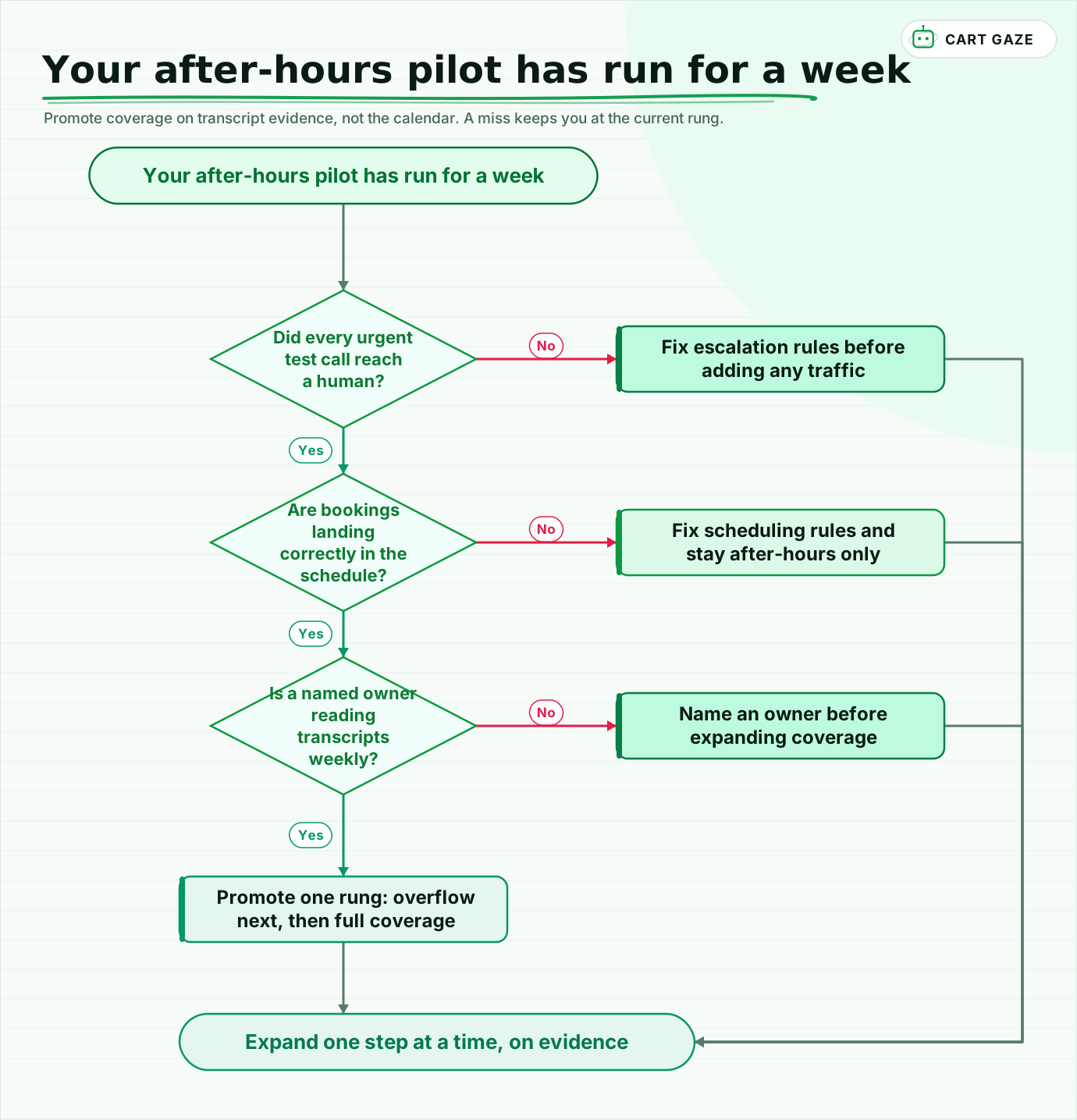 Promote coverage on transcript evidence, not the calendar. A miss keeps you at the current rung.
Walk the flow after each pilot week. Urgent calls reached a human every time, bookings landed correctly in the schedule, and a named owner is reading transcripts weekly: promote one rung, after-hours to overflow, then overflow to full coverage. Any miss means you hold the current rung and repair that specific failure before adding traffic.
Structure the same discipline into the contract. A 30-day pilot with 1 clear success criterion, the arrangement recommended in the 2026 buying guide, keeps both sides honest and gives you a clean exit if the transcripts disappoint.
If you want the baseline before you start, the free Growth Leak Audit sizes your missed-call and after-hours slice from your own numbers, so week 1's audit begins with the leak already measured.
Fair questions.
How long does AI receptionist implementation take for a medical practice?
Plan on 2 to 4 weeks from signed contract to live calls. Vendors advertise faster, one claims a 75-minute minimum setup, and practices on major EHR systems typically land at 1 to 3 weeks. Enterprise health systems can take 3 months, but that scale has little in common with a small practice rollout.
What does my practice need to provide during setup?
The facts only you have: written answers to your top 15 to 20 caller questions, your accepted-insurance list by plan name, scheduling rules per visit type and provider, a staff roster showing who takes which calls, escalation contacts with hard-stop phrases, and a signed BAA. Budget roughly 4 to 8 hours for this homework in week 2.
Do we need a BAA before testing an AI receptionist?
Yes, if any test uses real patient information. A vendor handling patient details is a business associate under HIPAA and must sign a Business Associate Agreement before those details reach its system. Test with fictional patients until the BAA is signed, and treat any product marketed as "HIPAA certified" with suspicion, because that certification does not exist.
Will an AI receptionist rollout disrupt my front desk?
Not if you phase it. The standard rollout starts after hours, where calls were already going to voicemail, so daytime operations do not change on day 1. The AI is promoted to overflow and then full coverage only after clean weeks of transcripts. Your staff involvement is a few hours of training plus flagging errors they spot.
What should we monitor after the AI receptionist goes live?
Read transcripts weekly for the first month, then monthly. In a 15-minute review, check 4 things: bookings landed correctly, nothing that should have escalated was missed, questions that stumped the AI, and where callers hung up. Track missed calls recovered and booking accuracy as your 2 launch metrics, and feed every stumped question back into the knowledge base.
Sources.
- [1]AI receptionist setup time: what each phase involves (NextPhone)
- [2]Best virtual medical receptionist platforms for 2026 (Commure)
- [3]Best AI receptionist for medical practices 2026: an honest buying guide
- [4]AI receptionist comparison: setup hours and transcript review (XAssure)
- [5]How to train your AI receptionist with a knowledge base (OnceHub)
- [6]Medical practice phone statistics (Relatient after-hours share)
- [7]Missed call statistics: how many inbound calls practices miss
- [8]Common mistakes clinics make deploying AI receptionists
- [9]AI receptionist implementation checklist (VoiceFleet)
Written by

Muhammad Qasim Hammad
Founder, Cart Gaze
Qasim builds AI receptionists and front-office automation for medical and dental practices at Cart Gaze. Posts here start from published sources and real call data, not vendor claims, and every number links back to where it came from.
Keep reading.
 Practice Automation PlaybooksProvider Schedule Template Optimization Before You Automate11 min read
 Practice Automation PlaybooksFront Desk AI Training: The Conversation Practices Skip10 min read
 Practice Automation PlaybooksHuman in the Loop AI Approvals: What to Gate and What to Let Run11 min read
 Practice Automation PlaybooksAI Agent Orchestration Rules That Stop Automations Colliding12 min read
 Practice Automation PlaybooksThe Practice Daily Digest That Owners Actually Read10 min read
 Practice Automation PlaybooksWhat to Automate First: A 90-Day Practice Sequencing Plan10 min read