
The Front Office Automation Stack for Medical Practices
Front-office work is scattered across calls, intake, scheduling, and follow-up. Here is the whole front office automation stack, mapped and priced in one place.
Key takeaways.
- Front-office work splits into 6 connected jobs, speed-to-lead response, call handling, intake and insurance verification, scheduling and reminders, check-in, and follow-up, and treating them as one
- About 45% of front-desk phone time goes to insurance eligibility and prior authorization alone, according to a March 2026 MGMA Stat poll, more than the 31% spent on scheduling calls.
- Roughly 41% of patient calls arrive outside business hours and about 23% of calls go unanswered overall, so call handling is usually the single biggest leak to measure first.
- No-shows and late cancellations run 15% to 20% at many practices and can cost a medical group roughly 14% of a day's revenue, according to MGMA data from December 2025.
- The fastest way to choose a starting layer is to measure your own call volume, no-show rate, and intake method, not to buy whichever tool has the best demo.
Table of Contents9 sections
- Why front-office automation means 6 connected jobs, not one tool
- The front-office automation stack, layer by layer
- Where an AI receptionist fits, and where it has to stop
- Killing the clipboard: intake and insurance verification
- Scheduling, reminders, and the no-show math
- Manual front desk vs. an automated stack, side by side
- The real cost of a disconnected front office, in numbers
- Where to start: map your stack before you buy anything
- Fair questions
Front-office work at a medical or dental practice is scattered across at least 6 disconnected manual tasks, and most practices only ever fix one of them at a time. Staff spend about 45% of their phone time on insurance eligibility and prior authorization alone, according to a March 2026 MGMA Stat poll, and that is before scheduling calls, intake paperwork, reminders, check-in, and follow-up ever come up. Buy a single point tool for one of those jobs and the other 5 keep leaking.
This post maps the whole front-office automation stack in one place: what each layer does, what it replaces, roughly what it costs, and how the pieces connect. There is no single-vendor pitch here and no invented case study. The goal is a clear picture of the stack so you can decide which layer to automate first using your own numbers, not a demo.
Start with the shape of the whole stack, then use the numbers in each section to see where your own practice is leaking the most.
Why front-office automation means 6 connected jobs, not one tool
A medical practice's front office is not one workflow, it is 6: speed-to-lead response, call handling, intake and insurance verification, scheduling and reminders, visit-day check-in, and post-visit follow-up. Each job has its own volume, its own risk, and its own fix. Automating one and ignoring the rest still leaves 5 leaks open.
Search "front office automation" and most page-one results sell exactly one of those 6 jobs: an AI receptionist, a reminder app, or an intake form builder. Each is honest about its own slice and quiet about the other 5. A practice that buys the best-reviewed call-handling tool still has paper intake forms, a spreadsheet for recall, and a front desk that manually checks eligibility by phone.
AI-receptionist vendors sell the phone. Intake vendors sell the paperwork. Reminder platforms sell the no-show fix. Practice-management suites bundle a few of these pieces but market the bundle, not the map. None of them has a strong reason to draw you the whole picture, because the whole picture is not what any one of them sells.
The fix is not a bigger single tool. It is knowing which of the 6 layers is leaking the most for your practice specifically, then sequencing fixes in that order. The rest of this post is the map.
The front-office automation stack, layer by layer
The front-office stack runs in a rough order: speed-to-lead response, AI receptionist call handling, intake and insurance verification, scheduling and reminders, visit-day check-in, and post-visit follow-up. Each layer can run as a separate tool or a bundled feature. What matters is that every layer gets covered by something, manual or automated, not that one vendor covers all 6.
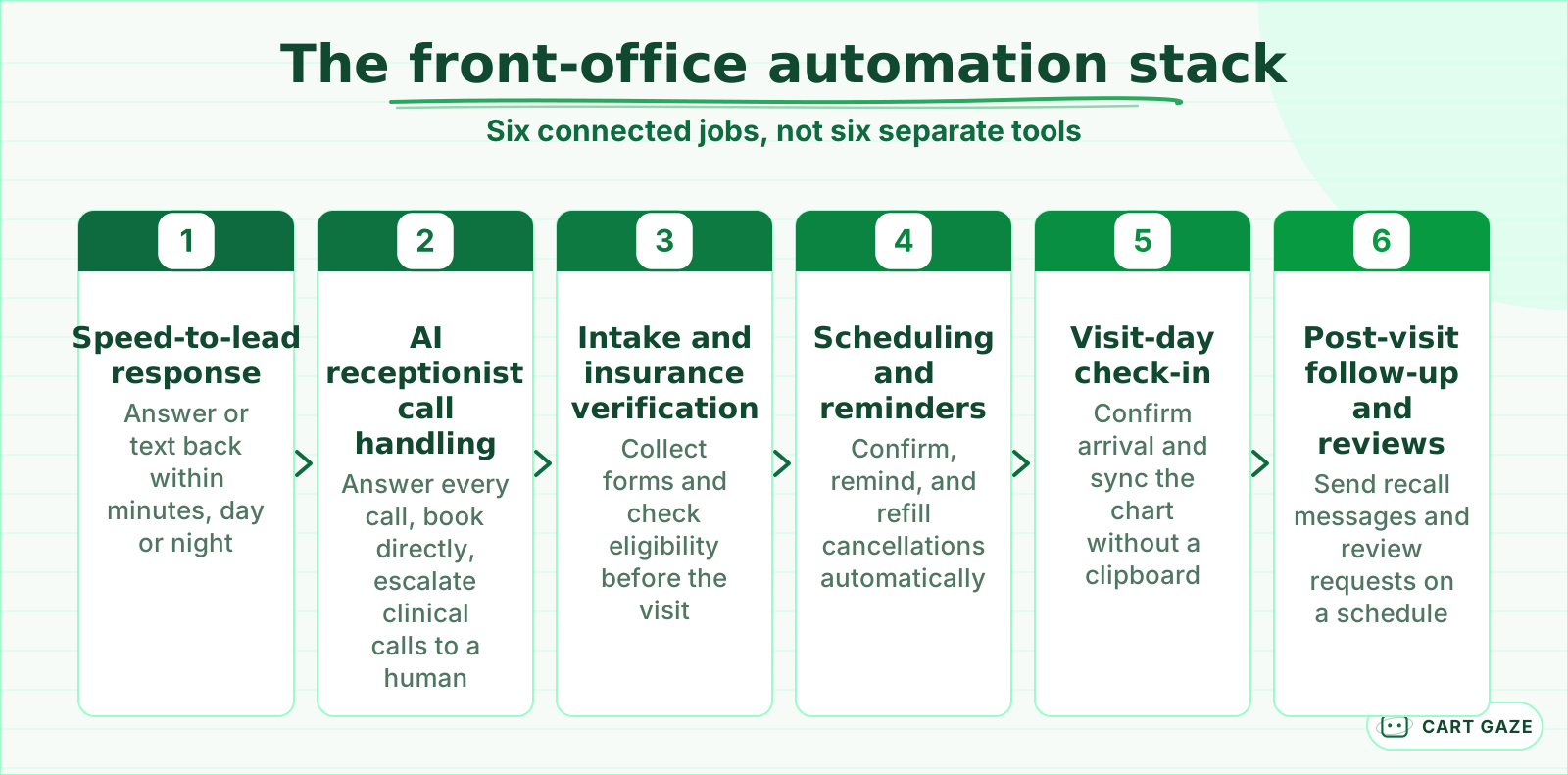 Six connected jobs, not one tool. Cover every layer before judging any single piece.
6 layers is a lot to hold in your head at once, so here is where each one typically shows up as a measurable leak before you fix it. None of these numbers assumes a specific vendor or a specific practice; they are published ranges pulled from the categories below.
| Front-office layer | What breaks today | Typical scale of the leak |
|---|---|---|
| Speed-to-lead / call handling | Calls sent to voicemail or hold music | 23% of calls go unanswered; 41% arrive after hours |
| Intake paperwork | Paper forms at check-in | 15 to 25 minutes per new patient |
| Insurance verification | Manual payer calls and portals | 5 to 15 minutes per patient |
| Scheduling and reminders | No-shows and late cancellations | 15% to 20% no-show rate at many practices |
| Front-desk staffing | Turnover and overtime | 29% of practices report turnover rose this year |
None of these leaks is fatal by itself. Stacked across a month, they add up to the single biggest line item most practices never measure directly: front-office labor and lost bookings.
Some vendors bundle 2 or 3 of these layers into one subscription; most cover exactly one. Either way, the question is the same for every layer: does it have real coverage right now, even if that coverage is still a person doing it by hand.
Where an AI receptionist fits, and where it has to stop
An AI receptionist answers calls, texts, and sometimes portal messages around the clock, books directly into your calendar, and answers routine questions like hours and pricing. It should never assess symptoms, give medical advice, or decide how urgent a call is. The safe rule is recognition and redirection: flag anything clinical and hand it to a human immediately.
If you have never evaluated one of these systems, start with what an AI receptionist does and where it stops before you shop, so you can tell a real boundary from a sales line.
Warning
An AI receptionist should never be the only thing standing between a symptomatic caller and a human. Chest pain, a feverish infant, or a caller in distress needs to reach a licensed person immediately, every time, with no exceptions written into the configuration.
The safest configurations page an on-call provider with a structured handoff, name, date of birth, callback number, and reason, rather than trying to resolve the call themselves. That handoff is what turns an answered call into a safely answered call.
Pricing follows the same split as the rest of the stack. Flat-rate AI receptionists commonly run in the low hundreds of dollars a month, well under the cost of a part-time hire, though a signed Business Associate Agreement and bilingual handling usually add to the base price. The full breakdown, including what drives the number up or down, is in what an AI receptionist costs.
Killing the clipboard: intake and insurance verification
New-patient paperwork commonly takes 15 to 25 minutes on paper, and manual insurance verification adds another 5 to 15 minutes per patient on hold with a payer or clicking through a portal. Digital intake forms collect the same information before the visit and can check eligibility automatically, so the front desk confirms instead of re-typing.
The paperwork and the insurance check are really the same problem twice: information a practice needs before the visit, collected twice by hand instead of once electronically. Automating new-patient intake paperwork walks through the forms side specifically, including which fields still need a human to review.
Tip
Verify insurance before the visit, not at the check-in desk. A denied claim discovered after the appointment is a much harder conversation than a coverage question resolved by phone or text 2 days earlier.
Most of that 5 to 15 minutes is not the check itself. It is waiting on hold with a payer, or clicking through a portal, then re-typing what comes back into the chart by hand. Automating that lookup does not remove the need for a human to review an unusual result, it just removes the wait.
Scheduling, reminders, and the no-show math
No-shows and late cancellations run 15% to 20% at many US medical and dental practices, and MGMA data from December 2025 puts the daily revenue impact of missed and canceled visits at roughly 14% for a typical medical group. Automated reminders and a simple waitlist that fills cancellations address most of that gap without adding staff.
Reminder timing matters more than reminder existence. A single reminder 24 hours out catches some patients; a multi-touch sequence, a few days out and then a same-day nudge, recaptures more of the slice that simply forgot. Text performs at least as well as a phone call for this job and costs a fraction as much per message.
A single no-show or unfilled slot is commonly estimated at around $200 in lost revenue, a widely cited industry figure. Modeled example: at a 20% no-show rate on 100 scheduled visits a week, that is 20 empty slots and roughly $4,000 in lost revenue a week, before counting the provider's idle time. Swap in your own volume and rate before you repeat that number to anyone.
Manual front desk vs. an automated stack, side by side
A manual front desk and an automated front-office stack differ most on response time and coverage, not on whether the work gets done eventually. Manual response runs minutes to hours during business hours only; an automated stack answers in seconds, 24 hours a day. That gap is where most of the missed calls and lost bookings happen.
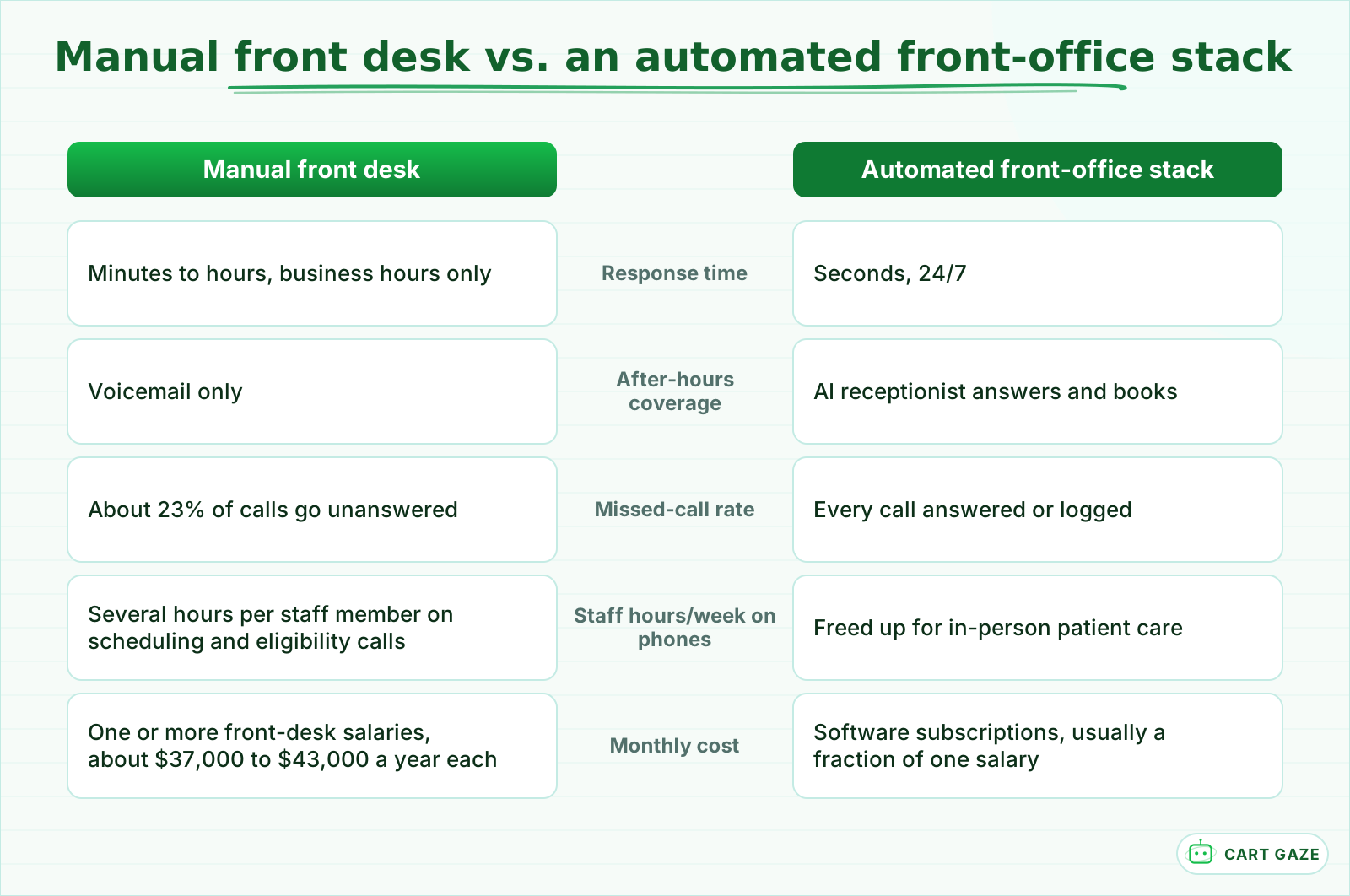 The gap is speed and coverage, not whether the work eventually gets done.
The same routine-versus-urgent split that governs phone calls applies to text and portal messages too. Triaging patient portal messages with AI covers the same logic for the messages piling up in your inbox: most are routine, a few need a clinician now, and the system has to tell them apart correctly every time.
Important
None of this is an argument for replacing your front-desk staff. It is an argument for giving them fewer repetitive calls and more of the conversations that actually need a person, like a nervous new patient or a complex billing question.
A single front-desk salary alone runs roughly $37,000 to $43,000 a year before benefits, turnover, and training are added in. Most software layers in this stack cost a small fraction of that per month, which is one reason the math often favors automating the repetitive slice of the job over adding another hire to cover it.
The real cost of a disconnected front office, in numbers
Four numbers show the size of the front-office gap without any vendor spin. Front-desk phone time skews toward insurance work, after-hours calls are a large share of total volume, no-shows eat into daily revenue, and new-patient paperwork still takes longer than most visits themselves. None of these numbers is a Cart Gaze result; they are published, sourced ranges.
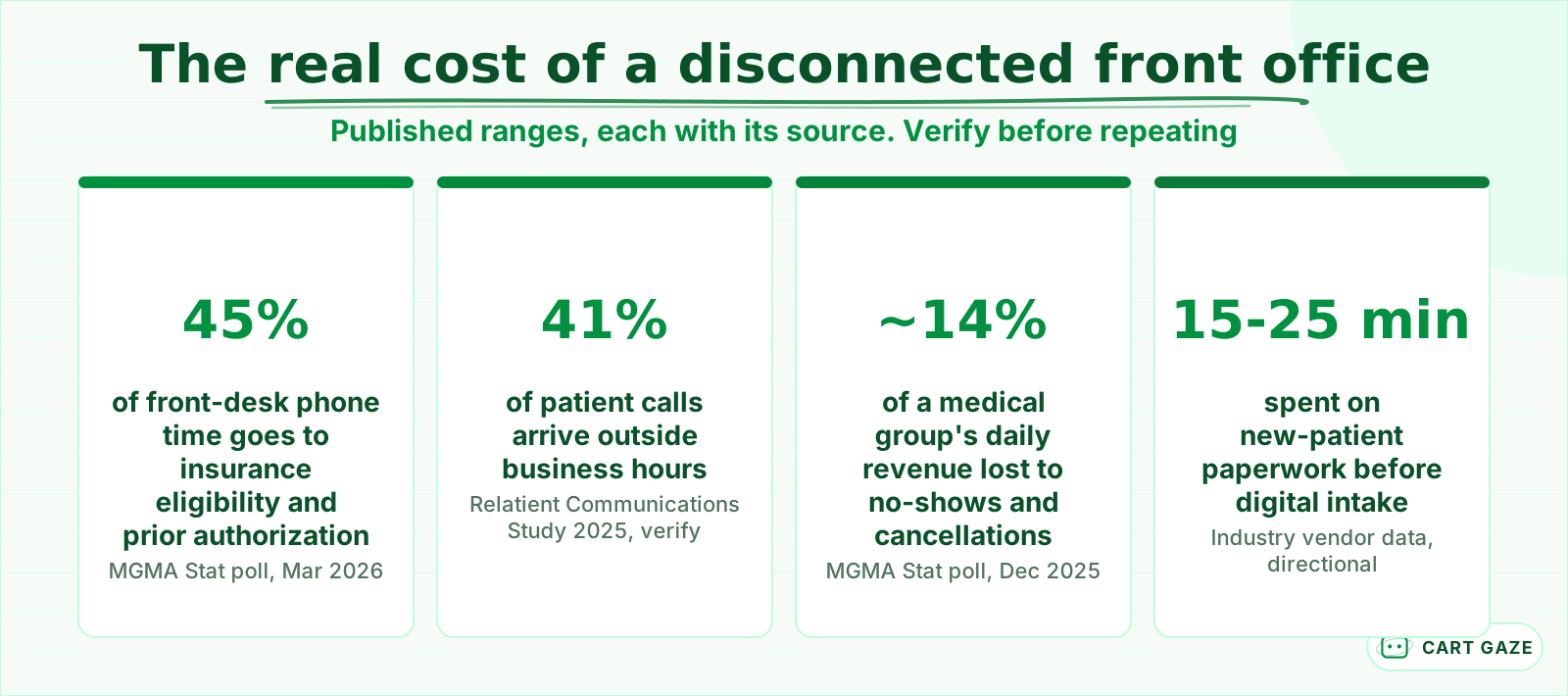 Published, sourced ranges. Reasons to measure your own practice, not your result.
Treat every number here as a reason to measure your own practice, not as a promise of what automation will recover for you. A single-provider practice and a 10-provider group will see very different absolute dollars from the same percentages.
None of these numbers guarantees a specific outcome for your practice. What they show is that the leak is spread across the stack, not concentrated in one layer, which is exactly why a single point tool rarely closes the whole gap on its own.
Where to start: map your stack before you buy anything
Pick the layer with the biggest measurable leak in your own numbers, not the one with the flashiest demo. High after-hours or overflow call volume points to an AI receptionist first. A high no-show rate points to scheduling and reminder automation. Paper or fax-based intake points to intake automation. Everyone else is ready to sequence the rest.
Automate one layer, measure it for a real stretch of time, then move to the next. Trying to swap all 6 layers at once is how a practice ends up debugging 6 new tools at the same time instead of closing one leak at a time.
Before you automate any front-office layer
- Confirm the vendor signs a Business Associate Agreement if patient health details are involved.
- Write down the escalation path: who a clinical or urgent call reaches, and how fast.
- Test the tool against your 10 most common real calls or messages, not a scripted demo.
- Read the first week of transcripts end to end before expanding to a second layer.
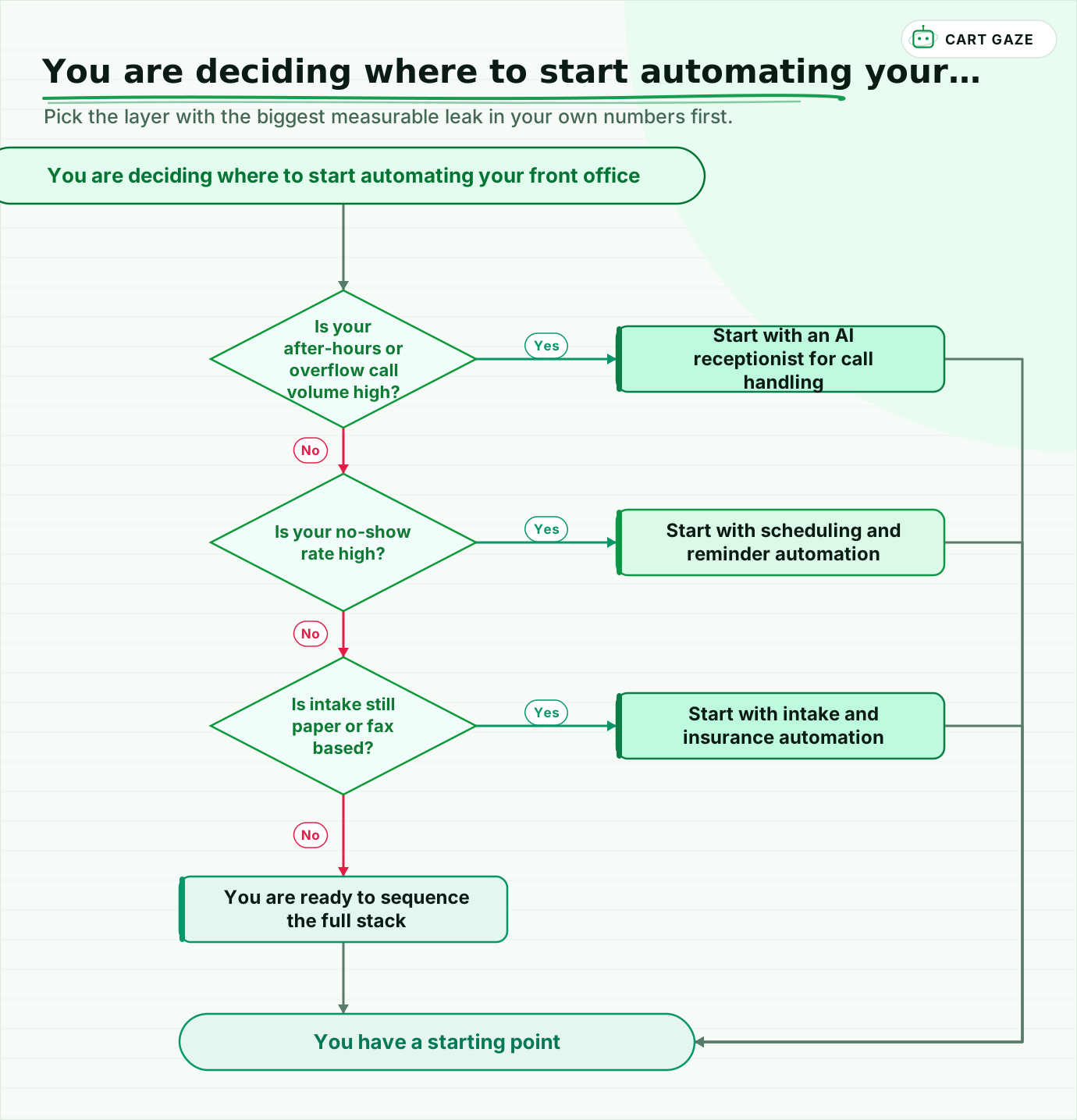 Pick the layer with the biggest measurable leak in your own numbers first.
This post is the map. If you want the sequencing, not just the map, a 90-day roadmap for what to automate first walks through the order in more detail. If you would rather have your own leaks sized before you commit to either, the free Growth Leak Audit does that from your own numbers.
Fair questions.
What is a front-office automation stack?
A front-office automation stack is the set of tools that cover a practice's administrative work end to end: speed-to-lead response, AI call handling, patient intake and insurance verification, scheduling and reminders, visit-day check-in, and post-visit follow-up. Most practices automate one layer at a time, which is why a single point tool rarely fixes the whole problem on its own.
Where should a practice start automating its front office?
Start with your biggest measurable leak. If after-hours or overflow calls are high, start with an AI receptionist. If your no-show rate is high, start with scheduling and reminder automation. If intake is still paper or fax based, start with intake and insurance automation. Measure your own call volume and no-show rate before choosing.
Can one AI receptionist replace the entire front desk?
No. An AI receptionist can answer calls, book appointments, and handle routine questions 24/7, but it should route clinical or urgent calls to a licensed human and never diagnose. Intake, insurance verification, and reminders are usually separate tools or features, so most practices layer several pieces rather than replacing the front desk with one system.
How much does front-office automation cost compared to hiring more staff?
A single front-desk role costs roughly $37,000 to $43,000 a year in salary alone, before benefits and turnover. Software layers such as an AI receptionist or a reminder system typically run in the low hundreds of dollars a month each, so a full stack often costs less than one additional hire while covering more hours of the day.
Is a front-office automation stack HIPAA compliant?
HIPAA compliance is a configuration and contract matter, not a certification, so "HIPAA certified" is not a real credential. Any vendor in the stack that touches patient health information needs a signed Business Associate Agreement. Confirm what each tool stores, reads back, and deletes before connecting it to a patient-facing phone line or message channel.
Sources.
- [1]Phones are still a bottleneck costing medical practices time (MGMA Stat, Mar 2026)
- [2]Patient access priorities for 2026: wait times, phones, no-shows (MGMA Stat, Dec 2025)
- [3]Can staff turnover continue to be tamed in medical practices into 2026 (MGMA Stat, May 2025)
- [4]Medical practice phone statistics: 15 numbers every healthcare provider should know
- [5]How to reduce patient no-shows: 15 proven strategies for 2026
- [6]What is patient intake? 2026 guide
- [7]Healthcare patient intake automation: cutting check-in time
- [8]Automated insurance verification: how it works in 2026
- [9]Medical front office receptionist salary data
- [10]Best medical answering services and AI receptionist pricing
- [11]AI receptionist cost breakdown
- [12]The math on what it costs for every missed patient call
- [13]Healthcare call tracking metrics and revenue drivers
Written by

Muhammad Qasim Hammad
Founder, Cart Gaze
Qasim builds AI receptionists and front-office automation for medical and dental practices at Cart Gaze. Posts here start from published sources and real call data, not vendor claims, and every number links back to where it came from.
Keep reading.
 Practice Automation PlaybooksWhat to Automate First: A 90-Day Practice Sequencing Plan10 min read
 Practice Automation PlaybooksProvider Schedule Template Optimization Before You Automate11 min read
 Practice Automation PlaybooksHuman in the Loop AI Approvals: What to Gate and What to Let Run11 min read
 Practice Automation PlaybooksAI Agent Orchestration Rules That Stop Automations Colliding12 min read
 Practice Automation PlaybooksFront Desk AI Training: The Conversation Practices Skip10 min read
 Practice Automation PlaybooksPractice Phone System Migration: Move Lines Without Losing Calls10 min read