
What to Automate First: A 90-Day Practice Sequencing Plan
A limited automation budget cannot buy every tool at once. Here is a 90-day framework for picking your first category and proving it before you add the next.
Key takeaways.
- A typical business has 40 to 50 processes it could automate, but only 5 to 6 actually deserve to go first, so sequencing beats buying everything at once.
- A 90-day plan works in three phases: pick and deploy one category in days 1 to 30, measure it against a baseline in days 31 to 60, then expand or hold in days 61 to 90.
- Front-desk and phone automation typically pays back fastest, often under 30 days, while billing and revenue-cycle automation typically takes 6 months or more.
- 71% of healthcare respondents call change management difficult or very difficult for their latest workforce technology rollout, and 39% blame staff resistance more than the software itself.
- An AI scribe commonly costs $99 to $299 a month per provider versus $3,000 to $6,000 for a human scribe, but a large real-world study found inconsistent use, so adoption matters as much as price.
Table of Contents7 sections
- Why buying every automation tool at once backfires
- The 90-day framework for sequencing your first automation
- Compare the 4 automation categories before you choose
- Which automation type typically pays back fastest
- The real bottleneck is change management, not the software
- Find your 30-day automation target and start there
- Fair questions
You have decided to automate part of your front office, and four different vendors are each telling you to start with them. The AI-receptionist company wants your phone line. The scheduling platform wants your reminders. The billing vendor wants your claims. The scribe company wants your documentation. None of them has a reason to tell you they are not the right first purchase.
A typical business has 40 to 50 processes it could automate, and only 5 to 6 of those actually deserve to go first. Pick the wrong one on a limited budget and the real bottleneck, the one costing you patients, staff hours, or revenue, stays untouched while a half-adopted tool sits in the corner.
This post is a concrete 90-day sequencing plan: how to pick your first automation category from your own numbers, what each category typically costs and pays back, and a short flowchart that turns your practice's biggest complaint into a specific 30-day target instead of a wish list.
Why buying every automation tool at once backfires
Rolling out several new systems at once multiplies the number of workflows your staff must learn and trust in the same month. Health systems that report strong automation returns tend to follow one pattern: pick one high-frequency, low-stakes workflow, prove it works, then widen scope. Skipping that order is the most common way a limited budget gets spent twice.
Search "what to automate first" and most results are a single vendor explaining why their own category deserves your first dollar. That is not dishonest, it is just incomplete. The real question is not which automation is best in general. It is which bottleneck is costing your specific practice the most right now, and that answer is different for a single-provider dental office than for a 10-provider multi-specialty group.
Important
The fastest payback on paper is not automatically the right first move. A category that pays back in 30 days is still the wrong choice if it is not your practice's actual top complaint.
A polished demo call or a clean sample claim tells you the tool works in general. It does not tell you whether your practice's actual call volume, no-show pattern, claims mix, or documentation load makes that category the biggest leak you have. Only your own numbers answer that.
The front-office automation stack maps all 6 connected front-office jobs in one place, from call handling to follow-up. This post is not that map. It is the order to fix those jobs in when your budget or your team's attention can only handle one at a time.
The 90-day framework for sequencing your first automation
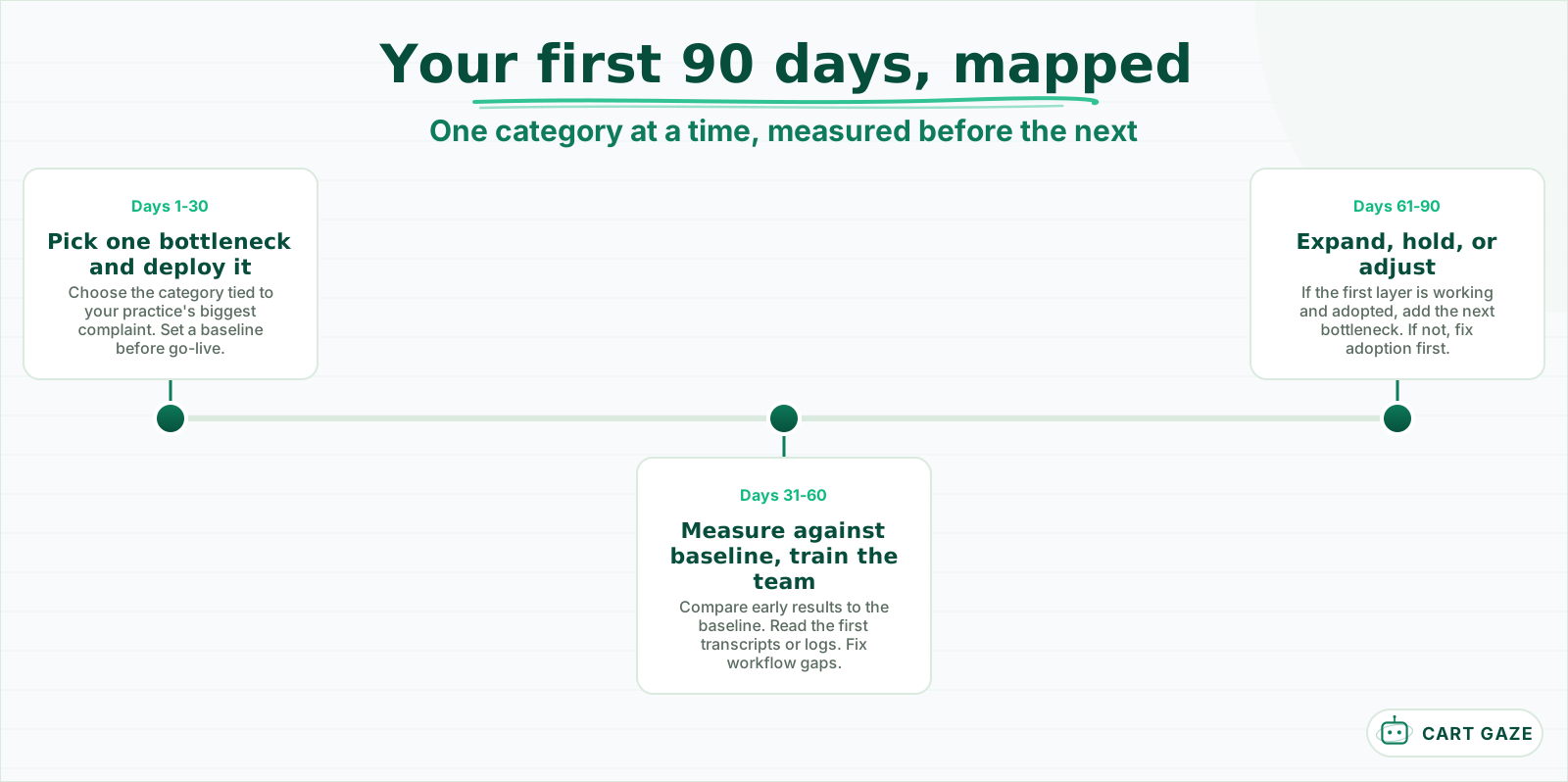
A 90-day window is long enough to measure a real result and short enough to stay honest about what one layer actually changed. Days 1 to 30 pick and deploy a single automation category. Days 31 to 60 measure it against a baseline. Days 61 to 90 decide whether to expand or hold.
 One layer at a time, measured before the next one goes in.
Days 1 to 30 are for choosing, not shopping around forever. Pick the single category tied to your practice's loudest complaint, whether that is calls going unanswered, a no-show rate that will not budge, staff drowning in claims, or charting that eats every evening. Set up the tool, and just as important, write down where you stand today before anything changes.
Tip
Write down your baseline number, missed calls a week, no-show rate, hours on claims, or minutes charting per visit, before you flip anything on. Day 90 without a baseline is just a guess dressed up as a result.
Days 31 to 60 are for measuring, not assuming. Compare the new numbers to the baseline you wrote down, read the first week of call transcripts or claim logs end to end, and fix the workflow gaps that show up before you touch a second tool. Days 61 to 90 are the decision point: if the first layer is working and your staff has actually adopted it, add the next bottleneck on your list. If adoption is shaky, spend this window fixing that instead of buying anything new.
Expanding does not mean buying the next tool the moment day 90 arrives. It means picking the next bottleneck on your list using the same rule: the biggest complaint, not the flashiest pitch. A practice that sequences 3 or 4 categories over 6 to 9 months, each one measured before the next begins, ends up better automated than one that bought all 4 in month one and fully adopted none of them.
Compare the 4 automation categories before you choose
Front-desk and phone automation, scheduling and reminders, billing and revenue-cycle work, and clinical documentation each solve a different bottleneck, cost a different amount, and pay back on a different timeline. None of the four is universally first. The right one matches whichever bottleneck is actually costing your practice the most right now.
| Automation category | Typical monthly cost | Typical payback | Start here if... |
|---|---|---|---|
| Front-desk / phone (AI receptionist) | $49 to $300 flat | Under 30 days | Missed calls or slow response are losing you patients |
| Scheduling and reminders | $50 to $200 per provider | A few billing cycles | No-shows or empty slots are the biggest leak |
| Billing and revenue-cycle | $50 to $600+ per provider, or 4% to 10% of collections | 6 months or more | Staff burn hours on claims and prior authorization |
| Clinical documentation (AI scribe) | $99 to $299 per provider | Minutes saved per shift immediately, full adoption slower | Charting after hours is the real complaint |
Read the last column first. It is the only one that depends on your practice rather than the vendor, and it is the column every sales conversation skips.
If you have never evaluated one of these systems, start with what an AI receptionist does and where it stops before you compare vendors on price alone. On the documentation side, a large real-world study across 1,800 clinicians at 5 academic medical centers found ambient scribes saved about 16 minutes of documentation time and 13 fewer minutes in the record per 8 hours of patient care, with adopters seeing roughly one additional patient every 2 weeks. The honest caveat in that same study was inconsistent use, meaning the tool only pays off once staff actually rely on it. We cover that category in depth in ambient AI scribes for clinical documentation.
Warning
An AI scribe drafts a note. It should never auto-finalize one into the chart without a clinician reading and signing it first, and any vendor touching a patient encounter needs a signed Business Associate Agreement before it goes near real charts.
An AI scribe commonly runs $99 to $299 a month per provider, against $3,000 to $6,000 a month for a full-time human scribe before training and turnover. That gap is real, but it is a reason to measure your own charting burden, not a reason to assume documentation is your first move.
Which automation type typically pays back fastest
Front-desk and phone automation tends to pay back fastest because it is the simplest to turn on, with some vendors reporting a payback under 30 days. Billing and revenue-cycle automation typically takes the longest, often 6 months or more, because it touches payer rules and claims systems that resist a fast rollout.
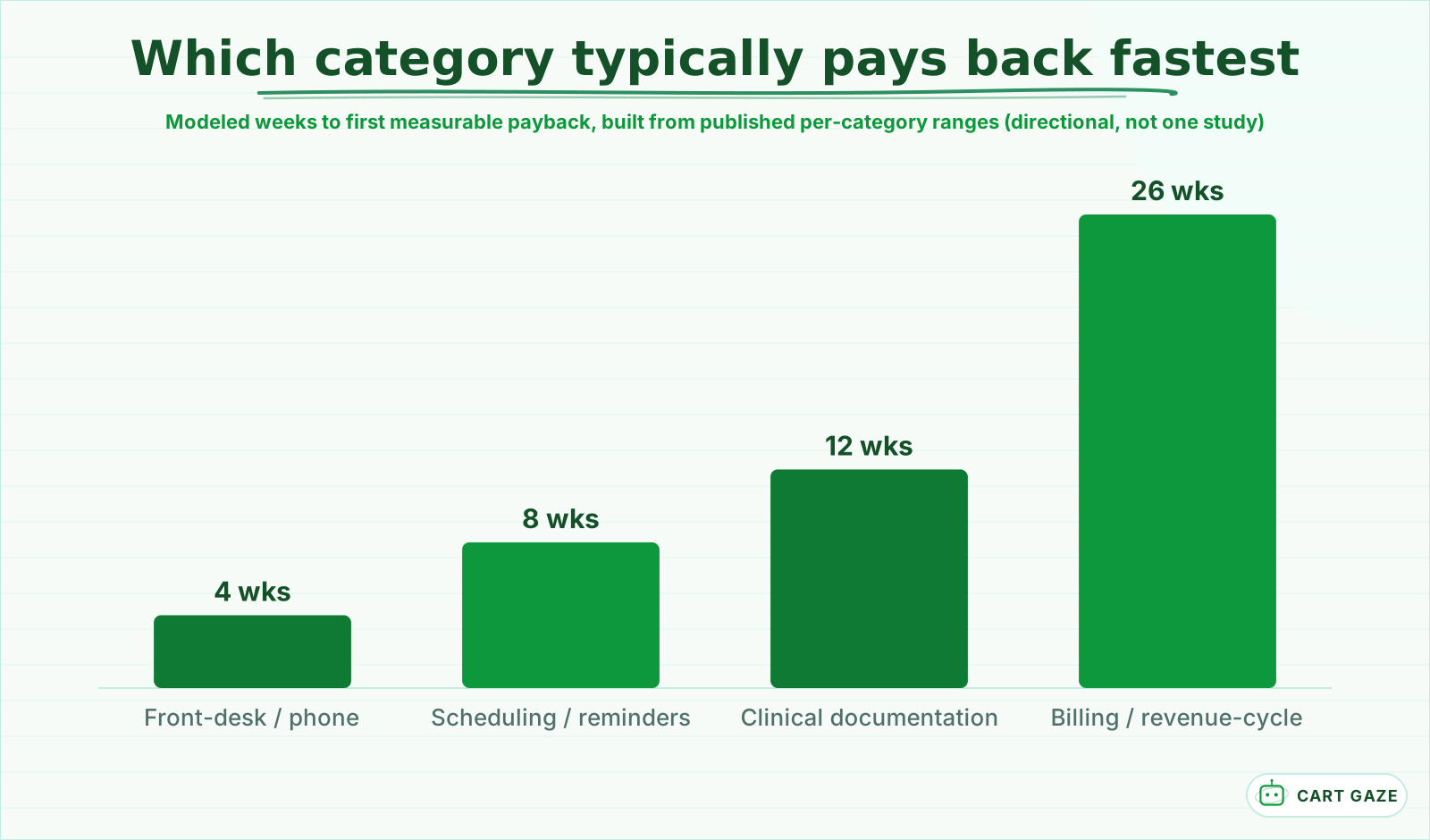 A modeled sequencing framework built from published per-category ranges, not one single study.
Scheduling and reminder automation sits in the middle: no-shows commonly drop 30% to 50% once reminders are running consistently, and that shows up within a few billing cycles rather than a single month. Clinical documentation lands in the middle too, for a different reason. The per-shift time savings are close to immediate, but the study cited above found utilization was inconsistent, so full workflow-level payback takes longer to show up than the per-visit number suggests.
Payback speed is one input, not the whole decision. A category that pays back in 4 weeks but does not touch your actual bottleneck still wastes a slot in your 90-day plan. None of these numbers is a promise for your practice specifically. They are ranges pulled from vendor and industry reporting, useful for ranking categories against each other, not for predicting your own dollar figure before you measure it.
If your loudest complaint is staffing versus software cost specifically for front-desk coverage, the math is laid out in more detail in AI receptionist versus hiring a receptionist, including where a part-time hire still beats automation.
The real bottleneck is change management, not the software
Most automation projects do not stall because the software fails. They stall because nobody trained staff, nobody set a baseline, or nobody read the first week of results. Healthcare leaders rate change management as the hardest part of a rollout more often than they blame the tool itself.
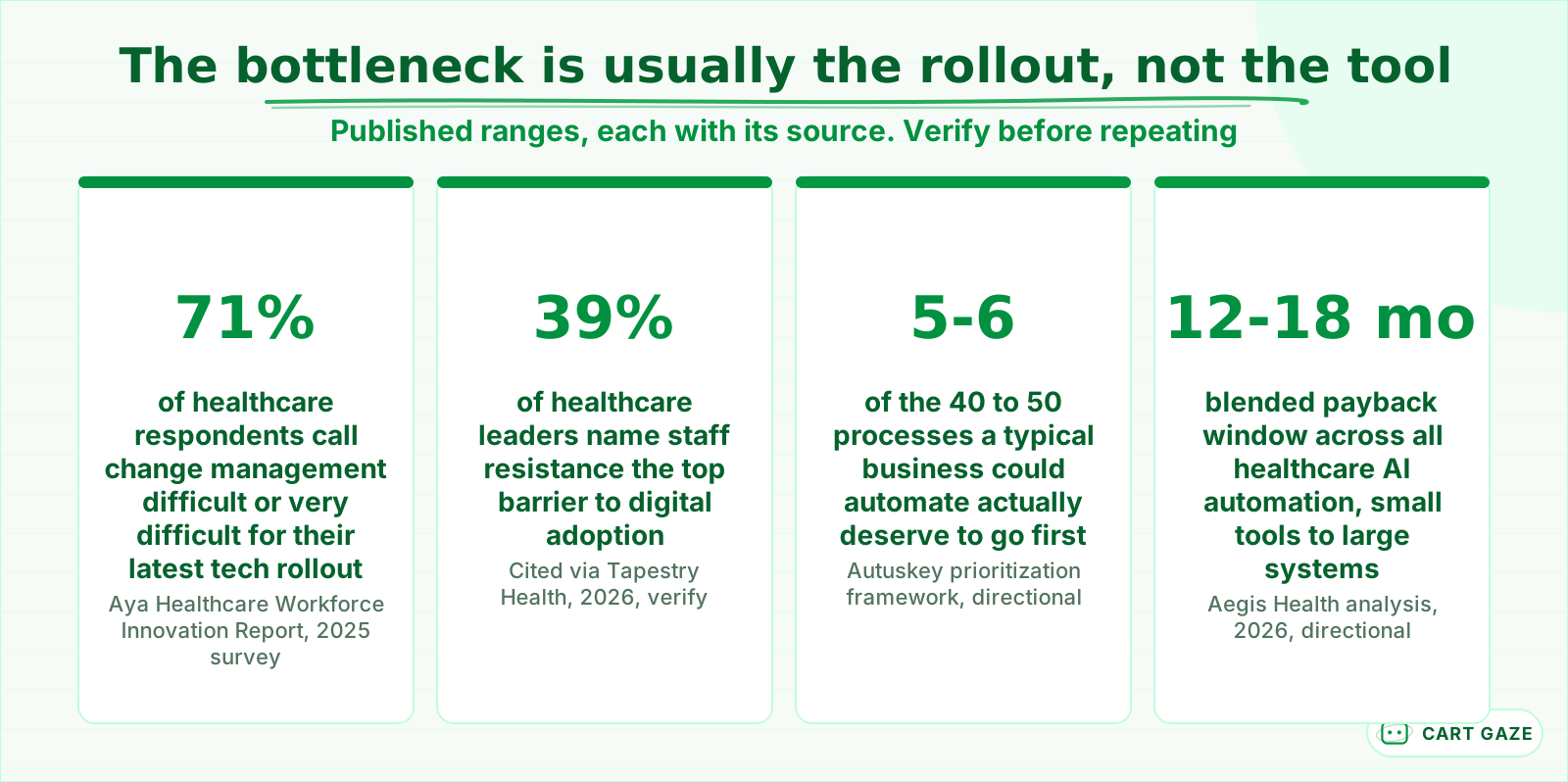 Published, sourced ranges. Reasons to sequence deliberately, not proof of your own result.
Two numbers explain why sequencing matters more than picking the "best" tool. Only 5 to 6 of the 40 to 50 processes a typical business could automate actually deserve to go first, and 71% of healthcare respondents in one 2025 survey called change management for their latest workforce technology rollout difficult or very difficult. Add a third: 39% of healthcare leaders point to staff resistance, not the software, as the top barrier to digital adoption.
That blended 12 to 18 month payback figure you sometimes see quoted for healthcare AI automation mixes hospital-wide systems with small point tools bought by a single practice. A solo or small-group practice buying one focused layer at a time typically sees a shorter payback per category, which is exactly the case for sequencing instead of a single big rollout that tries to do everything at once.
None of this argues against automating at all. It argues for treating the rollout, training, a baseline, and someone reading the results, as part of the purchase, not an afterthought bolted on after the invoice is paid.
Before you turn on the first layer
- You can name your practice's single biggest complaint in one sentence, not four.
- You have a baseline number for that complaint from the last 30 days.
- One person owns reading the first week of results end to end.
- A signed BAA is in place before any tool touches patient or scheduling data.
Find your 30-day automation target and start there
You do not need a consultant to pick your first automation category. Answer one question honestly: which single complaint costs you the most calls, hours, or dollars right now? The flowchart below turns that answer into a specific 30-day target instead of a vague plan to automate everything eventually.
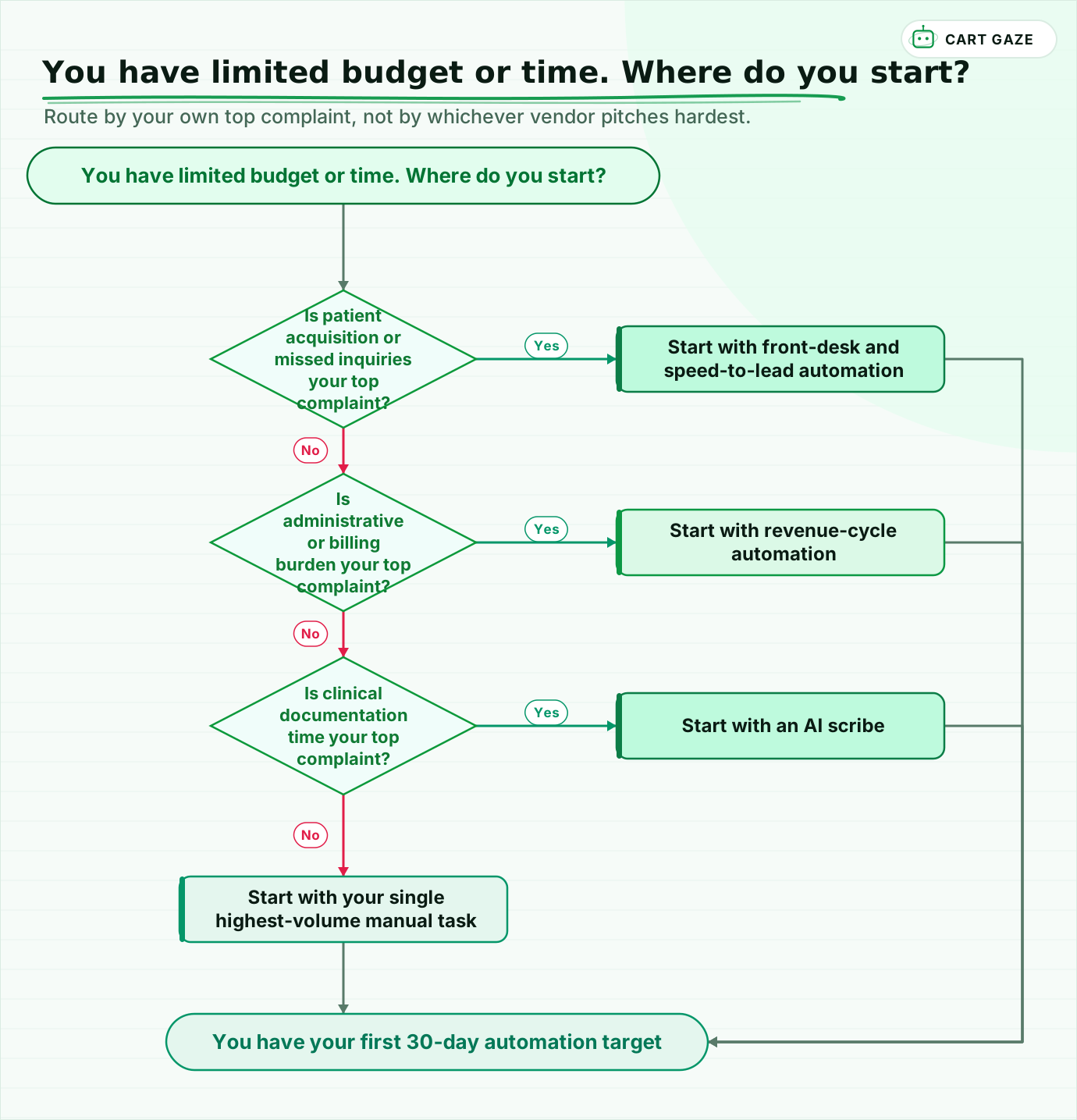 Route by your own top complaint, not by whichever vendor pitches hardest.
Walk the flow once, honestly. If missed calls or slow response are costing you new patients, front-desk automation goes first. If your staff is buried in claims and prior authorization, revenue-cycle automation goes first. If charting after hours is the real complaint, an AI scribe goes first. If none of those is your loudest problem, automate your single highest-volume manual task instead of waiting for a cleaner answer.
Whatever the flowchart points to, treat it as a 30-day target, not a 5-year plan. Deploy it, measure it against the baseline you wrote down, and revisit this same question in 90 days with real numbers instead of a vendor's pitch deck. If you would rather have your own bottleneck sized before you spend anything, the free Growth Leak Audit does that from your own numbers first.
Fair questions.
What should a medical practice automate first?
Match the category to your practice's single biggest complaint rather than a universal ranking. If missed calls or slow response cost you new patients, start with front-desk automation. If no-shows are the leak, start with scheduling and reminders. If claims work buries staff, start with revenue-cycle automation. If charting is the real pain, start with an AI scribe.
How long should a practice wait before automating a second process?
Give the first automation category a full 90 days before adding a second. Spend days 1 to 30 deploying it against a written baseline, days 31 to 60 measuring real results and fixing workflow gaps, and days 61 to 90 deciding whether adoption is solid enough to expand. Adding a second tool before the first is measured is how budgets get spent twice.
Which automation pays back the fastest for a medical or dental practice?
Front-desk and phone automation typically pays back fastest, with some vendors reporting a payback under 30 days, because it is the simplest system to turn on. Scheduling and documentation automation sit in the middle. Billing and revenue-cycle automation usually takes the longest, often 6 months or more, because it touches payer rules and claims systems that resist a fast rollout.
Is it true that most digital transformation projects fail?
A commonly repeated figure claims 70% of digital transformation projects fail, but that number traces back to a single opinion column rather than a rigorous study, so treat it skeptically. What is better supported: 71% of healthcare respondents in one 2025 survey called change management difficult or very difficult, and only 5 to 6 of every 40 to 50 automatable processes actually deserve to go first.
Is an AI scribe or AI receptionist HIPAA compliant?
HIPAA compliance is a configuration and contract matter, not a certification, so no vendor is legitimately 'HIPAA certified.' Any tool that touches patient health information, whether it answers calls, sends reminders, processes claims, or drafts clinical notes, needs a signed Business Associate Agreement. Confirm what each vendor stores, reads back, and deletes before connecting it to a real patient record or phone line.
Sources.
- [1]AI process automation in healthcare 2026: types, use cases, and ROI (Aegis Health)
- [2]Healthcare Workforce Innovation Report 2026 (Aya Healthcare)
- [3]The Adoption Gap: why your staff isn't the problem (Tapestry Health)
- [4]Which business processes should you automate first: a 2026 framework (Autuskey)
- [5]What's the ROI of an AI receptionist? 2026 calculation (Aira)
- [6]Automated appointment reminders boost ROI and cut no-shows (DoctorConnect)
- [7]Appointment reminder software comparison 2026 (Curogram)
- [8]ROI of automation for healthcare practices: 2026 cost breakdown (US Tech Automations)
- [9]How much does medical billing software cost? A complete pricing guide (Tebra)
- [10]Large AI scribe study finds modest time savings, inconsistent use (STAT News)
- [11]Cost of AI medical scribes: pricing guide and ROI analysis 2026 (GetFreed.ai)
Written by

Muhammad Qasim Hammad
Founder, Cart Gaze
Qasim builds AI receptionists and front-office automation for medical and dental practices at Cart Gaze. Posts here start from published sources and real call data, not vendor claims, and every number links back to where it came from.
Keep reading.
 Practice Automation PlaybooksThe Front Office Automation Stack for Medical Practices10 min read
 Practice Automation PlaybooksProvider Schedule Template Optimization Before You Automate11 min read
 Practice Automation PlaybooksFront Desk AI Training: The Conversation Practices Skip10 min read
 Practice Automation PlaybooksThe Practice Daily Digest That Owners Actually Read10 min read
 Practice Automation PlaybooksAI Receptionist Implementation: A Realistic Week-by-Week Guide10 min read
 Practice Automation PlaybooksPractice Automation Integration: Where the Handoffs Break10 min read