
Practice Automation Integration: Where the Handoffs Break
A practice can buy 5 good automations and still lose money every month. Here is where practice automation integration actually breaks, and a 10-minute way to test your own stack.
Key takeaways.
- The average practice already runs 3.23 separate software products, and 35% name integration between them as a top challenge, not a hypothetical one.
- Most practice-automation failures cluster at 4 handoffs: booking to calendar, intake and eligibility to billing, clinical notes to coding, and cancellations to reminders.
- A seam that fails silently costs more than one that fails loudly, since a visible sync error gets fixed the same day and a silent one can run for months.
- Independent hospitals stay routinely connected across their own systems only 22% of the time, versus 53% for system-affiliated hospitals, a gap that tracks closely with what a small practice faces
- Every vendor touching patient data anywhere in the chain, even one that only handles scheduling or reminders, needs a signed BAA, since HIPAA compliance is a contract and configuration question, not
Table of Contents8 sections
- Why buying 5 good tools does not add up to a connected practice
- The 4 seams where practice automation quietly breaks
- What a broken seam looks like from the front desk
- Point solutions look cheap, until you count what the seams cost
- What disconnected practice software actually costs
- Confirm the basics before you connect one more tool
- Audit your own seams before you add the next tool
- Fair questions
A practice can buy 5 good automations, an AI receptionist, an eligibility checker, a scheduling tool, a reminder system, a billing add-on, and still lose money every month. The tools are usually not the problem. The seams between them are: the exact moments where one system's finished work is supposed to become another system's starting point, and nobody ever checks whether that handoff actually happened.
This post maps the handoffs where practice automation quietly breaks, shows what a silent failure at each seam actually costs, and gives you a way to test your own stack before you add the next tool. The average practice already runs 3.23 separate software products, and 35% name integration between them as a top challenge, not a hypothetical one.
Why buying 5 good tools does not add up to a connected practice
Every point solution in a practice, the AI receptionist, the eligibility checker, the scheduling tool, is built and sold to do its own job well. None of them is built, priced, or supported to guarantee its output becomes the next tool's input. That handoff is nobody's product, which is exactly why it quietly fails.
Vendors sell the piece they built, not the seam between pieces. A demo always looks clean, because a demo only ever has to show its own screen. The moment a booking, an eligibility check, or a clinical note has to leave one system and land correctly inside another, the demo stops covering what actually happens in your practice.
If you have not evaluated an AI receptionist yet, start with what it actually does and where it stops before you wire it to anything else. The honest starting question is not which tool is best on its own. It is which handoffs your stack already depends on, and whether anyone has ever actually tested one.
That is a different question than which vendor has the best reviews. A tool with excellent reviews on its own product page has never once been asked to prove it works with the specific 3 or 4 other systems sitting next to it inside your practice.
The 4 seams where practice automation quietly breaks
Most practice-automation failures cluster at 4 handoffs: a booking reaching the practice-management calendar, intake and eligibility data reaching billing, a clinical note reaching the coder, and a cancellation reaching the reminder system. Each is a place where one tool's finished work is supposed to become another tool's starting point, silently.
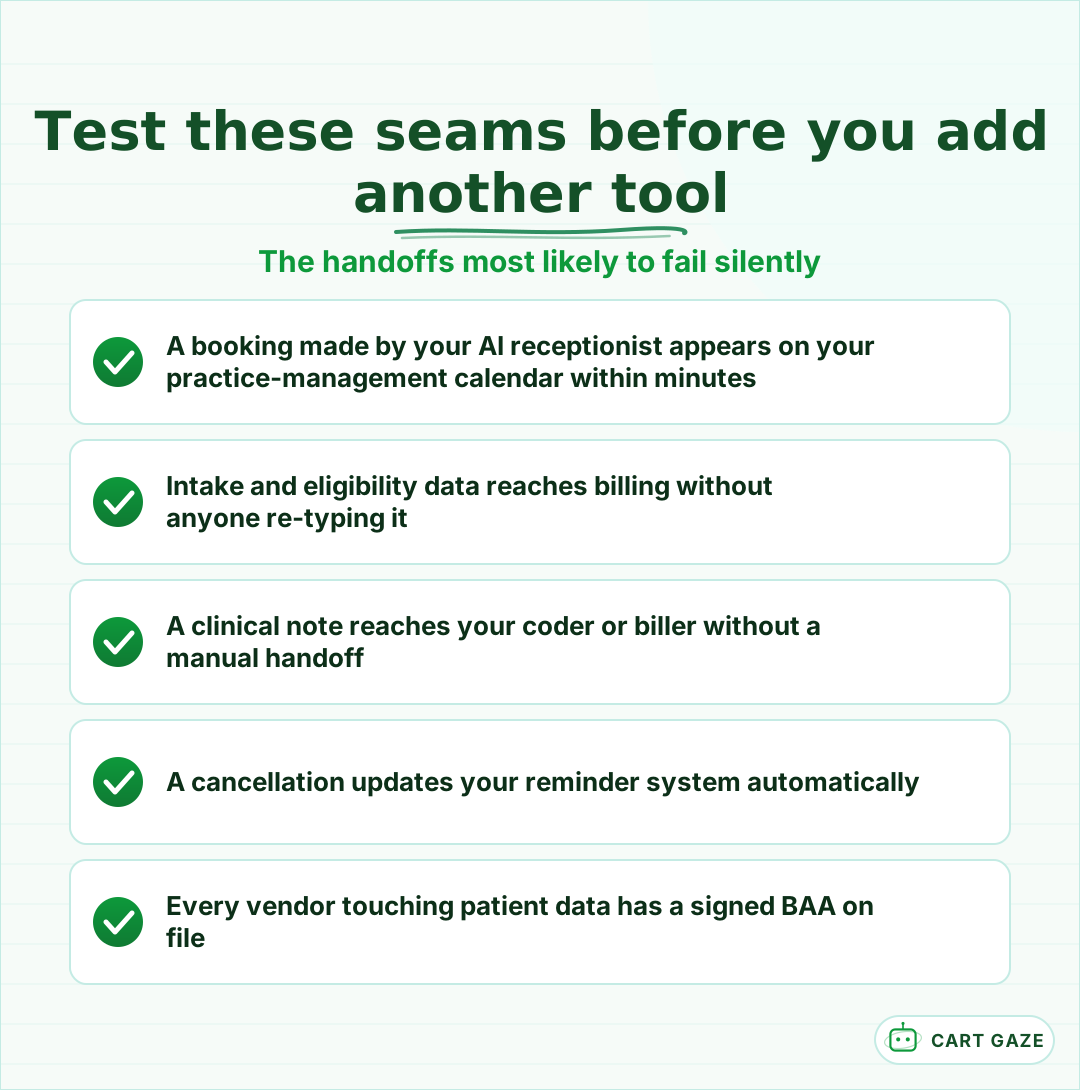 Five checks any practice can run itself, no vendor required.
Each seam has its own quiet failure mode. A booking made after hours does not always push to the calendar the front desk actually uses, so 2 patients get offered the same slot. Eligibility data collected at intake often lives only inside the intake tool, so billing staff re-key it from scratch a day later. A clinical note can be finished and locked without ever reaching the person who codes it, so the claim gets built from memory instead of the record. A cancellation frequently updates one system's status field without ever touching the reminder queue, so a patient who canceled still gets a text reminding them of a visit that no longer exists. None of these failures shows up in any single tool's error log, because from each tool's own point of view, it did exactly what it was asked to do.
Important
Every vendor in this chain, including the one that only handles reminders or scheduling, is a business associate under HIPAA the moment it touches patient data, and needs a signed BAA on file. Compliance is a configuration and contract question for each vendor, not a certification any product can claim.
This post picks up a narrower thread than the full pipeline these seams sit inside, which maps all 5 stages from the first call to final payment. This one stays on the specific joints between whatever automations you already have, whether or not they sit inside that pipeline.
What a broken seam looks like from the front desk
A broken seam rarely announces itself with an error message. It shows up as a double-booked slot, an insurance detail retyped at check-in, a claim coded from memory instead of the note, or a reminder sent for a visit that was already canceled. Each symptom points to one specific handoff, and each has a fast way to confirm it.
The table below matches the symptom your staff already complains about to the seam actually causing it, and a quick way to confirm the diagnosis before you assume a tool itself is broken when only the connection between 2 tools is.
| Seam | Symptom you'll notice | What's actually happening | Quick check |
|---|---|---|---|
| Booking to PM calendar | 2 patients booked into the same slot | The receptionist and the calendar do not share live availability | Book a test slot and time how long it takes to appear |
| Intake/eligibility to billing | Front desk retypes insurance at check-in | Eligibility data never leaves the intake tool | Ask billing whether they ever open the intake system directly |
| Clinical note to coder | A claim gets coded from memory | Documentation and coding tools do not share a record | Ask your coder how they actually access the finished note |
| Cancellation to reminders | A canceled patient still gets reminded | The reminder tool runs on its own schedule, not on events | Cancel a test visit and watch what the reminder system does |
None of these 4 checks costs anything beyond about 10 minutes and a willingness to watch what actually happens, rather than trust what a sales page promised it would do. Run all 4 once, write down what actually happened, and you have a real map of your stack instead of a guess about it.
Point solutions look cheap, until you count what the seams cost
Buying one tool at a time for scheduling, eligibility, or reminders is genuinely cheaper and faster to start than committing to a single connected platform. The honest tradeoff is that nobody owns the space between those tools, so the savings on the sticker price often reappear later as staff time and quietly lost revenue.
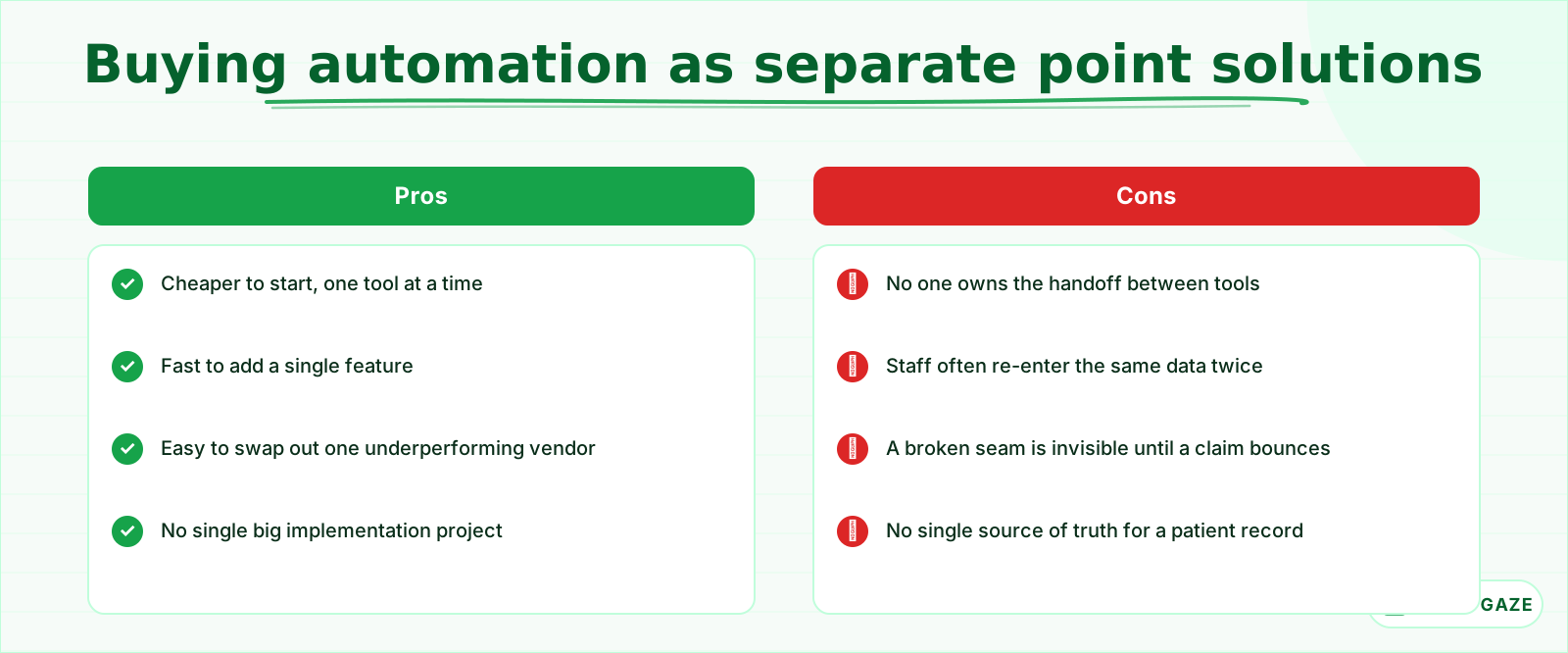 Cheaper to start. Nobody owns the space between the tools, which is exactly where the savings can disappear.
Neither approach is automatically right for every practice. A single-location practice adding its first automation has a real reason to start with one point solution and prove it works before spending more on the rest of the stack. A multi-provider group already juggling 6 or 7 separate tools has a different problem: the seams have multiplied past what any one person can track from memory alone.
Warning
A seam that fails silently is more dangerous than one that fails loudly. A sync error that throws a visible message gets fixed the same day. A sync that silently drops half its bookings can run for months before anyone notices the missing revenue.
If your AI receptionist is the piece already in place, how it should integrate with your practice management software is the specific seam worth testing first, since booking is usually the highest-volume handoff in the entire stack. It is also the easiest one to test: a single booked test slot either shows up on the calendar within a few minutes, or it does not.
What disconnected practice software actually costs
The cost of a broken seam rarely shows up as a line item you can point to. It shows up as a double-booked slot, a re-typed insurance form, or a claim coded from memory instead of a note, each one small, each one repeating every week until the total becomes real money nobody budgeted for losing.
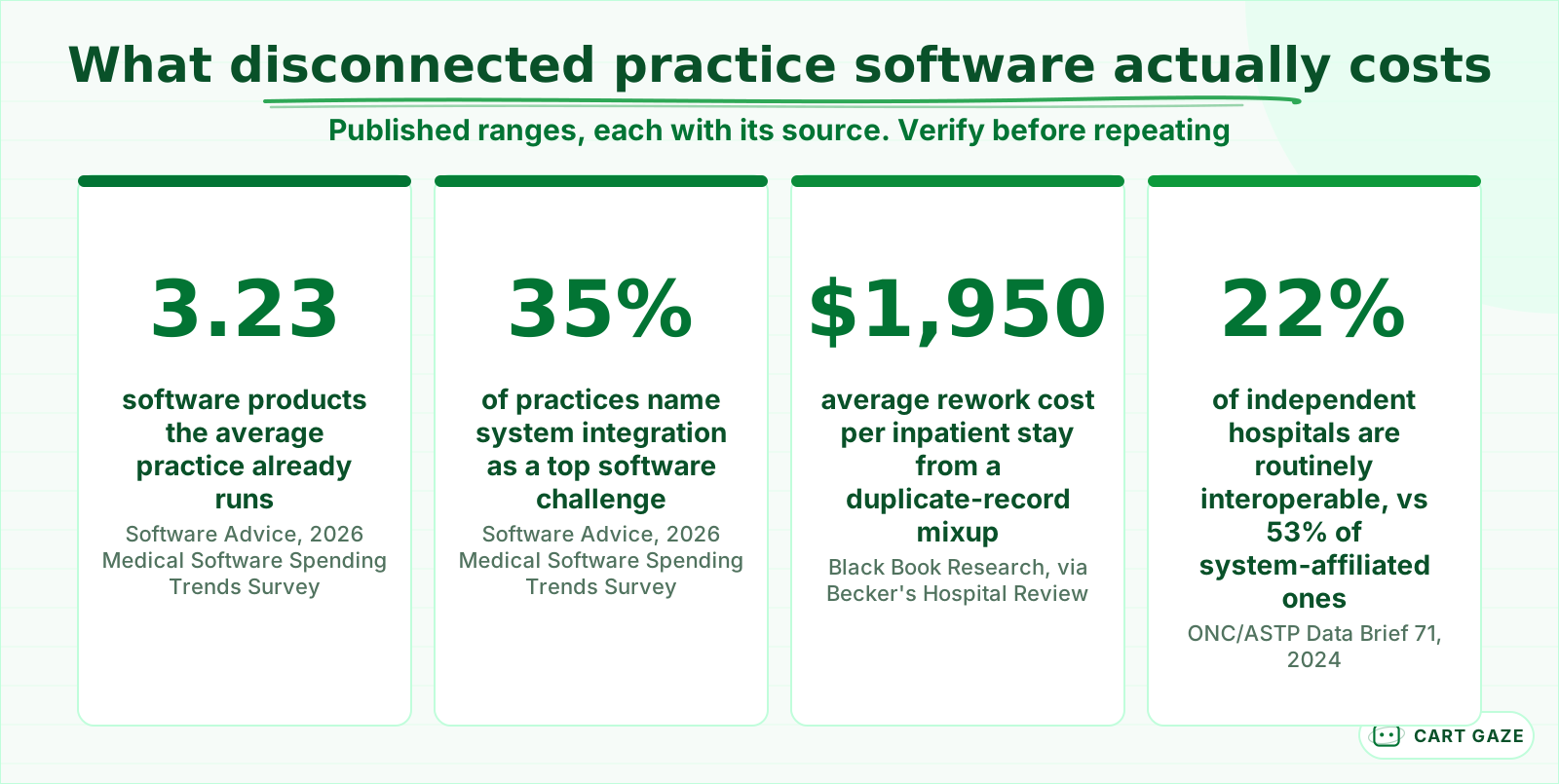 Published figures, each sourced. Reasons to test your own stack, not your result.
None of the 4 figures above is a Cart Gaze result or a prediction for your specific practice. They are published ranges from different studies at different scales, meant to size the shape of the problem, not hand you your own number. The independent-versus-system-affiliated gap is the most useful one for a small practice to sit with: 22% of independent hospitals stay routinely connected across their own systems, versus 53% of hospitals backed by a larger system's dedicated IT team. A solo or small-group practice sits closer to the independent side of that gap than the enterprise side, and the pattern shows up the same way, in seams nobody has staff specifically watching. That gap is not a reason to distrust automation. It is a reason to test your own connections instead of assuming size or budget already solved the problem for you.
Referral leakage is another place this exact pattern shows up: a handoff between your practice and a referring provider that fails just as silently as a handoff between 2 pieces of software.
Confirm the basics before you connect one more tool
Before adding another automation to a stack that is already partly connected, confirm 4 operational basics that have nothing to do with which vendor you picked. Skipping this step is how a practice ends up with 6 tools instead of 5, and the exact same unowned seams it started with, just spread across one more system.
These are not compliance theater. Each one has caused a real, traceable revenue loss at a practice that skipped it. A missed BAA or an unowned handoff rarely shows up the week you add a tool. It usually shows up 2 or 3 months later, as a denied claim or a complaint nobody can trace back to its actual source.
Before you connect one more tool to your stack
- Confirm a signed BAA covers every vendor that will touch patient data, not only the newest one.
- Name who owns each handoff: booking to calendar, intake to billing, documentation to coding.
- Test the new tool against your 10 most recent real cases, not a vendor's sample demo.
- Watch the first 2 weeks of activity end to end before you add the next automation.
Tip
You do not have to replace every point solution at once. Fixing the single worst seam, usually the one costing the most silent revenue, tends to pay for itself before you touch the rest of the stack.
Audit your own seams before you add the next tool
The fastest way to find where your practice automation actually breaks is not another vendor demo. It is walking your own stack through 4 plain questions, in order, and stopping at the first one that fails. The flow below is the same one worth running before any new tool joins your practice.
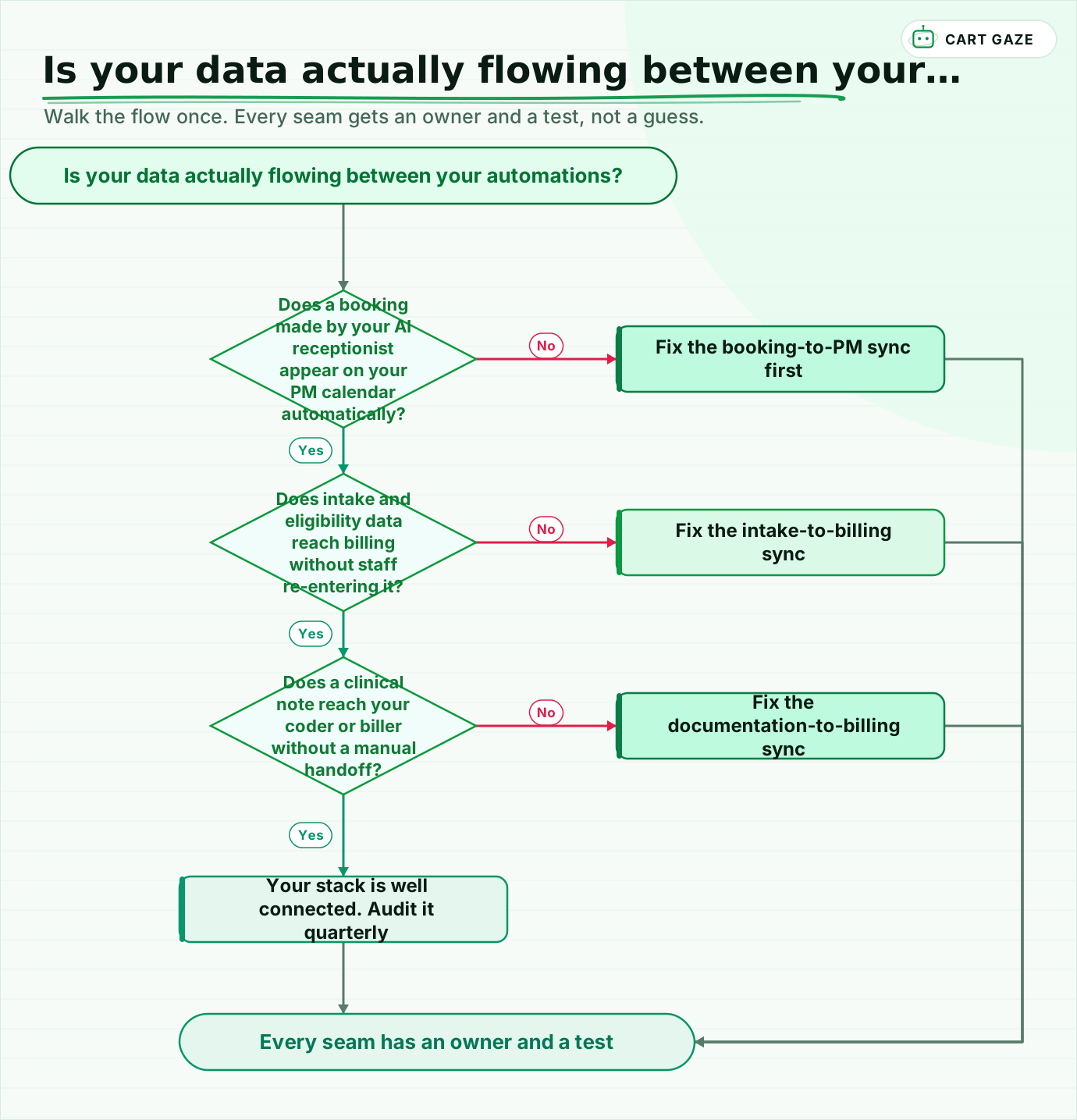 Walk the flow once. Every seam gets an owner and a test, not a guess.
Walk it once with your actual front-desk and billing staff in the room, not just the person who bought the software. The people who touch each handoff every day usually already know exactly where it sticks. They have just never been asked in a way that leads anywhere near a fix, because the question never came up until something bounced. Run this walkthrough before every new tool, not only once. A stack that passes all 4 questions today can fail one of them again the moment a fifth or sixth system joins without anyone repeating the check.
If you would rather start from your own numbers than a walkthrough, the free Growth Leak Audit sizes where your specific stack is leaking before anyone talks about buying another tool.
Fair questions.
Why does practice automation break even when every tool works fine on its own?
Each tool can pass its own test in isolation, but automation fails at the handoffs between tools, not inside them. A booking, an eligibility check, or a clinical note has to leave one system and land correctly in the next one, and no vendor's contract makes that specific connection anyone's job to guarantee or monitor.
How many separate software systems does the average practice actually run?
The average practice already runs 3.23 separate software products, according to Software Advice's 2026 Medical Software Spending Trends Survey, and 35% name integration between existing systems as a top challenge. Even a small stack of 2 or 3 tools creates real seams if nobody owns the handoffs between them.
What is the fastest way to find where my own practice automation is breaking?
Walk your stack through 4 plain questions in order: does a booking reach your calendar automatically, does eligibility data reach billing without re-entry, does a clinical note reach your coder without a manual handoff, and does a cancellation reach your reminder system. Stop at the first one that fails and fix that seam first.
Is it cheaper to buy separate point solutions or one connected platform?
Point solutions are usually cheaper and faster to start, since you add one tool at a time without a large implementation project. The tradeoff is that nobody owns the space between them, so upfront savings can reappear later as staff time spent re-entering data and revenue lost at a seam nobody was watching.
Do all the vendors in a practice's software stack need to sign a BAA?
Yes. Any vendor that touches patient data anywhere in the chain, including a tool that only handles scheduling or reminders, is a business associate under HIPAA and needs a signed Business Associate Agreement. Compliance is a configuration and contract question for each vendor, not a certification any single product can claim on your behalf.
Sources.
- [1]Medical Software Spending Trends: Why Costs Are Rising and What Practices Can Do (Software Advice, 2026)
- [2]5 Essential Types of Medical Software for Your Practice, and How to Build Your Tech Stack (Software Advice)
- [3]Interoperable Exchange of Patient Health Information Among U.S. Hospitals: 2023 (ONC/ASTP Data Brief No. 71, May 2024)
- [4]From Disparate to Dynamic: Opportunities and Challenges in U.S. Healthcare Operations (symplr Compass Survey)
- [5]From Fragmentation to Integration: Inside the Push to Simplify Healthcare IT (Becker's Hospital Review)
- [6]Black Book: Duplicate Patient Records Cost Hospitals Almost $2k Per Inpatient Stay (Becker's Hospital Review)
Written by

Muhammad Qasim Hammad
Founder, Cart Gaze
Qasim builds AI receptionists and front-office automation for medical and dental practices at Cart Gaze. Posts here start from published sources and real call data, not vendor claims, and every number links back to where it came from.
Keep reading.
 Practice Automation PlaybooksPatient Journey Automation: Map the Pipeline From Call to Payment11 min read
 Practice Automation PlaybooksWhat to Automate First: A 90-Day Practice Sequencing Plan10 min read
 Practice Automation PlaybooksProvider Schedule Template Optimization Before You Automate11 min read
 Practice Automation PlaybooksHuman in the Loop AI Approvals: What to Gate and What to Let Run11 min read
 Practice Automation PlaybooksAI Agent Orchestration Rules That Stop Automations Colliding12 min read
 Practice Automation PlaybooksFront Desk AI Training: The Conversation Practices Skip10 min read