
Front Desk SOP Template: A Five-Step Guide for Medical Practices
Most front desks run on what the longest-serving person remembers. This five-step guide turns that into a written SOP a new hire can follow on day one, with the HIPAA pieces built in.
Key takeaways.
- A front desk SOP covers 6 areas: call handling, messages, escalation, scheduling rules, PHI on the phone, and opening and closing.
- Write it for the newest person on the team, with one named owner and a review date per section.
- The PHI section must say how staff verify a caller before disclosing anything, as 45 CFR 164.514(h) requires.
- HIPAA requires written privacy policies kept for 6 years and training for every workforce member, including new hires.
- When a situation comes up that the SOP does not cover, add a line within the week, checked by the section owner.
Table of Contents8 sections
In most practices, the front desk runs on what the longest-serving person remembers. That works until that person is on vacation, until a new hire answers a call about a patient's results, or until a surveyor asks to see the written procedure. HIPAA itself requires covered practices to keep their privacy policies and procedures in written or electronic form, and to retain them for 6 years.
A front desk SOP template turns that memory into a document a new hire can follow on day one. This guide builds one in five steps: call handling, messages and escalation, scheduling rules, PHI on the phone, and a cycle for keeping it current and training staff on it.
What a front desk SOP should cover
A front desk SOP should cover six areas: answering and routing calls, taking and passing messages, escalating urgent and clinical calls, scheduling rules, handling PHI on the phone, and opening and closing the desk. Each section answers the questions staff actually face, in the order they face them, with one named owner.
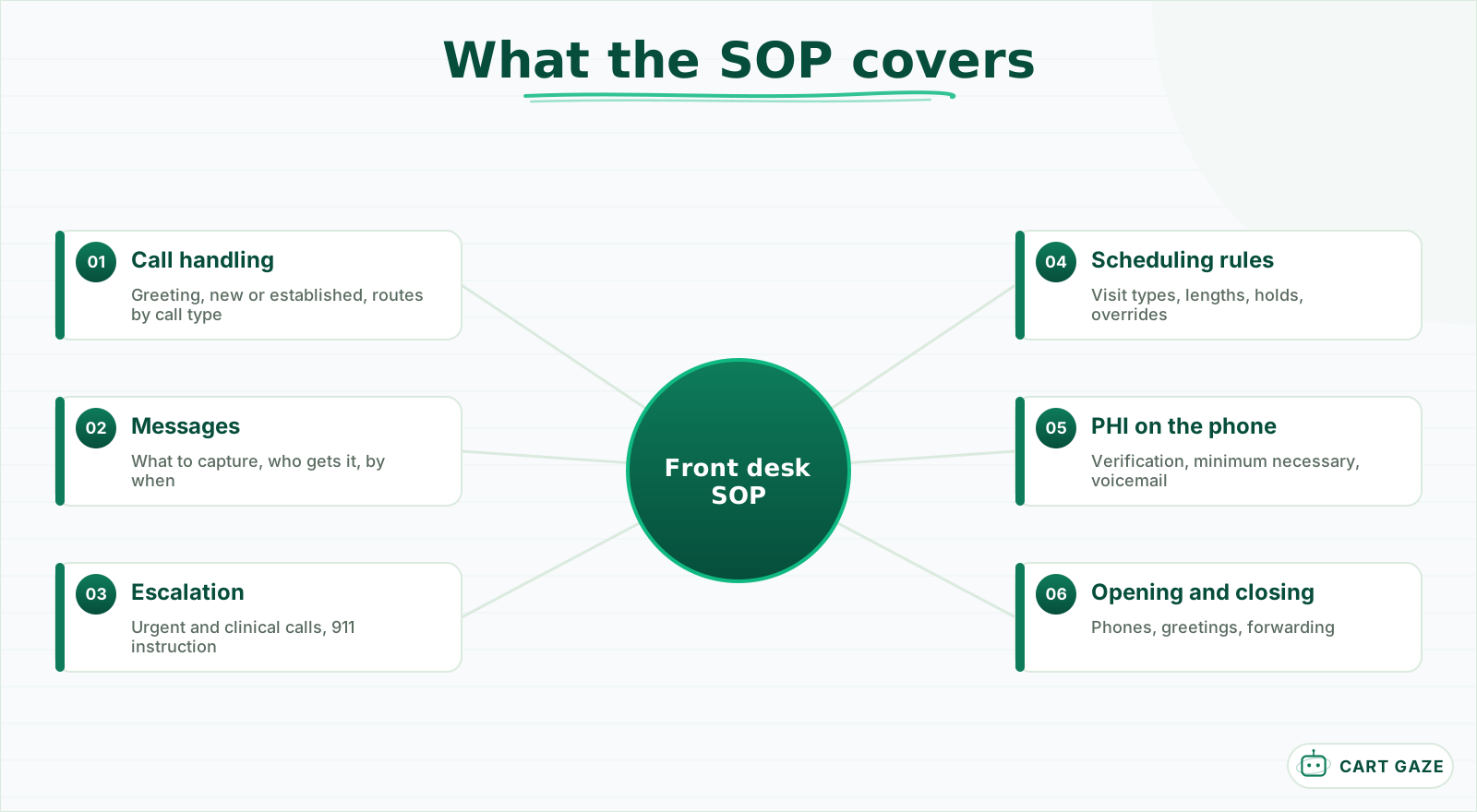 Six sections, each with an owner. The most common decisions go at the top of each.
Keep the document short enough to use. A section per area, one or two pages each, is enough for most practices. Put the decisions staff make most often at the top of each section, and move the rare cases to the end.
Write it for the newest person on the team, not the most experienced. If a new hire could follow it on their first day with a colleague nearby, it is detailed enough. If it assumes knowledge of how "we always do it," it will fail the first time the person who always does it is away.
Each section needs an owner who keeps it current, and the whole document needs a version date at the top. Here is a template for the sections and who usually owns them.
| Section | What it answers | Usual owner | Review |
|---|---|---|---|
| Call handling | How to greet, identify, route | Front desk lead | Quarterly |
| Messages | What to capture, who gets it, by when | Front desk lead | Quarterly |
| Escalation | Where urgent and clinical calls go | Clinical lead | Quarterly and on changes |
| Scheduling rules | Visit types, lengths, who can override | Office manager | When templates change |
| PHI on the phone | Verification, minimum necessary, messages | Privacy officer | Yearly and on changes |
| Opening and closing | Phones, greetings, forwarding | Office manager | When hours change |
Step 1: write the call-handling section
The call-handling section says how to answer, how to find out who is calling and why, and where each kind of call goes. It includes the greeting, the question that separates new patients from established ones, the common call types and their routes, and what to do when the line is busy.
List the common call types in order of volume: booking, rescheduling, prescription refill requests, billing questions, records requests, and clinical questions. For each, write the route in one line: who handles it, what they need from the caller, and how long it should take.
Concrete lines work better than principles. For example: "Refill request: take the patient's name, date of birth, medication and pharmacy; send to the nurse refill queue; tell the patient to allow 2 business days." Or: "Records request from another office: take their fax and the patient's name; route to records; do not confirm the patient is seen here until the request is verified."
Scripts belong here too, but keep them to the key lines rather than full dialogue. A tested set of booking scripts lives in booking scripts for the medical front desk; the SOP should say which ones staff use and where to find them.
Include the busy-line rule. When every line is occupied, where does the next call go, how long does it ring, and who checks the callback queue? If the answer depends on the time of day, say so.
Step 2: write messages and escalation
The messages section says what every message must capture, who receives each type, and how fast it must be acted on. The escalation section says where urgent and clinical calls go, in hours and after hours, and that anyone describing an emergency is told to hang up and call 911.
A message template removes most of the confusion. Every message captures the caller's name, callback number, the patient if different, the reason in a few words, the urgency, the time taken, and who took it. Say which system messages go into, so they do not end up on sticky notes.
Give each message type a turnaround target and write it where the caller will hear it. Scheduling messages might be returned the same day, billing questions within 1 business day, and non-urgent clinical questions per the clinical lead's standard. If staff tell callers the target, the practice has a promise to keep and a reason to keep it.
Escalation needs to be unambiguous. Write down which symptoms or phrases mean a call goes straight to a nurse or clinician, who that is in each window, and how the transfer happens. Malpractice insurer guidance from The Doctors Company is that emergent callers should be directed to call 911 or the nearest emergency department, and the SOP should say exactly that.
Warning
Front desk staff should never give clinical advice, even to a patient they know well. The SOP should say this plainly and give the exact words to use: "I'm going to get you to a nurse now."
Step 3: write the scheduling rules
The scheduling section lists each visit type, its length, which providers see it, and any rules that go with it: new-patient slots held open, how many same-day slots each provider keeps, when double-booking is allowed, and who may override a rule. Without it, each person schedules by instinct.
Build the list from your actual schedule templates, not from memory. For each visit type, note the length, the prep the patient needs, and anything that must happen before booking, such as a referral on file or insurance verification.
Write the override rule explicitly. Who can put a patient into a held slot or double-book a provider, and does the provider need to agree? Much scheduling friction comes from rules that exist but that nobody wrote down.
Write the rules as sentences staff can apply without judgment calls: "Each provider keeps two same-day slots until 10 a.m. then they open to anyone." "New patients are never booked into a follow-up slot." "Only the office manager may double-book, and only with the provider's agreement."
Rules change when templates change. Tie the review of this section to any change in provider schedules, so the document and the system stay in step.
Step 4: write PHI on the phone
The PHI section says how staff verify who is calling before discussing any patient, what they may say to family members and others, what goes in a voicemail, and how to honor confidential-communication requests. HIPAA requires verifying the identity and authority of a caller who is not known before disclosing PHI.
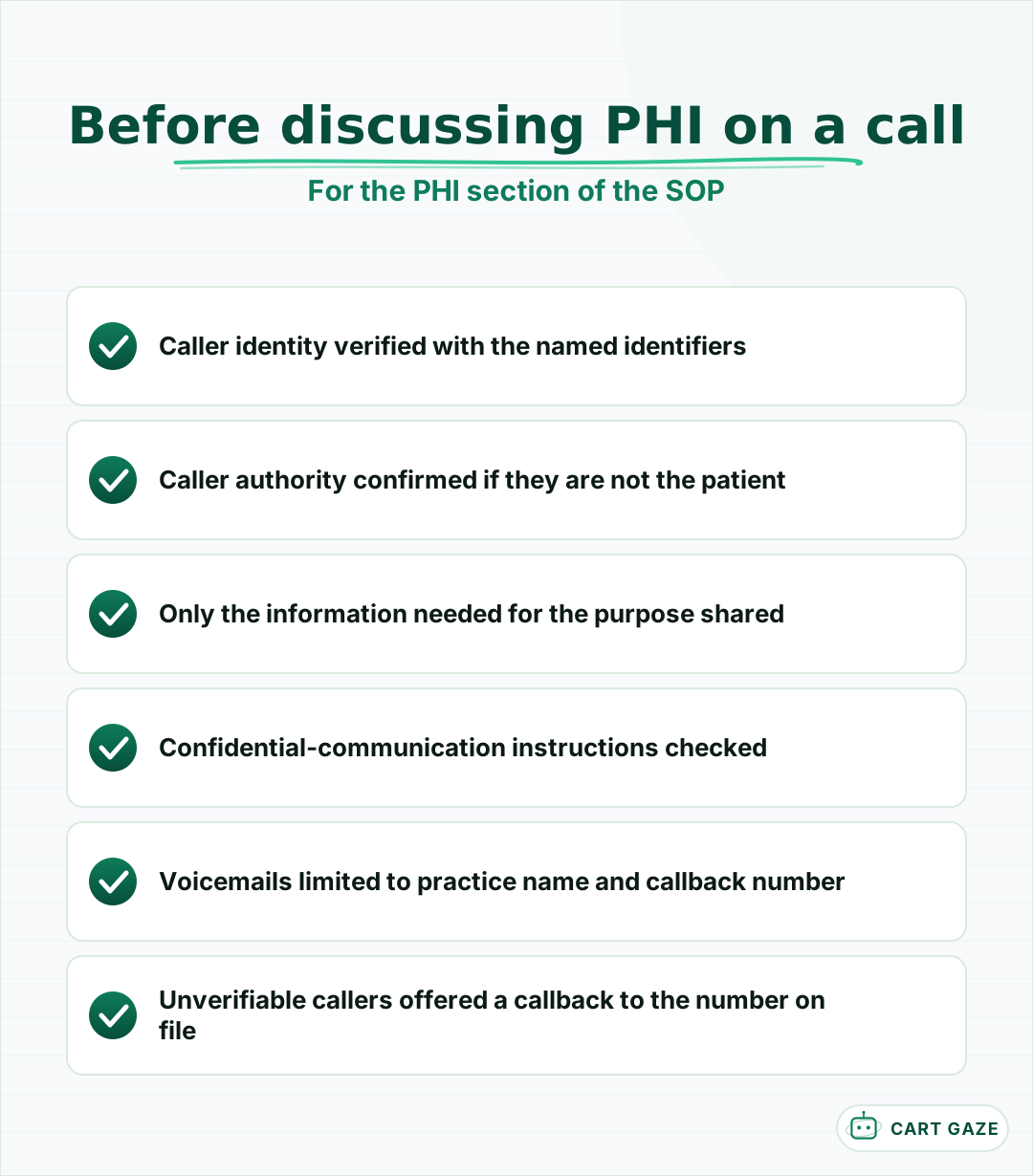 Verification first, every time the caller is not already known.
The rule is 45 CFR 164.514(h): before a permitted disclosure, a covered entity must verify the identity of the person requesting PHI and their authority to have it, if either is not known. The SOP should name the identifiers staff check, such as full name and date of birth, and say what to do when a caller cannot provide them.
Family members and caregivers are the most common grey area. The SOP should say where a patient's authorized contacts are recorded, and that staff check that record on every call rather than relying on who sounds familiar. When in doubt, the safe step is to take a message for the patient rather than share details.
Voicemails need their own line. HHS's Office for Civil Rights suggests leaving only the provider's name and number and asking the patient to call back. Confidential-communication requests, under 45 CFR 164.522(b), must be accommodated when reasonable, and the SOP should say where they are recorded so every staff member and every automated message sees them.
Step 5: keep it current and train on it
An SOP is only useful if it is current and people know it. Put a version date on it, review each section on its schedule, and train every new hire on it before they answer phones alone. HIPAA requires workforce training on privacy policies, and written policies kept for 6 years.
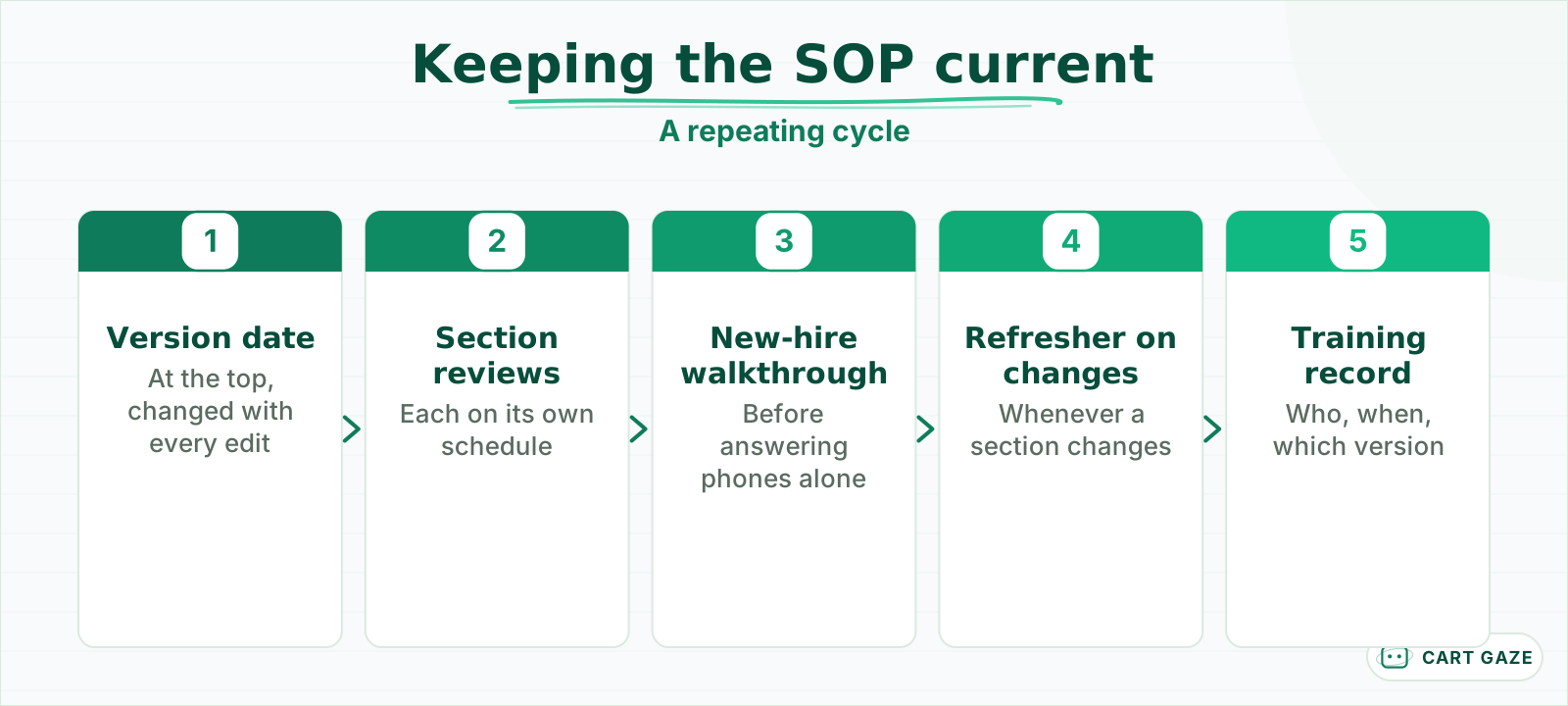 A current document, and a record that people were trained on it.
The two requirements are in 45 CFR 164.530. Covered entities must train all workforce members on their PHI policies and procedures, including new members within a reasonable period, and must maintain those policies in written or electronic form, retaining documentation for 6 years from its creation or the date it was last in effect.
The opening and closing section is the shortest and the easiest to forget. At opening: confirm the day's greeting is playing, clear overnight voicemail and messages, and check the callback queue. At closing: switch to the after-hours route, confirm the on-call number is current, and make sure no message has been left unassigned.
Training works best with the document open. Walk a new hire through each section, have them shadow calls for a few days, then have a senior person listen to their first solo calls. Repeat a short refresher whenever a section changes, and record who was trained and when.
Automation needs its own rules. If an AI receptionist answers some calls, the SOP should say what it may handle, where it hands off, and how staff pick up those hand-offs; that policy is covered in writing an internal policy for your AI receptionist. The AI routes every clinical, urgent, or distressed caller to a person and never gives medical advice, as set out in what an AI receptionist does and where it hands off.
Before you publish the SOP
- Every section has a named owner and a review date.
- The escalation section has been checked by a clinician.
- The PHI section names the identifiers staff verify.
- Every current staff member has been walked through it.
Put the SOP to work
Put the SOP where staff can reach it in seconds, walk every current staff member through it, and use it to train every new hire. When a situation comes up that it does not cover, add a line within the week. A living SOP is one that grows from the questions the desk actually gets.
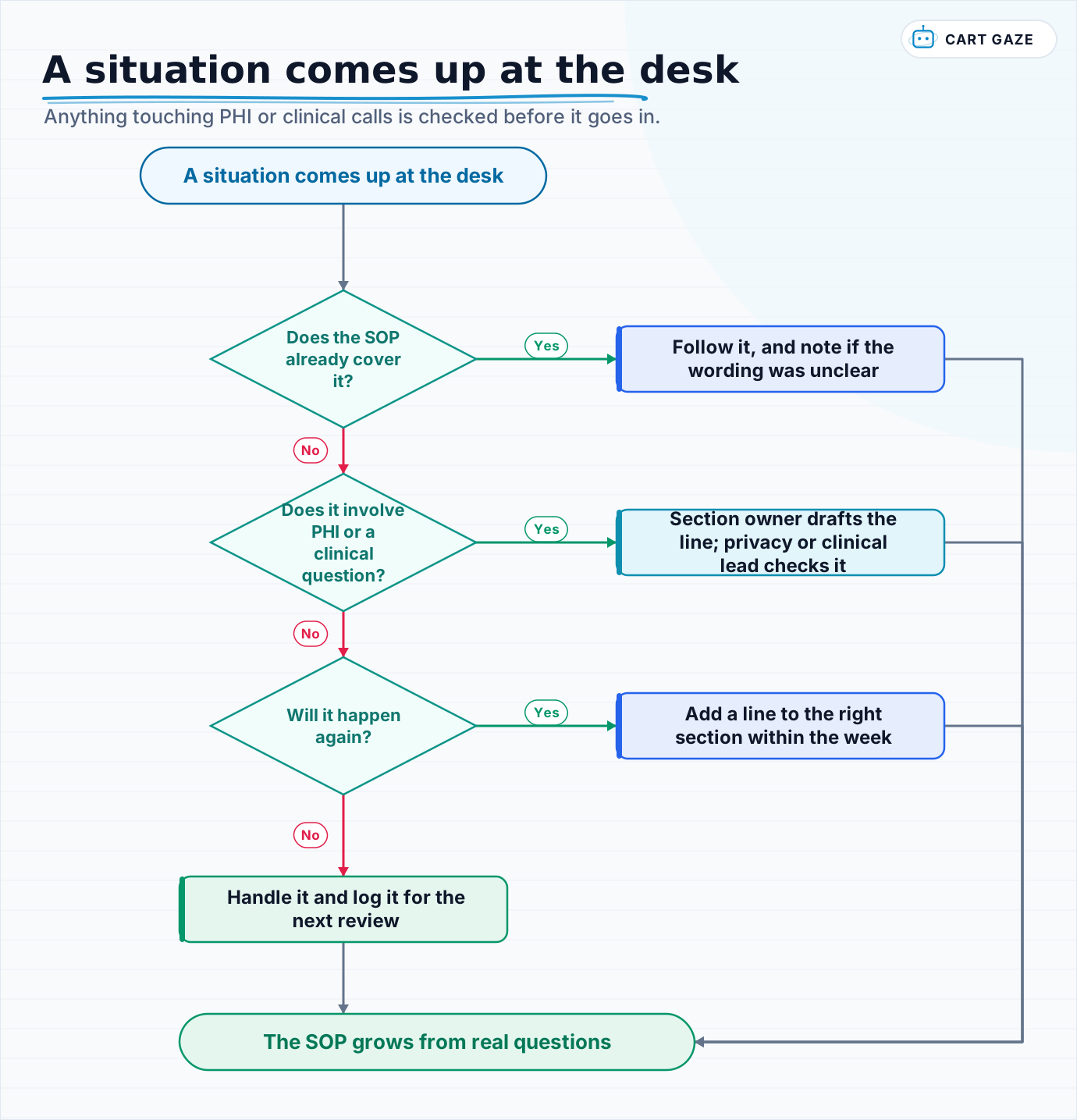 Anything touching PHI or clinical calls is checked before it goes in.
Use the flow each time something new happens at the desk. Most additions will be one or two lines, and the ones that touch PHI or clinical calls should be checked by the owner of that section before they go in.
To see what a finished build looks like when a practice's written procedures turn into working phone coverage, what a live build actually looked like walks through one.
Fair questions.
What should a medical front desk SOP include?
Six sections: how to answer and route calls, what messages must capture and who gets them, where urgent and clinical calls go, scheduling rules by visit type, how to handle PHI on the phone, and how to open and close the desk. Each section needs a named owner and a review date, with the most common decisions at the top.
Does HIPAA require written front desk procedures?
HIPAA requires covered entities to maintain their privacy policies and procedures in written or electronic form and to retain that documentation for 6 years from creation or the date it was last in effect, under 45 CFR 164.530(j). Procedures for handling PHI at the front desk, such as caller verification, belong in that documentation.
How should front desk staff verify a caller before discussing a patient?
Under 45 CFR 164.514(h), staff must verify the identity and authority of a caller who is not known before disclosing PHI. The SOP should name the identifiers staff check, such as full name and date of birth, and say what happens when a caller cannot provide them, for example offering a callback to the number on file.
How often should a front desk SOP be updated?
Review each section on its own schedule: call handling, messages and escalation quarterly, scheduling rules whenever provider templates change, and the PHI section at least yearly. Add a line within the week whenever the desk meets a situation the SOP does not cover, and put a version date at the top of the document.
How do you train new front desk staff on the SOP?
Walk them through each section with the document open, have them shadow calls for a few days, then have a senior colleague listen to their first solo calls. HIPAA requires training on privacy policies for new workforce members within a reasonable period. Record who was trained and when, and refresh when a section changes.
Sources.
- [1]eCFR: 45 CFR 164.514(h), verification requirements
- [2]eCFR: 45 CFR 164.530, administrative requirements (training, documentation, retention)
- [3]eCFR: 45 CFR 164.522(b), confidential communications
- [4]AAFP Family Practice Management: HIPAA, answers to your frequently asked questions (2018)
- [5]The Doctors Company: telephone triage and advice, patient safety strategies (October 2024)
Written by

Muhammad Qasim Hammad
Founder, Cart Gaze
Qasim builds AI receptionists and front-office automation for medical and dental practices at Cart Gaze. Posts here start from published sources and real call data, not vendor claims, and every number links back to where it came from.
Keep reading.
 Practice Automation PlaybooksClinic Phone Coverage Plan: A Five-Phase Playbook for Practices10 min read
 Practice Automation PlaybooksMedical Practice Phone System Audit: A 30-Day Guide10 min read
 Practice Automation PlaybooksReduce Call Abandonment in 30 Days: A Week-by-Week Plan10 min read
 Practice Automation PlaybooksThe Practice Daily Digest That Owners Actually Read10 min read
 Practice Automation PlaybooksHuman in the Loop AI Approvals: What to Gate and What to Let Run11 min read
 Practice Automation PlaybooksAI Agent Orchestration Rules That Stop Automations Colliding12 min read