
Reduce Call Abandonment in 30 Days: A Week-by-Week Plan
Most practices know too many callers hang up and have never had a plan to change it. This 30-day plan lowers call abandonment one measured week at a time, starting with the fixes that cost nothing.
Key takeaways.
- Target the 2 or 3 hours where abandonment is worst, measured from 4 weeks of queue data, not the daily average.
- Week 2 is free: shorten the greeting to about 20 seconds before a caller reaches a queue, and cut unused menu options.
- Week 3 adds a callback offer after 30 to 60 seconds and an overflow rule set in seconds, never straight to voicemail.
- Week 4 takes routine calls off the queue with online booking or an AI receptionist, which changes how many callers wait at all.
- On day 30, compare the same hours with the same report, keep what moved the rate, and re-check monthly.
Table of Contents8 sections
Every abandoned call is a patient who wanted something from your practice and gave up before they got it. Most practices know the number is too high and have never had a plan to lower it, because the fixes seem to need new staff or new software. Many do not. Invoca's 2025 healthcare benchmarks found that only 59% of callers spoke with a person, which leaves a lot of room for fixes that cost nothing.
This 30-day plan reduces call abandonment one week at a time: measure a baseline in week 1, fix greetings and menus in week 2, add a callback offer and an overflow rule in week 3, move routine calls off the queue in week 4, and re-measure on day 30. Each step is small, and each one is measured.
What the 30-day plan changes, and what it does not
The plan changes how calls are routed, greeted, queued and answered, in that order, starting with the free fixes. It does not change your staffing model or buy a new phone system. Four weeks is enough to see whether each change moved abandonment, because you measure the same hours before and after.
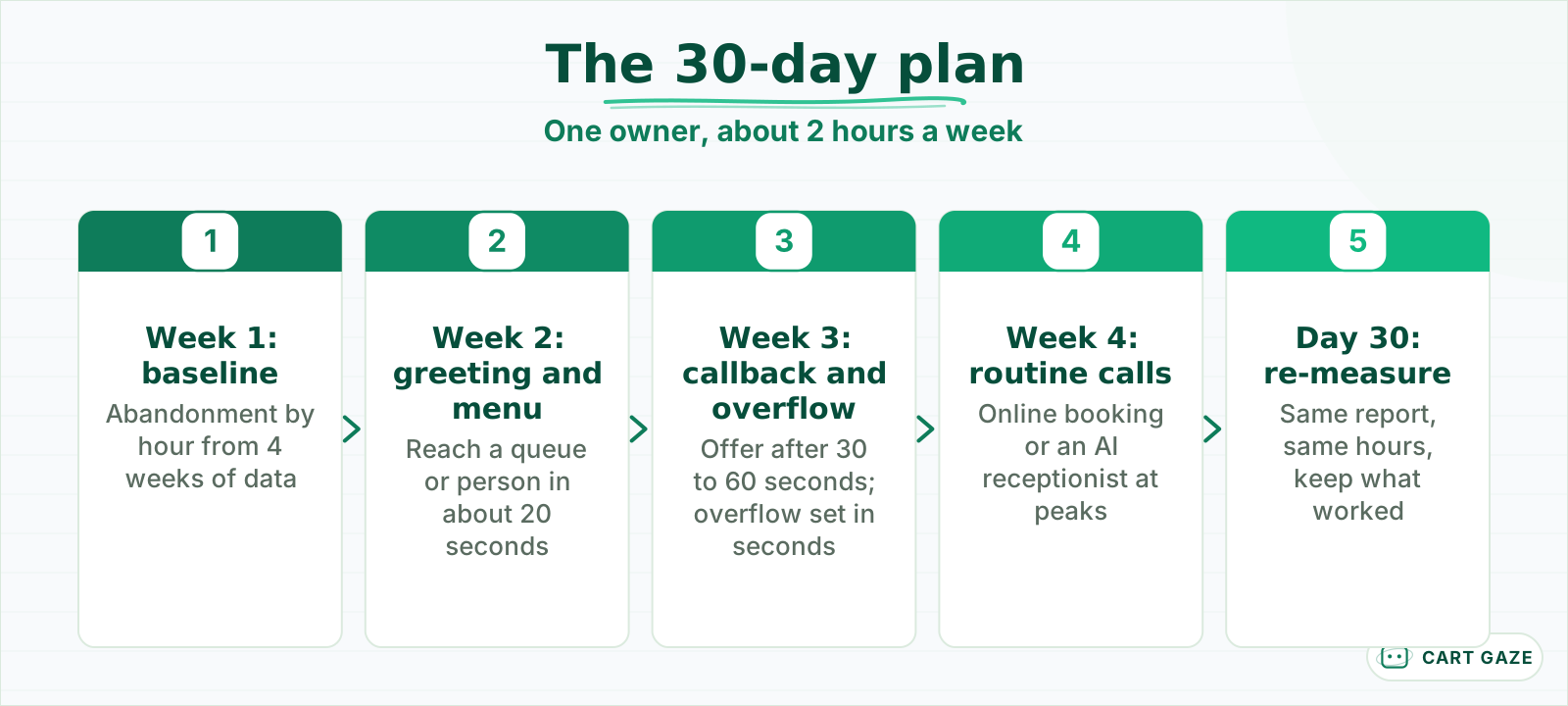 Free fixes first, bigger changes last, and a measured result at the end.
The order matters. Greeting and menu fixes are free and quick, so they go first. Callback and overflow rules are settings in most cloud phone systems, so they come next. Taking routine calls off the queue, through online booking or an AI receptionist, is the biggest change, so it comes last, when you already know how much the first three moved the number.
One owner runs the plan, usually the office manager, with about 2 hours a week. Make one change at a time within each week and write down the date of every change, so the week 4 and day 30 numbers can be read against them.
Keep the promise modest. The goal is a lower abandonment rate in the hours where it was worst, not a perfect number. A practice that halves abandonment at 8 a.m. and leaves the rest alone has done most of the useful work.
Week 1: measure the baseline by hour
In week 1, pull 4 weeks of queue data and compute abandonment by hour and weekday: abandoned calls divided by calls offered, with your system's definitions written down. Find the two or three hours where abandonment is worst. Those hours, not the daily average, are what the plan targets.
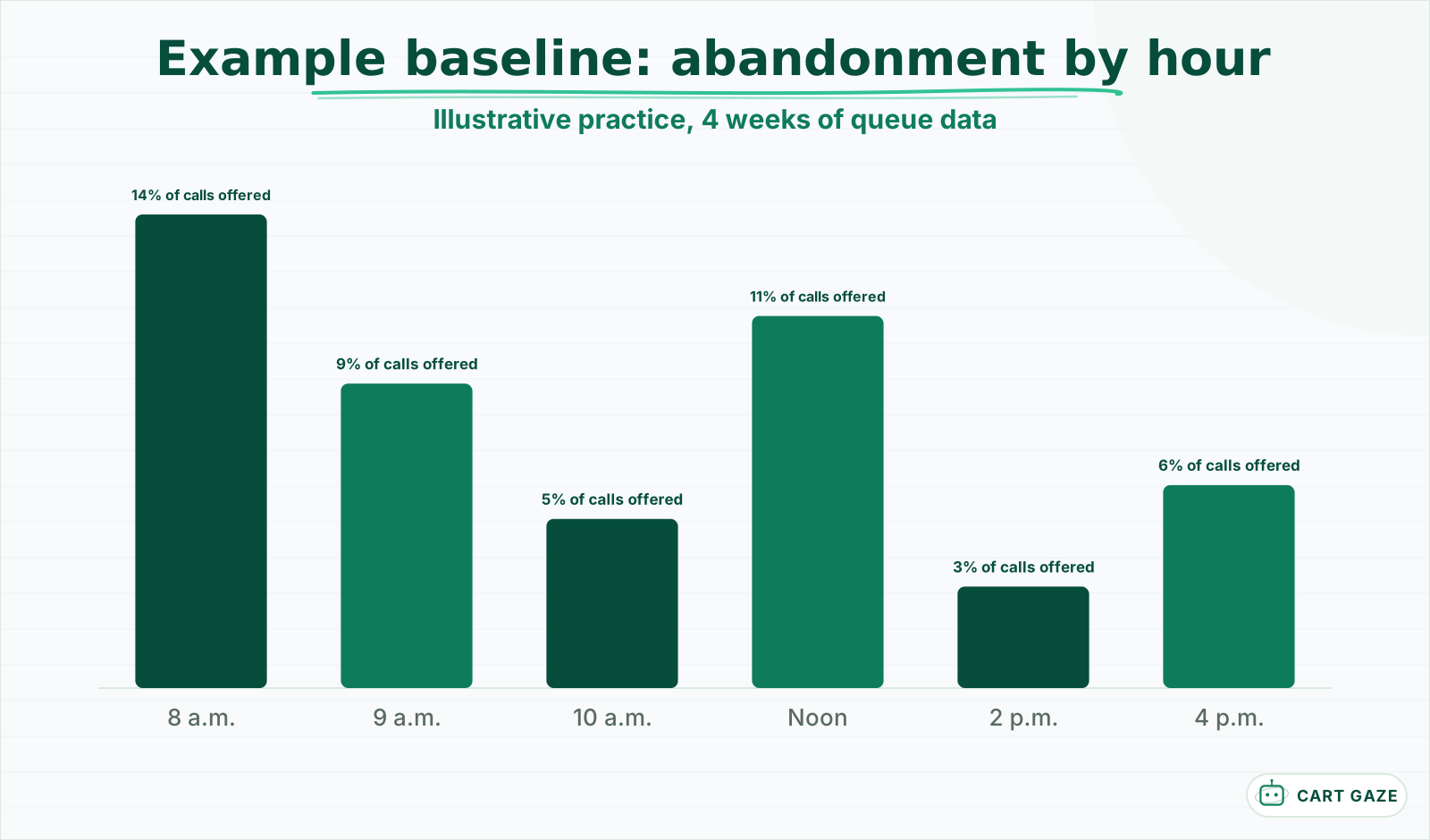 An example baseline, not a benchmark. Your own report decides the target hours.
In the example chart, 8 a.m. at 14% and noon at 11% would be the targets; 9 a.m. at 9% is next in line, and 10 a.m. at 5%, 2 p.m. at 3% and 4 p.m. at 6% can wait. Your own chart will look different, but the pattern of two or three bad hours is common.
Use the queue or call-flow report, not per-user missed calls, since a call that rang several phones may be counted once per phone. Write down how your system defines abandoned: some count only calls that waited in a queue and hung up; others include calls that rang out to voicemail.
Record three numbers for each target hour: calls offered, abandonment rate, and average wait before abandoning. The last one tells you where callers give up. If most abandoned callers leave within 30 seconds, the problem is the greeting and the first ring; if they leave after 2 minutes, it is the wait.
While you are in the reports, note how many calls reach voicemail during open hours. Every one of them is a caller the desk could not answer, and some of those callers will not leave a message. What each missed call is worth in revenue is set out in the real cost of missed calls.
Week 2: fix greetings and menus
In week 2, shorten the greeting, move the emergency instruction to the front, and cut the phone menu to the fewest options callers actually use. Long greetings and deep menus add seconds before a caller reaches a person or a queue, and callers abandon during them without ever showing up as "waiting."
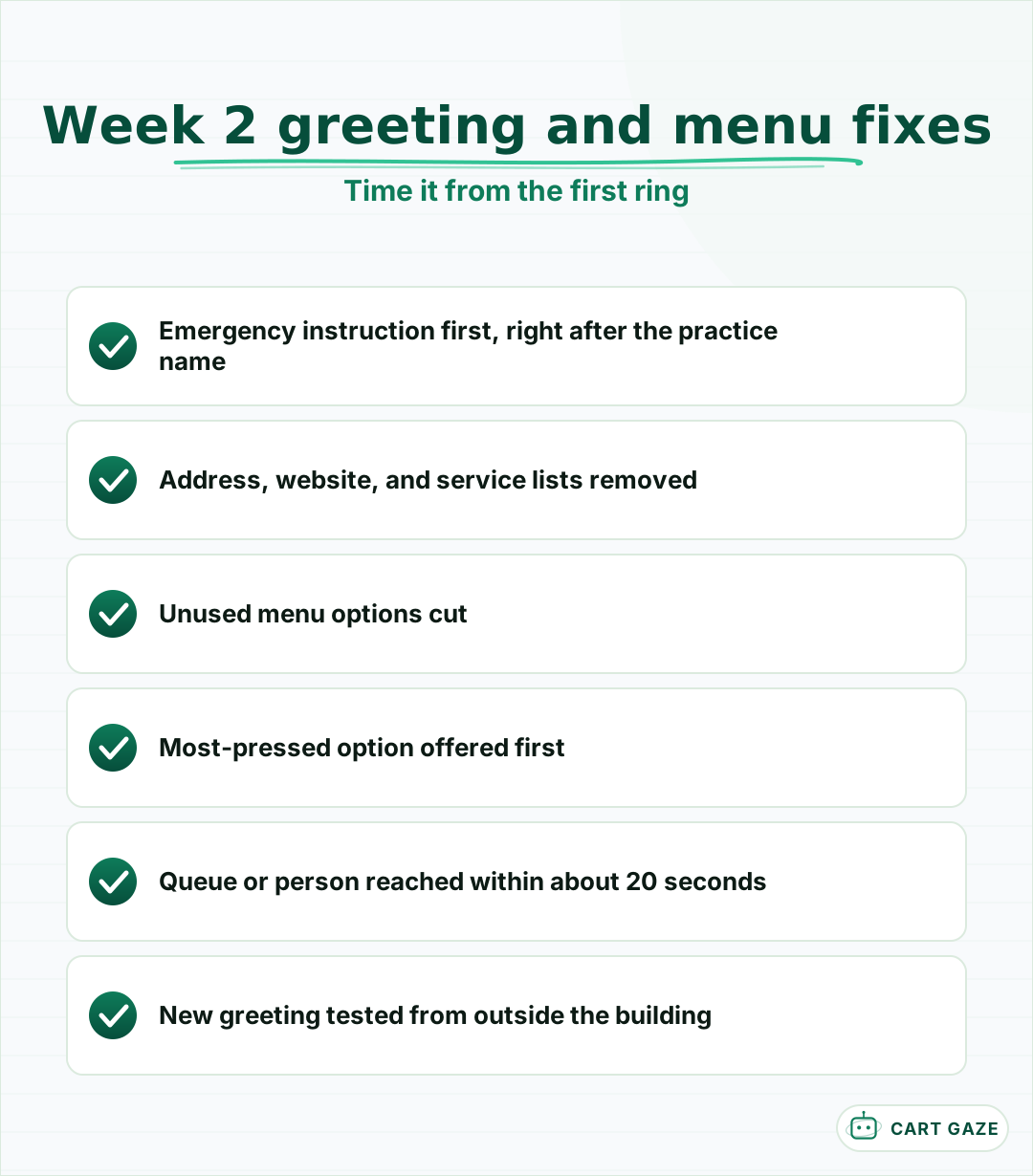 Free, fast, and measurable within a week.
Time your current greeting and menu from the first ring to the moment a caller reaches a queue or a person. If it is more than about 20 seconds, trim it. Remove anything patients do not need on every call: the address, the website, a list of services, and marketing messages.
Look at the menu options callers actually press. Many phone systems report this. Options almost nobody uses can go; options most callers press should come first. Phone trees that route perfectly into a dead end are their own problem, covered in why medical office phone trees fail.
Test the new greeting from outside the building before the end of the week, and record the date the change went live.
Week 3: add a callback offer and an overflow rule
In week 3, add two settings: a callback offer for callers who have waited past a set time, and an overflow rule that sends calls somewhere useful when the desk is saturated. Both target the long waits and ring-outs in your worst hours, and both are available in most cloud phone systems.
The callback offer keeps a caller's place in line without keeping them on the phone. Offer it after 30 to 60 seconds of waiting, promise a specific window such as "within 2 hours," and give one person the callback queue in set blocks so the promises are kept. A callback that never happens is a missed call with a worse story.
The overflow rule decides where the next call goes when everyone is busy. Set it in seconds rather than rings: a traditional US ring cycle is about 6 seconds, so 3 rings is roughly 18 seconds. Send overflow to a trained backup, a queue, or an answer that can book, never straight to voicemail.
While callers wait, tell them something useful. If your system can announce the expected wait or their place in line, turn it on; callers tolerate a known wait better than an open-ended one. Replace a repeating "your call is important to us" loop with the callback offer and one line on booking online, so the hold message gives callers a way out instead of a reason to hang up.
Tip
Return callbacks from the main practice number, not a staff mobile. A callback from an unfamiliar number is easy for a patient to ignore, and the promise is only kept if they pick up.
Week 4: take routine calls off the queue
In week 4, reduce the number of calls competing for the desk in your worst hours. Routine requests, such as booking, rescheduling, hours and directions, can go to online booking, a text-back link, or an AI receptionist that answers and completes them. The calls left for staff are fewer and need a person.
This is the step that changes the arithmetic. Weeks 2 and 3 help callers wait better; week 4 reduces how many are waiting at all. If a third of the calls at 8 a.m. are routine and something else completes them, the desk has a third more capacity at the hour it needs it most.
An AI receptionist is one way to do it. It answers on the first ring, books into the real schedule, and passes anything else to staff with the reason attached. It must route every clinical, urgent, or distressed caller to a person and never assess symptoms or give medical advice, and because it hears PHI, the vendor must sign a BAA. What it does and where it stops is set out in what an AI receptionist does and where it hands off.
Online booking helps only if callers know it exists. Mention it once in the greeting, add it to the callback offer, and send a booking link by text to callers who hang up during business hours, if they have agreed to texts. Then watch the share of new bookings made online; it is the clearest sign that routine calls are leaving the queue.
Start it on the worst hours or on overflow only, so you can compare those hours before and after without changing the rest of the day.
Before you call the 30 days done
- The baseline and day 30 numbers use the same report and definitions.
- Every change has a date written against it.
- The callback queue has an owner and a kept window.
- Clinical calls reach a person in every route you changed.
Day 30: re-measure and decide what stays
On day 30, pull the same report for the same hours and compare abandonment with the week 1 baseline. Keep the changes that moved it, adjust the ones that did not, and set the next target hour. Then schedule the same check monthly, because routing drifts as staff and hours change.
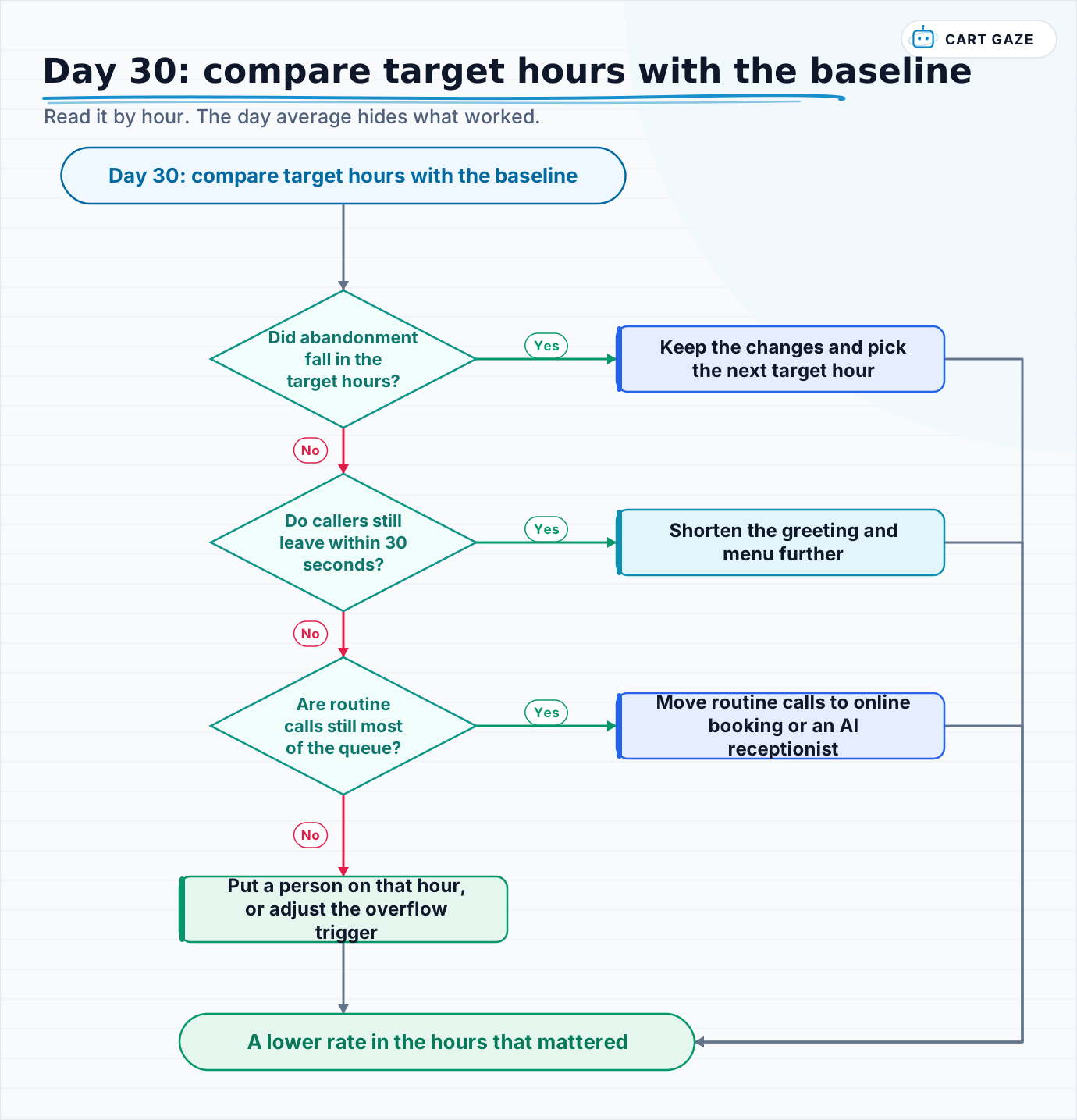 Read it by hour. The day average hides what worked.
Keep a simple change log through the month, so the day 30 comparison reads against what actually changed.
| Week | Change | Target hours | Compare on day 30 |
|---|---|---|---|
| 2 | Shorter greeting and menu | All hours | Abandons within 30 seconds |
| 3 | Callback offer | Worst 2 or 3 hours | Abandons after 60 seconds, callbacks kept |
| 3 | Overflow rule | Peak hours | Calls ringing out or reaching voicemail |
| 4 | Routine calls off the queue | Worst hours | Calls offered to the desk, online bookings |
Read the results by hour, not by day. If 8 a.m. abandonment fell and 1 p.m. did not change, the week 3 settings may need a different trigger after lunch, or the post-lunch hour may need a person rather than a rule.
Be honest about seasonality. A month that included a holiday week or a flu surge is not a clean comparison, so note anything unusual next to the day 30 numbers.
Keep abandonment down after day 30
Keep the gains with a monthly check of the same report, a re-run of the plan whenever hours or staffing change, and a short monthly test call from outside. Routing drifts quietly: a new hire is missing from a ring group, a holiday schedule never switches back, and the old rate returns.
Share the numbers with the desk. The people answering the phones usually know why a particular hour went badly, and a monthly two-minute look at the chart together turns the plan into their plan rather than the manager's.
Re-run the full 30 days after any change that reshapes the phones: new hours, a new provider, a new phone system, or a new answering arrangement. Each can move the worst hours somewhere new, and the first week's baseline is how you find them again.
To see what a finished build looks like when a plan like this ends in new phone coverage, what a live build actually looked like walks through one.
Fair questions.
How can a medical practice reduce call abandonment?
Work in order of cost. Measure abandonment by hour to find the worst hours. Shorten the greeting and phone menu. Add a callback offer for callers who have waited and an overflow rule for when the desk is saturated. Then move routine calls, such as booking and rescheduling, to online booking or an AI receptionist.
How do I measure call abandonment at my practice?
Use your phone system queue or call-flow report. Divide abandoned calls by calls offered, by hour and weekday, over at least 4 weeks, and write down how your system defines abandoned. Record the average wait before abandoning too: callers leaving within 30 seconds point to the greeting, while those leaving after 2 minutes point to the wait.
Does a callback option reduce call abandonment?
It helps callers who would otherwise hang up during a long wait, because they keep their place without staying on the line. It only works if callbacks are returned inside a promised window, from the main practice number, by a named person working the queue in set blocks. Offer it after 30 to 60 seconds of waiting.
How long should a practice phone greeting be?
Short enough that callers reach a queue or a person within about 20 seconds of the first ring, including any menu. Put the emergency instruction first, then the fewest options callers actually use. Leave out the address, the website, and service lists, which callers can find elsewhere and which delay every call.
Can an AI receptionist lower call abandonment?
It can reduce how many calls wait in the queue by answering routine calls on the first ring and completing them, such as bookings and reschedules. That leaves the desk more capacity at peak hours. It must route clinical or urgent callers to a person and never assess symptoms, and the vendor must sign a BAA.
Sources.
Written by

Muhammad Qasim Hammad
Founder, Cart Gaze
Qasim builds AI receptionists and front-office automation for medical and dental practices at Cart Gaze. Posts here start from published sources and real call data, not vendor claims, and every number links back to where it came from.
Keep reading.
 Practice Automation PlaybooksMedical Practice Phone System Audit: A 30-Day Guide10 min read
 Practice Automation PlaybooksClinic Phone Coverage Plan: A Five-Phase Playbook for Practices10 min read
 Practice Automation PlaybooksFront Desk SOP Template: A Five-Step Guide for Medical Practices10 min read
 Practice Automation PlaybooksHuman in the Loop AI Approvals: What to Gate and What to Let Run11 min read
 Practice Automation PlaybooksAI Agent Orchestration Rules That Stop Automations Colliding12 min read
 Practice Automation PlaybooksFront Desk AI Training: The Conversation Practices Skip10 min read