
Holiday Closure Communication: Keep Patients From a Locked Door
Patients calling a closed practice need three things: when you reopen, what to do if it is urgent, and how to rebook, especially if their appointment falls inside the closure.
Key takeaways.
- Practices typically observe 6 to 10 paid holidays a year, plus staff CME days and vacations, so closure exposure adds up to more days than most owners count.
- A holiday or CE-day closure is a multi-day, calendar-driven event, not just a longer version of nightly after-hours coverage, so it needs its own notification and rebooking sequence.
- 90% of patients prefer text for healthcare communication and 84% say a text reminder makes them more likely to attend, so closure alerts should ride the same channel as reminders.
- Appointments that land inside a closure window do not cancel themselves; they need a proactive rebooking outreach before the closure starts, or they quietly become a no-show.
- 75% of patients say online rescheduling access would help them attend more appointments, and 42% of practices now charge a no-show fee, so an unmoved appointment carries a real cost.
Table of Contents8 sections
- Why a holiday closure is a different problem than after-hours coverage
- What patients need to hear when they call during a closure
- Warn patients before you close: text, email, hold message, and the website
- What an AI receptionist or auto-attendant should do during a closure
- The appointment nobody moved: what happens when a booking lands on a closure day
- Building the seasonal closure calendar before the year gets away from you
- Turn closures into a non-event for patients
- Fair questions
A patient calls the office the Wednesday before Thanksgiving, gets a beep, and has no idea if the practice is closed for the day or the whole week. Most practices close for something like 6 to 10 paid holidays a year, and that is before staff vacations, a CE day, or a weather closure gets added on top.
The usual fix, a "we're closed" voicemail, answers exactly one question and ignores the two that matter more: what should this caller do if it's urgent, and what happens to the appointment they already booked for the day the office is dark. Neither gets solved by a nicer recording.
This post covers three things in order: what to tell patients before you close, what an AI receptionist or auto-attendant should say and do while you're closed, and how to catch the appointments that land squarely on a closure day before the patient finds out by driving to a locked door.
Why a holiday closure is a different problem than after-hours coverage
A holiday closure is not just a longer version of a slow Tuesday night. After-hours coverage runs on a nightly, predictable clock; a holiday or CE-day closure is a multi-day, calendar-driven event that has to be planned, staffed down, and reopened on a schedule, with its own notification and rebooking sequence.
That distinction matters because the fix is different too. After-hours call handling is about routing tonight's calls to the right coverage every single night. A holiday closure needs a plan that switches on for a defined window, says the same thing everywhere a patient looks, and switches back off cleanly when the doors reopen.
Most practices carry more closure exposure than they count. Practices typically observe 6 to 10 paid holidays a year, and physicians take an average of about 6 CME days a year on top of that, sometimes far more at academic institutions. Add a staff retreat or a weather day and a single-location practice can be closed, in whole or in part, on 15 to 20 days across a year without anyone treating it as one problem.
Three jobs make up that one problem: warn patients before the closure happens, answer correctly while it's happening, and catch the appointments that land inside the window before the patient shows up to nothing.
What patients need to hear when they call during a closure
A closure message that only says "we're closed" answers nothing useful. A message that works states the exact reopening date, gives a real path for anything urgent, and offers a way to reschedule immediately, by text or link, rather than promising a callback the caller has no reason to trust yet.
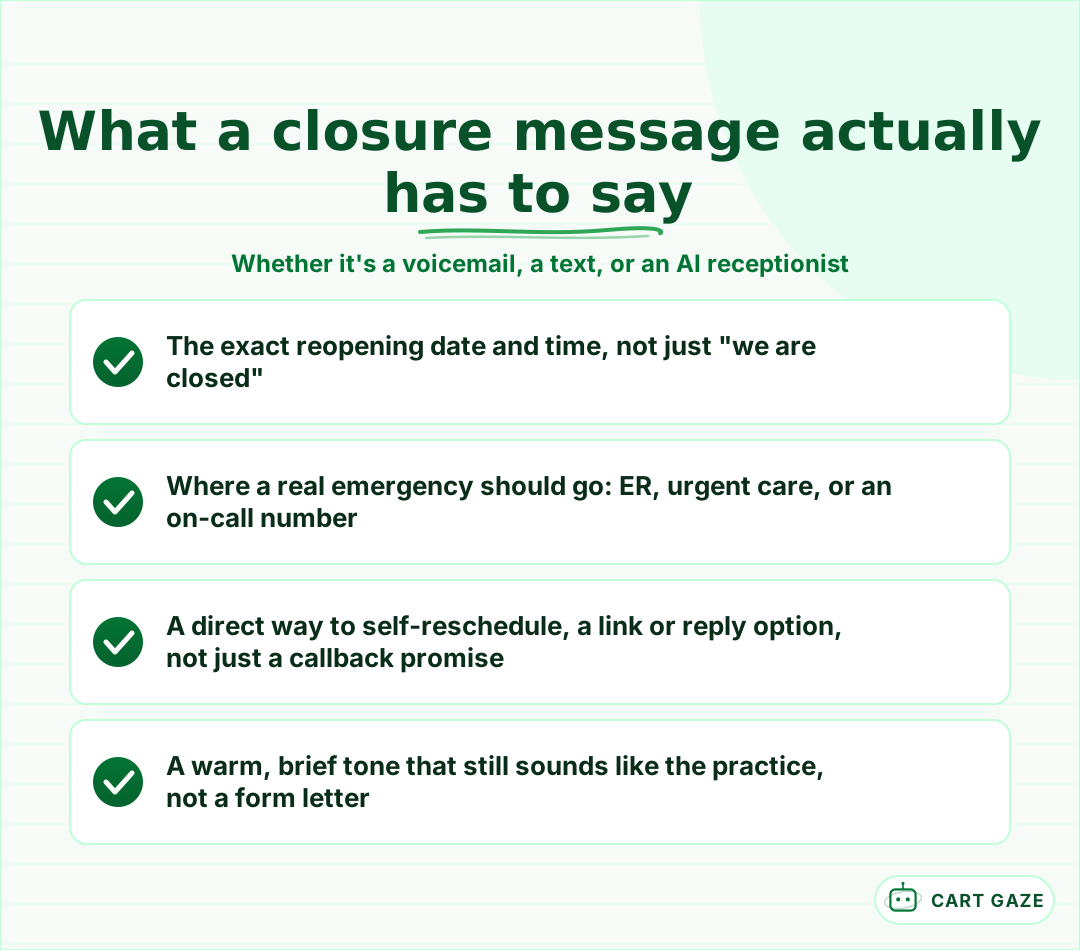 A we're closed recording answers nothing. These four lines do.
A workable pattern gets close to right with four lines: name the practice, give the exact closed dates and the reopening date, name where a real emergency should go, whether that's the ER or an on-call number, and close with something that still sounds like a person wrote it, not a form letter.
A message can hit every one of those points and still fail if nobody can act on it. If the only next step is "leave a message and we'll call you back," a patient who needed to move Thursday's appointment has no way to know if that will happen before the practice reopens. The message needs an action attached to it, not just information.
Warn patients before you close: text, email, hold message, and the website
Patients should hear about a closure more than once and through more than one channel, because a single email sent three weeks out gets buried. Text, email, the on-hold or voicemail message, and a website banner each do a different job, and layering them, not picking one, is what keeps a caller from being surprised.
| Channel | Send it | What it should say | Reaches |
|---|---|---|---|
| Text | About 1 month out, then 2-3 days before | Closed dates, reopening date, rebooking link | Patients who opted in to SMS |
| About 1 month out | Full details plus what to do if urgent | Your full patient list | |
| On-hold / voicemail message | Live from the day you record it | Reopening date and emergency redirect | Anyone who calls during the window |
| Website banner | Live from the day you post it | Reopening date and a rebooking link | Anyone who checks before calling |
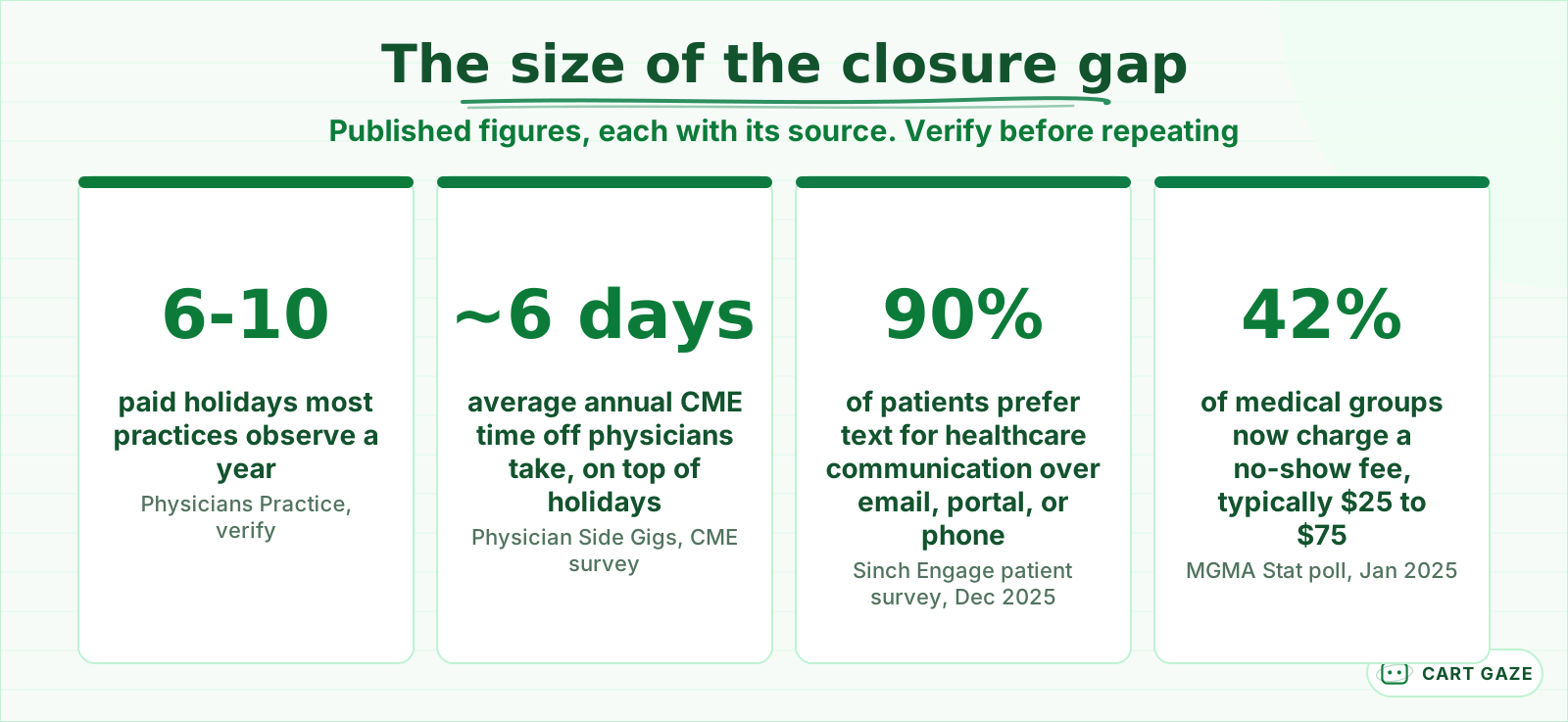 Published figures, each sourced. Reasons to plan the calendar, not a target.
General holiday-prep guidance recommends starting the notice about a month out, then repeating it closer to the date, since one message alone is easy to miss. The channel choice is not a coin flip either: 90% of patients say they prefer text for healthcare communication over email, a patient portal, or a phone call, and 84% say they are more likely to show up to an appointment after getting a text reminder, according to a survey of 1,000 U.S. patients run by Sinch Engage in December 2025. A closure notice should ride the same channel patients already trust for reminders.
Tip
Reuse the reminder channel a patient already engages with for the closure notice itself. A text sent from the same number that sends appointment reminders gets opened; a one-off email from a new address is easy to miss or mark as spam.
What an AI receptionist or auto-attendant should do during a closure
During the closure itself, whatever answers the phone, human, voicemail, or an AI receptionist, has three jobs and no others: state the reopening date, redirect anything that sounds urgent to a real emergency path, and offer self-service rebooking on the spot rather than only taking a message for later.
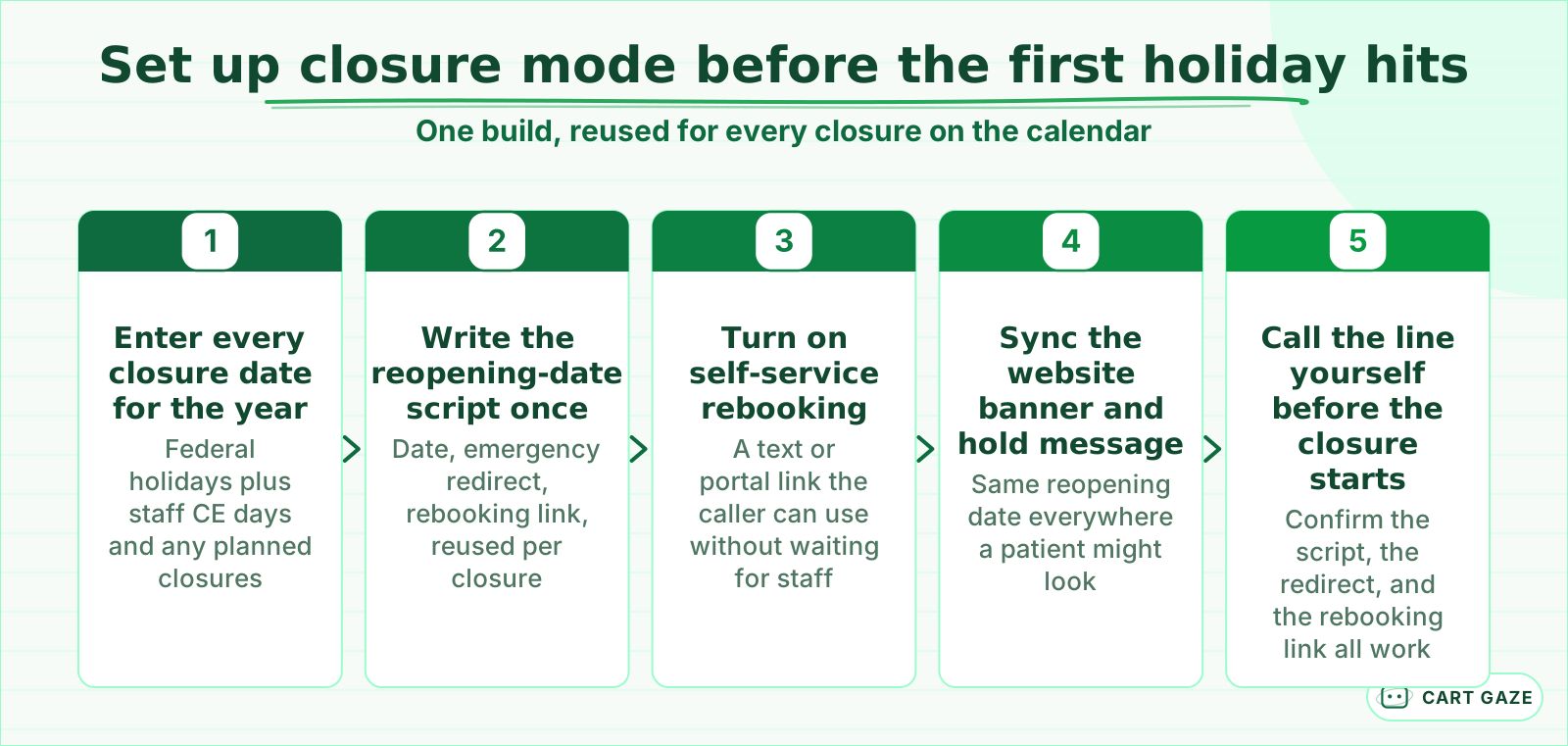 Built once per season, reused for every closure on the calendar.
Configuring that is a one-time build, not a per-holiday scramble. Enter every closure date for the year at once, write the reopening-date script a single time so it can be reused across Thanksgiving, Christmas, and any CE day, and turn on a rebooking link the caller can use without waiting on hold. Sync the same reopening date to the website banner and the hold message so nobody hears two different answers.
One vendor's holiday out-of-office feature adds a detail worth copying: any automated reminder that would normally land on the holiday itself gets pushed a day earlier instead, so the patient still gets it before the office goes quiet.
Warning
An automated closure message must never try to judge how urgent a symptom is. Its job is recognition and redirection: get anything that sounds serious to a real emergency line, an on-call number, or the ER, immediately. That boundary does not change just because the office happens to be closed.
The appointment nobody moved: what happens when a booking lands on a closure day
A patient with a Thursday appointment does not know their slot is a ghost until they drive to a locked door, because a closure on the schedule does not automatically clear the booking. Every appointment scheduled inside a closure window needs a proactive rebooking outreach before the closure starts, not a note left for after.
The practical fix, borrowed from a workflow that practice-management systems already support, is straightforward: pull every appointment scheduled inside the closure window onto a separate list before the closure starts, then work that list to a new date one by one. In one common dental practice-management setup, that means moving each affected appointment to a wait-list status so it lands on an unscheduled list, sorted by the original date, with the patient's phone number already attached.
Give that list a way to reschedule itself, not just a callback number. 75% of patients say access to online rescheduling would help them make it to more appointments, which is the case for a direct link over a message that depends on staff calling back before the closure begins.
Important
Closing a date in the scheduling system without notifying the patient does not cancel the appointment, it just turns a plannable closure into an unplanned no-show. That gap has a real cost: 42% of medical groups now charge a no-show fee, typically $25 to $75, so an unmoved appointment can cost the patient money on top of the wasted trip.
Before the closure-day list goes to zero
- Every appointment inside the closure window is pulled onto its own list, not left on the regular schedule.
- Each patient on that list gets a direct rebooking link or text, not only a phone number to call back.
- The outreach goes out before the closure starts, with enough lead time to actually land a new slot.
- Someone confirms the list is empty the morning the closure begins, not after the first missed visit.
Building the seasonal closure calendar before the year gets away from you
The fix that makes every other step easy is boring: one running calendar of every closure a practice expects, federal holidays, staff CE or CME days, planned retreats, and a placeholder for weather days, locked in 60 to 90 days ahead so the notification and rebooking sequence trigger automatically instead of getting rebuilt by hand.
A calendar without a trigger is just a list. Once the dates exist in one place, the pre-closure notification sequence, the closure-day rebooking sweep, and any script update for the phone line can all fire off the same dates instead of depending on someone remembering three weeks out.
The same calendar also covers the closures nobody plans for. A snow day or a burst pipe does not come with 60 days of notice, but the script, the emergency redirect, and the rebooking link are already built. Only the trigger date changes, which is the point of building this once instead of scrambling every time.
Turn closures into a non-event for patients
The plan comes down to three moving parts working off one calendar: warn patients early and on more than one channel, give whoever answers during the closure a script that states the date, redirects real emergencies, and offers rebooking, and sweep the schedule for appointments trapped inside the window before the doors actually close.
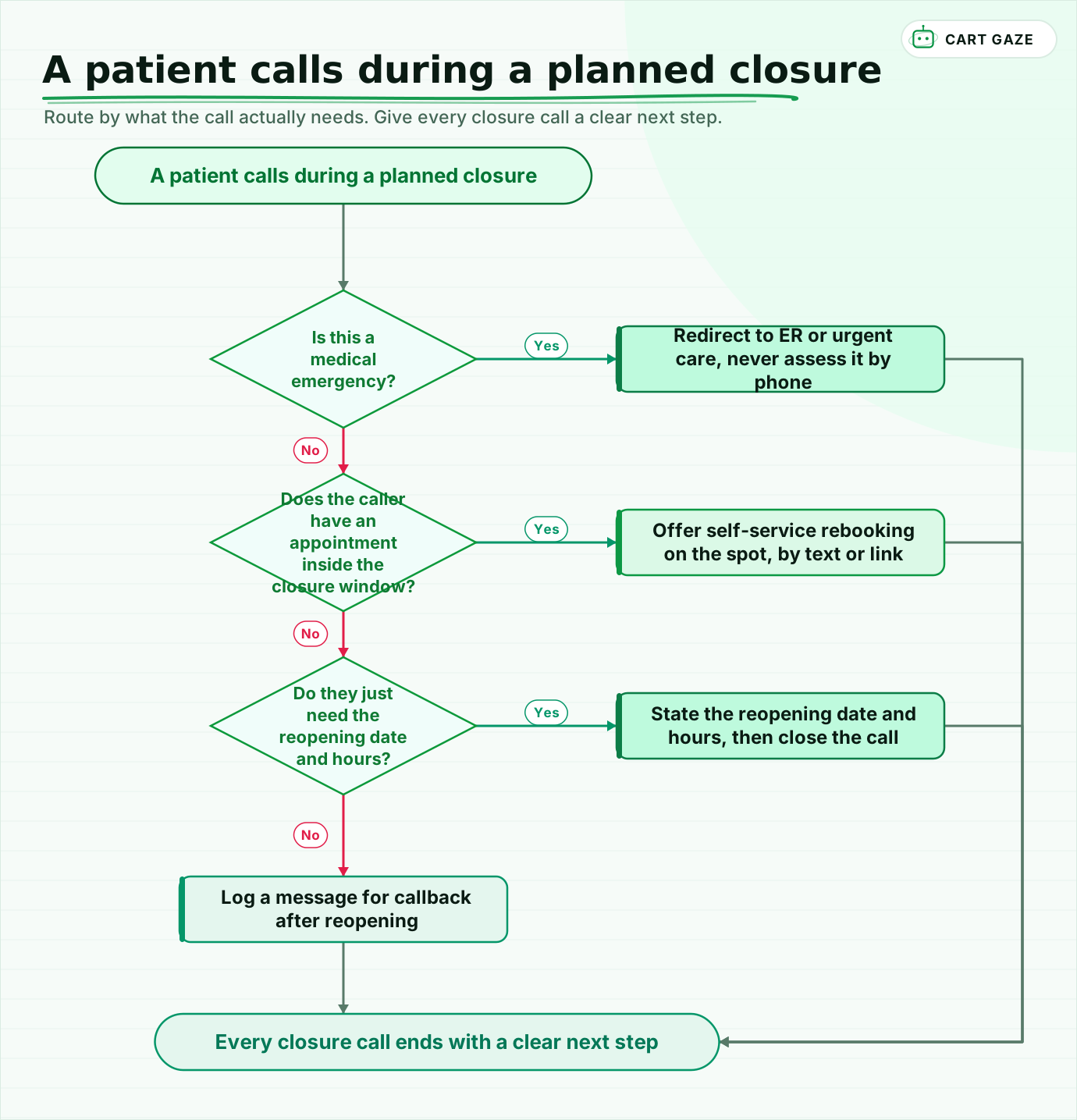 Route by what the call actually needs. Give every closure call a clear next step.
Walk the flow once. A caller with an actual emergency goes straight to a redirect, never an automated assessment. A caller with an appointment inside the closure window gets rebooking offered immediately, not a promise to call back. A caller who just needs the reopening date gets it and the call ends cleanly. Everything else becomes a logged message for the morning you reopen.
Pilot the sequence on the next closure already on your calendar. Read the first batch of closure-window calls or texts, and confirm the rebooking list actually reaches zero before the doors close, not after the first no-show shows you it didn't. For the mechanics of the reminder and rebooking sequence the rest of the year, see AI appointment scheduling and reminders. For the broader picture of what an AI receptionist should and shouldn't do, start with what an AI receptionist does and where it stops.
Whatever you build, size it against your own numbers first. The free Growth Leak Audit can show how much a poorly handled closure window is actually costing in missed bookings before you build anything.
Fair questions.
What should a holiday closure message tell patients?
A closure message needs four things: the exact reopening date, not just "we are closed," where a real emergency should go such as the ER or an on-call number, a direct way to self-reschedule like a text or link, and a tone that still sounds like the practice. A message with information but no action attached still fails a patient who needs to move an appointment.
How is a holiday closure different from after-hours call coverage?
After-hours coverage runs on a nightly, predictable clock and answers routine calls every evening. A holiday or CE-day closure is a multi-day, calendar-driven event that has to be planned, staffed down, and reopened on a schedule, with its own notification sequence and a separate sweep for appointments that land inside the closed dates.
What happens to an appointment scheduled on a closure day?
It does not cancel itself. Closing a date in the scheduling system without notifying the patient just turns a plannable closure into an unplanned no-show. The fix is to pull every appointment inside the closure window onto its own list before the closure starts and rebook each one, ideally with a direct link rather than only a callback number.
Which channel works best for a holiday closure notice?
90% of patients say they prefer text for healthcare communication over email, a patient portal, or a phone call, and 84% say a text reminder makes them more likely to attend an appointment. A closure notice should still be layered across text, email, the on-hold or voicemail message, and a website banner, since one channel alone is easy to miss.
Can an AI receptionist handle calls during a holiday closure?
For routine questions, yes: it can state the reopening date and offer self-service rebooking around the clock. It must never try to judge how urgent a symptom sounds. The safe rule is recognition and redirection, so anything that sounds serious goes straight to a real emergency line, an on-call number, or the ER, closure or not.
Sources.
- [1]Why Missed Calls Hurt Medical Offices, and How to Prevent Them
- [2]Creating a Medical Practice Holiday Policy: What to Include
- [3]Average Annual Continuing Medical Education (CME) Allowance and Days
- [4]Patient no-shows in 2025: what is changing and what to do about it
- [5]No-show fees in medical practices on the rise to balance bumpy attendance rates
- [6]Write the best no-show policy for your practice (and patients)
- [7]The State of Patient Communication in 2026
- [8]Reach patients with a holiday out-of-office message
- [9]Rescheduling Appointments Due to Office Closures
- [10]Four Tips for Preparing Your Medical Office for Holiday Hours
Written by

Muhammad Qasim Hammad
Founder, Cart Gaze
Qasim builds AI receptionists and front-office automation for medical and dental practices at Cart Gaze. Posts here start from published sources and real call data, not vendor claims, and every number links back to where it came from.
Keep reading.
 No-Shows & Follow-UpThe Intake Form Completion Chase: Paperwork Done Before Arrival11 min read
 No-Shows & Follow-UpAI Appointment Rescheduling: Make Cancelling Easy On Purpose12 min read
 No-Shows & Follow-UpThe New Patient Welcome Sequence That Gets Them Through9 min read
 No-Shows & Follow-UpNo-Show Prediction: Spot High-Risk Visits Before They Happen10 min read
 No-Shows & Follow-UpPatient Review Automation: Automate the Ask, Not the Reply9 min read
 No-Shows & Follow-UpReduce Patient No-Shows: The Reminder Playbook That Actually Works11 min read