
AI Appointment Scheduling That Books 24/7 and Cuts No-Shows
AI appointment scheduling books routine visits by phone and online around the clock, then sends the reminders that keep them. Here is how it fills the calendar, how PMS sync really works, and where it must stop.
Key takeaways.
- AI appointment scheduling answers by phone, chat, and text 24/7, offers real open slots, and writes the confirmed visit into your calendar, so bookings stop dying in voicemail.
- Phone-only booking leaks badly: about 23% of practice calls go unanswered, roughly 60% of patients hang up after 1 minute on hold, and close to 40% of bookings happen after hours.
- Reminders reduce but never eliminate no-shows: a BMJ Open meta-analysis found patients 25% less likely to no-show, 15% versus 21%, and two-way confirmations beat one-way blasts.
- Integration depth decides everything: real-time two-way PMS sync prevents double-booking, while a shallow request-only hookup still needs staff to confirm each appointment.
- AI books routine slots and sends reminders, but it must route clinical questions to a human, never triage, and any patient detail it handles needs a signed BAA.
Table of Contents7 sections
Your schedule has open slots this week, and your phone rang out to voicemail a dozen times yesterday. Those two facts are the same problem. About 23% of calls to medical practices go unanswered, and a booking that lands in voicemail at 6 p.m. rarely calls back the next morning. It books with whoever picked up.
AI appointment scheduling closes that gap on the front end, and appointment reminders close it on the back end. The software answers the phone or the text, offers a real open slot, writes the visit into your calendar around the clock, and then nudges the patient so they actually arrive. Roughly 40% of bookings now happen after hours, so a system that never sleeps is not a luxury for most practices anymore.
This guide covers what AI scheduling really books, what reminders do and do not do to no-shows, whether any of it will sync with your PMS without creating double-bookings, and the clinical line it must never cross. Every number here is either sourced or reproducible from stated assumptions.
Why phone-only scheduling quietly leaks appointments
Phone-only booking leaks patients at every step. A caller who cannot get through, waits on hold, or hits voicemail is a booking you never see. About 23% of practice calls go unanswered, roughly 60% of patients give up after a minute on hold, and most never leave a message, so the slot just stays open.
The leak is worse after hours. Something like 40% of appointments are booked outside business hours, and a large share of those land on a phone that only offers voicemail. That demand is real, and voicemail throws it away. We size that specific window in after-hours call handling, because it needs different coverage than a daytime miss.
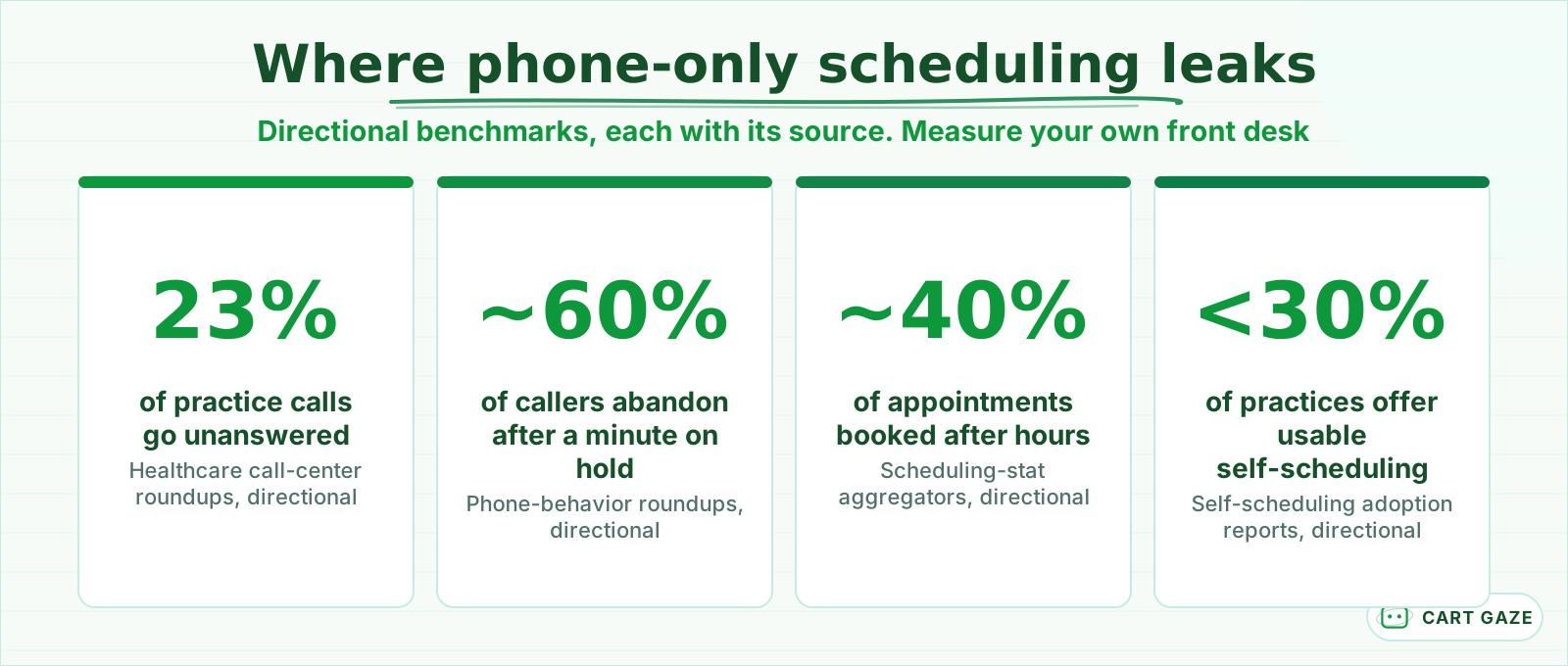 Directional benchmarks, each sourced. Reasons to measure your own front desk, not your result.
Patients also do not try just once. On average a patient makes about 3.5 calls per scheduling need, so a missed call is not a single lost attempt, it is friction that pushes them toward the practice that answered first. And most offices cannot absorb that demand: fewer than 30% offer online self-scheduling in a form patients can actually use.
A midday miss is partly a staffing problem you can hire around. The after-hours and overflow miss is a coverage problem, because no front desk is on the clock at 9 p.m. That is the specific gap AI scheduling is built to close, and it is why so many practices reach for it first.
The money follows the same pattern. A missed new-patient call is worth more than a routine one, often estimated at $200 to $300 in lifetime value walking out the door, and it walks quietly because nobody logs the call that never connected. That is what makes this leak so easy to underfund: you cannot see the patients you never spoke to, so the loss never shows up on a report.
What AI appointment scheduling actually does
AI appointment scheduling answers a patient by phone, web chat, or text, checks your real availability, offers open slots, and writes the confirmed visit into your calendar 24/7. It can reschedule, cancel, take a structured message, and route anything clinical to a human. It handles the routine booking so your front desk does not have to.
The routine work is where it earns its place: new-patient and recall bookings, reschedules, cancellations with waitlist backfill, and the endless hours-and-directions questions that eat your staff's afternoon. None of that needs a nurse, and all of it can happen while the office is dark.
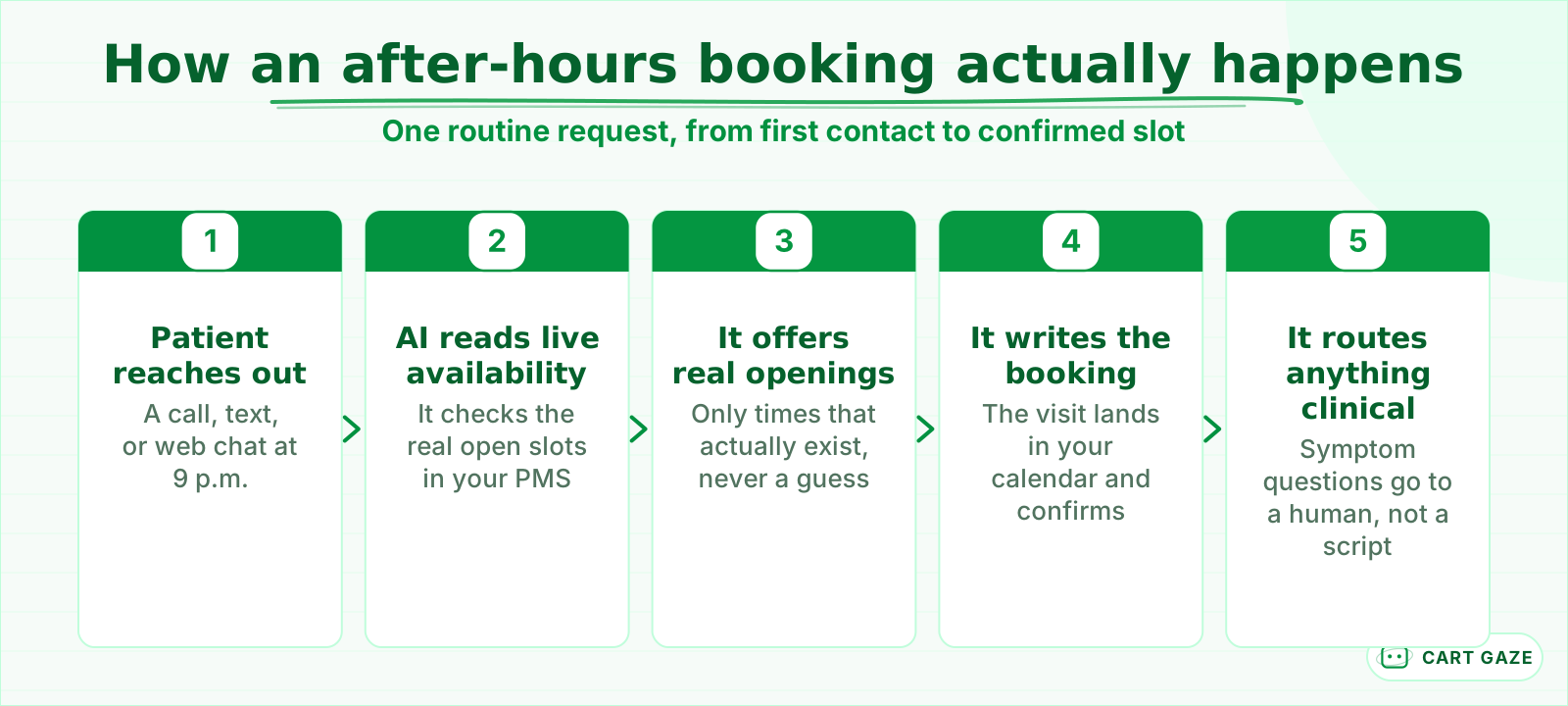 One routine request, start to finish. Only real open slots, never a guess.
Walk one booking. A patient texts at 9 p.m. wanting a cleaning. The system reads your live schedule, offers two real openings, writes the chosen slot into the PMS, and sends a confirmation. If that same patient asks whether a throbbing tooth can wait until then, the system stops and routes the question to a person. If you have never drawn that line before, start with what an AI receptionist does and where it stops so you can tell a real boundary from a sales line.
Tip
Ask a vendor to demo a live reschedule and a cancellation with waitlist backfill, not just a clean new booking. Rescheduling and cancel-with-backfill are where weak integrations quietly fall apart.
Channels matter as much as capability. A good scheduler meets patients where they already are: a click-to-book link on your site, the patient portal, an SMS thread, or the phone line answered by voice AI. The strongest setups also collect the basics before the visit, insurance details and a reason for the appointment, so your front desk starts each day with cleaner intake instead of a stack of callbacks to make.
What reminders and confirmations really do to no-shows
Reminders reduce no-shows, but they do not erase them. They fix forgetting, not intent. A patient who simply forgot will show up once you remind them; a patient blocked by cost, transport, or second thoughts often will not. The honest effect is a real, measurable dent in your rate, not the clean disappearance vendors imply.
The peer-reviewed evidence is consistent. A BMJ Open systematic review and meta-analysis found patients who received electronic notifications were 25% less likely to no-show, 15% versus 21%, and 23% more likely to attend. A separate 2023 review of 10 randomized trials found roughly an 11% relative lift in attendance. Some vendor pages advertise up to 38% fewer no-shows, so treat that as the optimistic ceiling of the range, not the number to plan around.
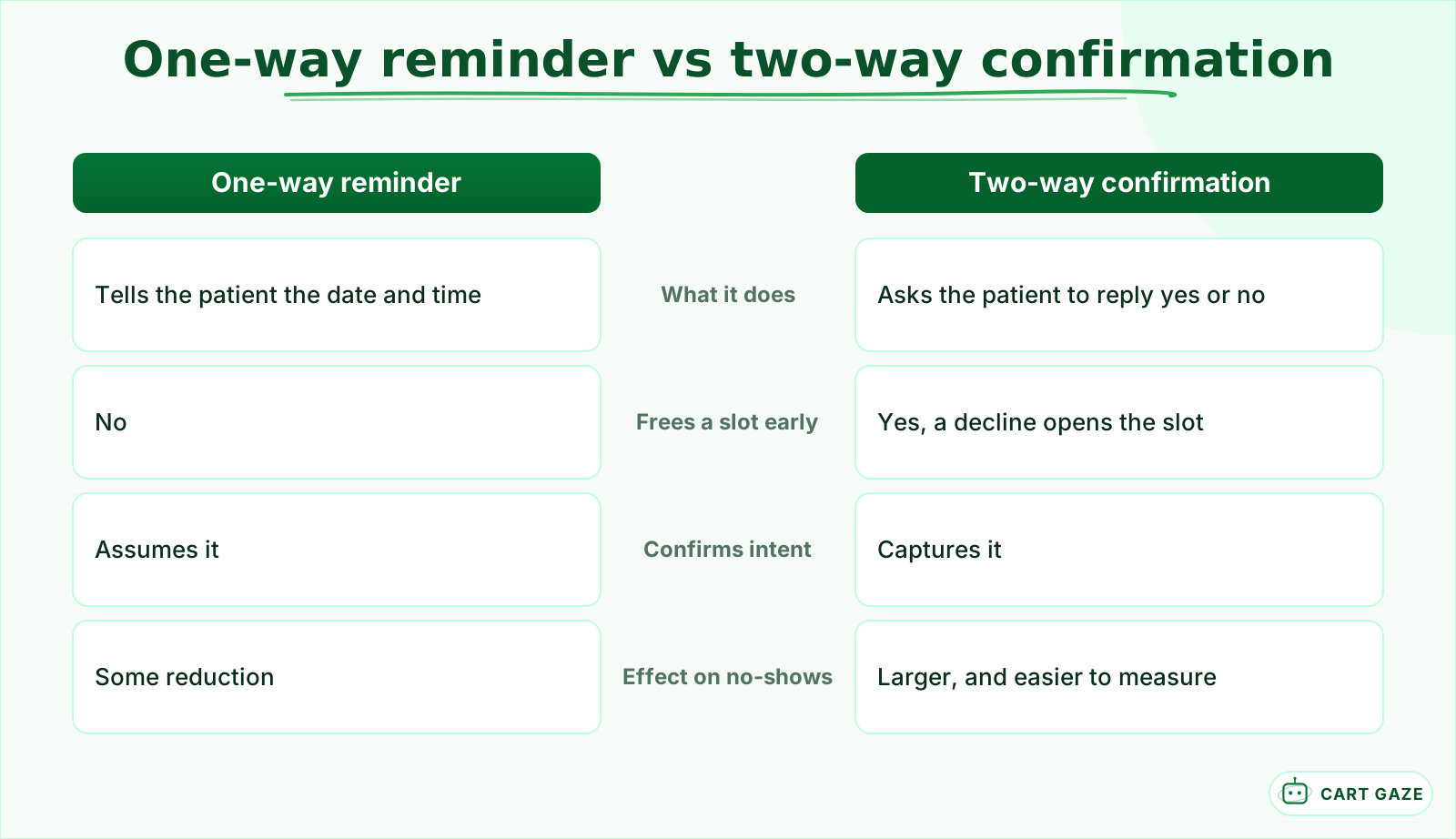 The reply is where the reduction concentrates. A decline frees the slot early.
There are really two messages doing two different jobs. The confirmation at the moment of booking sets the expectation and catches a wrong number early. A reminder a day or two out, then a short nudge a few hours before, is what recovers the patient who genuinely forgot. Sending only the second message is how a lot of practices leave part of the reduction on the table.
The shape of the reminder matters more than the volume. A one-way blast tells the patient something. A two-way confirmation asks them to reply yes or no, and that reply both firms up the booking and frees the slot early when they decline, which is when a waitlist actually earns its keep. Multiple reminders beat a single one. Because a missed visit is commonly pegged near $200 in lost time and capacity, and no-show rates run from about 15% in dentistry to nearly 39% in some sleep and behavioral-health clinics, even a modest reduction compounds across a full schedule. For the full cadence, channels, and how to measure the drop, see reducing patient no-shows.
Will it sync with your PMS or EHR, or just create double-bookings?
It depends entirely on how deep the integration goes. A real-time, two-way sync reads your live availability and writes the booking straight back, which is what actually prevents double-booking. A shallow, one-way or request-only hookup still needs a staff member to retype the appointment, and that lag is exactly where two patients land in one slot.
Most AI schedulers connect through HL7 FHIR or vendor APIs to systems like Epic, athenahealth, eClinicalWorks, and NextGen. Connecting is not the same as syncing in real time. The questions that decide whether it works are boring and specific: does it write back automatically, how fast, and does the reschedule-and-cancel flow update both sides.
| Integration type | What it enables | Double-booking risk |
|---|---|---|
| Real-time two-way sync | Live availability and instant write-back, auto reschedule and cancel | Low |
| Delayed or batched sync | Bookings appear after a lag of minutes to hours | Medium, during the lag |
| One-way or request-only | AI collects the request, staff confirm and enter it by hand | High if staff fall behind |
| No integration | Bookings arrive by email or a separate calendar | Highest, constant manual reconciliation |
Warning
A booking tool that cannot write back to your live schedule in real time will eventually double-book a patient. Confirm two-way sync against your exact PMS version before you go live, not against a generic demo environment.
Integration depth varies more by your PMS than by the AI vendor. Some systems expose a full real-time booking API; others only accept a request that a staff member has to approve, which caps what the automation can safely do on its own. Before you sign, ask the vendor to name practices running your exact system and version, and ask them what happens when two patients request the last open slot at the same second.
Where AI scheduling has to stop
AI scheduling books routine visits and sends reminders. It must not assess symptoms, decide how urgent a problem is, or give medical advice. The safe rule is recognition and redirection, not triage. When a caller describes a clinical concern, the system's only job is to recognize it and route that person to a human, quickly and every time.
That boundary is not a nice-to-have, and it is where the cheapest tools get practices into real trouble.
Important
Any system that touches patient health details is a business associate under HIPAA and needs a signed Business Associate Agreement before it goes live. There is no such thing as a HIPAA-certified scheduler; that phrase is a marketing tell, not a credential.
Practically, that means the scheduling layer can handle names, appointment times, and a reason for the visit inside a BAA, while symptom questions, test results, and anything ambiguous go straight to your staff. Get the escalation path in writing: who receives the handoff, what information travels with it, and how fast a human picks it up.
Before you point patients at an AI scheduler
- A signed BAA is in place before any patient detail reaches the system.
- Two-way sync is confirmed against your actual PMS version, not a demo.
- The clinical escalation path is written down: who is paged, and how fast.
- Someone reviews the first week of bookings and transcripts end to end.
Put it in, then measure what changes
Do not buy on a demo; buy on your own numbers. Before you switch anything on, record your baseline: unanswered calls, after-hours booking attempts, and your no-show rate by visit type. Then turn AI scheduling on for one appointment type, keep a human path for everything clinical, and compare the same numbers after 30 to 60 days.
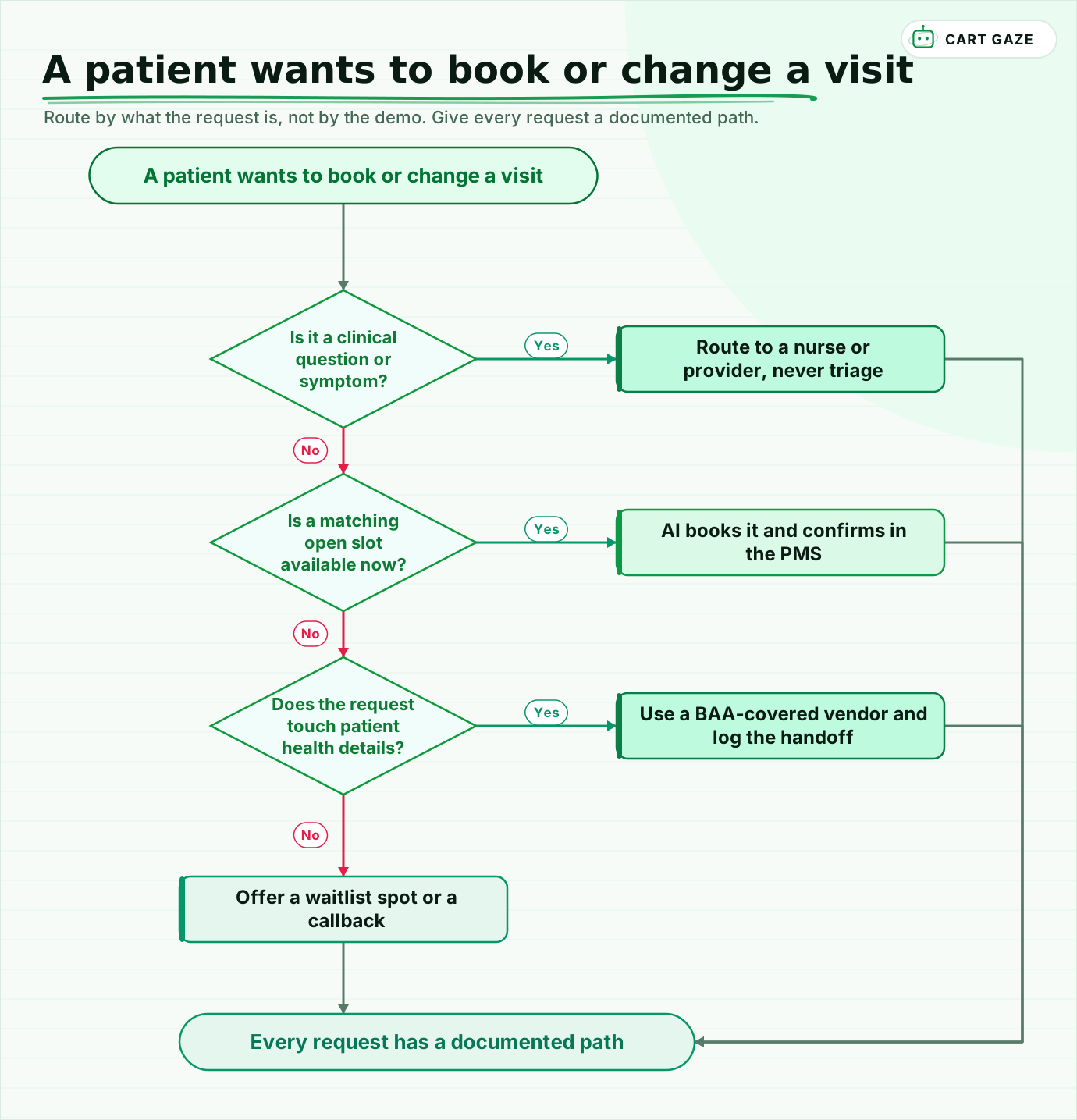 Route by what the request is, not by the demo. Give every request a documented path.
Walk the flow once. A clinical question always goes to a person. A routine request with an open slot gets booked and confirmed on the spot. A request that touches health details needs a BAA-covered vendor and a logged handoff. Anything else can take a waitlist spot or a callback. Every request ends with a documented path, which is the whole point of automating it.
Pick the pilot deliberately. Start with your highest-volume routine visit, a cleaning, a recall, or a simple follow-up, where a wrong booking is cheap to fix and easy to spot. Keep every clinical and new-complaint call on the human path for now. Once the numbers hold for a month, widen it one appointment type at a time rather than flipping the whole phone line over at once.
Read the first week of transcripts yourself, watch for slots the system offered that did not actually exist, and count recaptured bookings and no-show changes in your own schedule. Someone else's before-and-after slide is not your practice. If you would rather size the leak before you shop, the free Growth Leak Audit estimates the bookings you are losing to voicemail and no-shows from your own numbers, before anyone talks tools.
Fair questions.
What does AI appointment scheduling actually do?
AI appointment scheduling answers patients by phone, web chat, or text, checks your live availability, offers real open slots, and writes the confirmed visit into your calendar 24/7. It can reschedule, cancel with waitlist backfill, and answer routine hours and prep questions. Anything clinical, like a symptom or an urgent concern, it routes to a human instead of handling itself.
Do appointment reminders really reduce no-shows?
Yes, but they reduce no-shows rather than eliminate them. A BMJ Open meta-analysis found patients who got electronic reminders were 25% less likely to no-show, 15% versus 21%, and a 2023 review pooled about an 11% attendance lift. Reminders fix forgetting, not intent, so they do little for misses driven by cost or transportation.
Will AI scheduling integrate with my EHR or PMS?
Usually through HL7 FHIR or vendor APIs to systems like Epic, athenahealth, eClinicalWorks, and NextGen, but the depth varies. A real-time two-way sync writes bookings back instantly and prevents double-booking. A shallow, request-only connection still needs a staff member to confirm each appointment, so confirm two-way sync against your exact PMS version before you commit.
Can AI scheduling handle clinical or urgent calls?
No, and a safe system will not try. AI scheduling books routine visits and sends reminders; it must recognize a clinical or symptom question and route that person to a nurse or provider, never triage or give advice. Any vendor touching patient health details must sign a Business Associate Agreement, because HIPAA compliance is a contract and configuration question, not a product badge.
How much can AI scheduling and reminders help my practice?
It depends on your baseline, which is why you measure first. If you miss a lot of calls and book heavily after hours, 24/7 scheduling recaptures real bookings; if your no-show rate is high, reminders trim it. Record unanswered calls and your no-show rate by visit type, pilot one appointment type, and compare after 30 to 60 days.
Sources.
- [1]Medical practice phone statistics: unanswered calls, voicemail, and after-hours volume
- [2]Healthcare call center statistics and call-abandonment benchmarks
- [3]Appointment scheduling statistics: online and after-hours booking demand
- [4]Healthcare scheduling statistics: self-scheduling adoption
- [5]Using digital notifications to improve clinic attendance: systematic review and meta-analysis (BMJ Open)
- [6]Systematic review and meta-analysis of appointment reminders for hospital attendance (2023)
- [7]Text appointment reminders reduce no-shows by up to 38% (vendor-cited)
- [8]Impact of online appointment scheduling on the no-show rate (Frontiers in Digital Health, 2025)
- [9]EHR scheduling and two-way sync to prevent double-booking
- [10]Patient access priorities for 2026: phones, wait times, and no-shows (MGMA)
Written by

Muhammad Qasim Hammad
Founder, Cart Gaze
Qasim builds AI receptionists and front-office automation for medical and dental practices at Cart Gaze. Posts here start from published sources and real call data, not vendor claims, and every number links back to where it came from.
Keep reading.
 No-Shows & Follow-UpNo-Show Prediction: Spot High-Risk Visits Before They Happen10 min read
 No-Shows & Follow-UpAI Appointment Rescheduling: Make Cancelling Easy On Purpose12 min read
 No-Shows & Follow-UpThe New Patient Welcome Sequence That Gets Them Through9 min read
 No-Shows & Follow-UpTelehealth Scheduling: Fewer No-Shows, a New Failure Mode9 min read
 No-Shows & Follow-UpReduce Patient No-Shows: The Reminder Playbook That Actually Works11 min read
 No-Shows & Follow-UpThe Intake Form Completion Chase: Paperwork Done Before Arrival11 min read