
Patient Satisfaction Survey Automation: Texts That Get Answers
A short survey sent by text the same day catches a complaint before it becomes a one-star review. Here is what to ask, how to route unhappy patients, and why the review link must go to everyone.
Key takeaways.
- Send the survey by text and email together the same day; in a Stony Brook study, text drew 67.1% and email 43.1%, and both together 74.4%.
- Ask 4 questions at most; in PBGH testing an ultrashort survey was completed 99% of the time against 91% for the standard one.
- Route any score of 6 or below to a named person who calls within 1 business day, and any clinical concern to clinical staff the same day.
- Send the review request to every patient on its own schedule; inviting only high scorers can be deceptive under the FTC guides and breaks Google policy.
- Tag comments by theme each month and fix the frequent, high-impact ones first, which are usually access and waiting rather than clinical care.
Table of Contents8 sections
Most practices find out a patient was unhappy when the one-star review appears, weeks after anyone could have fixed the problem. A short survey sent by text the same day catches the same complaint while the patient still wants a phone call more than a public post. Getting answers is not the hard part: in a Stony Brook study, surveys sent by text drew a 67.1% response before surgery against 43.1% by email.
Patient satisfaction survey automation is easy to set up and easy to get wrong. This post covers what a post-visit survey is for, why it should go by text and email together, the four questions worth asking, how to route unhappy patients to a person the same day, why the review request has to go to everyone, and how to turn a month of answers into fixes.
What a post-visit survey is for
A post-visit survey has three jobs: find problems while they can still be fixed, reach unhappy patients before they post publicly, and show whether things are getting better month to month. It is not a way to harvest reviews. Mixing those purposes is how practices end up breaking review rules.
The formal instrument for outpatient care, the CAHPS Clinician and Group survey, runs 22 core questions plus demographics in the version PBGH describes, and longer in others. It is built for comparable, audited measurement across practices, often run by a vendor, and it is valuable for that. It is too long to send by text the afternoon of a visit, and it is not designed to trigger a call to one unhappy patient.
A practice-run survey sits beside it. It is short, fast, and tied to action: every low score reaches a named person, and every comment gets a theme. The rest of this post is about that kind of survey.
A satisfaction survey is not a clinical check-in either. Asking how a patient is recovering after a procedure is care, with its own clinical routing, and it is covered in how a post-visit check-in agent works. Keep the two messages separate so a clinical answer never lands in a satisfaction report.
Send it by text and email, the same day
Send the survey by text and email together, within a few hours of the visit. In a 2021 Stony Brook study, text alone drew more responses than email alone, and both together drew the most. Same-day timing matters too, because memories of a visit fade quickly and so does the patient's patience.
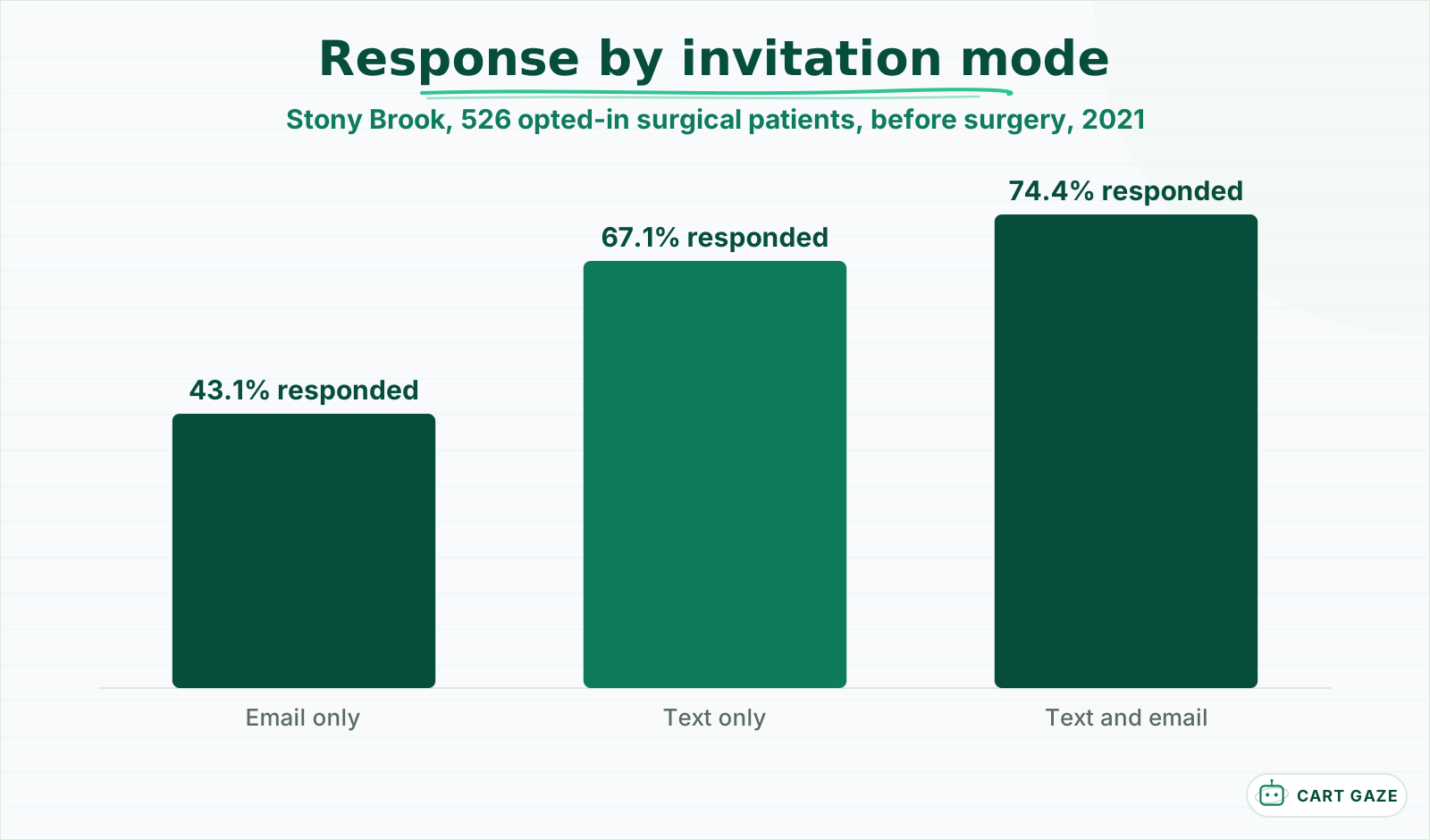 Opted-in surgical patients, recovery surveys. The shape holds; your numbers will differ.
The Stony Brook study asked 615 surgical patients to join a web-based recovery survey program, and 526 opted in. Before surgery, 74.4% responded when invited by both text and email, 67.1% by text alone, and 43.1% by email alone. At 30 days the pattern held: 65.0%, 49.5%, and 43.1%. These were recovery surveys to patients who had agreed to take part, so treat the numbers as the shape of the effect rather than what a satisfaction survey will draw.
Consent matters for the text. A satisfaction survey is not one of the purposes the TCPA healthcare exemption lists, so send it only to patients who have agreed to receive texts from you, and include "Reply STOP to opt out." Send one invitation and at most one reminder.
The survey tool also sees names, visit dates, and sometimes comments about care, which makes it a business associate. Confirm the vendor will sign a BAA before the first survey goes out, and keep the comment field out of any marketing system.
Keep it to four questions
Ask four questions at most: how likely the patient is to recommend you, the main reason for that score, one question on the thing you most want to fix, and whether you may contact them. Short surveys get finished. In PBGH's California testing, an ultrashort survey was completed 99% of the time against 91% for the standard one.
| # | Question | Format | Why it is there |
|---|---|---|---|
| 1 | How likely are you to recommend us to a friend or family member? | 0 to 10 | One score to track and to route on |
| 2 | What is the main reason for your score? | Open text | Tells you what to fix |
| 3 | How easy was it to reach us and get an appointment? | 1 to 5 | The access question most practices need |
| 4 | May we contact you about your answers? | Yes or no | Permission for the follow-up call |
PBGH, which ran the testing with about 10,000 HMO patients across California in 2020, also found that short surveys of 12 questions or less raised completion by 8% compared with a full-length CG-CAHPS survey, while simply telling people a survey was short made them only 1% more likely to start it. Short has to be real, not a promise.
The first question uses the Net Promoter scale. Scores of 9 or 10 are promoters, 7 or 8 are passives, and 0 to 6 are detractors. You do not need to publish a Net Promoter Score to use the bands; they are a simple, widely understood rule for deciding who gets a call.
What to leave out matters as much. Do not ask for anything you already have, such as age, visit type, or provider, since the survey tool can attach those from the schedule. Skip grids that ask patients to rate eight things on the same scale; they produce tidy charts and careless answers. And never ask a clinical question in a satisfaction survey, because an answer like "the pain is worse" deserves a clinician, not a monthly report.
Tip
Swap question 3 every quarter for whatever you are working on: wait times, billing clarity, phone access. A rotating question keeps the survey short while still measuring the fix you just made.
Route unhappy patients to a person the same day
Any score of 6 or below should alert a named person, who calls the patient within 1 business day if they agreed to be contacted. The call is to listen and fix, not to ask for a review. Any comment that mentions a clinical or safety concern goes to clinical staff the same day, whatever the score.
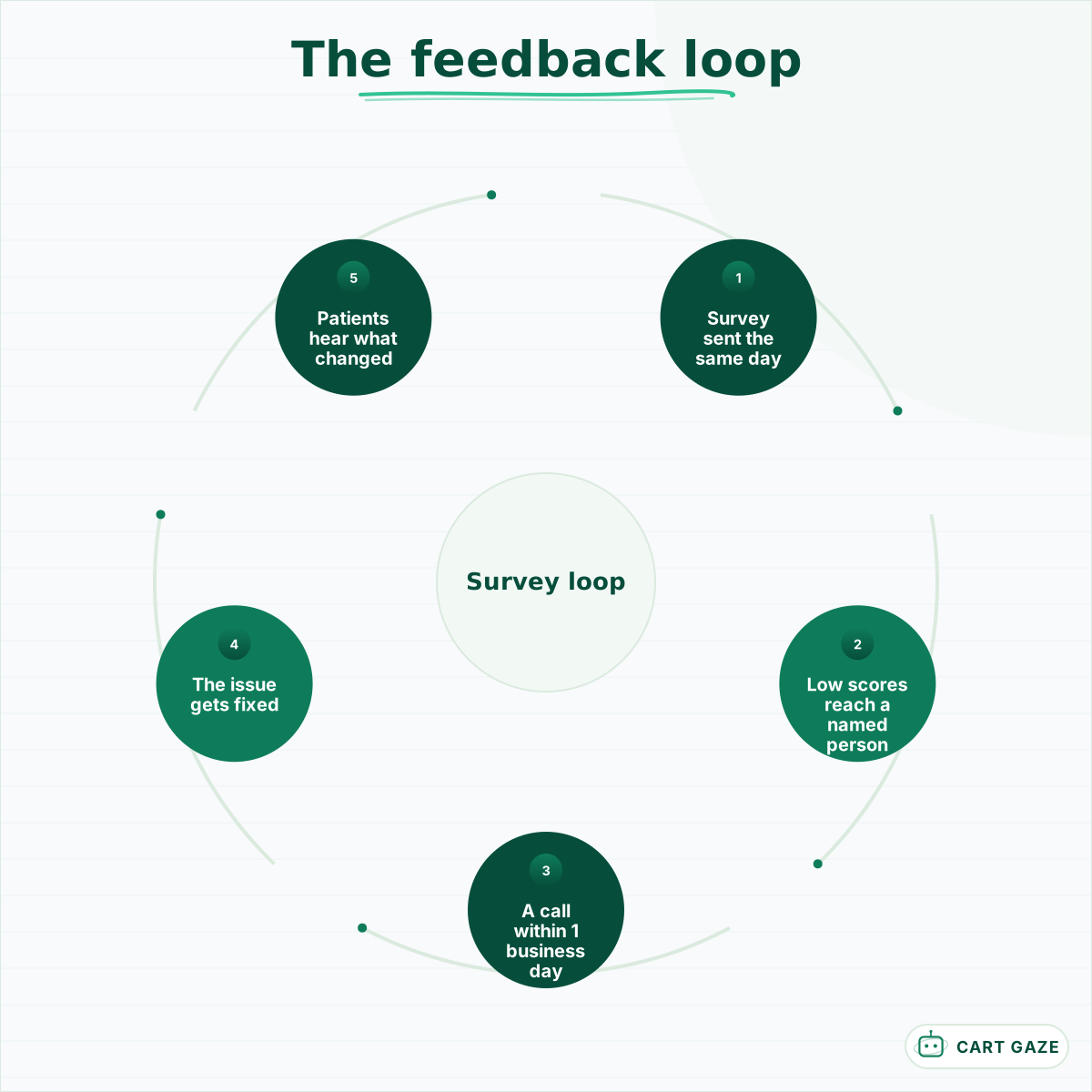 The loop only compounds if the fix is visible to the patients who asked for it.
The call works because timing is on your side. A patient who rated a visit 4 and wrote "waited an hour and nobody told me why" is still deciding what to do about it. A call the next morning that acknowledges the wait, explains what changed, and offers something concrete often ends the matter there.
Keep the call honest. Do not argue with the score, and do not ask the patient to change it. If the complaint touches their care, bring in the clinician, and never discuss another patient to explain a delay.
Log every call with its outcome. Over a few months the log becomes the most useful document the survey produces, because it shows which complaints a phone call resolves and which keep coming back.
Ask everyone for a review, or no one
A review request must go to every patient on the same schedule, never only to those who scored you highly. The FTC's endorsement guides describe inviting only very positive customers to post reviews as potentially unfair or deceptive, and Google's policy prohibits selectively soliciting positive reviews.
This is where survey automation most often goes wrong. Many survey tools offer a feature that sends a review link to anyone who scores 9 or 10 and a "tell us more" form to everyone else. The FTC's guides, at 16 CFR 255.2, give almost exactly that as an example: a business that invites only its happiest customers to post reviews, and thanks the rest, may be acting unfairly or deceptively if the posted reviews end up substantially more positive as a result. Inviting all recent customers, even while hoping for good reviews, is not.
Warning
Turn off any setting that sends the review link only to high scorers. Send the review request as its own message, to every patient, on its own schedule, whatever they said in the survey.
The cleanest design keeps the two apart. The survey is for you. The review request, if you send one, goes separately to all patients, and how to run it without a HIPAA problem when you reply to reviews is covered in how patient review automation works.
Turn the answers into fixes
Once a month, tag every comment with a theme, count the themes, and set them against how much each one drags the score down. Fix the frequent, high-impact themes first, act immediately on the rare serious ones, and tell staff what changed because of the survey. Without that loop, the survey is a report nobody reads.
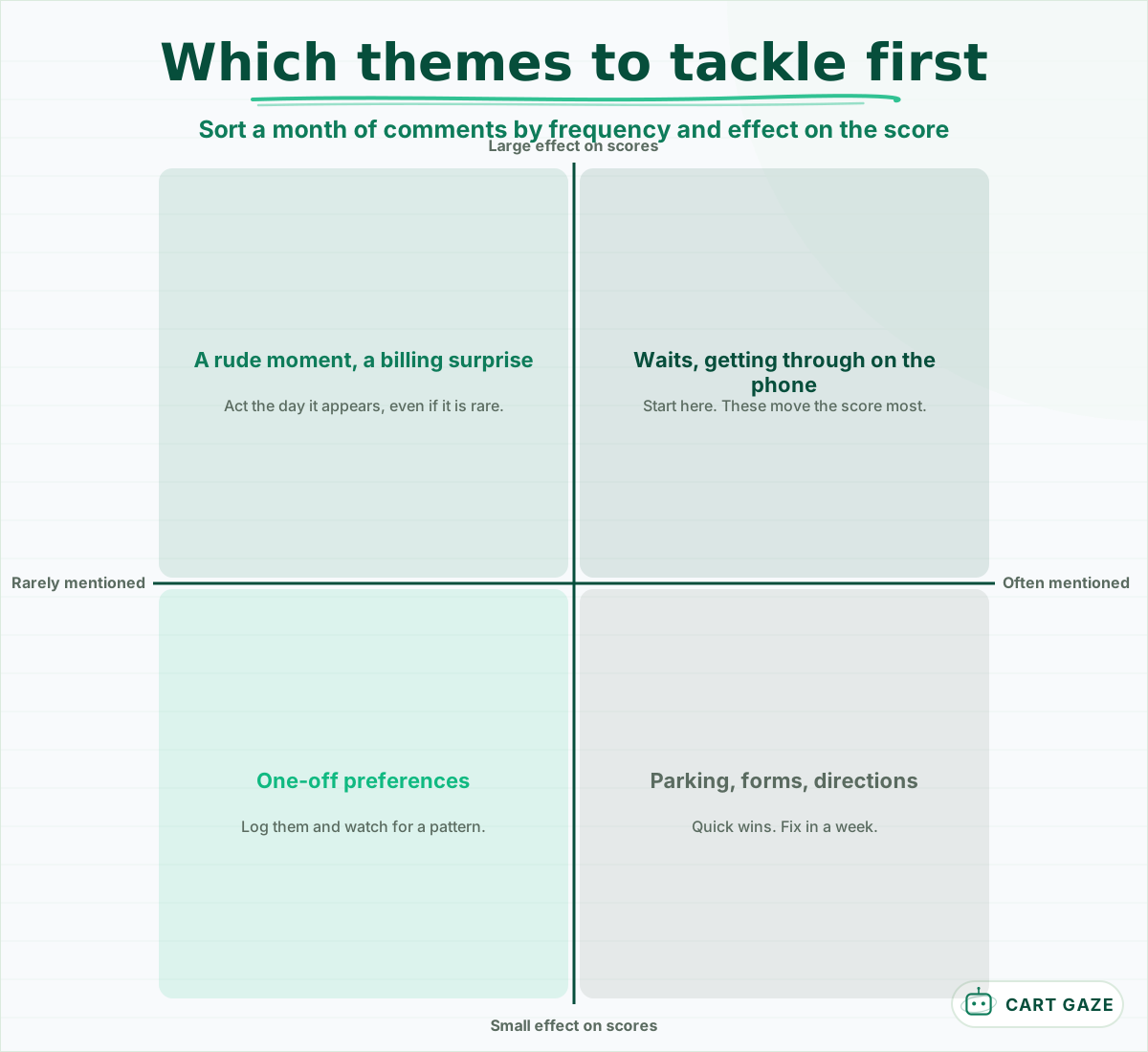 Frequent and costly first. Rare but serious the moment it appears.
Most practices find that the high-impact themes are about access and time, not about clinical care: getting through on the phone, waiting to be seen, and getting a call back. Those are fixable with process and staffing, and sometimes with automation.
When "could not get through" shows up month after month, the fix is phone coverage. An AI receptionist can answer routine calls at peaks and after hours and book them into the schedule, while clinical and urgent callers always go to a person; it never assesses symptoms or gives medical advice. What it does and where it stops is set out in what an AI receptionist does and where it hands off.
Close the loop visibly. A line in the waiting room or on the website saying "you told us about waits; here is what we changed" makes the next survey more likely to be answered, because patients can see that answers go somewhere.
Before you switch on survey automation
- The survey is 4 questions or fewer and goes out the same day.
- Scores of 6 or below alert a named person with a 1-business-day deadline.
- The review request goes to every patient, never only to high scorers.
- The survey vendor has signed a BAA.
Build your survey loop
Build the loop in four steps: a short survey sent by text and email the same day, a routing rule that puts clinical concerns and low scores in front of a person, a review request that goes to everyone separately, and a monthly theme review. Start with one provider or location, then widen it.
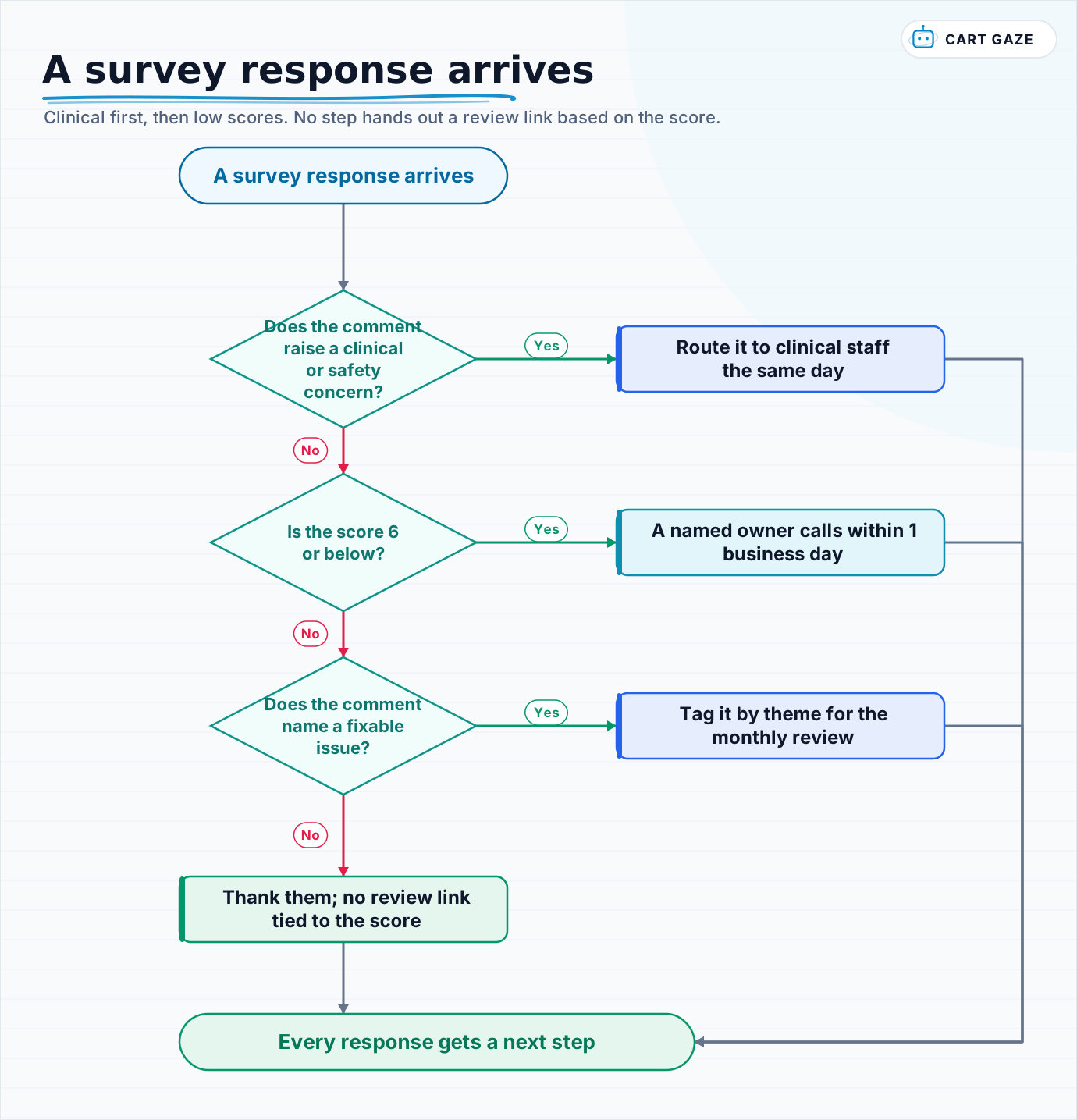 Clinical first, then low scores. No step hands out a review link based on the score.
Walk every new response through the flow for the first month by hand, so the rules match what patients actually write. After that, most of it can run on its own. Measure three things monthly: the response rate by channel, the share of low scores that got a call inside 1 business day, and the count of each top theme. The second number is the one that shows whether the loop is working.
If your themes keep pointing at phone access, the choice is usually between more staff, an answering service, and an AI receptionist, and the booking difference between the last two is set out in how an AI receptionist compares with an answering service.
Fair questions.
How do you automate patient satisfaction surveys?
Trigger a short survey from the visit status in your scheduling system, sent by text and email within a few hours of the visit to patients who agreed to texts. Keep it to 4 questions, route scores of 6 or below to a named person, send clinical concerns to clinical staff the same day, and review comment themes monthly.
What is a good response rate for patient surveys sent by text?
It depends heavily on the population and the invitation. In a Stony Brook study of surgical patients who had opted in, 67.1% answered a text invitation before surgery against 43.1% for email, and 74.4% when both were used. A satisfaction survey to all patients will usually draw less, so track your own rate by channel.
How many questions should a patient satisfaction survey have?
Four or fewer for a same-day text survey: a 0 to 10 likelihood to recommend, the main reason for the score, one rotating question on what you are trying to fix, and permission to contact the patient. In PBGH testing, an ultrashort survey was completed 99% of the time, against 91% for the standard CG-CAHPS version.
Is it allowed to send a review link only to happy patients?
No. That is review gating. The FTC endorsement guides describe inviting only very positive customers to post reviews as potentially unfair or deceptive if it makes posted reviews substantially more positive, and Google policy prohibits selectively soliciting positive reviews. Send any review request to every patient, separately from the survey.
What should a practice do with a low survey score?
Have a named person call the patient within 1 business day, if they agreed to be contacted, to listen and fix what went wrong. Do not argue with the score or ask the patient to change it. If the comment raises a clinical or safety concern, route it to clinical staff the same day, whatever the score.
Sources.
- [1]Romeiser et al. Comparing email, SMS, and concurrent mixed modes to capture quality of recovery (JMIR Formative Research, 2021)
- [2]California Quality Collaborative: is shorter better when it comes to collecting patient feedback (PBGH, October 2020)
- [3]Net Promoter System: measuring your Net Promoter Score
- [4]eCFR: 16 CFR 255.2, consumer reviews (Example 11)
- [5]Google Maps user contributed content policy: fake engagement
Written by

Muhammad Qasim Hammad
Founder, Cart Gaze
Qasim builds AI receptionists and front-office automation for medical and dental practices at Cart Gaze. Posts here start from published sources and real call data, not vendor claims, and every number links back to where it came from.
Keep reading.
 Patient Acquisition & GrowthCall Tracking Numbers for Medical Practice Marketing, Done Safely10 min read
 Patient Acquisition & GrowthNew Patient Call Conversion Rate: Benchmarks and the Five Leaks10 min read
 Patient Acquisition & GrowthMultichannel Lead Response: One Thread Per Patient, Not Four11 min read
 Patient Acquisition & GrowthHow to Write a Lead Response SLA Your Practice Can Keep11 min read
 Patient Acquisition & GrowthHealthcare Directory Lead Response: One Queue and One Clock12 min read
 Patient Acquisition & GrowthPaid Social Lead Response Automation for Meta Instant Forms11 min read