
Overflow Call Handling for Medical Offices: Where the Third Call Goes
When both front desk lines are busy, a setting nobody remembers decides where the next caller goes. Here are the four overflow destinations, the trigger to set, and a 10-minute test.
Key takeaways.
- A cloud phone system can take many calls at once, so overflow is limited by people, and an unset rule usually ends in endless ringing or voicemail.
- Set the overflow trigger in seconds: a traditional US ring cycle is about 6 seconds, so 3 rings is roughly 18 seconds and 6 rings about 36.
- Add up every step a caller can pass through; stacked ring groups can leave a caller ringing for more than a minute before anything answers.
- Run overflow as a ladder of trained back-up, then a queue or an answer that can book, and give lunch and after-hours their own rules.
- Test by calling your own line from 3 phones during a busy hour, then track overflow calls, overflow answered, and how each one ended.
Table of Contents8 sections
Both people at your front desk are on calls when a third patient dials in. Where that call goes next was decided by a phone-system setting someone chose years ago, and most practices have never looked at it. It might ring until the caller gives up, drop into a voicemail box, sit in a queue, or reach a person in the back office who is halfway through a prior authorization.
Overflow call handling is that setting. This post covers what actually happens to a call when everyone is busy, the four places an overflow call can go, how to set the trigger in seconds rather than rings (a traditional US ring cycle is about 6 seconds), the order the destinations should run in, where an AI receptionist fits, and how to test the rule by calling your own line.
What happens to the third call when everyone is busy
The third call goes wherever your no-answer rule sends it. A modern phone system can accept many calls at once, so the limit is people, not lines. If nobody set a rule, the default is usually endless ringing or voicemail, and the caller decides for you by hanging up.
Most practices run one of two structures, often without knowing which. A ring group rings a set of phones, all at once or in order, and has no line to wait in: if nobody picks up, the no-answer rule fires. A call queue holds callers when everyone is busy and hands each call to the next free person. RingCentral's own documentation draws the line the same way: a queue can hold a call even when all members are busy, while a ring group simply rings.
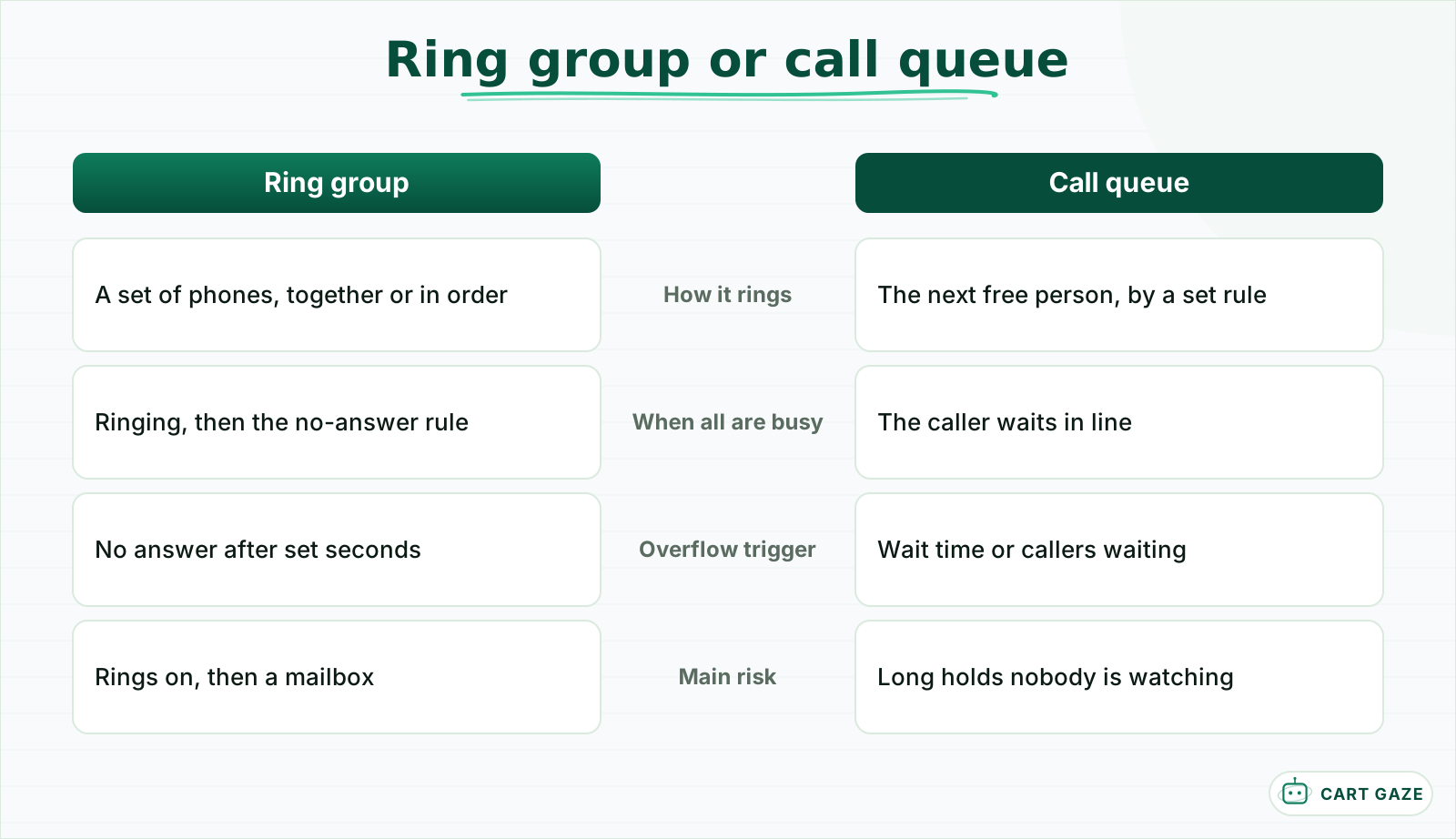 A ring group needs a timed overflow rule. A queue needs a wait limit and a hold message.
Queues come with their own ring options. RingCentral, for example, lets a queue ring members simultaneously (up to 10 extensions at once), sequentially in an order you set, or in rotation so the work spreads evenly. Other cloud systems offer similar choices under different names.
The distinction matters because the fix depends on it. A ring group needs a timed overflow rule, because otherwise the caller hears ringing and then a mailbox. A queue needs a wait limit and a hold message, because otherwise the caller waits with no idea how long.
The four places an overflow call can go
An overflow call can go to more people, to a hold queue, to an answering service, or to an AI receptionist. Voicemail is the fifth option and the usual default, but it is not really a destination. Each choice trades cost against what the caller actually gets: a person, a wait, a message, or a booking.
| Overflow destination | What the caller gets | Can it book? | Cost pattern | Watch out for |
|---|---|---|---|---|
| More staff in the ring group | A person, if one is free | Yes | Staff time | Pulls clinical or billing staff off their work |
| Hold queue | A wait, then a person | Yes | Low | Long holds at peaks, with no end in sight |
| Answering service | A live person taking a message | Only with calendar access | Per minute or per call | Every message still needs a callback |
| AI receptionist | An immediate answer | Yes, with schedule access | Monthly or per minute | Must route clinical calls to a person |
| Voicemail, the default | A recording | No | Free | Callers who will not leave a message are lost |
The cost pattern matters more than the headline price. Per-minute overflow charges most on exactly the hours you bought it for, which is one reason to size the problem before choosing, as set out in forecasting front desk call volume and staffing.
The "more staff" option is the one practices reach for first and regret most. Adding the billing coordinator or a medical assistant to the ring group answers the call, but it interrupts work that has its own deadlines, and the person answering may not be trained to schedule.
Set the overflow trigger in seconds, not rings
Set the overflow trigger in seconds, because a ring is not a fixed unit. A traditional US ring cycle is 2 seconds of ringing and 4 of silence, about 6 seconds in all, so 3 rings is roughly 18 seconds. Cloud systems vary, which is why seconds are the safer setting.
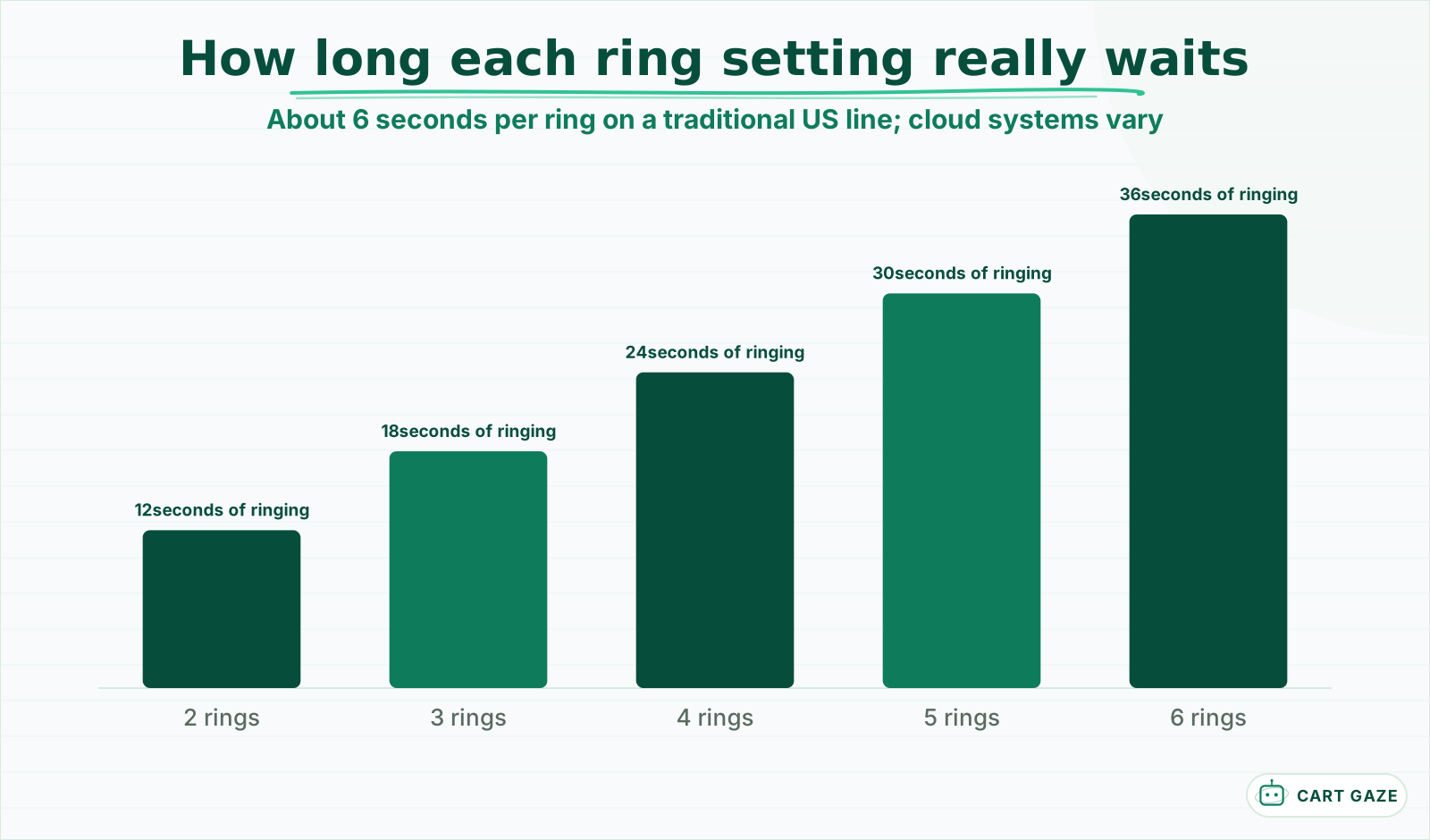 A ring setting hides the wait. Convert it to seconds before you choose one.
Most phone systems let you set the no-answer time in seconds or rings. When the setting is in rings, convert it: 4 rings is about 24 seconds and 6 rings about 36 seconds, and by then many callers have decided nobody is coming. A trigger of 15 to 20 seconds, roughly 3 rings, gives the desk a fair chance and still moves the call before the caller gives up.
Two traps sit inside this setting. The first is stacking: a ring group that rings for 30 seconds, then a second group that rings for another 30, then voicemail, adds up to more than a minute of ringing with no answer. Add up every step the caller can pass through. The second is the carrier's own no-answer forwarding, which can fire before or after your system's rule and send calls somewhere nobody expected. Test it, as described below.
Tip
Write the trigger on the same page as your hours. When the office changes its hours or its staffing, the overflow timer usually needs to change with it, and nobody remembers it exists.
Put the overflow destinations in order
Run overflow as a short ladder: other trained staff for a few seconds, then the queue or an automated answer, never straight to voicemail. Decide what each step may do, keep clinical calls on a human path, and give lunch and after-hours their own rules instead of stretching the daytime one.
A workable daytime ladder for a small practice looks like this. First, the front desk rings for about 18 seconds. Second, one designated back-up person, trained to schedule, rings for a few more seconds. Third, the call goes to the queue with a callback offer, or straight to an AI receptionist or answering service. The order matters less than the rule that no step ends in endless ringing.
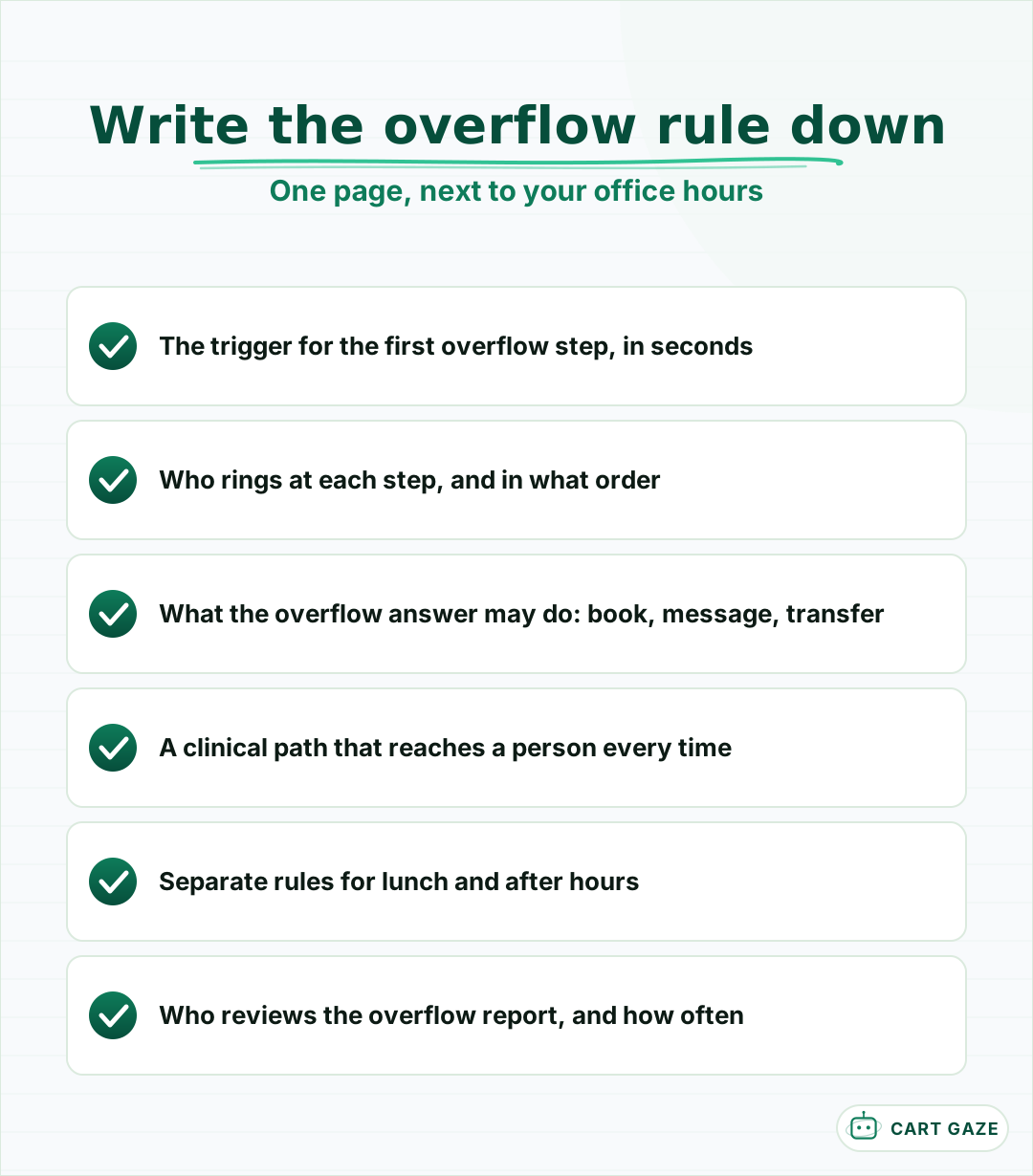 If it is not written down, the rule changes whenever someone touches the phone settings.
Lunch is its own window. Many practices treat it as a short after-hours period and forward every call for 60 minutes, which is fine as long as the rule is written down and switches back on its own. After hours is a separate problem with a different call mix, covered in how to handle after-hours calls. Do not let the daytime overflow rule quietly become the after-hours plan.
Each destination needs a written scope. An answering service should know which calls to take messages on and which to transfer. An AI receptionist should know what it may book, what it may answer, and which callers go straight to staff.
Where an AI receptionist fits as overflow
As overflow, an AI receptionist answers every call the desk cannot reach, immediately, and completes the routine ones: bookings, reschedules, hours, directions. Anything else goes to staff with the caller's name and reason attached. It never takes a clinical decision, and unlike a message service, it can finish the task.
Overflow is the easiest place to pilot one, because it only touches calls your staff were already missing. The front desk keeps answering first. The AI takes the call when the trigger fires, so a practice can compare a month of overflow outcomes against the month before without changing anything the patients see on a quiet day. For the pilot, count the overflow calls it answered, how many ended in a booking, how many it passed to staff, and how many callers hung up before it finished. Those four numbers settle whether it beats the old rule.
Warning
Every clinical, urgent, or distressed caller must reach a person. An AI receptionist on overflow routes those calls to staff or your clinical line and never assesses symptoms or gives medical advice. If a configuration cannot guarantee that transfer, it is not ready for a patient line.
The other conditions are practical. It needs read and write access to your schedule to book, or it becomes a friendlier message service. It hears PHI, so the vendor must sign a BAA. What it does on a call, and where it hands off, is set out in what an AI receptionist does and where it stops.
Before you turn on an overflow rule
- The trigger is set in seconds and every step's time adds up to under a minute.
- A clinical caller reaches a person at every step.
- Lunch and after-hours have their own rules.
- Someone has called the line during a busy hour to hear it.
Test and measure your overflow
Test the rule by calling your own line from three phones at once during a busy hour, then listen to what the third caller hears. Measure it monthly with three numbers: how many calls reached overflow, how many of those were answered, and what share ended in a booking, a transfer, or a hang-up.
The test takes 10 minutes and finds most problems. Ask two colleagues to call the main number while the desk is busy, then call yourself. Time how long you ring, note where you land, and try it again at lunch and just after closing. A surprising number of practices discover a mailbox that is full, a greeting from two office moves ago, or a transfer to a phone that nobody sits beside.
For measurement, the queue or call-flow report in most cloud systems shows how many calls took the overflow path. Divide overflow calls by total calls to see how often the desk is saturated, and look at which hours produce them. If overflow is concentrated in the first 2 hours of the day, you have a staffing question as much as a routing one.
Choose your overflow rule
Pick the rule from what your overflow calls need. If a trained person can usually take them within seconds, ring that person next. If waits are short, queue them. If they are mostly routine and the desk cannot keep up, send them to an answer that can book, and keep clinical calls with staff.
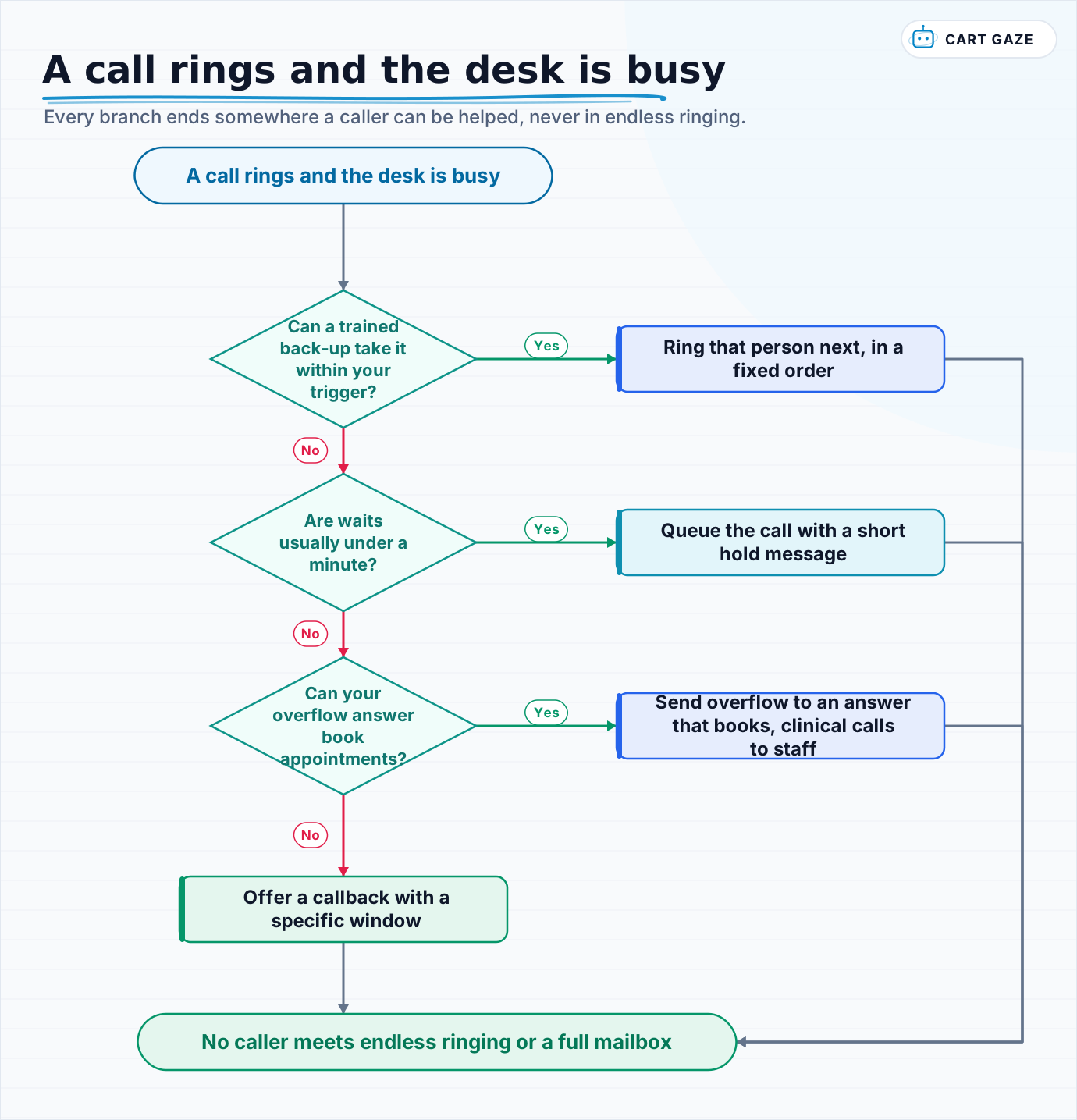 Every branch ends somewhere a caller can be helped, never in endless ringing.
Walk the flow with your call report open. The goal is not zero overflow, which would mean paying for idle staff most of the day. The goal is that no caller meets endless ringing or a full mailbox, and that every overflow call ends with a booking, a person, or a callback you can keep.
To see how an overflow call gets answered and booked while the desk is busy, what an AI receptionist does on a live call walks through a booking, a transfer to staff, and a hand-off.
Fair questions.
What is overflow call handling in a medical office?
It is the rule that decides where a call goes when everyone who normally answers is busy: another staff member, a hold queue, an answering service, an AI receptionist, or voicemail. Most cloud phone systems can take many calls at once, so the limit is people, and an unset rule usually leaves callers ringing until they hang up.
How many rings before a call should go to overflow?
Set it in seconds where you can. A traditional US ring cycle is about 6 seconds, 2 of ringing and 4 of silence, so 3 rings is roughly 18 seconds. A trigger of 15 to 20 seconds gives the desk a fair chance and still moves the call before most callers give up. Cloud systems vary, so test yours.
What is the difference between a ring group and a call queue?
A ring group rings a set of phones, all at once or in order, and has nowhere for callers to wait; when nobody answers, the no-answer rule fires. A call queue holds callers when everyone is busy and passes each call to the next free person. Ring groups need a timed overflow rule, and queues need a wait limit and a hold message.
Should overflow calls go to an answering service or an AI receptionist?
It depends on what the calls need. An answering service gives callers a person but usually takes messages, so each one still needs a callback. An AI receptionist with schedule access can book and answer routine questions immediately. Either way, clinical and urgent calls must reach a person, and any vendor that hears PHI must sign a BAA.
How do I test my practice overflow call routing?
During a busy hour, have two colleagues call the main number and then call it yourself. Time how long you ring, note where you land, and repeat at lunch and just after closing. Many practices find a full mailbox, an outdated greeting, or a transfer to an empty desk. Then check the call report monthly for overflow volume and outcomes.
Sources.
Written by

Muhammad Qasim Hammad
Founder, Cart Gaze
Qasim builds AI receptionists and front-office automation for medical and dental practices at Cart Gaze. Posts here start from published sources and real call data, not vendor claims, and every number links back to where it came from.
Keep reading.
 AI ReceptionistsMulti-Provider Call Routing: Get the Right Doctor on Every Call10 min read
 AI ReceptionistsAI Receptionist Escalation: Designing the Handoff to a Human10 min read
 AI ReceptionistsCaller Frustration Detection: Escalate Before They Hang Up12 min read
 AI ReceptionistsDouble Booking Prevention for AI Scheduling: Hold, Then Confirm11 min read
 AI ReceptionistsAI Appointment Booking: The 3-Step Architecture That Works12 min read
 AI ReceptionistsThe AI Receptionist Policy Your Practice Hasn't Written Yet9 min read