
Web Form Lead Response Automation: Submit to First Touch
Directional 2026 benchmarks put the median first reply to an inbound web form near 42 hours. Here is the submit-to-first-touch sequence on a clock, the fields to keep off the form, and the consent record that holds up.
Table of Contents8 sections
- Why the contact form is the slowest lane in your practice
- What should fire in the first 60 seconds after a form submits
- What the form should collect, and what it must never ask
- Route by service line before anyone picks up the phone
- The retry ladder, and when to stop
- Make the form your consent record without breaking TCPA
- Build the sequence your form volume actually justifies
- Fair questions
Your phone at least rings. A web form submission makes no sound at all: it drops into a shared inbox and sits there until somebody opens the tab, which on a busy Tuesday might be after lunch. Directional 2026 benchmarks put the median first reply to an inbound web form near 42 hours, and roughly 7% of teams answer inside 5 minutes.
That is a lane you already paid for. The ad spend, the local SEO, the redesign that finally added a "request an appointment" button, all of it ends at the same inbox with nothing listening behind it. The patient who filled that form out is usually filling out two more while they wait for you.
This post puts web form lead response automation on a clock: what should fire in the first 60 seconds, what the form should and should not ask, how to route by service line, when to stop chasing, and how to make the form a consent record that survives a TCPA question instead of creating one.
Why the contact form is the slowest lane in your practice
A ringing phone interrupts someone. A form submission interrupts nobody. It lands in a shared inbox with no alert, no owner and no clock on it, so it gets answered whenever the next person opens their email. That is why the slowest response in most practices comes through the fastest channel.
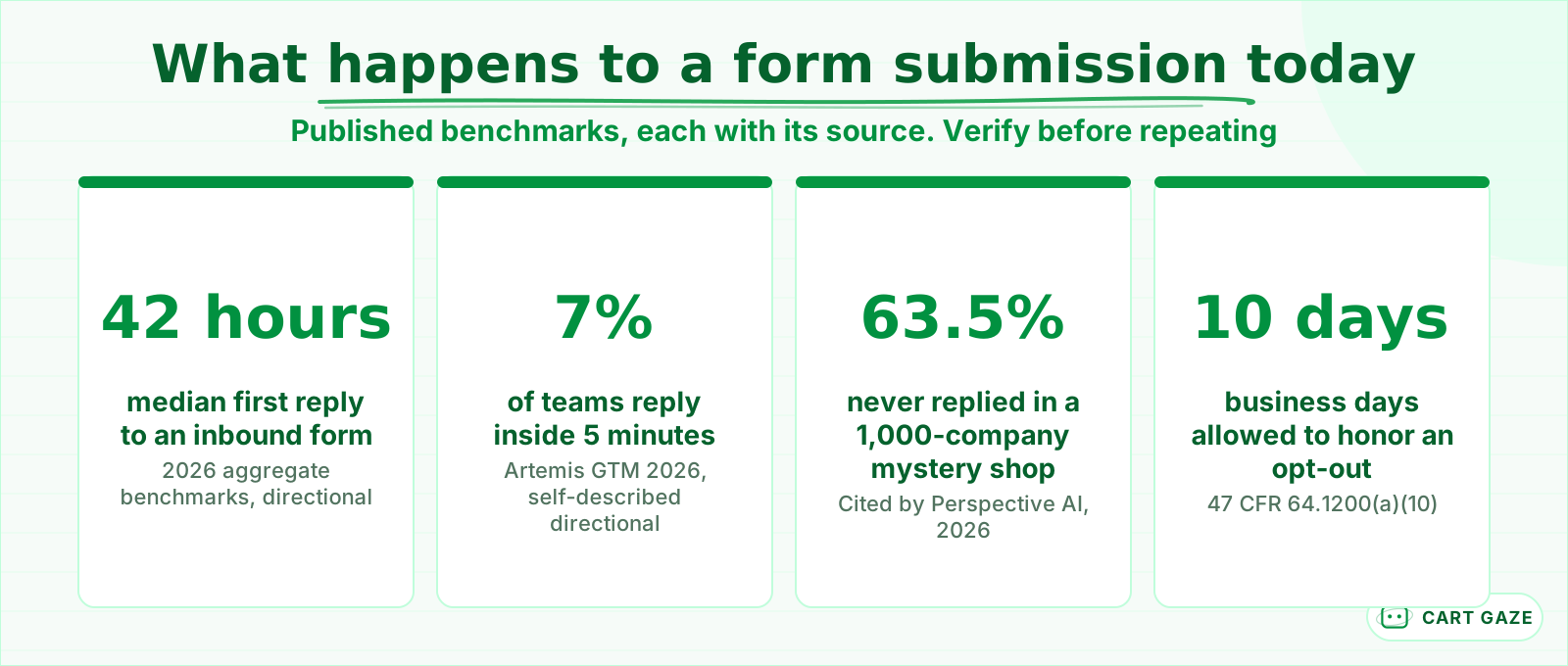 Published benchmarks, each sourced. Reasons to time your own form, not your result.
The benchmark numbers are worth knowing and worth distrusting in equal measure. The 42-hour median comes from a 2026 aggregate whose publisher calls its own figures directional rather than a controlled sample. A widely repeated mystery shop of 1,000 companies found 63.5% never replied at all. Every one of those studies is business-to-business. None of them measured a dental office.
The healthcare number with a real sample behind it is smaller and more useful. MGMA polled practice leaders on 9 December 2025 and got 236 applicable responses: 24% named online scheduling their top patient access priority for 2026, and 22% named phone access. Practices already know the digital lane matters. The form is the part they left manual.
So treat this as a missing trigger, not a marketing problem. Nothing in your stack is listening for the submit event. Until something is, response time is a function of who checks email and when.
What should fire in the first 60 seconds after a form submits
Five separate things should happen, and only one of them is a phone call. The screen confirms and sets an expectation, an acknowledgement reaches the patient, the record routes by service line, someone attempts contact, and a second channel opens if the first one goes quiet. Each one fails differently.
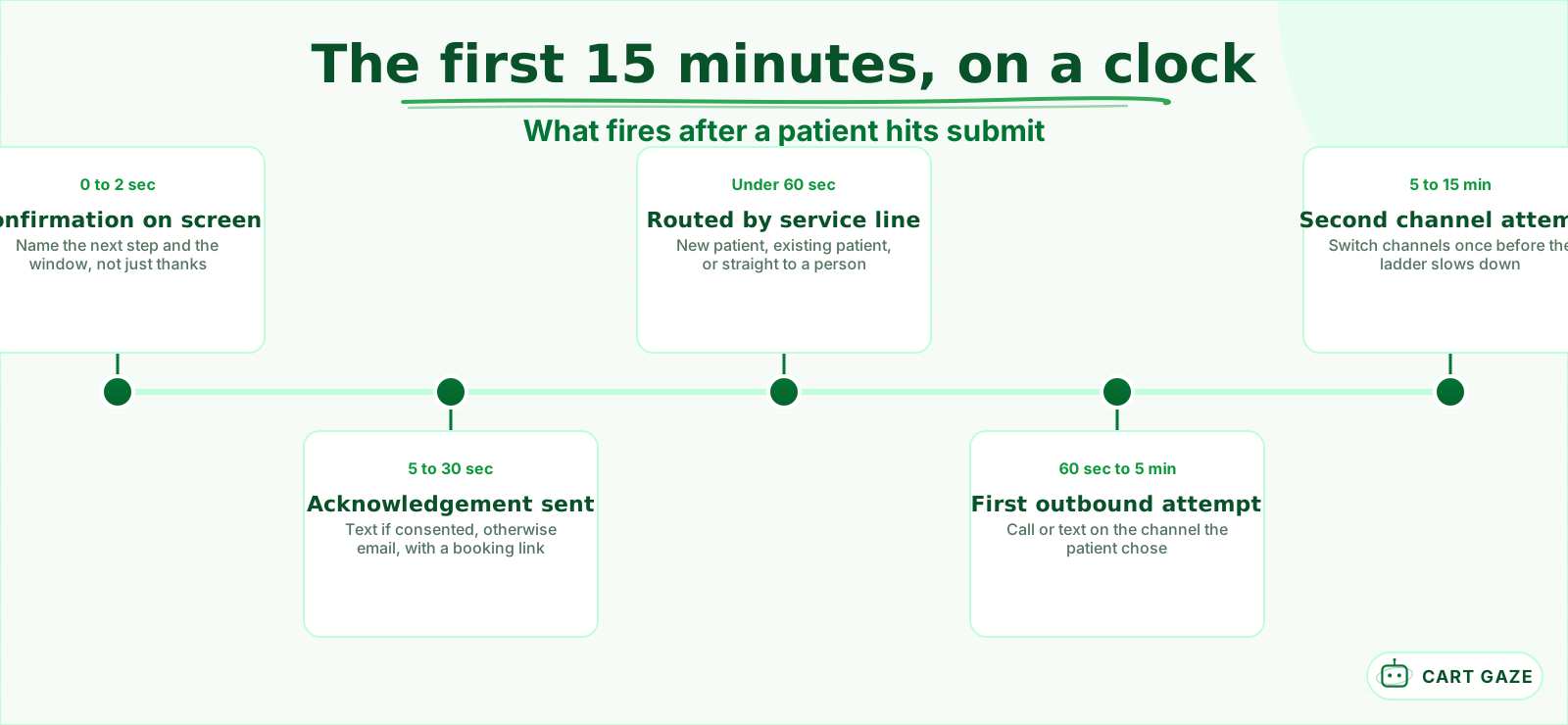 Five events, not one. Each has its own owner and its own way of failing.
Start with the screen. A bare "thank you, we will be in touch" tells the patient nothing, so they go back to the search results. Name the next step and the window instead: "we will call you within 15 minutes during office hours, or first thing tomorrow morning." That single sentence buys you the patience the callback needs.
The acknowledgement should carry a self-serve booking link, because a meaningful share of people who fill in a form would rather not wait for a call at all. Aggregated scheduling data suggests around 40% of appointments get booked outside business hours, which is exactly when your form is busiest and your desk is empty.
The research everyone quotes for the 5-minute rule is old. The 2007 MIT and InsideSales study covered 6 companies, more than 15,000 leads and over 100,000 call attempts, and found contact odds fell roughly 100x and qualification odds roughly 21x between a 5-minute and a 30-minute callback. The 2011 Harvard Business Review audit of 2,241 US firms put the average first response at 42 hours. Both are nearly 20 years old and neither studied healthcare, so use them as the origin of the idea, not as a benchmark for your practice.
What the form should collect, and what it must never ask
Ask for what you need to call the patient back and book them: name, mobile number, the service they want, a preferred time window, and consent. Keep clinical detail off the form entirely. A symptom box turns a marketing inbox into a store of protected health information overnight.
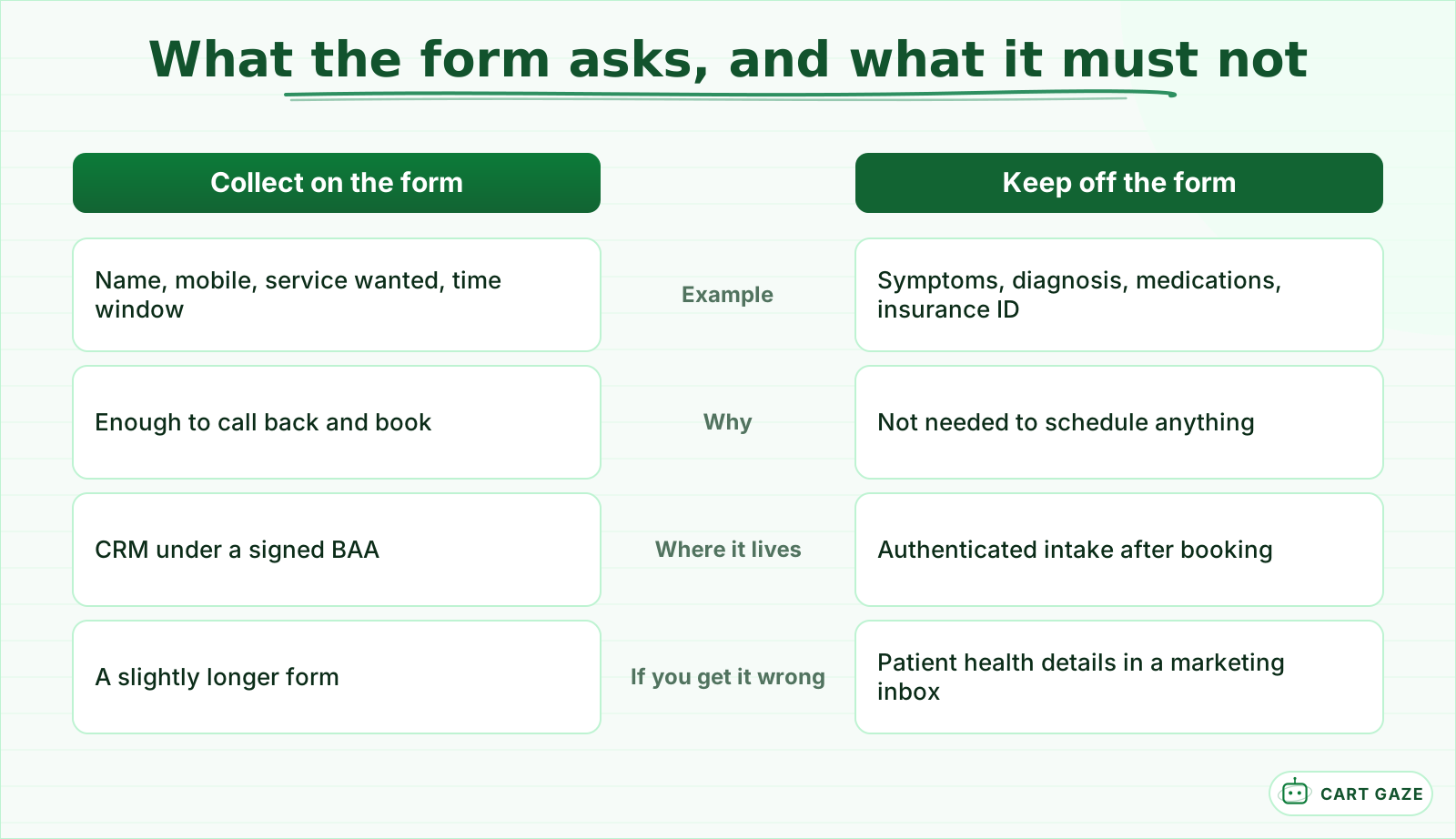 Ask for the appointment. Ask for the clinical detail after the appointment exists.
The trap here is the assumption that no symptoms means no PHI. A name, a phone number and the fact that this person is requesting care from your practice is already individually identifiable health information once it reaches you. The form host, the CRM and the inbox that receives it are creating, receiving, maintaining or transmitting that information, which makes each of them a business associate.
Popular conversion advice says shorter forms always win. The actual test data is messier than that. Venture Harbour's roundup of form-length experiments includes a case where removing fields cut conversions by 14% and relabeling the same fields lifted them 19.21%, plus a MarketingExperiments test where a 15-field form beat an 11-field baseline. Clarity beats brevity.
In a practice, the field count is set by minimum necessary rather than by conversion folklore. Four fields plus a consent checkbox is enough to schedule someone. The clinical history belongs in an authenticated intake form the patient completes after the appointment exists, which is also where it can be attached to a chart properly.
Route by service line before anyone picks up the phone
One queue means one response time, which is wrong for every submission in it. A cosmetic consult request and a routine reschedule need different first touches, different owners and different urgency. Split the queue at the moment of submit, using what the patient already told you on the form.
| Submission type | First touch | Channel | Owner | Target time |
|---|---|---|---|---|
| New patient, cash-pay or cosmetic | Live call | Phone, then text | Treatment coordinator | Under 5 minutes |
| New patient, insurance | Text with a booking link | Text, then phone | Front desk | Under 15 minutes |
| Existing patient, scheduling | Automated link plus confirmation | Text or email | Automated, staff on exception | Under 60 seconds |
| Anything clinical or urgent | Human callback, no automated reply | Phone | Clinical staff | Immediate |
| Suspected spam or invalid number | Held, not dialed | None | Reviewed daily | Same day |
Cash-pay and cosmetic inquiries carry the highest value per patient and the shortest shopping window, so they earn the live call. Insurance-based new patients can start with a text that asks the one verification question you actually need. Existing patients usually just want a link.
Anything that reads as clinical goes to a person, immediately, and never to an automated reply that could be mistaken for advice. That boundary is the same one that governs voice: a system like this routes and books, it does not assess symptoms. If you have not drawn that line yet, what an AI receptionist does and where it stops is the place to start.
Screen for junk before you dial. A honeypot field, a per-IP rate limit and a line-type lookup on the phone number cost nothing and keep staff off bot submissions. For the visitors who never fill in a form at all, the parallel path is turning website chat into a booked appointment.
The retry ladder, and when to stop
A single missed call is not a rejection, and four calls in one afternoon is not persistence. Five attempts across 4 days, alternating channels, is a defensible default: 60 seconds, 5 minutes, 30 minutes, the next business morning, then day 4. Every step stops when the patient replies, books, or opts out.
Alternate the channel rather than repeating one. Called and got voicemail, send a text. Texted and got silence, call. Repeating the same channel five times reads as pressure and gets you blocked.
Then plan for the automation breaking, because it will. The webhook returns a 500, the CRM rejects a malformed number, the messaging provider queues and drops. Without a dead-letter queue and a weekly reconciliation, form submissions counted against first touches logged, a silent failure looks exactly like a slow week. Run that count every Monday and keep the two numbers in the same report.
Make the form your consent record without breaking TCPA
For most practices the form is the only place a patient ever agrees to be called or texted, which makes the checkbox part of the automation spec. Prior express written consent needs a clear, conspicuous, separately given agreement, and the practice has to be able to produce it later.
The rule text is specific. Under 47 CFR 64.1200(f)(9), the agreement must clearly authorize the seller to deliver telemarketing calls or texts to the number given, using an autodialer or an artificial or prerecorded voice, with a clear and conspicuous disclosure and a statement that signing is not a condition of purchase. In a practice that last part reads as: consent is not required to receive care.
Build it as one unchecked checkbox of its own, never bundled into the terms link. Name the practice, the channels, the fact that automated technology may be used, the message frequency, and that message and data rates may apply. Then store the evidence beside the lead: timestamp, IP address, page URL, the exact wording version shown, and the checkbox state. A consent you cannot produce is a consent you did not get.
Two things changed recently and both matter here. The Eleventh Circuit vacated the FCC's one-to-one consent rule on 23 January 2025, so a single clear consent can still cover more than one named party. Separately, since 11 April 2025 a patient can revoke by any reasonable means and you have no more than 10 business days to honor it, with one clarification message allowed and no marketing content in it.
Statutory damages run $500 per violation, and up to $1,500 for a willful or knowing one, per message. The deeper walkthrough of what triggers that, including where the healthcare exemption stops, is in TCPA rules for automated patient texting.
Build the sequence your form volume actually justifies
Size the build to your volume before you buy anything. At 5 submissions a week, an inbox rule and a phone alert will hold. At 50 a week, the manual version fails quietly and nobody notices for a month. Count last month's submissions, then pick the smallest thing that covers them.
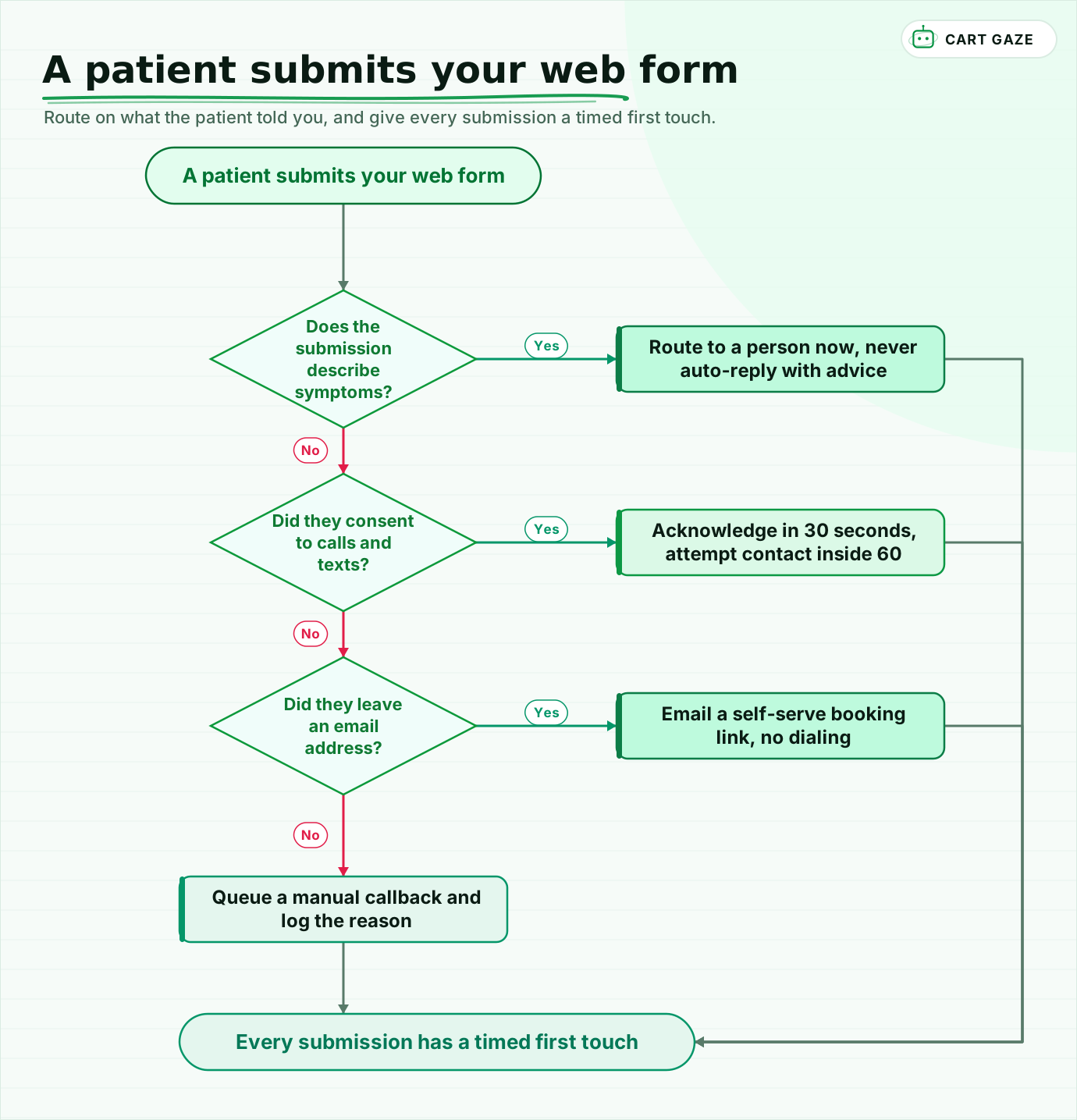 Route on what the patient told you, and give every submission a timed first touch.
Walk the flow once. Anything describing symptoms goes to a person, with no automated reply attached. A consented submission gets an acknowledgement inside 30 seconds and a contact attempt inside 60. Email-only submissions get a booking link and no dialing. Everything else waits in a named queue with a logged reason, which is very different from waiting in an inbox with none.
Pilot on one form and one service line for 30 days. Read every acknowledgement message and every call note, and measure time to first touch in your own logs rather than trusting a vendor slide. If you would rather see the size of the leak before you build anything, the free Growth Leak Audit works it out from your own numbers.
Fair questions.
How fast should a medical practice respond to a website contact form?
Aim for an acknowledgement within 30 seconds and a live contact attempt inside 60 seconds during office hours. The often-quoted 5-minute rule comes from 2007 and 2011 business-to-business research, not healthcare, so treat it as the origin of the idea rather than a benchmark. Measure your own time to first touch before setting a target.
What should a patient appointment request form ask for?
Name, mobile number, the service they want, a preferred time window, and a consent checkbox. That is enough to call back and book. Clinical detail belongs in an authenticated intake form the patient completes after the appointment exists, where it can be attached to a chart instead of sitting in a marketing inbox.
Does a website contact form collect PHI?
Usually yes. A name and phone number combined with the fact that someone is requesting care from your practice is individually identifiable health information once it reaches you. That makes the form host, the CRM and the receiving inbox business associates, and a Business Associate Agreement is required before PHI is disclosed to them.
Can I text someone who filled out my contact form?
Only with consent that matches what you are sending. Prior express written consent requires a clear and conspicuous agreement, given separately, stating that automated calls or texts may be sent to that number and that signing is not a condition of purchase. Keep the stored evidence, because you may need to produce it.
What happens if a patient asks to stop receiving texts?
Stop the entire follow-up ladder, not just the message they replied to. Since April 2025 a person can revoke consent by any reasonable means and you have no more than 10 business days to honor it. One clarification message is permitted, with no marketing content in it. Share one suppression list across every system.
Sources.
- [1]Speed to lead benchmark 2026: response-time medians and ranges
- [2]Lead response time 2026: benchmarks and what actually converts
- [3]Lead response time statistics: form response benchmarks
- [4]Lead response time: the MIT/InsideSales and HBR studies explained
- [5]MGMA Stat: patient access priorities for 2026
- [6]5 studies on how form length impacts conversion rates
- [7]47 CFR 64.1200: prior express written consent and revocation
- [8]47 U.S.C. 227: TCPA private right of action and damages
- [9]Eleventh Circuit vacates the FCC TCPA one-to-one consent rule
- [10]The TCPA new opt-out rules take effect on April 11, 2025
- [11]FCC extends limited waiver for part of the TCPA consent revocation rule
- [12]HIPAA business associate agreement requirements
- [13]Appointment scheduling statistics: online and after-hours booking
Written by

Muhammad Qasim Hammad
Founder, Cart Gaze
Qasim builds AI receptionists and front-office automation for medical and dental practices at Cart Gaze. Posts here start from published sources and real call data, not vendor claims, and every number links back to where it came from.
Keep reading.
 Patient Acquisition & GrowthSpeed to Lead Benchmarks Medical Practices Can Actually Measure12 min read
 Patient Acquisition & GrowthMissed Call Text Back for Medical Practices: How It Works10 min read
 Patient Acquisition & GrowthSpeed to Lead: Why New Patients Book With Whoever Answers First11 min read
 Patient Acquisition & GrowthPatient Referral Programs: Ask More People, Reward Carefully10 min read
 Patient Acquisition & GrowthConsultation Follow Up That Converts Without Pressure9 min read
 Patient Acquisition & GrowthGoogle Business Profile Automation Without a HIPAA Slip10 min read