
Turn Website Chat Into Booked Appointments the Compliant Way
A visitor who lands on your site after hours needs more than a contact form. Here is how website chat turns into booked appointments without crossing a clinical line.
Key takeaways.
- A static contact form leaves an after-hours visitor with no way to act, and contact-form-style pages convert around 6.6% at the median, likely lower for a plain practice site.
- 90% of patients say they prefer texting a provider over a phone call, and chat users expect a fast reply: 90% want one within 10 minutes, 60% within 2 minutes.
- A safe chat widget answers a fixed list, hours, insurance, pricing, and booking, and escalates anything clinical to a human the instant it comes up, not at the end of a script.
- A small-practice chat tool typically costs $20 to $150 a month flat, up to $300 with AI-driven booking and a signed BAA, or roughly $0.50 to $6 per resolved conversation on usage-based plans.
- 74% of consumers say they would rather text a business if they know a real person is behind the reply, which is exactly why a clean handoff to staff matters as much as the automation.
Table of Contents8 sections
- What Happens When a Visitor Lands On Your Site After Hours
- How a Compliant Chat-to-Booking Flow Works
- Contact Form vs. Real-Time Chat: What Changes
- What Your Chat Widget Should Answer, and What Must Go to a Person
- What a Compliant Chat Setup Costs and Requires
- Route Every Chat With One Simple Decision Ladder
- Turn This Into a Plan for Your Practice
- Fair questions
A visitor lands on your practice website at 9 p.m. with a real question. Are you in-network with their insurance? Do you have anything open this week? Most practice sites give that visitor exactly one option: a contact form that nobody reads until the next business day, if then. By the time your front desk opens, that visitor has already messaged the next practice on the results page.
That gap is measurable, not a guess. Contact-form-style pages convert around 6.6% at the median across industries, and patients now expect a reply in minutes, not hours: 90% of chat users want a response within 10 minutes, and 60% expect one within 2 minutes. A form sitting unread overnight cannot hit either number. A practice that only answers during 8 posted hours a day is effectively unavailable for most of the hours a search engine can still send it a visitor.
This post lays out what a compliant chat-to-booking setup for a healthcare practice actually looks like: what the widget should answer on its own, where it has to stop and hand off to a person, what it costs, and how to route every conversation so it ends in a booking, a callback, or a human, never a guess.
What Happens When a Visitor Lands On Your Site After Hours
Most practice websites still hand an after-hours visitor a static contact form, and that visitor has no way to get a same-minute answer about hours, insurance, or an open slot. Contact-form-style pages convert at roughly 6.6% at the median across industries, and a form sitting unread overnight cannot beat that number higher on its own.
A chat widget changes the mechanics, not the compliance rules. It answers the routine question the moment it is asked, at 9 p.m. or on a Sunday, and offers a real appointment slot instead of a promise to call back. If you have never evaluated one of these systems before, start with what an AI receptionist does and where it stops, since the same boundary applies here: fast on the routine question, and out of the clinical ones entirely.
That 6.6% median also includes every optimized, paid-traffic landing page in the dataset behind it. A plain contact form buried in a practice site's footer is almost certainly on the low end of that range, not the high end, which is exactly why an instant, real-time alternative is worth measuring on your own site before you assume the form is good enough.
Nothing about that lost visitor disappears quietly, either. They usually just open a new tab, search the same term again, and land on whichever practice actually answers first. A missed chat is a missed booking, not a delayed one, because a results page always has a next name to click, and that next name did not have a slow contact form standing in the way.
How a Compliant Chat-to-Booking Flow Works
A safe chat-to-booking flow follows the same 6 moves every time: greet the visitor, answer the routine question, offer a real slot, let them book or ask for a callback, confirm immediately, and escalate anything clinical to a person the instant it comes up, not after the conversation ends.
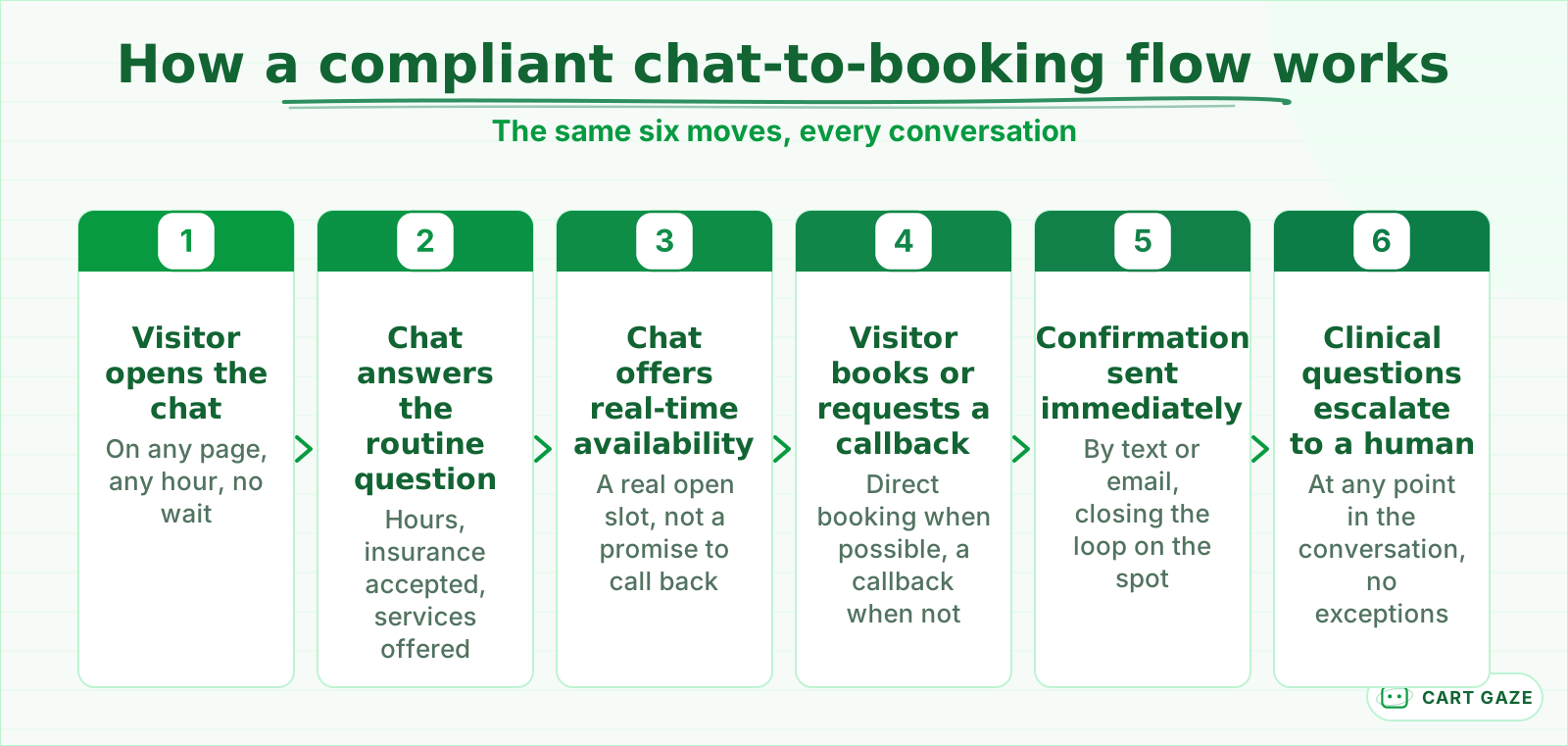 The same six moves every time. Escalation runs the whole time the chat is open, not just at the end.
Each step matters for a different reason. The greeting and routine answer keep a visitor from bouncing to a competitor's site. The real-time slot beats a "we will call you back" message every time, because the visitor books while still looking at your page. Confirmation closes the loop immediately, by text or email, so nobody wonders whether the booking went through. A confirmation that lands within seconds also does quiet work on the no-show side: a patient who picked their own slot, at the moment they wanted it, tends to keep it more than one who accepted whatever a callback offered a day later. What happens after that confirmation, the reminder sequence that keeps the visit on the calendar, is its own system: see how automated reminders cut down on no-shows once the booking exists.
The sixth move matters most for a healthcare practice. Escalation is not a fallback tacked onto the end of a script, it is a standing rule that runs the entire time the chat is open.
Warning
A website chat widget should never assess symptoms, offer a diagnosis, or judge how urgent something is. Any clinical or symptom question needs to reach a person immediately, every time, with no exception written into the script.
Contact Form vs. Real-Time Chat: What Changes
A contact form and a real-time chat widget look similar on the page, but they behave completely differently once a visitor actually needs something. The form waits for business hours; the chat answers in seconds, offers a slot on the spot, and keeps the visitor on your site instead of a competitor's.
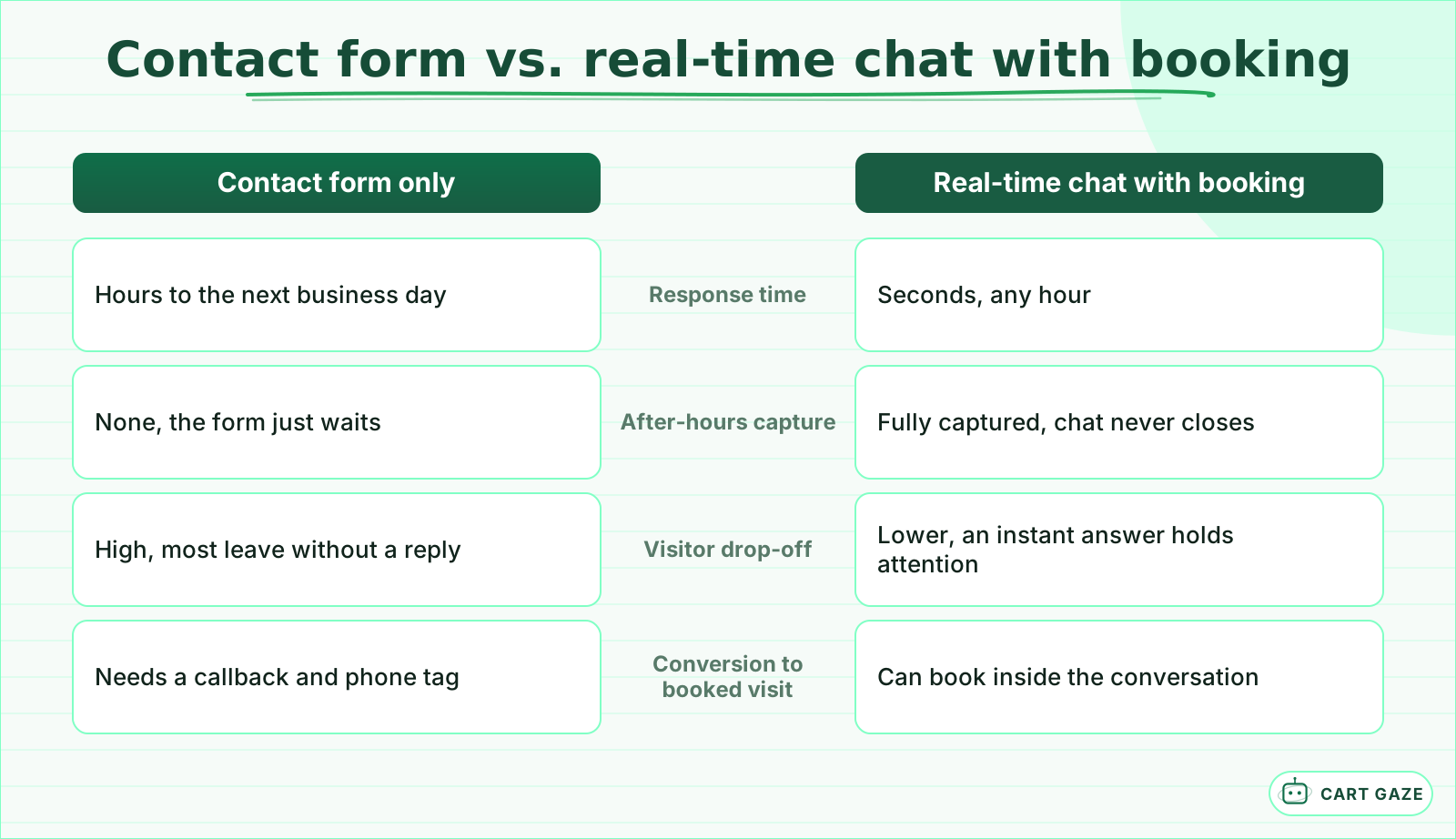 The mechanics change more than the compliance rules do. Both still need the same clinical boundary.
None of this is unique to chat. Response speed decides bookings across every channel a practice runs, phone, form, email, and chat alike, which is the same pattern covered in why response speed decides so many new-patient inquiries. Chat just makes the gap between a fast and a slow reply visible in real time, on the same page, to the same visitor.
The instant reply only pays off if the visitor trusts what is answering them. In a 2021 survey of over 1,000 consumers conducted for Podium, 74% said they would rather text a business if they knew a real person was on the other end, not an automated one. A chat widget earns that trust two ways: being upfront about what it is, and routing every visitor to a real person the moment a question turns clinical.
A dropped visitor rarely complains, which is exactly why this leak stays invisible. They simply do not book, and a practice watching only its phone line never sees the loss on a spreadsheet. The comparison above is a way to put a number on something that otherwise never shows up anywhere except a slower month.
What Your Chat Widget Should Answer, and What Must Go to a Person
A safe chat widget has a short, fixed list of things it can answer on its own: hours, location, insurance accepted, prices, and open appointment slots. Everything outside that list, symptoms, medication questions, billing disputes, or anything a visitor describes as urgent, gets routed to a person, without exception.
| Request type | Chat handles it | Human required |
|---|---|---|
| Office hours, location, parking | Yes | No |
| Insurance accepted, general pricing | Yes | No |
| Book, reschedule, or cancel a visit | Yes | No |
| A specific cost estimate for a procedure | Partial, ballpark only | Yes, for a firm quote |
| Symptom, medication, or clinical question | No | Yes, immediately |
| Billing dispute or a complaint | No | Yes |
A ballpark range is fine for a chat widget to quote, because it is the same range your own front desk already gives over the phone. A firm number tied to a specific procedure, a patient's coverage, or their deductible needs a person who can actually open the file, so route those requests instead of guessing at them in the chat window.
Important
If the chat widget will see a patient's name alongside anything health-related, insurance details, appointment reason, or symptoms, that is protected health information. The vendor is a business associate under HIPAA, and you need a signed Business Associate Agreement before a single conversation goes live. "HIPAA compliant" is a marketing phrase, not a real certification; ask what the vendor actually signs.
What a Compliant Chat Setup Costs and Requires
Most website chat tools built for a small practice run somewhere between $20 and $150 a month on a flat plan, climbing toward $300 once you add AI-driven booking, a signed BAA, or after-hours coverage. The number that matters more than the sticker price is what the tool is contractually allowed to see and store.
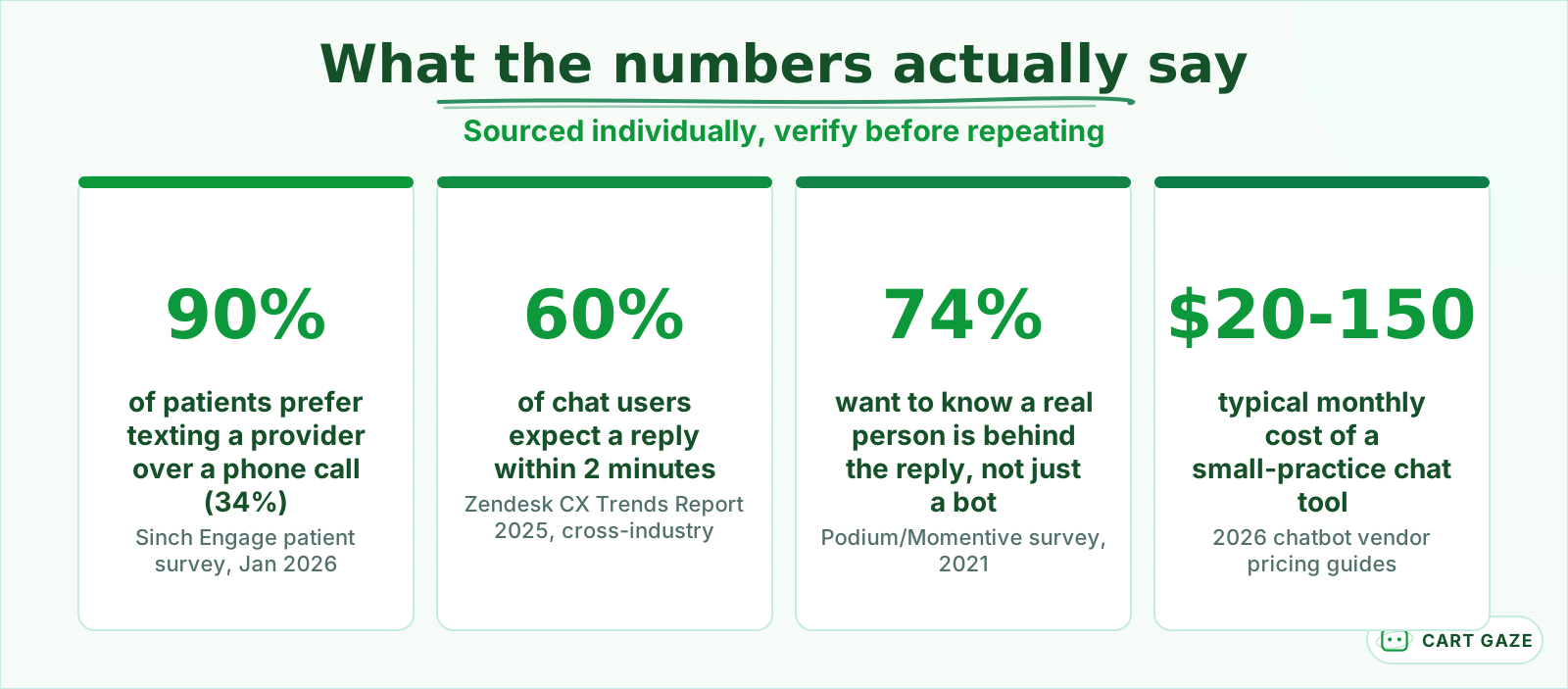 Each number sourced separately. Verify against your own site and vendor before repeating.
Pricing tiers usually split on three things: how much of the conversation an AI model handles versus a scripted flow, whether the plan includes a signed BAA at all, and whether booking writes directly into your scheduling system or just sends you a message to call back. A $20 plan that cannot see your calendar is not actually cheaper than a $150 plan that books directly, once you count the staff time spent typing appointments in by hand.
Usage-based plans are the other common model, running roughly $0.50 to $6 per resolved conversation. That can look cheap at low volume and expensive the moment your after-hours traffic picks up, so run the math on your own visitor count before you sign anything. Ask a vendor for last month's actual invoice from a practice your size, not the number on their pricing page, before you commit to a year of it.
Route Every Chat With One Simple Decision Ladder
Every message a chat widget receives falls into one of 4 buckets: administrative, clinical, pricing, or everything else, and each bucket has exactly one correct destination. Building the routing as a fixed ladder, checked in the same order every time, is what keeps a fast chat widget from ever guessing on a clinical question.
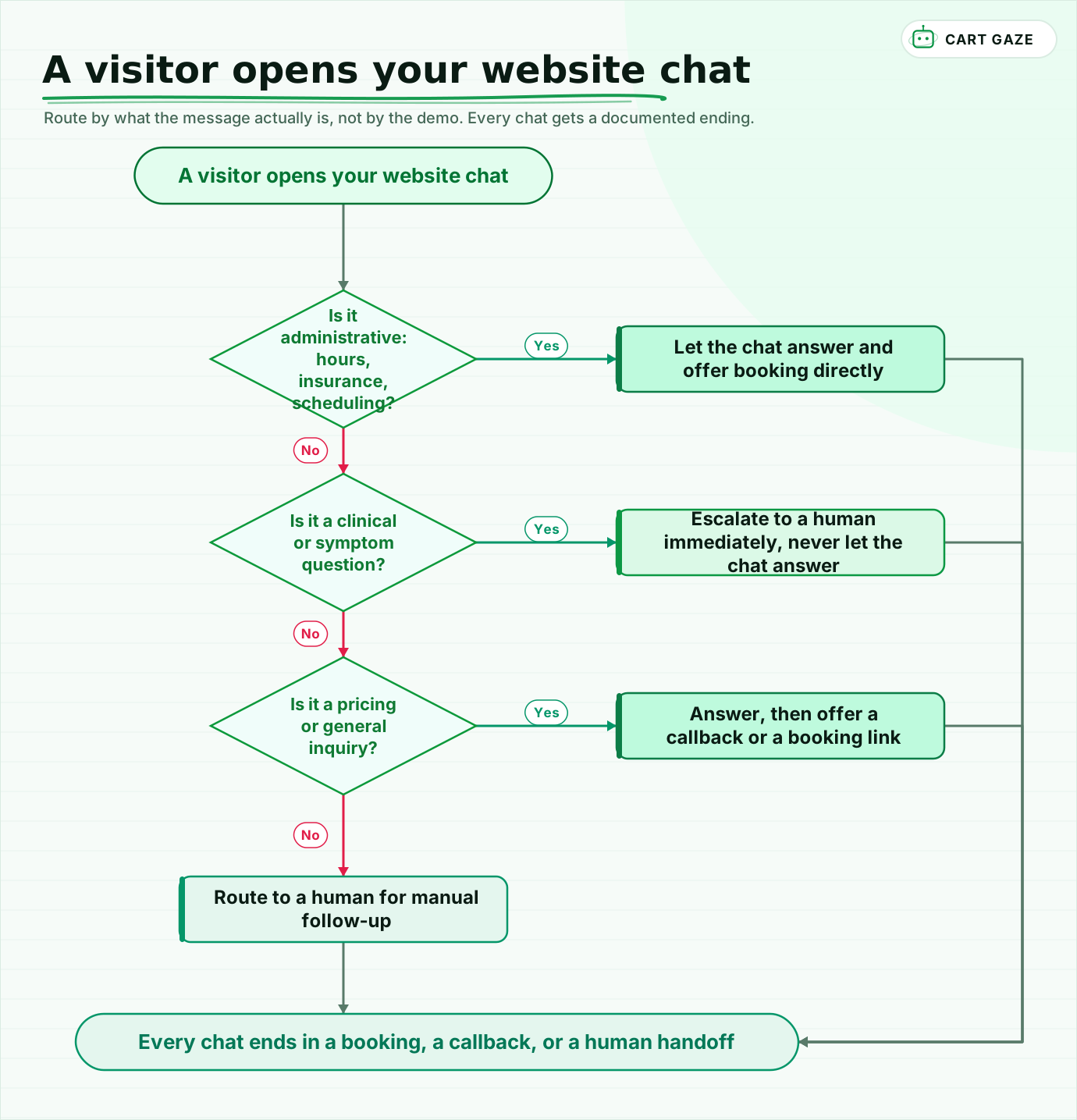 Route by what the message actually is, not by the demo. Every chat gets a documented ending.
Walk it in order, every time. An administrative question gets answered and offered a slot. A clinical or symptom question, no matter how minor it sounds, goes straight to a person. A pricing or general question gets an answer plus an offer to book or call back. Anything that does not fit cleanly goes to a person too, because a chat widget that guesses is worse than one that admits it needs help.
Write the ladder down somewhere your own staff can see it, not just inside the vendor's dashboard. A front-desk team that understands why the chat handed a conversation to them trusts the tool more than one that just sees an unexplained transfer land in their queue.
Tip
Test the ladder against your own top 10 real visitor questions before it goes live, not a scripted demo. If any of those 10 questions would make the widget hesitate, rework the routing before it ever talks to a patient.
Before the chat widget goes live
- The scripted answers stop at scheduling, hours, and insurance, nothing clinical.
- A signed BAA is in place if the vendor will see patient names or health details.
- Every ambiguous or clinical message routes to a person within your posted response time.
- Someone reads the first week of transcripts before the widget runs on every page.
Turn This Into a Plan for Your Practice
The right chat setup for your practice depends on two things only your own site can tell you: how many after-hours visitors you are already losing to a contact form, and how many of your real questions are administrative versus clinical. Measure both before you shop, and the right tool becomes an obvious choice instead of a guess.
Start by reading a week of your own contact-form submissions and missed calls side by side. If most of them are routine, a chat widget that answers instantly and books directly will likely earn back its cost within the first month or two. If the clinical share is larger than you expected, spend that budget on the escalation path first and treat the chat widget as the smaller piece of the setup, not the whole answer.
Either way beats guessing from a sales demo, because a demo is built to look good on stage, not to match your actual call volume or your patient mix. If you would rather have that gap sized for you first, the free Growth Leak Audit looks at your own numbers before anyone talks tools.
Fair questions.
Can a website chat widget book appointments directly for a medical or dental practice?
Yes, for routine requests. A well-configured chat widget can check real-time availability and book a visit directly into your calendar, day or night. It should stick to administrative booking only: scheduling, rescheduling, and cancellations. Anything involving a symptom, a medication question, or an urgent concern needs to route to a person immediately rather than being handled inside the chat.
Is a website chat widget HIPAA compliant?
HIPAA compliance is a configuration and contract question, not a badge a chat tool earns once. If the widget will see a patient's name alongside health, insurance, or appointment details, the vendor is a business associate and needs a signed Business Associate Agreement before it goes live. Be skeptical of any vendor claiming to be HIPAA certified, since that certification does not exist.
Should a chat widget ever answer medical or symptom questions?
No. A website chat widget should recognize a clinical or symptom question and hand it to a person immediately, never assess it, offer advice, or judge how urgent it is. The safe design treats every symptom mention as an automatic escalation, with no exception written into the script, regardless of how minor the question sounds to the visitor typing it.
How much does a website chat tool cost for a small practice?
Most small-practice chat tools run $20 to $150 a month on a flat plan, rising toward $300 once you add AI-driven booking, a signed BAA, or after-hours coverage. Usage-based plans charge roughly $0.50 to $6 per resolved conversation instead. Ask a vendor for a real invoice from a practice your size before you sign anything, since the sticker price rarely matches the final bill.
Do patients actually prefer chatting on a website over calling or filling out a form?
The evidence points that way, though it is not a perfect one-to-one comparison. 90% of patients say they prefer text-based contact with a provider over a phone call, and 74% of consumers say they would rather text a business than call, provided they know a real person is behind the reply. A contact form, by comparison, is typically read only once a day.
Sources.
- [1]Patient communication in healthcare 2026 (Sinch Engage survey)
- [2]Report: Consumers crave personal, conversational messaging with local businesses (Podium/Momentive)
- [3]24/7 AI support chatbot benchmarks (cites Zendesk CX Trends Report 2025)
- [4]Landing page conversion benchmark 2026 (cites Unbounce Q4 2024 dataset)
- [5]How much do AI chatbots cost? Estimates for 2026
- [6]How much does a chatbot cost in 2026? Real pricing for every budget
Written by

Muhammad Qasim Hammad
Founder, Cart Gaze
Qasim builds AI receptionists and front-office automation for medical and dental practices at Cart Gaze. Posts here start from published sources and real call data, not vendor claims, and every number links back to where it came from.
Keep reading.
 Patient Acquisition & GrowthSpeed to Lead: Why New Patients Book With Whoever Answers First11 min read
 Patient Acquisition & GrowthHealthcare Directory Lead Response: One Queue and One Clock12 min read
 Patient Acquisition & GrowthPatient Referral Programs: Ask More People, Reward Carefully10 min read
 Patient Acquisition & GrowthGoogle Business Profile Automation Without a HIPAA Slip10 min read
 Patient Acquisition & GrowthLead Scoring for Paid Ads: Stop Wasting Spend on Cold Leads10 min read
 Patient Acquisition & GrowthAI Search Visibility for Medical Practices: A Practical Checklist10 min read