
Patient Check-In Automation: Arrive With Nothing Left to Do
In one clinic study, patients who arrived early waited 38.8 minutes and late arrivals waited 18.2. Arrival is a queue problem, not a form problem. Here is what check-in automation should own, and what it must not.
Key takeaways.
- A good check-in is one with nothing left to do, because every task still open at arrival had a deadline days earlier.
- Arrival is a queue problem: in one 171-patient clinic study, early arrivals waited 38.8 minutes against 18.2 minutes for late arrivals.
- Automation should own 4 jobs at arrival: a pre-arrival sweep, an arrival signal, a ready status to the clinical team, and exception routing to a named person.
- A lobby display or sign-in sheet pairing a name with a reason for visit or a balance is a disclosure you designed, not an incidental one.
- Keep a staffed path running at the same speed, because 78% of adults aged 65 and older own a smartphone against 91% of all US adults.
Table of Contents8 sections
- What actually happens in the 10 minutes after the door
- Arrival is a queue problem, not a form problem
- What patient check-in automation should actually own
- The lobby is a public room, so treat it like one
- Copay capture at arrival is a payments problem
- Every automated path needs a staffed one beside it
- Start with the tasks, not the kiosk
- Fair questions
A patient walks in at 9:56 for a 10:00 appointment, and the next 10 minutes decide how the rest of the visit feels. In one otolaryngology clinic that actually measured it, patients who arrived early spent 38.8 minutes in the waiting room. Patients who arrived late spent 18.2 minutes.
That is not a paperwork problem. It is a queue: one staffed desk, a burst of people who all turn up just before the hour, and a stack of tasks that should have been finished days ago. Every task still open when a patient reaches the desk is a task somebody chose to leave until the worst possible moment.
This post takes the arrival moment apart. What is actually still open at the desk, why a kiosk usually moves that work instead of removing it, what patient check-in automation should own, and the two things it must never be allowed to swallow: privacy in a room full of strangers, and the patients who cannot use the digital path at all.
What actually happens in the 10 minutes after the door
Arrival looks like one event and is really a stack of unfinished admin. Identity, insurance, consent signatures, demographics, forms, and money all fall due at the same moment, at a desk staffed by one person. The visit has not started yet and the patient is already doing unpaid clerical work.
Start with the scale. A national analysis of time-use data put the average ambulatory visit at 121 minutes of a patient's day, with 84 minutes of that spent inside the clinic. That study drew on 2003 to 2010 data, so treat it as an order of magnitude rather than your current benchmark, but the shape has not changed. Most of a visit is not the visit.
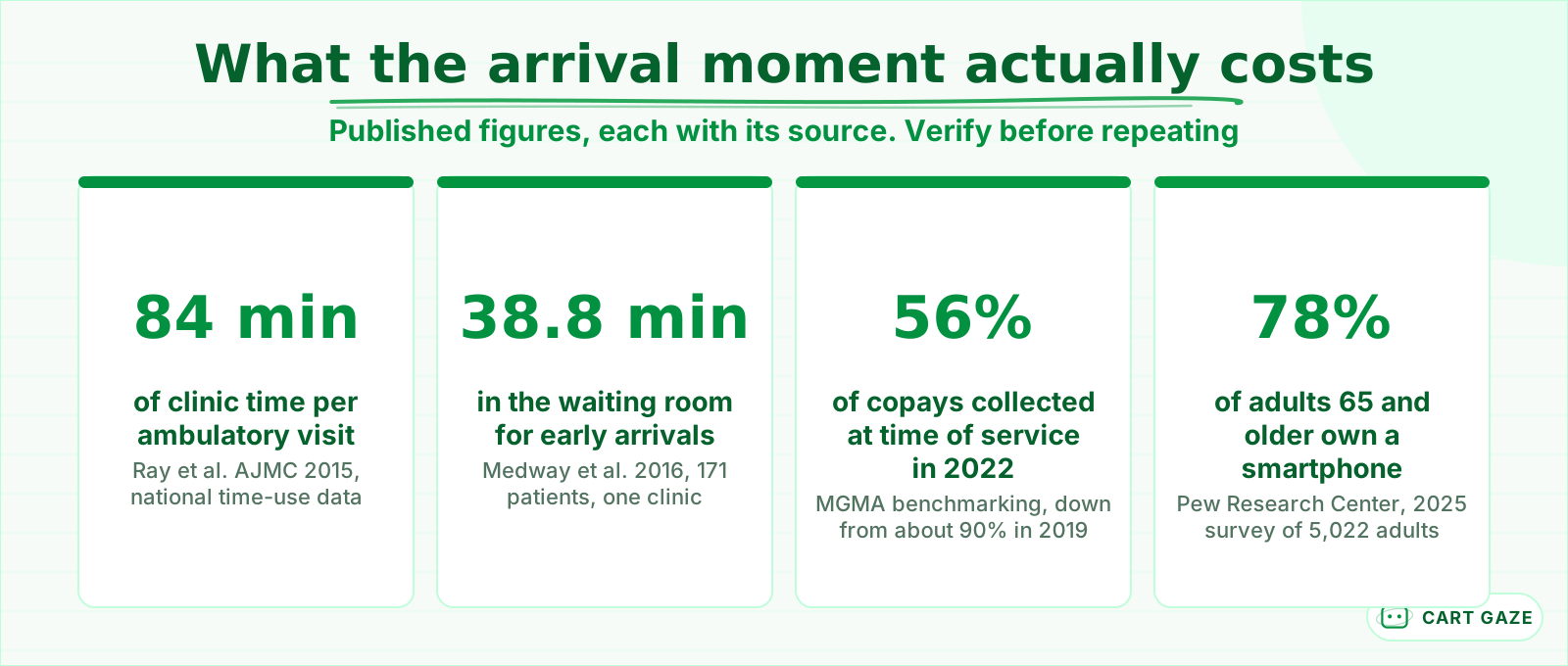 Four published figures, each with its source. Reasons to measure your own arrival window.
The vendors selling you a fix know this. Health iPASS states on its own site that average check-in time falls from over 10 minutes to as little as 15 seconds with its kiosks. There is no study behind it, no named practice, and no source, so treat it as marketing. Then look at what the claim actually requires: 15 seconds is only reachable when there is nothing left to do. The number is an argument for finishing the work early, not for buying a stand.
That is the thesis worth holding. A good check-in is one with nothing left to do. Forms, photo ID, insurance card, consent signatures, and demographics confirmation all have a natural deadline days before the visit. A kiosk that collects them in the lobby has not removed the work, it has relocated it and handed it to the patient while they stand up. The form itself is a separate discipline, covered in what intake automation should collect, and when.
Arrival is a queue problem, not a form problem
The bottleneck at 9:55 is not the length of your forms. It is one staffed desk absorbing a burst of arrivals that all cluster just before the hour, because that is when appointments start. Until you fix the queue, shortening the form moves the same crowd through slightly faster.
The otolaryngology study makes the mechanism visible. Across 171 patients, late arrivals sat in the waiting room 18.2 minutes, on-time arrivals 30.7 minutes, and early arrivals 38.8 minutes. Total visit length ran 57.4, 68.6, and 81.9 minutes in the same order. Arriving early bought a longer wait, not a shorter one.
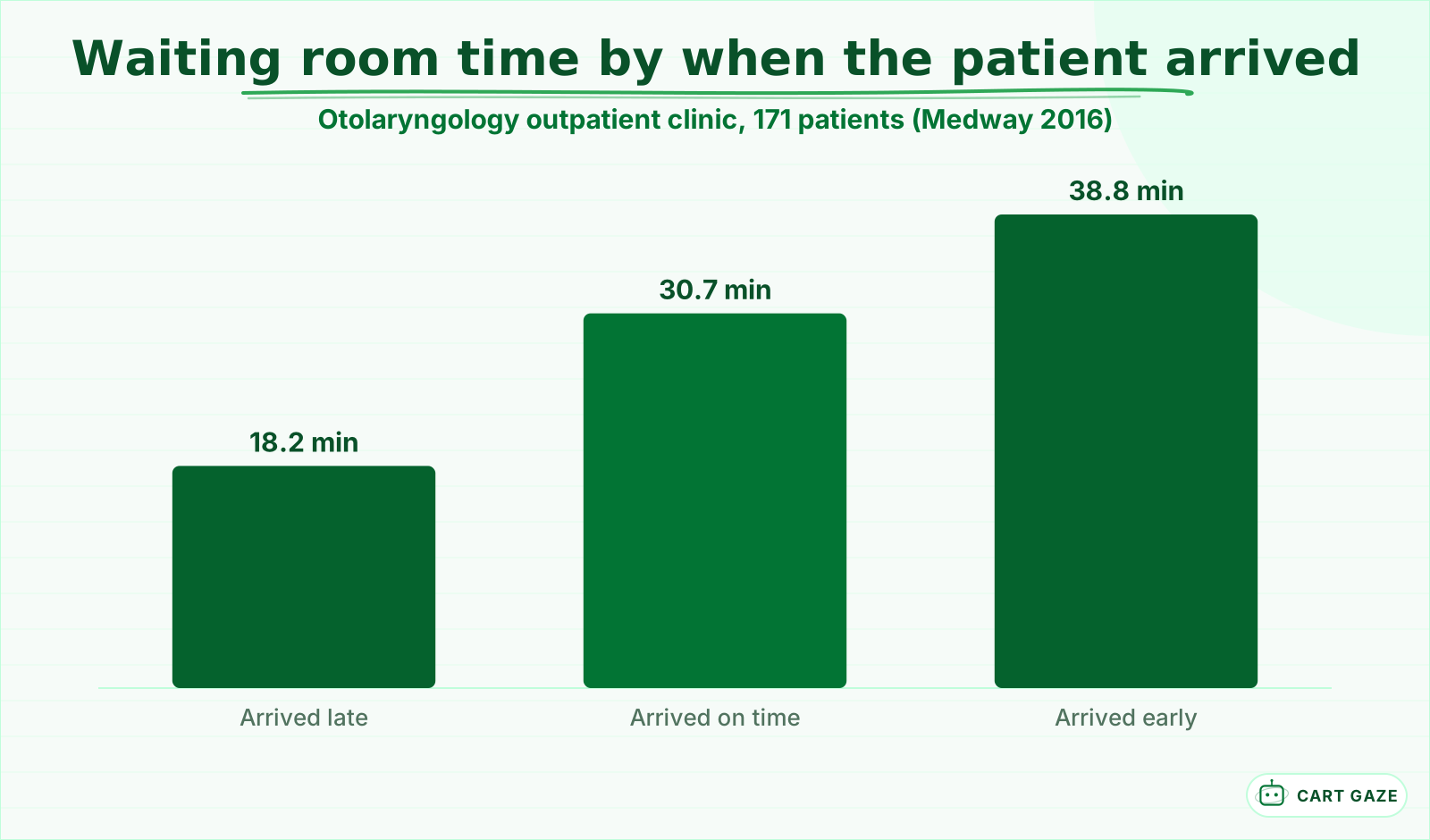 Arriving early bought a longer wait. One clinic, 171 patients, so treat it as directional.
That is what happens when a desk serves in arrival order rather than appointment order. Ask every patient to arrive 15 minutes early and you have not bought yourself slack. You have manufactured the queue you then blame on paperwork.
A separate study of 1,353 scheduled appointments at a neurology clinic found only 5.1% of patients arrived late, against a 9.5% non-attendance rate, with older patients arriving earliest of all. Almost everyone who shows up is on time or early, which is exactly what builds the pre-hour crowd. Both studies are single sites, so treat the exact minutes as directional. The mechanism travels.
The queue framing changes what you automate. If arrivals cluster and the desk is the only server, the fix is to take whole tasks off the desk, not to shave 20 seconds off each transaction.
What patient check-in automation should actually own
Four jobs, and no more. A pre-arrival sweep that carries only the tasks still unfinished, an arrival signal so nobody queues to announce themselves, an automatic ready status to the clinical team, and exception routing that sends the small number of broken cases to a named human at the desk.
| Arrival task | When it should finish | What it costs in the lobby |
|---|---|---|
| Intake forms | 3 to 7 days before | 5 to 10 minutes of patient time, standing up |
| Insurance and photo ID | At booking, re-checked 48 hours out | A claim written off weeks later |
| Consent signatures | Before the day of service | A visit that starts unsigned or starts late |
| Demographics confirmation | 48 hours out, one tap to confirm | A returned statement and a dead phone number |
| Copay or balance | Pre-arrival link, or a compliant surface | Money chased for 90 days instead |
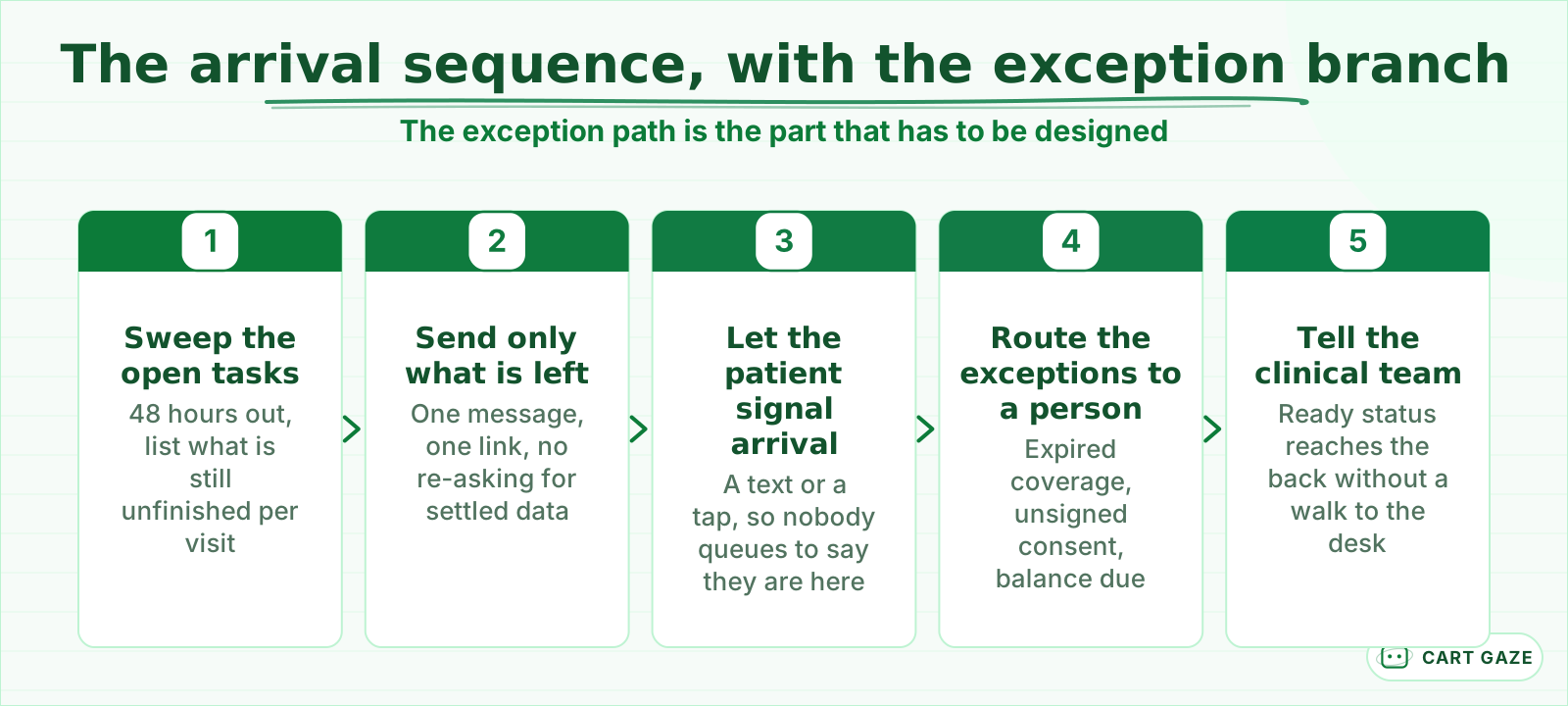 Step four is the one demos skip. Exceptions need a named person, not a retry loop.
The exception branch is the part demos skip. Coverage that terminated, a consent nobody signed, a card that expired, a name that does not match the chart: those are the cases that jam a lobby, and retrying an automated message will not clear a single one. Route them to a named person with the reason attached, so that person handles 3 exceptions instead of 30 check-ins.
The arrival signal is worth separating from your pre-visit messages. What you send in the days before a visit is its own sequence, laid out in what to send before the visit, and when. The arrival signal does one thing: the patient tells you they are here, from the parking lot or the doorway, and the system moves them into the queue without a conversation.
One boundary, stated plainly. An assistant working the arrival desk, by phone or by text, routes and records. It does not assess. A patient who arrives describing new chest pain is an immediate handoff to a human, not an input to a form. If you have not evaluated one of these systems before, what an AI receptionist does and where it stops draws that line in more detail.
The lobby is a public room, so treat it like one
A sign-in sheet, a called-out name, and a lobby display all disclose something about a patient in front of strangers. HIPAA permits that as an incidental disclosure, but only where reasonable safeguards and the minimum necessary standard are in place, which is a design instruction rather than a free pass.
The rule sits at 45 CFR 164.502(a)(1)(iii), which allows a disclosure incidental to one already permitted, conditioned on the safeguards at 45 CFR 164.530(c) and on minimum necessary. HHS has said directly that a physician's office may use sign-in sheets and call out patient names in the waiting room, so long as what is disclosed is appropriately limited, and that the sheet may not display medical information that is not necessary for signing in, such as the medical problem.
Warning
A lobby display showing a full name beside a reason for visit, a provider whose specialty gives that reason away, or an outstanding balance is not an incidental disclosure. It is one you designed. The same goes for a tablet left face-up on a counter with the previous patient's answers still on it.
In practice: a first name and a last initial is defensible. A queue position tied to a full name is usually fine. Anything pairing identity with clinical detail or money is not. Give every shared device a short auto-clear, angle it away from the room, and write down what is allowed to appear before someone decides it in the moment.
Copay capture at arrival is a payments problem
There is real money in the arrival moment, which is exactly why it should not be improvised. MGMA benchmarking shows copay collection at time of service fell from about 90% in 2019 to 56% in 2022. Card handling also drags a practice into PCI DSS, which HIPAA does not cover.
Patient-due balance collection moved the other way over the same period, from roughly 15% to 39%. Practices got better at chasing balances after the fact while getting worse at the simplest collection of all, the copay, from a patient standing in front of them.
Tip
Never let a staff member, a chatbot, or a voice assistant read, retype, or store a card number. Send the patient to a validated payment surface and take back a status, not a number. Fully outsourcing card handling is what keeps a practice in the simplest self-assessment category rather than the full one.
Being a HIPAA covered entity exempts nobody from PCI DSS. They are different rule sets over different data, and a signed Business Associate Agreement says nothing about card security. Ask your payment vendor which self-assessment questionnaire your setup lands in, and ask before you buy hardware, because the answer turns on whether card data ever touches your own devices.
Every automated path needs a staffed one beside it
A check-in flow that requires a smartphone, an app, English, or good eyesight excludes real patients on your schedule today. 78% of adults aged 65 and older own a smartphone, against 91% of all US adults. Roughly 1 in 5 of your older patients cannot start where you want them to start.
Those figures come from a Pew Research Center survey of 5,022 US adults, fielded between February 5 and June 18, 2025. Smartphone ownership is only the first filter. Behind it sit vision, dexterity, reading level, language, and the patient who owns a phone and will not type insurance details into it.
Important
The staffed path is not a fallback for people who failed the real one. It has to run at the same speed with the same courtesy. If your lobby waves digital check-ins straight through and sends everyone else to a line, you have built a two-tier waiting room.
There is a dated regulatory edge here too. 45 CFR 84.84 requires web content and mobile apps to conform to WCAG 2.1 Level A and Level AA, beginning May 11, 2027 for recipients with 15 or more employees and May 10, 2028 for those with fewer than 15. That rule reaches recipients of federal financial assistance from HHS, so confirm your own status, and your vendor's conformance, with counsel rather than assuming either.
Day to day it means large text, no session that times out mid-form, keyboard and assistive-technology support, a translated path, and a staff member who can complete any step on the patient's behalf without making it feel like a favor.
Before you switch on arrival automation
- A signed BAA covers every vendor that will touch patient details at the desk.
- Card numbers never reach staff, a bot, or your own hardware.
- A staffed check-in runs at the same speed as the digital one, every day you are open.
- One named person owns the exception queue and reads it daily.
Start with the tasks, not the kiosk
Skip the demo and count instead. For 20 consecutive visits, write down every task still open when the patient reached the desk. That list is your specification, not a vendor feature grid. The list is usually short, and almost every item on it had a deadline days before the patient arrived.
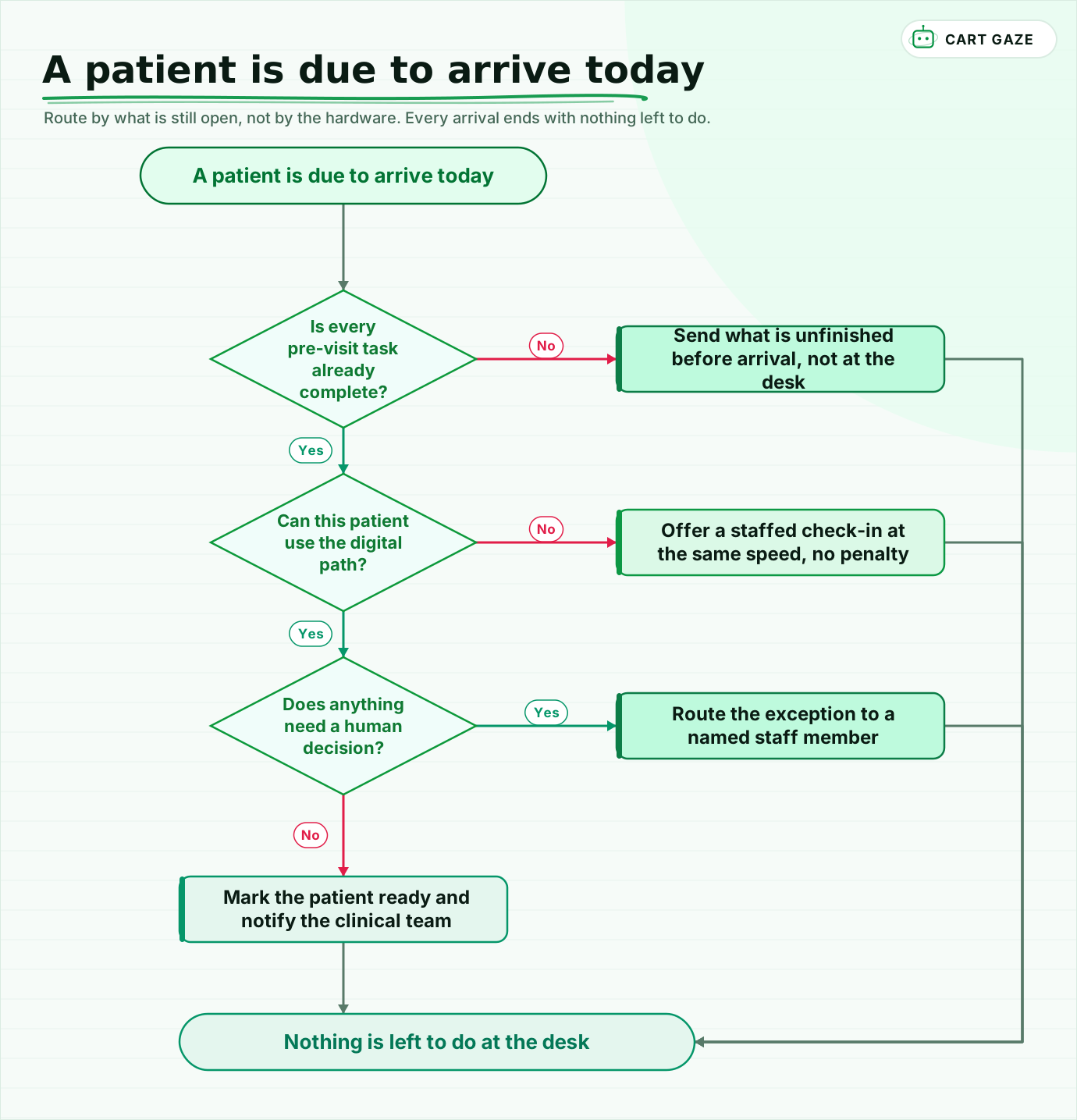 Route by what is still open, not by the hardware. Every arrival ends with nothing left to do.
Walk the flow once. A pre-visit task that is still open gets sent before arrival rather than handed over at the desk. A patient who cannot use the digital path gets a staffed check-in at the same speed. Anything needing a human decision goes to a named person. Everything else marks the patient ready and tells the clinical team without anyone walking anywhere.
Then pilot narrowly. Pick one visit type, run it for 2 weeks, and read every exception rather than the summary. Re-measure lobby time in your own schedule after 30 to 60 days, because somebody else's before-and-after slide is not your practice.
If you would rather see where the arrival window is leaking before anyone talks about hardware, the free Growth Leak Audit sizes it from your own numbers.
Fair questions.
What should patient check-in automation actually do?
Four jobs. It sweeps open pre-visit tasks and sends only what is unfinished, lets the patient signal arrival by text or tap instead of queuing, pushes a ready status to the clinical team, and routes exceptions like expired coverage or an unsigned consent to a named person. Everything else should have finished days before the visit.
Do check-in kiosks actually reduce wait times?
They mostly relocate the work rather than remove it, moving forms and card capture from the desk into the lobby and handing them to the patient. One vendor claims check-in drops from over 10 minutes to 15 seconds, with no study attached. That speed is only reachable when nothing was left to do at arrival.
Is a waiting room sign-in sheet a HIPAA violation?
No, when it is limited. HHS has said offices may use sign-in sheets and call out patient names so long as what is disclosed is appropriately limited, and the sheet may not show medical information unnecessary for signing in, such as the medical problem. The permission sits under the incidental disclosure rule at 45 CFR 164.502(a)(1)(iii), conditioned on reasonable safeguards.
Can we take copays through the check-in system?
Only through a validated payment surface. Accepting cards puts a practice inside PCI DSS, and being a HIPAA covered entity exempts nobody from it. Staff, chatbots, and voice assistants should never read, retype, or store a card number. Outsourcing card handling entirely keeps you in the simplest self-assessment category, so ask your vendor which one applies.
What about patients who cannot use a digital check-in?
Keep a staffed path that runs at the same speed. 78% of adults aged 65 and older own a smartphone against 91% of all US adults, so roughly 1 in 5 older patients cannot start on a phone. Vision, dexterity, language, and reading level narrow it further. 45 CFR 84.84 also sets dated accessibility duties for HHS-funded recipients.
Sources.
- [1]Opportunity costs of ambulatory medical care in the United States (Ray et al. AJMC 2015)
- [2]Why patients should arrive late: arrival time, wait time and satisfaction (Medway et al. 2016)
- [3]Association between age and outpatient clinic arrival time: myth or reality? (BMC Health Services Research, 2018)
- [4]Patient balance collection: what is moving the numbers (MGMA Stat, October 2025)
- [5]Mobile fact sheet: US smartphone ownership by age (Pew Research Center, 2025)
- [6]45 CFR 164.502: uses and disclosures of protected health information, general rules
- [7]45 CFR 84.84: web and mobile accessibility requirements and compliance dates
- [8]May physician offices use patient sign-in sheets or call out patient names? (HHS OCR FAQ 199)
- [9]Guide to payment card security for the healthcare industry (PCI DSS scope)
- [10]Health iPASS point-of-service hardware: vendor check-in time claim
Written by

Muhammad Qasim Hammad
Founder, Cart Gaze
Qasim builds AI receptionists and front-office automation for medical and dental practices at Cart Gaze. Posts here start from published sources and real call data, not vendor claims, and every number links back to where it came from.
Keep reading.
 Missed Calls & Front DeskPatient Callback Requests: How to Offer, Staff and Automate Them10 min read
 Missed Calls & Front DeskCall Hold Time Benchmarks for Medical Practices: When Callers Hang Up12 min read
 Missed Calls & Front DeskCall Volume Forecasting for Your Front Desk: Staff the Peak11 min read
 Missed Calls & Front DeskWhy Your Practice's Calls Show as Spam Likely to Patients10 min read
 Missed Calls & Front DeskReplacing a Medical Office Phone Tree: What Actually Fixes It10 min read
 Missed Calls & Front DeskInsurance Card Capture: Why Scanning Is Not Verifying10 min read