
Front Desk Burnout: What Automation Fixes, and Does Not
Front-desk staff are burning out on repetitive volume, not the job itself. Here is what automation can honestly relieve, and what it cannot fix alone.
Key takeaways.
- 46% of health workers report frequent burnout, up from 32% in 2018, and front-desk roles are the most frequently cited turnover hotspots in medical practices.
- Front-desk turnover runs 25-40% annually, and replacing one $38,000 role can cost roughly $76,000 once recruiting, training, and coverage gaps are counted.
- Front-desk burnout is driven by operational fragmentation, repetitive tasks and constant task-switching, not a lack of care for the job itself.
- Automation can genuinely relieve high-volume, repetitive workload; it cannot fix inadequate staffing, poor training, or a difficult workplace culture on its own.
- Introduce automation as a workload change, not a performance judgment, and ask staff directly which repetitive tasks they most want removed.
Table of Contents7 sections
- What front-desk turnover actually costs a practice
- Why front-desk roles burn out faster than the job description suggests
- A front desk drowning in repetition versus one with room to work
- Where automation fits front-desk retention, and where it does not
- Measure your front-desk burnout risk before you buy
- Match the fix to your own turnover numbers
- Fair questions
The front-desk hire who just gave notice was good at the job. That is usually what makes it sting: the practice is not losing someone who could not handle the role, it is losing someone who handled 3 jobs' worth of phone volume, paperwork, and interruptions for as long as they reasonably could before it wore them down.
Most AI receptionist marketing skips straight past that story and sells the tool as a replacement for the position entirely. This site already covers that direct comparison honestly in AI receptionist versus hiring front-desk staff. This post is about something else: the staff already on payroll, the ones burning out and leaving, and what automation can and cannot actually do about it.
Front-desk and medical assistant roles are the most frequently cited turnover hotspots in medical practices, and replacing one is expensive enough that retention is a financial question, not just a kindness. The honest case for automation here is workload relief, not headcount reduction, and it comes with a real limit worth stating plainly upfront.
None of this is an argument that a tool alone fixes culture, staffing levels, or management. It is an argument that a specific, well-documented driver of front-desk burnout, repetitive high-volume phone and data work, is something automation can genuinely relieve, and that relief is worth pursuing on its own even if it is not a complete answer.
What front-desk turnover actually costs a practice
46% of health workers report frequent burnout, up from 32% in 2018, and front-desk and medical assistant roles are the most frequently cited turnover hotspots in medical practices. Front-desk turnover runs 25% to 40% annually, exceeding 40% in some dental practices, and replacing one $38,000 role can cost roughly $76,000 all in.
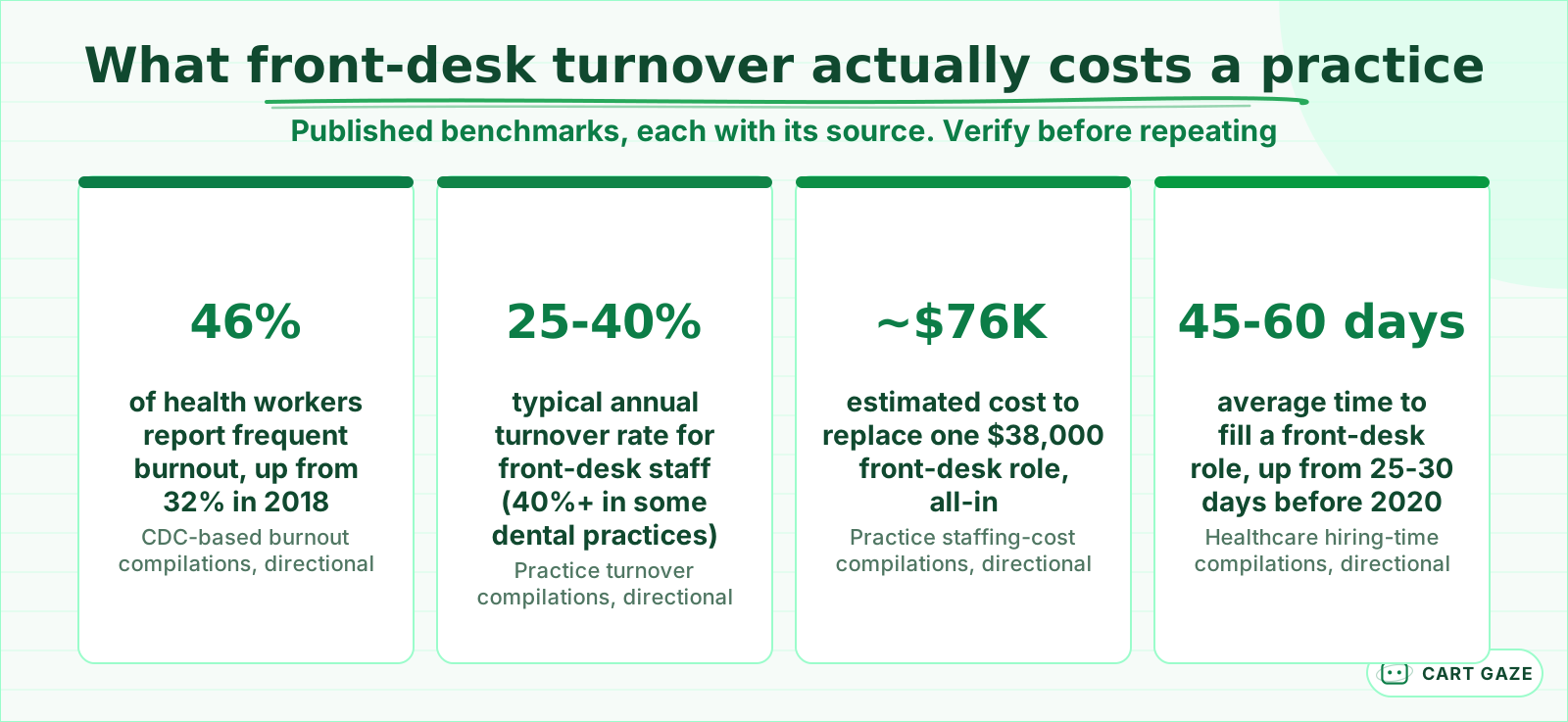 Published ranges, each sourced. Reasons to measure your own turnover, not to repeat as fact.
That replacement figure is worth sitting with rather than skimming past. $76,000 is not a hypothetical, worst-case number, it is a documented estimate for a single front-desk departure once recruiting, training, and the productivity gap are counted honestly. A practice losing even 1 front-desk employee a year at the low end of the 25% to 40% turnover range is absorbing a cost most owners never see itemized on a single line of a budget.
Time to fill has also gotten worse, not better. The average front-desk role now takes 45 to 60 days to fill, nearly double the 25 to 30 days it took before 2020, which means the remaining staff absorb a longer stretch of understaffed pressure before relief arrives, often making the next departure more likely, not less.
That pattern compounds in a way flat turnover statistics do not fully capture. One departure stretches remaining staff thin for 6 to 8 weeks while a replacement is found, and if that stretch pushes a second person toward their own breaking point, the practice is not managing one open role, it is managing a cascade that started with a single resignation.
For a multi-location group, this same dynamic can play out differently at every site, which connects to a related question worth checking: how a group keeps call handling consistent across locations often surfaces exactly which sites are running short-staffed and absorbing the most burnout risk.
Why front-desk roles burn out faster than the job description suggests
Front-desk staff juggle scheduling, insurance verification, intake forms, payment collection, referral follow-ups, and patient complaints, often simultaneously, with constant fragmentation between the phone and the waiting room. Operational inefficiency, not a lack of care for the job itself, is what the research consistently points to as the actual driver.
| Replacement cost component | Typical range | What it covers |
|---|---|---|
| Recruiting | $1,000-$2,000 | Job postings, screening, interview time |
| Training | $2,000-$4,000 | 2-4 weeks of reduced productivity learning systems and protocols |
| Coverage gaps | $3,000-$5,000 | 2-6 weeks of missed calls and scheduling errors before a replacement starts |
That breakdown matters because it shows the cost is not concentrated in one obvious place. It is spread across hiring, ramp-up, and the quiet operational damage that happens while a seat sits empty, which is exactly why the total tends to surprise owners who only budgeted for the new hire's salary.
Insurance verification alone illustrates how much of this workload is genuinely repetitive rather than skill-intensive. The same handful of payer questions, the same eligibility checks, the same follow-up calls, recur constantly across a full day, and none of that repetition requires the judgment a front-desk hire was actually trained and trusted to provide.
A hospital administrative burnout study found physical job demands and inadequate social support as the strongest predictors of burnout, which lines up with what front-desk staff describe anecdotally: the job is not hard because any single task is difficult, it is hard because there is no real recovery time between tasks, all day, every day.
The environment drives this more than the task list does. In the MEMO study of 420 primary care physicians, published by AHRQ in 2005, 38% called their office environment busy and tending toward chaotic and another 10% called it hectic or chaotic, with that atmosphere strongly associated with physician stress. Your front desk sits at the center of that room all day.
A controlled experiment shows why that cost stays invisible. When 48 participants worked an office task while being interrupted by phone or instant message, they finished faster and at no lower quality, but reported more stress, frustration, time pressure and effort (Mark, Gudith and Klocke, 2008). The cost never landed on the output. It landed on the person absorbing it, which is why a front desk can hit every throughput number right until someone resigns.
That framing should change what a practice tackles right away. Adding headcount without changing the task mix often just distributes the same fragmented, low-recovery workload across more people, while removing the repetitive volume itself changes the actual shape of the day for whoever is already there.
A front desk drowning in repetition versus one with room to work
The job does not disappear when repetitive tasks are automated. Staff still handle complaints, complex cases, and patient relationships, the parts of the role that actually need a person's judgment. What changes is how much of the day gets consumed by repeat phone questions and manual data entry instead of that judgment work.
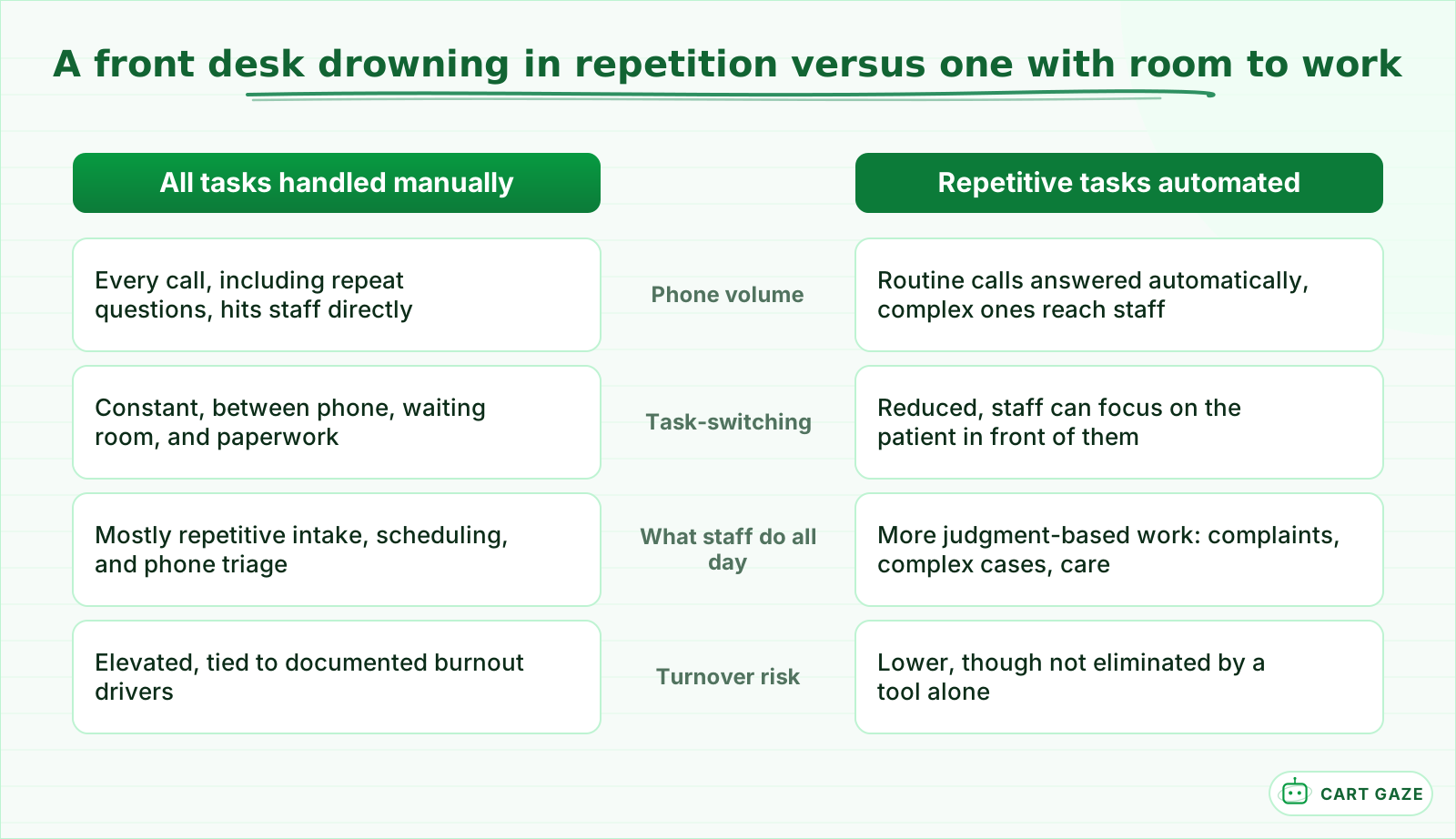 The job does not disappear. The repetitive part of it does.
Warning
Automation is not a complete fix for burnout. Inadequate staffing levels, poor training, and a genuinely difficult workplace culture all drive turnover too, and no phone system corrects a management or staffing problem by itself. Be honest with your team about what a new tool is actually meant to change.
Tip
Ask staff directly which tasks they would most want off their plate, rather than guessing from the outside. The answer is often more specific and more mundane than expected, repeat insurance questions, appointment confirmations, or the same 3 scheduling questions dozens of times a day, and specific answers point to specific fixes.
Important
Introduce any new automation as a workload change, not a performance judgment. Staff who hear "we're automating the phones" without context often hear "we think you were doing this badly," when the actual point is that nobody should have been doing this much of it manually in the first place.
Where automation fits front-desk retention, and where it does not
Automation fits absorbing high-volume, repetitive call and scheduling work so staff time shifts toward the judgment-based tasks a person actually needs to handle. It does not fit solving inadequate staffing levels, poor training, or a genuinely difficult workplace culture, all of which need their own fix regardless of what phone system is in place.
If you have never evaluated one of these systems before, what an AI receptionist does and where it stops covers the general boundary; the retention question here is really about which side of that boundary is actually consuming your current staff's day.
For the direct cost comparison between automating and simply hiring more front-desk capacity, AI receptionist versus hiring front-desk staff walks through that math separately. The 2 questions are related but distinct: one is about dollars, this one is about whether the people you already have can sustainably keep doing the job.
Weigh the counter-evidence before you sign anything. The National Academies' 2019 report on clinician burnout studied electronic health records rather than phones, but the pattern transfers: especially in the first year after implementation, clinicians spent more time in the record than they had spent documenting on paper, and many usability problems trace to local configuration rather than the software. Plan for the dip, configure against how your front desk actually works, and judge the result after the first 60 days rather than during the learning curve.
Ask a vendor directly what specifically gets removed from a staff member's day, not just what the system can technically do. A vague answer about "handling calls" tells you little; a specific answer about which repeat questions get absorbed and which stay with staff tells you whether the tool matches what your team actually described as exhausting.
Measure your front-desk burnout risk before you buy
Before evaluating any vendor, spend 30 minutes on your own numbers. Pull your front-desk turnover rate for the last 2 years, estimate what your last replacement genuinely cost once recruiting and training are counted, and ask staff directly which tasks eat the most time before you decide what to automate first.
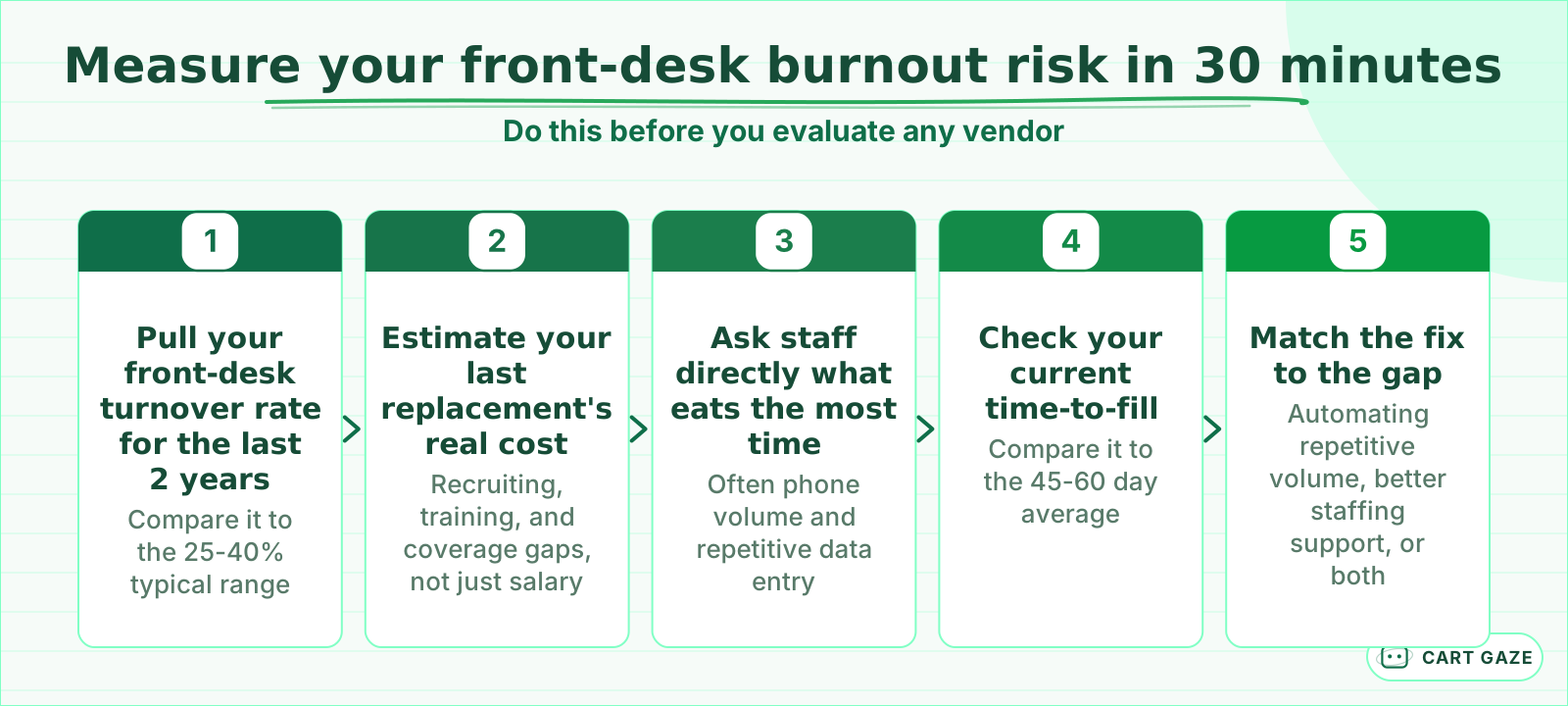 Thirty minutes with your own turnover numbers shows what automation would actually be worth here.
Before automating for staff retention
- Front-desk turnover and time-to-fill numbers have been pulled for the last 2 years, not estimated from memory.
- Staff were asked directly which repetitive tasks they would most want automated.
- Leadership is honest with the team that this is meant to relieve workload, not signal upcoming headcount cuts.
- Underlying staffing or process problems are being addressed separately, not left for a phone system to fix.
Revisit these numbers every 6 to 12 months rather than only at the moment someone quits. Turnover risk builds quietly, and the practices that catch it early are usually the ones already watching the leading indicators, call volume, hold times, and how staff describe their own day, rather than waiting for an exit interview to find out what went wrong.
Match the fix to your own turnover numbers
The right fix depends on your own turnover and workload numbers, not a vendor's promise. A practice with high turnover and heavy phone volume has a clear, measurable case for automating the repetitive slice first. A practice with low turnover but a genuinely understaffed front desk needs more people, not just a tool.
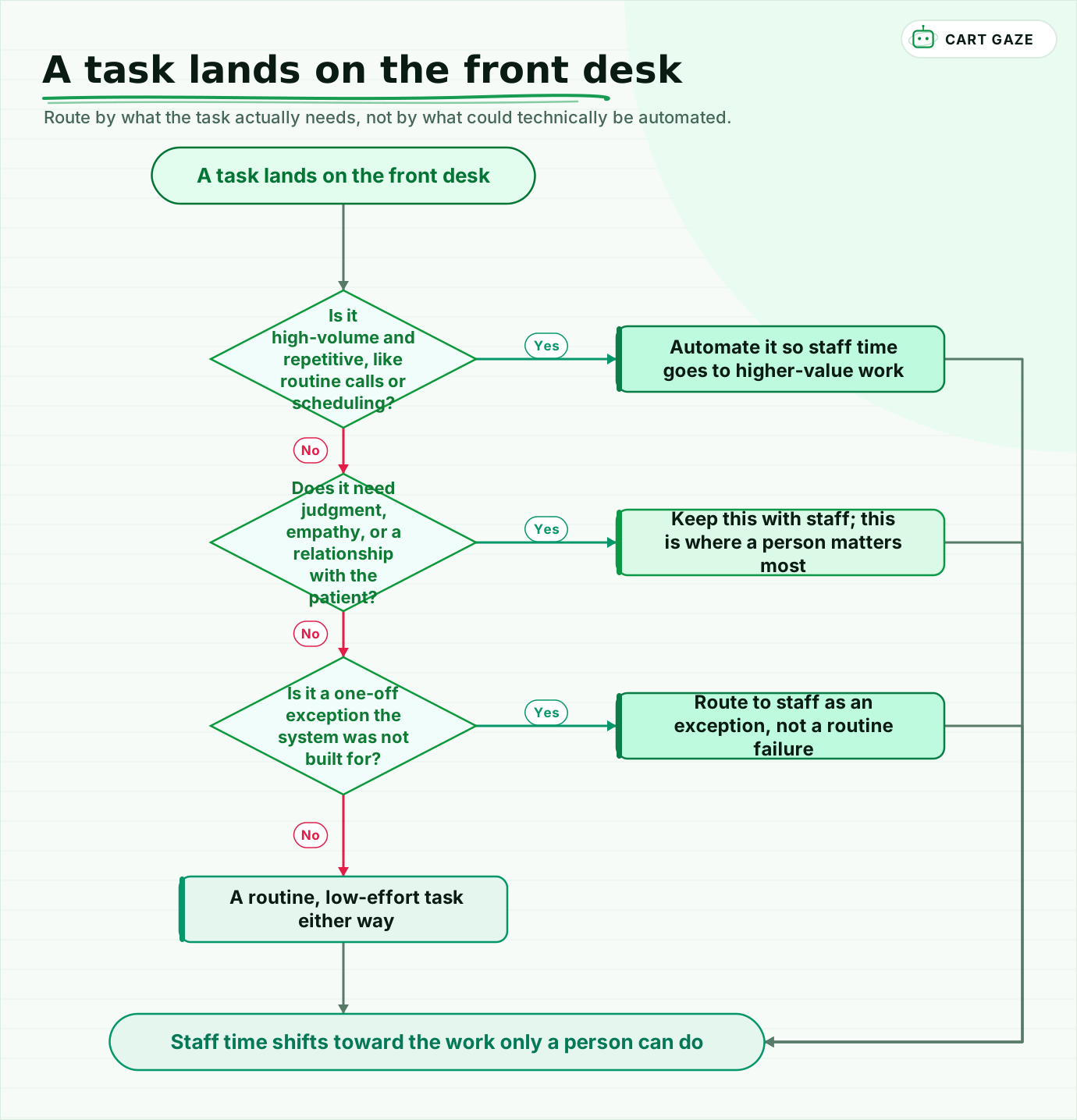 Route by what the task actually needs, not by what could technically be automated.
Walk the flow once: high-volume, repetitive tasks get automated so staff time frees up. Anything needing judgment, empathy, or a real patient relationship stays with a person, since that is where staff expertise actually matters. A genuine exception the system was not built for routes back to staff as an exception, not a routine failure.
Pilot on the single most repetitive, highest-volume task first, and ask staff directly whether their day feels different after 30 to 60 days, not just whether the numbers moved. None of this requires an all-at-once rollout that upends how the front desk works. Most practices see the clearest signal by automating one genuinely repetitive task completely before deciding whether to expand further.
If you would rather have your turnover and workload gap sized for you first, the free Growth Leak Audit works from your own numbers before anyone talks tools.
Fair questions.
How much does front-desk staff turnover actually cost a medical practice?
Replacing one front-desk employee can cost roughly 50% to 200% of their annual salary once recruiting, training, and coverage gaps are counted. One estimate puts a $38,000 role at about $76,000 all-in. With front-desk turnover running 25% to 40% annually, this cost recurs regularly rather than being a rare, one-time expense.
Does an AI receptionist actually reduce front-desk staff burnout?
It can meaningfully relieve one well-documented driver of burnout, high call volume and repetitive administrative tasks, by absorbing routine calls and scheduling questions. It does not fix inadequate staffing levels, poor training, or a difficult workplace culture, which need their own solutions regardless of what phone system is in place.
Why do front-desk roles burn out faster than other administrative jobs?
Front-desk staff juggle scheduling, insurance verification, intake forms, payment collection, referral follow-ups, and patient complaints simultaneously, with constant fragmentation between phone calls and the waiting room. Research points to this operational fragmentation, not a lack of care for the job, as the primary driver of burnout in these roles.
How should a practice introduce automation to front-desk staff without alarming them?
Frame it explicitly as workload relief, not a performance judgment or a precursor to layoffs. Ask staff directly which repetitive tasks they would most want removed, and be specific about what the tool will and will not take off their plate, since a vague rollout tends to breed more anxiety than a clear one.
What is the difference between automating for cost savings versus for staff retention?
Cost-focused automation is usually framed around reducing headcount or hours, covered separately in the direct cost-comparison between an AI receptionist and hiring staff. Retention-focused automation is about relieving the repetitive workload of staff already on payroll so they can sustainably keep doing the parts of the job that need a person.
Sources.
- [1]Healthcare worker burnout statistics and trends (Reward Gateway)
- [2]Healthcare front desk burnout: the hidden cost practices can't afford to ignore
- [3]Can staff turnover continue to be tamed in medical practices into 2026 (MGMA)
- [4]True cost of front desk turnover for DSOs
- [5]True cost of hiring a medical receptionist in 2026
- [6]What tasks still consume the most front desk time (Honey Health)
- [7]Administrative burden in hospital administrative staff and burnout outcomes
Written by

Muhammad Qasim Hammad
Founder, Cart Gaze
Qasim builds AI receptionists and front-office automation for medical and dental practices at Cart Gaze. Posts here start from published sources and real call data, not vendor claims, and every number links back to where it came from.
Keep reading.
 Missed Calls & Front DeskPatient Callback Requests: How to Offer, Staff and Automate Them10 min read
 Missed Calls & Front DeskCall Hold Time Benchmarks for Medical Practices: When Callers Hang Up12 min read
 Missed Calls & Front DeskCall Volume Forecasting for Your Front Desk: Staff the Peak11 min read
 Missed Calls & Front DeskPatient Complaint Triage: Catch It Before It Costs You a Review10 min read
 Missed Calls & Front DeskFamily Scheduling Automation: Book Every Kid in One Call10 min read
 Missed Calls & Front DeskCancellation Waitlist Automation: Fill the Empty Slot Fast10 min read